当前位置:网站首页>SkiaSharp 之 WPF 自绘 拖曳小球(案例版)
SkiaSharp 之 WPF 自绘 拖曳小球(案例版)
2022-07-30 06:05:00 【dotNET跨平台】
感谢各位大佬和粉丝的厚爱和关心( 催更),我会再接再厉的,其实这也是督促自己的一种方式,非常感谢。
刚写了一篇万字长文,自己也休养生息(低调发育)了一段时间,接下来来几个小案例。
拖曳小球
WPF的拖曳效果,基本配置一下,就可以了,但是自绘的话,就得自己控制,按键点击,按键移动和按键松开的事件,与其配合达到目的。
这个效果实现了,其实也变相的实现了WPF里的拖动效果,这个效果用着还是很方便的。
但是代码,确十分的简单。
Wpf 和 SkiaSharp
新建一个WPF项目,然后,Nuget包即可 要添加Nuget包
Install-Package SkiaSharp.Views.WPF -Version 2.88.0其中核心逻辑是这部分,会以我设置的60FPS来刷新当前的画板。
skContainer.PaintSurface += SkContainer_PaintSurface;
_ = Task.Run(() =>
{
    while (true)
    {
        try
        {
            Dispatcher.Invoke(() =>
            {
                skContainer.InvalidateVisual();
            });
            _ = SpinWait.SpinUntil(() => false, 1000 / 60);//每秒60帧
        }
        catch
        {
            break;
        }
    }
});
实现代码的 鼠标按下,移动,鼠标松开
先对SkiaSharp对象,增加相关事件
skContainer.MouseDown += SkContainer_MouseDown;
    skContainer.MouseUp += SkContainer_MouseUp;
    skContainer.MouseMove += SkContainer_MouseMove;
然后增加相关事件处理代码,我这边都统一处理了.
private void SkContainer_MouseDown(object sender, MouseButtonEventArgs e)
{
    var cur = e.GetPosition(sender as IInputElement);
    drawClock.MouseDown(new SKPoint((float)cur.X, (float)cur.Y), true);
}
private void SkContainer_MouseUp(object sender, MouseEventArgs e)
{
    var cur = e.GetPosition(sender as IInputElement);
    drawClock.MouseDown(new SKPoint((float)cur.X, (float)cur.Y), false);
}
private void SkContainer_MouseMove(object sender, MouseEventArgs e)
{
    var cur = e.GetPosition(sender as IInputElement);
    drawClock.MouseMove(new SKPoint((float)cur.X, (float)cur.Y));
}
拖曳核心类
/// <summary>
/// 拖曳
/// </summary>
public class Drag
{
    public SKPoint centerPoint;
    public int Radius = 0;
    private bool Pressed = false;
    private bool CirclePressend = false;
    private SKPoint sKPoint = SKPoint.Empty;
    private SKPoint CirclePoint = SKPoint.Empty;
    private SKCanvas canvas;
    private float dx = 0;
    private float dy = 0;
    /// <summary>
    /// 渲染
    /// </summary>
    public void Render(SKCanvas canvas, SKTypeface Font, int Width, int Height)
    {
        this.canvas = canvas;
        centerPoint = new SKPoint(Width / 2, Height / 2);
        this.Radius = 40;
        canvas.Clear(SKColors.White);
        if (CirclePoint.IsEmpty)
        {
            CirclePoint = new SKPoint(centerPoint.X, centerPoint.Y);
        }
        if (CirclePressend)
        {
            CirclePoint = new SKPoint(sKPoint.X - dx, sKPoint.Y - dy);
            DrawCircle(this.canvas, CirclePoint);
        }
        else
        {
            DrawCircle(this.canvas, CirclePoint);
        }

        using var paint = new SKPaint
        {
            Color = SKColors.Black,
            IsAntialias = true,
            Typeface = Font,
            TextSize = 24
        };
        var msg = $"X:{ sKPoint.X}  Y:{sKPoint.Y}  Pressed:{Pressed} CirclePressend:{CirclePressend}";
        canvas.DrawText(msg, 0, 30, paint);
    }
    public void MouseMove(SKPoint sKPoint)
    {
        this.sKPoint = sKPoint;
        if (CirclePressend)//按下,就开始拖动
        {
            CirclePoint = sKPoint;
        }
    }
    public void MouseDown(SKPoint sKPoint, bool Pressed)
    {
        this.sKPoint = sKPoint;
        this.Pressed = Pressed;
        if (this.Pressed)
        {
            this.CirclePressend = CheckPoint(sKPoint, CirclePoint);
            if (this.CirclePressend)
            {
                dx = sKPoint.X - CirclePoint.X;
                dy = sKPoint.Y - CirclePoint.Y;
            }
        }
        else
        {
            this.CirclePressend = false;
        }
    }
    public bool CheckPoint(SKPoint sKPoint, SKPoint CirclePoint)
    {
        var d = Math.Sqrt(Math.Pow(sKPoint.X - CirclePoint.X, 2) + Math.Pow(sKPoint.Y - CirclePoint.Y, 2));
        return this.Radius >= d;
    }
    /// <summary>
    /// 画一个圆
    /// </summary>
    public void DrawCircle(SKCanvas canvas, SKPoint sKPoint)
    {
        using var paint = new SKPaint
        {
            Color = SKColors.Blue,
            Style = SKPaintStyle.Fill,
            IsAntialias = true,
            StrokeWidth = 2
        };
        canvas.DrawCircle(sKPoint.X, sKPoint.Y, Radius, paint);
    }
}
效果如下:
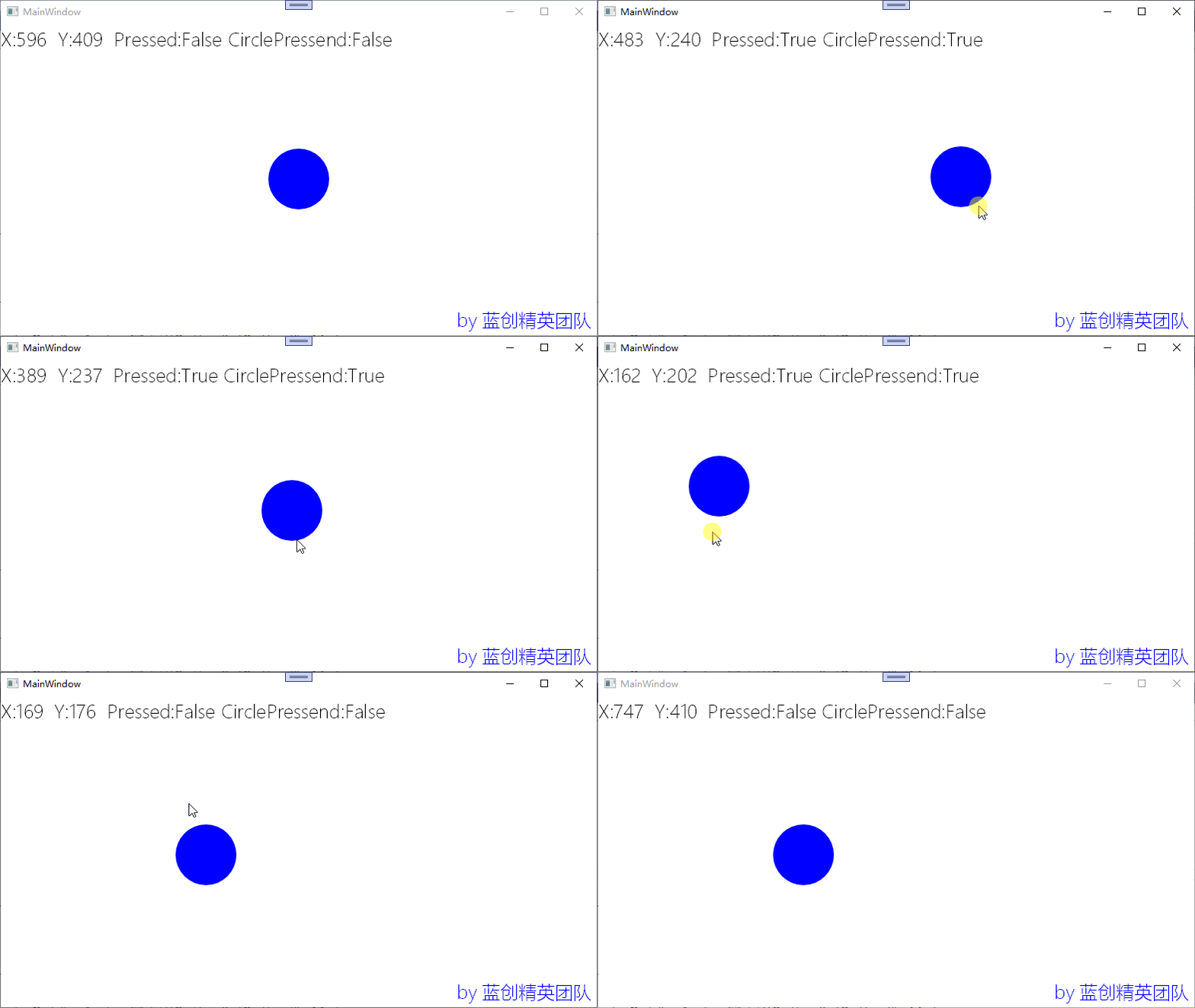
我可以点的球的边边哦,这也是一个小技巧,点到球哪里,停止的时候,鼠标还在那个位置,是不是有点像拖动窗体的感觉了。
总结
以前对拖曳总是很好奇,一直想是如何实现的,现在自己也自己从头到尾的实现了,那么,它就是已知的,这就是可以写出来的进步,每天都应该有一点这样的进步。
代码地址
https://github.com/kesshei/WPFSkiaDragDemo.git
https://gitee.com/kesshei/WPFSkiaDragDemo.git
阅
一键三连呦!,感谢大佬的支持,您的支持就是我的动力!
版权
蓝创精英团队(公众号同名,CSDN同名)
边栏推荐
- 雷总个人博客看到
- Go 结合Gin导出Mysql数据到Excel表格
- Vue2进阶篇-编程式路由导航、缓存路由组件、路由的激活与失活
- 架构设计指南 如何成为架构师
- Required request body is missing problem solving
- MYSQL下载及安装完整教程
- Upload file -- file type, picture type, document type, video type, compressed package type
- go : 使用 grom 删除数据库数据
- RAID disk array
- 2020 ACM | MoFlow: An Invertible Flow Model for Generating Molecular Graphs
猜你喜欢

Pioneer in Distributed Systems - Leslie Lambert

限塑令下的新材料——聚乳酸(PLA)

什么是微服务?

What happens when @Bean and @Component are used on the same class?

深度学习:线性回归模型

LVM and disk quotas
New material under the plastic restriction order - polylactic acid (PLA)
分布式系统中的开创者—莱斯利·兰伯特

The introduction of AI meta-learning into neuroscience, the medical effect is expected to improve accurately

Go 使用 freecache 缓存
随机推荐
Graphical relational database design ideas, this is too vivid
Ali two sides: List several tips for Api interface optimization
Boot process and service control
Go uses the mencached cache
MYSQL 主从恢复锁表后, 处理SQL 线程锁解决.
树状数组的基本用法
Go combines Gin to export Mysql data to Excel table
包含min函数的栈(js)
五号黯区靶场 mysql 注入之limit注入记录
interface
From catching up to surpassing, domestic software shows its talents
How to understand plucker coordinates (geometric understanding)
interface
this与super
手机端滚动至页面指定位置
go : use gorm to modify data
The terminal connection tools, rolling Xshell
Pioneer in Distributed Systems - Leslie Lambert
一段神奇的没有主方法的代码
Equation Derivation Proof of Vector Triple Product