当前位置:网站首页>[advanced ROS] lesson 5 TF coordinate transformation in ROS
[advanced ROS] lesson 5 TF coordinate transformation in ROS
2022-07-01 14:59:00 【Life is like Zhaoxu】
【ROS Advanced 】 The first five lectures ROS Medium TF Coordinate transformation

List of articles
Preface
In the introductory chapter ROS tutorial , We have simply studied about TF Content of coordinate transformation , The purpose of advanced chapter is to understand more deeply from the perspective of programming TF How to use coordinate transformation , And give static state 、 Dynamic and multi coordinate transformation And so on , Better grasp TF Function pack .
One 、TF Introduction to function package
1. Concept
- TF: namely TransForm Frame, Refers to coordinate transformation ;
- Coordinate system : That is, the position calibration system of the object , With Right hand coordinate system As the standard ;

- effect : Realize the transformation of points or vectors between different coordinate systems
2. TF2 And TF
- TF2: In the present ROS In the system ,TF2 The replacement has been 了 TF Use , It also includes the original functions ;
- difference :
- TF2 The function package corresponds to tf2、tf2_ros;TF The function package corresponds to tf package ,TF2 The feature pack of enhances cohesion , And internal differences API Completed subcontracting ;
- TF2 More efficient , Here is a demonstration of static coordinate transformation ;
- Static coordinate transformation demonstration : Because the information is fixed , so TF2 More efficient
- TF2:
Transform instruction :rosrun tf2_ros static_transform_publisher 0 0 0 0 0 0 /base_link /laser
Check the topic messages (rostopic):rostopic echo /tf( Cyclic output )- TF:
Transform instruction :rosrun tf static_transform_publisher 0 0 0 0 0 0 /base_link /laser 100
TF More startup parameters , There is a release frequency
Check the topic messages (rostopic):rostopic echo /tf_static( Single output )
- Common function packs :
- tf2_geometry_msgs: Can be ROS The message is converted to tf2 news .
- tf2: Encapsulates common messages of coordinate transformation .
- tf2_ros: by tf2 Provides roscpp and rospy binding , Encapsulates the commonly used coordinate transformation API.
- Refer to website address :ROS WIki TF2
3. Coordinate system viewing method
- Corresponding function package :tf2_tools, The installation instructions are as follows
sudo apt install ros-noetic-tf2-tools
- Tool use : Generate corresponding pdf file , Atlas presentation A tree structure
- Start the broadcast coordinate system program
- Run the toolkit instructions :
rosrun tf2_tools view_frames.py- The generated log is as follows :
[INFO] [1592920556.827549]: Listening to tf data during 5 seconds...
[INFO] [1592920561.841536]: Generating graph in frames.pdf file...
- Open the pdf file :
evince frames.pdf

4. Coordinate information
- Commonly used msg Information :
- geometry_msgs/TransformStamped: It is used to transmit the position information related to the coordinate system
std_msgs/Header header                     # Header information
 uint32 seq                                #|--  Serial number
 time stamp                                #|--  Time stamp
 string frame_id                            #|--  coordinate  ID
string child_frame_id                    # Of the sub coordinate system  id
geometry_msgs/Transform transform        # Coordinate information
 geometry_msgs/Vector3 translation        # Offset
   float64 x                                #|-- X  Offset of direction
   float64 y                                #|-- Y  Offset of direction
   float64 z                                #|-- Z  The offset in the direction
 geometry_msgs/Quaternion rotation        # Four yuan number
   float64 x
   float64 y
   float64 z
   float64 w
- geometry_msgs/PointStamped: It is used to transmit the information of coordinate points in a coordinate system
std_msgs/Header header                    # head
 uint32 seq                                #|--  Serial number
 time stamp                                #|--  Time stamp
 string frame_id                            #|--  Of the coordinate system  id
geometry_msgs/Point point                # Point coordinates
 float64 x                                    #|-- x y z  coordinate
 float64 y
 float64 z
- see msg Information command :
rosmsg info
Two 、 Static coordinate transformation
1. Scenario hypothesis
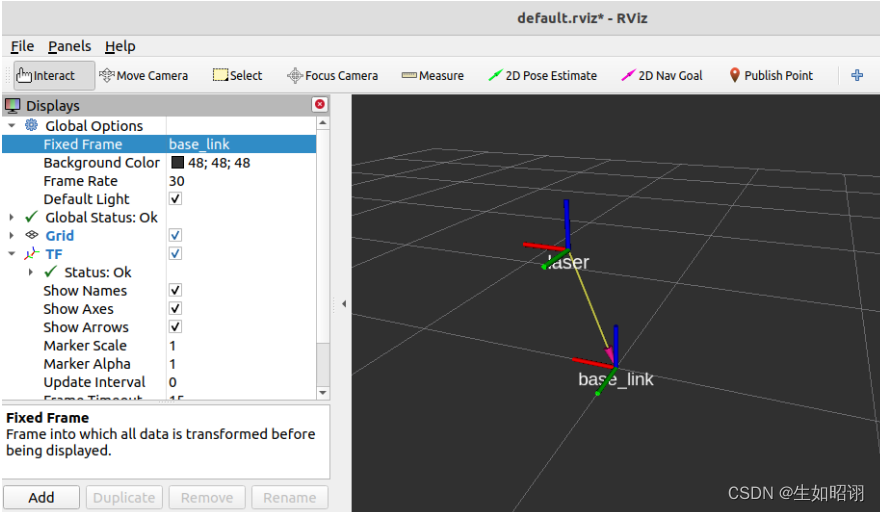
Question presentation : Suppose a robot model , The trunk body and the radar are respectively fixedly connected to two coordinate systems , The origin of the two coordinate system is located at the corresponding physical center , The displacement relationship between the radar origin and the torso origin is :x:0.2 y:0.0 z:0.5, In the radar coordinate system, the coordinate of an object is (2.0 3.0 5.0), Find the coordinates of this object in the torso coordinate system ?
3d Presentation under : The figure uses rviz Components , See the follow-up blog for specific usage
2. Programming to realize
- The basic idea :
- Create Feature Pack : Need to include tf2、tf2_ros、tf2_geometry_msgs、roscpp rospy std_msgs geometry_msgs etc.
- Create publisher : Release the relative relationship between torso coordinate system and radar coordinate
- Create subscribers : Subscribe to published information , According to the object information , With the help of TF The function package realizes coordinate transformation and output ;
notes :ROS The system also provides nodes for static coordinate conversion :
rosrun tf2_ros static_transform_publisher x Offset y Offset z Offset z angle of yaw y Pitch angle x Roll angle Parent coordinate system Sub coordinate system
- Publisher code :
/*  Static coordinate transformation publisher :  Release about  laser  Location information of coordinate system   Implementation process : 1. Include header file  2. initialization  ROS  node  3. Create a static coordinate conversion broadcaster  4. Create coordinate system information  5. The broadcaster publishes coordinate system information  6.spin() */

// 1. Include header file
#include "ros/ros.h"
#include "tf2_ros/static_transform_broadcaster.h"
#include "geometry_msgs/TransformStamped.h"
#include "tf2/LinearMath/Quaternion.h"

int main(int argc, char *argv[])
{

    setlocale(LC_ALL,"");
    // 2. initialization  ROS  node
    ros::init(argc,argv,"static_brocast");
    // 3. Create a static coordinate conversion broadcaster
    tf2_ros::StaticTransformBroadcaster broadcaster;
    // 4. Create coordinate system information
    geometry_msgs::TransformStamped ts;
    //---- Set header information
    ts.header.seq = 100;
    ts.header.stamp = ros::Time::now();
    ts.header.frame_id = "base_link";
    //---- Set the child coordinate system
    ts.child_frame_id = "laser";
    //---- Set the offset of the child relative to the parent
    ts.transform.translation.x = 0.2;
    ts.transform.translation.y = 0.0;
    ts.transform.translation.z = 0.5;
    //---- Set quaternion : take   Convert Euler angle data into quaternions
    tf2::Quaternion qtn;
    qtn.setRPY(0,0,0);
    ts.transform.rotation.x = qtn.getX();
    ts.transform.rotation.y = qtn.getY();
    ts.transform.rotation.z = qtn.getZ();
    ts.transform.rotation.w = qtn.getW();
    // 5. The broadcaster publishes coordinate system information
    broadcaster.sendTransform(ts);
    ros::spin();
    return 0;
}
- Subscriber code :
/*  Subscribe to coordinate system information , Generate a relative to   Coordinate point data of sub coordinate system , Convert to coordinate points in the parent coordinate system   Implementation process : 1. Include header file  2. initialization  ROS  node  3. establish  TF  Subscription node  4. Generate a coordinate point ( Relative to the child coordinate system ) 5. Convert coordinate points ( Relative to the parent coordinate system ) 6.spin() */
//1. Include header file
#include "ros/ros.h"
#include "tf2_ros/transform_listener.h"
#include "tf2_ros/buffer.h"
#include "geometry_msgs/PointStamped.h"
#include "tf2_geometry_msgs/tf2_geometry_msgs.h" // Be careful :  call  transform  Must contain the header file

int main(int argc, char *argv[])
{

    setlocale(LC_ALL,"");
    // 2. initialization  ROS  node
    ros::init(argc,argv,"tf_sub");
    ros::NodeHandle nh;
    // 3. establish  TF  Subscription node
    tf2_ros::Buffer buffer;
    tf2_ros::TransformListener listener(buffer);

    ros::Rate r(1);
    while (ros::ok())
    {

    // 4. Generate a coordinate point ( Relative to the child coordinate system )
        geometry_msgs::PointStamped point_laser;
        point_laser.header.frame_id = "laser";
        point_laser.header.stamp = ros::Time::now();
        point_laser.point.x = 1;
        point_laser.point.y = 2;
        point_laser.point.z = 7.3;
    // 5. Convert coordinate points ( Relative to the parent coordinate system )
        // Create a new coordinate point , Used to receive conversion results
        //-------------- Use  try  Statement or sleep , Otherwise, coordinate conversion may fail due to cache reception delay ------------------------
        try
        {

            geometry_msgs::PointStamped point_base;
            point_base = buffer.transform(point_laser,"base_link");
            ROS_INFO(" Converted data :(%.2f,%.2f,%.2f), The reference coordinate system is :",point_base.point.x,point_base.point.y,point_base.point.z,point_base.header.frame_id.c_str());

        }
        catch(const std::exception& e)
        {

            // std::cerr << e.what() << '\n';
            ROS_INFO(" Abnormal program .....");
        }


        r.sleep();
        ros::spinOnce();
    }


    return 0;
}
3、 ... and 、 Dynamic coordinate transformation
1. Scenario hypothesis
Question presentation : Keyboard controls turtle movement , Dynamically release the relationship between the turtle coordinate system and the world coordinate system ;
3d demonstration (rviz):

2. Programming to realize
- The basic idea :
- Create Feature Pack : Dependencies contain tf2、tf2_ros、tf2_geometry_msgs、roscpp rospy std_msgs geometry_msgs、turtlesim;
- Create publisher : subscribe turtle1/pose, Get the tortoise in the world coordinate system x coordinate 、y coordinate 、 Offset, linear velocity and angular velocity , take pose Information is converted into relative information of coordinate system and released
- Create subscribers : Subscribe to relative information and output ;
- Publisher code :
/*  Dynamic coordinate system relative attitude release ( The relative posture of one coordinate system relative to another coordinate system is constantly changing )  Implementation process : 1. Include header file  2. initialization  ROS  node  3. establish  ROS  Handle  4. Create subscription object  5. The callback function processes the subscribed data ( Realization TF radio broadcast ) 5-1. establish  TF  Broadcaster  5-2. establish   Broadcast data ( adopt  pose  Set up ) 5-3. The broadcaster publishes data  6.spin */
// 1. Include header file
#include "ros/ros.h"
#include "turtlesim/Pose.h"
#include "tf2_ros/transform_broadcaster.h"
#include "geometry_msgs/TransformStamped.h"
#include "tf2/LinearMath/Quaternion.h"

void doPose(const turtlesim::Pose::ConstPtr& pose){

    // 5-1. establish  TF  Broadcaster
    static tf2_ros::TransformBroadcaster broadcaster;
    // 5-2. establish   Broadcast data ( adopt  pose  Set up )
    geometry_msgs::TransformStamped tfs;
    // |---- Head set
    tfs.header.frame_id = "world";
    tfs.header.stamp = ros::Time::now();

    // |---- Coordinate system  ID
    tfs.child_frame_id = "turtle1";

    // |---- Coordinate system relative information setting
    tfs.transform.translation.x = pose->x;
    tfs.transform.translation.y = pose->y;
    tfs.transform.translation.z = 0.0; //  Two dimensional implementation ,pose  There is no z,z  yes  0
    // |---------  Quaternion settings
    tf2::Quaternion qtn;
    qtn.setRPY(0,0,pose->theta);
    tfs.transform.rotation.x = qtn.getX();
    tfs.transform.rotation.y = qtn.getY();
    tfs.transform.rotation.z = qtn.getZ();
    tfs.transform.rotation.w = qtn.getW();


    // 5-3. The broadcaster publishes data
    broadcaster.sendTransform(tfs);
}

int main(int argc, char *argv[])
{

    setlocale(LC_ALL,"");
    // 2. initialization  ROS  node
    ros::init(argc,argv,"dynamic_tf_pub");
    // 3. establish  ROS  Handle
    ros::NodeHandle nh;
    // 4. Create subscription object
    ros::Subscriber sub = nh.subscribe<turtlesim::Pose>("/turtle1/pose",1000,doPose);
    // 5. The callback function processes the subscribed data ( Realization TF radio broadcast )
    //
    // 6.spin
    ros::spin();
    return 0;
}
- Subscriber code :
//1. Include header file
#include "ros/ros.h"
#include "tf2_ros/transform_listener.h"
#include "tf2_ros/buffer.h"
#include "geometry_msgs/PointStamped.h"
#include "tf2_geometry_msgs/tf2_geometry_msgs.h" // Be careful :  call  transform  Must contain the header file

int main(int argc, char *argv[])
{

    setlocale(LC_ALL,"");
    // 2. initialization  ROS  node
    ros::init(argc,argv,"dynamic_tf_sub");
    ros::NodeHandle nh;
    // 3. establish  TF  Subscription node
    tf2_ros::Buffer buffer;
    tf2_ros::TransformListener listener(buffer);

    ros::Rate r(1);
    while (ros::ok())
    {

    // 4. Generate a coordinate point ( Relative to the child coordinate system )
        geometry_msgs::PointStamped point_laser;
        point_laser.header.frame_id = "turtle1";
        point_laser.header.stamp = ros::Time();
        point_laser.point.x = 1;
        point_laser.point.y = 1;
        point_laser.point.z = 0;
    // 5. Convert coordinate points ( Relative to the parent coordinate system )
        // Create a new coordinate point , Used to receive conversion results
        //-------------- Use  try  Statement or sleep , Otherwise, coordinate conversion may fail due to cache reception delay ------------------------
        try
        {

            geometry_msgs::PointStamped point_base;
            point_base = buffer.transform(point_laser,"world");
            ROS_INFO(" The coordinate point is relative to  world  The coordinates of the for :(%.2f,%.2f,%.2f)",point_base.point.x,point_base.point.y,point_base.point.z);

        }
        catch(const std::exception& e)
        {

            // std::cerr << e.what() << '\n';
            ROS_INFO(" Abnormal program :%s",e.what());
        }


        r.sleep();
        ros::spinOnce();
    }


    return 0;
}
notes : As for the advanced programming between dynamic coordinate transformations, in fact, the introduction of the introductory chapter shows the programming implementation of turtle tracking, that is, demonstration , Please read the introductory tutorial
Four 、 Multi coordinate transformation
1. Scenario hypothesis
- Question presentation : Suppose there are three coordinate systems , One of the coordinate systems is the parent coordinate system world, The other two are sub coordinate systems , The relative relationship between father and son is known , Find the relationship between two sub coordinate systems ;

2. Programming to realize
- The basic idea :
- Create Feature Pack : Dependencies contain tf2、tf2_ros、tf2_geometry_msgs、roscpp rospy std_msgs geometry_msgs、turtlesim
- Create publisher : Publish coordinate messages between parent and child coordinate systems
- Create subscribers : Subscription relativity , adopt TF Complete the conversion of two coordinate systems
- Publisher code : Use static coordinate transformation to publish
<launch>
    <node pkg="tf2_ros" type="static_transform_publisher" name="son1" args="0.2 0.8 0.3 0 0 0 /world /son1" output="screen" />
    <node pkg="tf2_ros" type="static_transform_publisher" name="son2" args="0.5 0 0 0 0 0 /world /son2" output="screen" />
</launch>
- Subscriber code :
/*  Implementation process : 1. Include header file  2. initialization  ros  node  3. establish  ros  Handle  4. establish  TF  Subscription object  5. Parse the subscription information to get  son1  The origin of the coordinate system is  son2  The coordinates of   analysis  son1  The point in is relative to  son2  Coordinates of  6.spin */
//1. Include header file
#include "ros/ros.h"
#include "tf2_ros/transform_listener.h"
#include "tf2/LinearMath/Quaternion.h"
#include "tf2_geometry_msgs/tf2_geometry_msgs.h"
#include "geometry_msgs/TransformStamped.h"
#include "geometry_msgs/PointStamped.h"

int main(int argc, char *argv[])
{
       setlocale(LC_ALL,"");
    // 2. initialization  ros  node
    ros::init(argc,argv,"sub_frames");
    // 3. establish  ros  Handle
    ros::NodeHandle nh;
    // 4. establish  TF  Subscription object
    tf2_ros::Buffer buffer;
    tf2_ros::TransformListener listener(buffer);
    // 5. Parse the subscription information to get  son1  The origin of the coordinate system is  son2  The coordinates of
    ros::Rate r(1);
    while (ros::ok())
    {

        try
        {

        //  analysis  son1  The point in is relative to  son2  Coordinates of
            geometry_msgs::TransformStamped tfs = buffer.lookupTransform("son2","son1",ros::Time(0));
            ROS_INFO("Son1  be relative to  Son2  Coordinate relationship of : The parent coordinate system ID=%s",tfs.header.frame_id.c_str());
            ROS_INFO("Son1  be relative to  Son2  Coordinate relationship of : Sub coordinate system ID=%s",tfs.child_frame_id.c_str());
            ROS_INFO("Son1  be relative to  Son2  Coordinate relationship of :x=%.2f,y=%.2f,z=%.2f",
                    tfs.transform.translation.x,
                    tfs.transform.translation.y,
                    tfs.transform.translation.z
                    );

            //  Coordinate point analysis
            geometry_msgs::PointStamped ps;
            ps.header.frame_id = "son1";
            ps.header.stamp = ros::Time::now();
            ps.point.x = 1.0;
            ps.point.y = 2.0;
            ps.point.z = 3.0;

            geometry_msgs::PointStamped psAtSon2;
            psAtSon2 = buffer.transform(ps,"son2");
            ROS_INFO(" stay  Son2  The coordinates of :x=%.2f,y=%.2f,z=%.2f",
                    psAtSon2.point.x,
                    psAtSon2.point.y,
                    psAtSon2.point.z
                    );
        }
        catch(const std::exception& e)
        {

            // std::cerr << e.what() << '\n';
            ROS_INFO(" Abnormal information :%s",e.what());
        }


        r.sleep();
        // 6.spin
        ros::spinOnce();
    }
    return 0;
}
summary
- Statement : The blog section of this section refers to CSDN User zhaoxuzuo ROS course , From the next blog ROS The advanced tutorial will step into ROSBAG On the basis of learning , Master this powerful ROS Record how the tool is used , Coming soon .
边栏推荐
- Internet hospital system source code hospital applet source code smart hospital source code online consultation system source code
- 互联网医院系统源码 医院小程序源码 智慧医院源码 在线问诊系统源码
- 数据产品经理需要掌握哪些数据能力?
- Reorganize the trivial knowledge points at the end of the term
- It's settled! 2022 Hainan secondary cost engineer examination time is determined! The registration channel has been opened!
- 职场太老实,总被欺负怎么办?
- JVM performance tuning and practical basic theory part II
- MIT team used graph neural network to accelerate the screening of amorphous polymer electrolytes and promote the development of next-generation lithium battery technology
- Flink 系例 之 TableAPI & SQL 与 Kafka 消息插入
- 基于价值量化的需求优先级排序方法
猜你喜欢

Basic operations of SQL database

Junda technology - wechat cloud monitoring scheme for multiple precision air conditioners
JVM第一话 -- JVM入门详解以及运行时数据区分析

Minimum spanning tree and bipartite graph in graph theory (acwing template)

One of the first steps to redis

写在Doris毕业后的第一天

Official announcement: Apache Doris graduated successfully and became the top project of ASF!
![After twists and turns, I finally found the method of SRC vulnerability mining [recommended collection]](/img/ac/ab6053e6ea449beedf434d4cf07dbb.png)
After twists and turns, I finally found the method of SRC vulnerability mining [recommended collection]

Cannot link redis when redis is enabled

JVM second conversation -- JVM memory model and garbage collection
随机推荐
保证生产安全!广州要求危化品企业“不安全不生产、不变通”
DirectX repair tool v4.1 public beta! [easy to understand]
In hot summer, please put away this safe gas use guide!
Opencv Learning Notes 6 -- image mosaic
leetcode:329. 矩阵中的最长递增路径
微服务开发步骤(nacos)
Cannot link redis when redis is enabled
Salesforce, Johns Hopkins, Columbia | progen2: exploring the boundaries of protein language models
Flink 系例 之 TableAPI & SQL 与 Kafka 消息获取
Build MySQL master-slave server under Ubuntu 14.04
[zero basic IOT pwn] reproduce Netgear wnap320 rce
Solid basic basic grammar and definition function
Redis安装及Ubuntu 14.04下搭建ssdb主从环境
leetcode:329. Longest increasing path in matrix
Chapter 4 of getting started with MySQL: creation, modification and deletion of data tables
Basic operations of SQL database
【天线】【3】CST一些快捷键
Digital transformation: data visualization enables sales management
期末琐碎知识点再整理
C learning notes (5) class and inheritance