当前位置:网站首页>We should learn to check the documented instructions of technical details
We should learn to check the documented instructions of technical details
2022-07-27 13:46:00 【dvlinker】
Catalog
2、GDI Problems encountered in drawing
2.1、 Create compatible bitmap Which should I use DC
2.2、 One bitmap Bitmap cannot be selected into multiple at the same time dc in
3、 What can't be done GDI Resource leakage
1、 summary
When we are using Windows API When there is a problem , Think of using Microsoft MSDN( On-line MSDN Or locally installed MSDN), To MSDN Look at the target on the Internet API Detailed description and notes (Remark part ), For example, the system in the figure below API function GetWIndowText:

Maybe we can find a solution to the problem .
Besides , When you encounter problems with some auxiliary software tools , If the tool has an official website , You can try to check the detailed description of the tool on the official website , You may also find a solution or breakthrough to the problem .
This article refers to the documented description of technical details , Microsoft MSDN Or the public explanatory text and notes given on the official website of the software tool . This paper combines several practical problems to be solved , To explain the importance of documented instructions .
2、GDI Problems encountered in drawing
2.1、 Create compatible bitmap Which should I use DC
stay Windows GDI In drawing , There is a concept of double buffer drawing , Now memory DC Draw on , After the drawing is successful, the memory DC Draw the contents of to the window .
When using double buffer drawing , We usually create a window first DC Compatible memory DC, Then create a compatible bitmap, And then bitmap Select memory DC in ,bitmap It's a drawing board , Draw the content to be drawn to bitmap On . Create compatible bitmap When it came in dc Parameters are particular . If the incoming is a newly created compatible dc, The code is as follows :
HDC hdc = ::GetDC( this->m_hWnd );  //  window DC
HDC hMemDC = ::CreateCompatibleDC( hdc );   //  Compatible memory DC
HBITMAP hBitmap = ::CreateCompatibleBitmap( hMemDC, 800, 600 ); //  What is passed in is the newly created compatible DC
It feels OK ,hMemDC It's with the window hdc Is compatible , Think of possible transitivity , Created bitmap It should also be with hdc Compatible , Operation should be no problem .
But after actual operation , The pictures drawn to the window become a single gray . What's going on here ? To MSDN View in CreateCompatibleBitmap API Function description of , stay Remarks The following description is found in part :
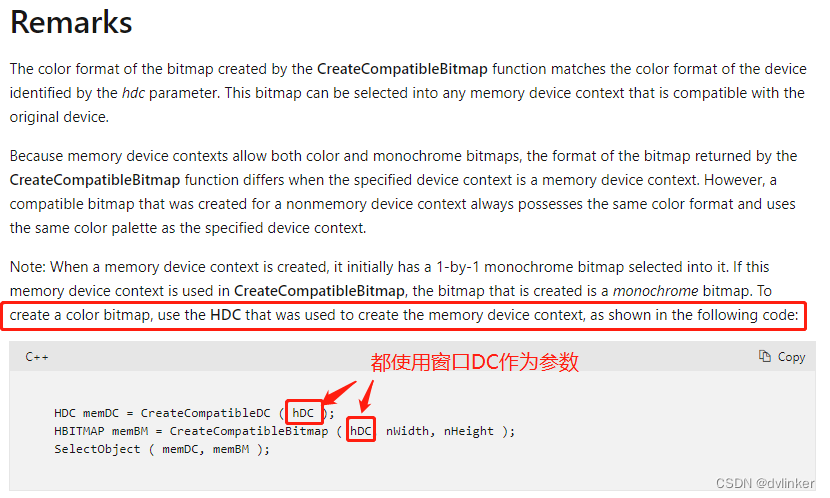
therefore , According to the above Microsoft instructions , If we use the code given above , The compatible bitmap created is a monochrome bitmap , The effect drawn is a single gray white .MSDN It is clearly stated in the , The incoming to CreateCompatibleBitmap Medium dc Should be and CreateCompatibleDC Incoming consistency , All use windows dc, The code is as follows :
HDC hdc = ::GetDC( this->m_hWnd );
HDC hMemDC = ::CreateCompatibleDC( hdc );
HBITMAP hBitmap = ::CreateCompatibleBitmap( hdc, 800, 600 ); //  What is passed in is the newly created compatible DC, This is no problem .
2.2、 One bitmap Bitmap cannot be selected into multiple at the same time dc in
Suppose bitmap m_hBitmap yes UI Member variables of class , And the image to be drawn on the window has been loaded into the bitmap , Window OnPaint The bitmap will be used in the function to draw the window , The relevant code slice is shown below :
HDC hdc = ::GetDC( this->m_hWnd );
HDC hMemDC = ::CreateCompatibleDC( hdc );
HBITMAP hOldBitmap = (HBITMAP)::SelectObject( hdc, m_hBitmap )
...... //  Use here BitBlt Or other functions to draw , Code ellipsis
When debugging code , Because I'm anxious to see the interface effect ( See if the code works ), Not pay attention to the standardization of the code , There is no compatibility that will be created dc(hMemDC) to delete fall . Running the program found , Only the first drawing is valid , It is normal when displayed on the window , The next painting is invalid every time the window is refreshed .
When the drawing is invalid , View the drawing function BitBlt The return value of , Is the return value of the successful call . What's going on here ? Clearly added code , Why didn't it have the desired effect ? After the event , stay SelectObject API Functional MSDN In the description , Here is a sentence :

That is, one bitmap cannot be selected into multiple at the same time dc in , Seeing this sentence, we seem to know the reason for the problem .
stay OnPaint Drawing code in function , It will be executed every time the window is refreshed OnPaint in , So the above code will be executed many times , Because the created is compatible dc(hMemDc) No, delete fall , Execute the above code slice next time , It will create new compatible dc, Then the bitmap m_hBitmap Select compatible dc, This leads to bitmap m_hBitmap Selected several dc It's in , So there are these problems .
This question also reminds us , Pay attention to standardization when writing code , Unused resources should be released in time ( This is also a mistake that novices are prone to make when writing code , This problem is encountered when helping newcomers check the problem code ). On the above code slice , The right thing to do is to create a compatible dc After use delete fall , In this way, the same bitmap colleagues will not be selected into two dc There's a problem in , The correct code is as follows :
HDC hdc = ::GetDC( this->m_hWnd );
HDC hMemDC = ::CreateCompatibleDC( hdc );
HBITMAP hOldBitmap = (HBITMAP)::SelectObject( hMemDC, m_hBitmap )

...... // Use here BitBlt Or other functions to draw , Code ellipsis

::SelectObject( hMemDC, hOldBitmap );
::DeleteDC( hMemDC ); //  Will create compatible dc release
3、 What can't be done GDI Resource leakage
After testing, colleagues gave feedback , Our software closes after opening some windows ,GDI The number of handles increases after each operation 6 individual , After several operations GDI The object will have a significant surge . Can pass Windows Resource manager to monitor the target process in real time GDI Number :( In the details tab of the task manager )

This shows that there is GDI Resource leakage . If there is GDI Object leaks , When the program runs for a long time , If the program is GDI The number of objects reaches tens of thousands , It will cause program exceptions and even crashes . therefore , This problem must be paid attention to , It has to be solved .
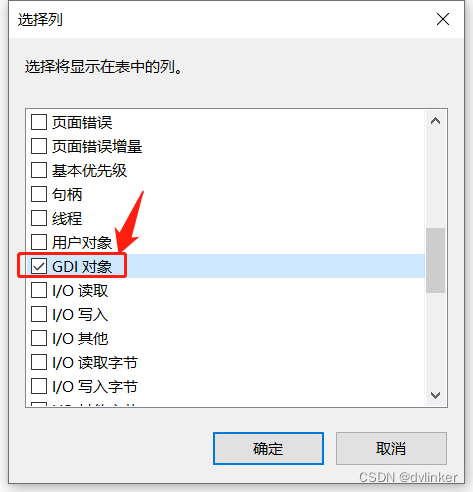
By default , open Windows Explorer , The default is not to see GDI Object column , You need to right-click the title bar of the process list , The following right-click menu pops up :
And then click “ Select column ” A menu item , Check... In the pop-up window “GDI object ”:
Then you can see in the process list GDI Object lists .

During the test , It was also found that some windows did not leak after opening and closing . Here's the GDI Leak detection sharp weapon GDIView Come on. :

By using GDI Resource leakage troubleshooting tool GDIView, When GDI When resources leak , The observed GDI Total The column does not grow ,All GDI The column grows every time ( rising 6 individual ). Generally, our resource leakage is mainly pen、bitmap、font、brush、region、dc Such as common GDI object , As a result, these routines GDI None of the objects are leaked , It's weird , I feel unable to check .
So try to GDIView Its official website (http://www.nirsoft.net/utils/gdi_handles.html) Take a look , See if there is any relevant explanation . As a result, the corresponding description was found , as follows :

That is, if there are other GDI The number has not increased , Only All GDI The column grows , It is possible that the icon or cursor resource created is not released .
So I checked the code dealing with icon and cursor resources , But no possible leak was found . I found out by accident that , When some windows have icons on the taskbar , There will be leakage , If the window does not have a taskbar window ( For example, the window of the program ), There will be no leakage . Is there a problem with the code that sets the taskbar window icon , Then find the corresponding code :
void CWindowWnd::SetIcon( UINT nRes )
{
    HICON hIcon = (HICON)::LoadImage( CPaintManagerUI::GetInstance()
                                , MAKEINTRESOURCE(nRes)
                                , IMAGE_ICON
                                , ::GetSystemMetrics(SM_CXICON)
                                , ::GetSystemMetrics(SM_CYICON)
                                , LR_DEFAULTCOLOR );
    ASSERT( hIcon );
    ::SendMessage( m_hWnd, WM_SETICON, (WPARAM)TRUE, (LPARAM)hIcon );

    hIcon = (HICON)::LoadImage( CPaintManagerUI::GetInstance()
                            , MAKEINTRESOURCE(nRes)
                            , IMAGE_ICON
                            , ::GetSystemMetrics(SM_CXSMICON)
                            , ::GetSystemMetrics(SM_CYSMICON)
                            , LR_DEFAULTCOLOR );
    ASSERT( hIcon );
    ::SendMessage( m_hWnd, WM_SETICON, (WPARAM)FALSE, (LPARAM)hIcon );
}
Is it LoadImage API There is a problem with the use of functions ? So it came to MSDN See the description of this function in detail on , Found the problem :

That is, if it is not used LR_SHARED Marker bit , You need to call DestroyXXX Interface to manually release these resources .
This flag bit is not used in the above code , Also did not release the loaded icon resources , So there is a leak of icon resources . The solution is , When loading icons , add LR_SHARED Marker bit . The modified code is as follows :
void CWindowWnd::SetIcon( UINT nRes )
{
    HICON hIcon = (HICON)::LoadImage( CPaintManagerUI::GetInstance()
                                , MAKEINTRESOURCE(nRes)
                                , IMAGE_ICON
                                , ::GetSystemMetrics(SM_CXICON)
                                , ::GetSystemMetrics(SM_CYICON)
                                , LR_DEFAULTCOLOR|LR_SHARED ); //  add to LR_SHARED Marker bit
    ASSERT( hIcon );
    ::SendMessage( m_hWnd, WM_SETICON, (WPARAM)TRUE, (LPARAM)hIcon );

    hIcon = (HICON)::LoadImage( CPaintManagerUI::GetInstance()
                            , MAKEINTRESOURCE(nRes)
                            , IMAGE_ICON
                            , ::GetSystemMetrics(SM_CXSMICON)
                            , ::GetSystemMetrics(SM_CYSMICON)
                            , LR_DEFAULTCOLOR|LR_SHARED );
    ASSERT( hIcon );
    ::SendMessage( m_hWnd, WM_SETICON, (WPARAM)FALSE, (LPARAM)hIcon );
}
Besides , For a deeper understanding of the problem , You can also have a look at LR_SHARED Description of marker bit :

From the above description , If used LR_SHARED Marker bit , The system is responsible for destroying icon resources when icon resources are no longer used .
4、 summary
As a qualified Windows Developer , Cultivate the habit of checking when you encounter problems MSDN Good habits .MSDN Documented details and descriptions on , It may help us solve the problems we encounter . For some tools , You can try to see some notes and instructions on the official website .
边栏推荐
- Dat.gui control custom placement and dragging
- 不需要标注数据的语义分割!ETH&鲁汶大学提出MaskDistill,用Transformer来进行无监督语义分割,SOTA!...
- 深度置信网络(DBN)【经典的DBN网络结构是由若干层 RBM(受限波尔兹曼机)和一层 BP 组成的一种深层神经网络】
- JS callback function (callback)
- SCI thesis writing
- Gray histogram
- Meshlab farthest point sampling (FPS)
- Data enhancement in image processing
- 【基础知识】~ 集成电路设计流程,以及各阶段所使用的EDA工具
- Conditions and procedures of futures account opening
猜你喜欢

JS 模块、闭包应用
SCI thesis writing

Application of responsibility chain model in transfer accurate valuation

Additional: [urlencoder.encode (string to be encoded, "encoding method");] (what is it?; why do we use this to encode when we set values in cookies?) (to be improved...)

Futures Commission Standard and margin ratio
idea Gradle7.0+ :Could not find method compile()

Data enhancement in image processing
字节跳动 AI Lab 总监李航:语言模型的过去、现在和未来

小程序毕设作品之微信校园洗衣小程序毕业设计成品(7)中期检查报告
不需要标注数据的语义分割!ETH&鲁汶大学提出MaskDistill,用Transformer来进行无监督语义分割,SOTA!...

随机推荐
Design of network abnormal traffic analysis system
Database kernel developer, worth a mug!!!
在“元宇宙空间”UTONMOS将打开虚实结合的数字世界
滑环使用如何固定
for .. of可用于哪些数据的遍历
电滑环的常用类型
以科技传递温度,vivo亮相数字中国建设峰会
Interviewers often ask: how to set up a "message queue" and "delayed message queue"?
Oppo self-developed large-scale knowledge map and its application in digital intelligence engineering
Summary of scaling and coding methods in Feature Engineering
js回调函数(callback)
JS 模块、闭包应用
English grammar_ Personal pronoun
【C进阶】指针数组 VS 数组指针
Set up SSH key based authentication using putty
Double material first!
C# FTP增、删、改、查、创建多级目录、自动重连、切换目录
期货公司开户后续会有哪些服务?
期货手续费标准和保证金比例
Seata's landing practice in ant International Banking