当前位置:网站首页>多点双向重发布和路由策略
多点双向重发布和路由策略
2022-07-27 10:03:00 【aweike】
实验要求:

1、使用双点双向重发布
2、所有路由器进行最佳选路
3、存在路由备份,不得出现环路和路由回馈
4、R1除本身环回外,外加几条环回
172.16.1.0/24 deny
172.16.2.0/24 type 1
172.16.3.0/24 cost 6
172.16.4.0/24 type 1 cost 9
更改如上参数
实验步骤:
1.IP地址的规划和拓扑结构的搭建

2.IP地址的配置
R1:
[r1]interface g0/0/0
[r1-GigabitEthernet0/0/0]ip address 1.1.1.1 24
[r1-GigabitEthernet0/0/0]interface g0/0/1
[r1-GigabitEthernet0/0/1]ip address 3.3.3.1 24
[r1-GigabitEthernet0/0/1]q
[r1]interface LoopBack 0
[r1-LoopBack0]ip address 192.168.1.1 24
[r1-LoopBack0]interface LoopBack 1
[r1-LoopBack1]ip address 172.16.1.1 24
[r1-LoopBack1]interface LoopBack 2
[r1-LoopBack2]ip address 172.16.2.1 24
[r1-LoopBack2]interface LoopBack 3
[r1-LoopBack3]ip address 172.16.3.1 24
[r1-LoopBack3]interface LoopBack 4
[r1-LoopBack4]ip address 172.16.4.1 24
R2:
[r2]interface g0/0/0
[r2-GigabitEthernet0/0/0]ip address 2.2.2.2 24
[r2-GigabitEthernet0/0/0]interface g0/0/1
[r2-GigabitEthernet0/0/1]ip address 1.1.1.2 24
[r2-GigabitEthernet0/0/1]q
[r2]interface LoopBack 0
[r2-LoopBack0]ip address 192.16.2.1 24
R3:
[r3]interface g0/0/1
[r3-GigabitEthernet0/0/1]ip address 2.2.2.1 24
[r3-GigabitEthernet0/0/1]interface g0/0/0
[r3-GigabitEthernet0/0/0]ip address 4.4.4.1 24
[r3-GigabitEthernet0/0/0]q
[r3]interface LoopBack 0
[r3-LoopBack0]ip address 192.168.3.1 24
R4:
[r4]interface g0/0/0
[r4-GigabitEthernet0/0/0]ip address 3.3.3.2 24
[r4-GigabitEthernet0/0/0]interface g0/0/1
[r4-GigabitEthernet0/0/1]ip address 4.4.4.2 24
[r4-GigabitEthernet0/0/1]q
[r4]interface LoopBack 0
[r4-LoopBack0]ip address 192.168.4.1 24
3.RIP和OSPF的配置
R1:
[r1]rip 1
[r1-rip-1]version 2
[r1-rip-1]network 1.0.0.0
[r1-rip-1]network 3.0.0.0
[r1-rip-1]network 192.168.1.0
[r1-rip-1]network 172.16.0.0
R2:
[r2]rip 1
[r2-rip-1]version 2
[r2-rip-1]network 1.0.0.0
[r2-rip-1]network 192.168.2.0
[r2-rip-1]q
[r2]ospf 1 router-id 2.2.2.2
[r2-ospf-1]area 0
[r2-ospf-1-area-0.0.0.0]network 2.2.2.0 0.0.0.255
R3:
[r3]ospf 1 router-id 3.3.3.3
[r3-ospf-1]area 0
[r3-ospf-1-area-0.0.0.0]network 2.2.2.0 0.0.0.255
[r3-ospf-1-area-0.0.0.0]network 192.168.3.0 0.0.0.255
[r3-ospf-1-area-0.0.0.0]network 4.4.4.0 0.0.0.255
R4:
[r4]rip 1
[r4-rip-1]version 2
[r4-rip-1]network 3.0.0.0
[r4-rip-1]q
[r4]ospf 1 router-id 4.4.4.4
[r4-ospf-1]area 0
[r4-ospf-1-area-0.0.0.0]network 192.168.4.0 0.0.0.255
[r4-ospf-1-area-0.0.0.0]network 4.4.4.0 0.0.0.255
4.多点双向重发布
R2:
[r2]rip 1
[r2-rip-1]import-route ospf 1
[r2-rip-1]q
[r2]ospf 1
[r2-ospf-1]import-route rip 1
[r2-ospf-1]
R4:
[r4]rip 1
[r4-rip-1]import-route ospf 1
[r4-rip-1]q
[r4]ospf 1
[r4-ospf-1]import-route rip 1
[r4-ospf-1]q
ospf协议传递本地环回接口网段时,为32位主机路由;但若将本地环回通过重发布导入其他路由时,基于本地路由表中的直连路由进行;若本地直连路由为其他长度掩码,将使得该网络出现两条掩码不同的路由来在整个网路传递;
解决:1)环回接口配置32位掩码ip地址 2)修改环回接口的网络类型

修改环回接口的网络类型
[r2]interface LoopBack 0
[r2-LoopBack0]ospf network-type broadcast
[r2-LoopBack0]q

[r4]interface LoopBack 0
[r4-LoopBack0]ospf network-type broadcast
[r4-LoopBack0]q
修改后:

5.路由策略的配置
R2:

R4:
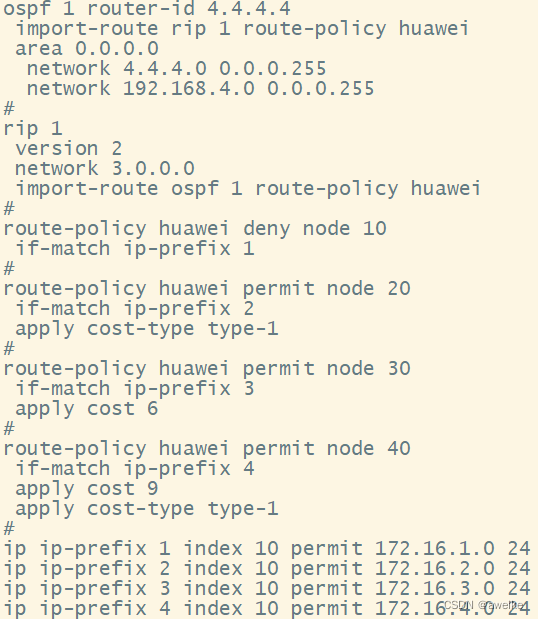
查看路由表cost值均已更改

边栏推荐
- Oracle查看硬解析
- Oracle调整数据文件大小杂谈
- Ubuntu及Mysql快速入门教程
- Matlab的不同进制转换
- DCGAN论文改进之处+简化代码
- Two architectures of ETL (ETL architecture and ELT Architecture)
- 3D face reconstruction and dense alignment with position map progression network
- Matlab draws the system response under different damping
- Oracle resizing data files
- Text processing tool in shell, cut [option parameter] filename Description: the default separator is the built-in variable of tab, awk [option parameter] '/pattern1/{action1}filename and awk
猜你喜欢

Excellent Kalman filter detailed article

程序的翻译和执行,从编辑、预处理、编译、汇编、链接到执行
备战金九银十Android面试准备(含面试全流程,面试准备工作面试题和资料等)

Shell operator, $((expression)) "or" $[expression], expr method, condition judgment, test condition, [condition], comparison between two integers, judgment according to file permission, judgment accor

安装CUDA失败的情况nsight visual studio edition失败

Wind10 configure ADB command

Acl2021 best paper released, from ByteDance
Anaconda installation (very detailed)
Program translation and execution, from editing, preprocessing, compilation, assembly, linking to execution

数据库性能系列之子查询
随机推荐
Shell operator, $((expression)) "or" $[expression], expr method, condition judgment, test condition, [condition], comparison between two integers, judgment according to file permission, judgment accor
Decision tree principle and case application - Titanic survival prediction
Metaspolit
samba服务器
【英雄哥六月集训】第 23天: 字典树
Local connection to remote server database under Windows platform (I)
Text processing tool in shell, cut [option parameter] filename Description: the default separator is the built-in variable of tab, awk [option parameter] '/pattern1/{action1}filename and awk
Matlab的不同进制转换
Matlab-基于短时神经网络的声音分类
NFT system development - Tutorial
Shell variables, system predefined variables $home, $pwd, $shell, $user, custom variables, special variables $n, $, $*, [email protected],
Shell read read console input, use of read
怎样关闭电脑开机自启动的应用
【英雄哥六月集训】第 27天: 图
Basic statement of database operation
Two architectures of ETL (ETL architecture and ELT Architecture)
Fsm onehot 答题记录
Ant高级-path和fileset
Oracle view hard parsing
如何创建一个带诊断工具的.NET镜像