当前位置:网站首页>Shell variables, system predefined variables $home, $pwd, $shell, $user, custom variables, special variables $n, $, $*, [email protected],
Shell variables, system predefined variables $home, $pwd, $shell, $user, custom variables, special variables $n, $, $*, [email protected],
2022-07-27 10:04:00 【Redamancy06】
List of articles
- 1. Variable
- 1.1 System predefined variables
- 1.2 Custom variable
- 1.2.1 Basic grammar
- 1.2.2 Variable definition rules
- 1.2.3 Case study
- 1.2.3.1 Defining variables a
- 1.2.3.2 View undefined sssshell
- 1.2.3.3“=” There are spaces before and after the sign
- 1.2.3.4 Change the value of the variable
- 1.2.3.5 When there are spaces in the content to be assigned, you need to add single quotation marks or double quotation marks
- 1.2.3.6 Local and global variables
- 1.2.3.7 take ssshell Define as global variable
- 1.2.3.8 In the child shell Change parent in shell Global variables are only in children shell It works , Back to the father shell It won't change
- 1.2.3.9 use vim Output the difference between global variables and local variables
- 1.2.3.10 stay set Look at custom variables
- 1.2.3.11 Declare static variables
- 1.2.3.12 Revoke variables a
- 1.2.3.13 Static variables cannot be undone
- 1.2.3.14 stay bash in , Variable default type is string type , No direct numerical operation
- 1.2.3.15 If you need to use , Need to use shell Expression of operators in
- 1.3 Special variables
1. Variable
1.1 System predefined variables
1.1.1 Common system variables
$HOME、$PWD、$SHELL、$USER etc.
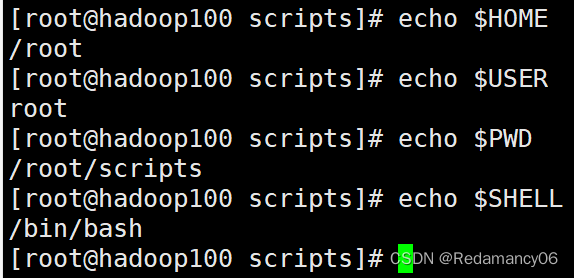
1.1.2 Look at all the global variable values
[[email protected] scripts]# env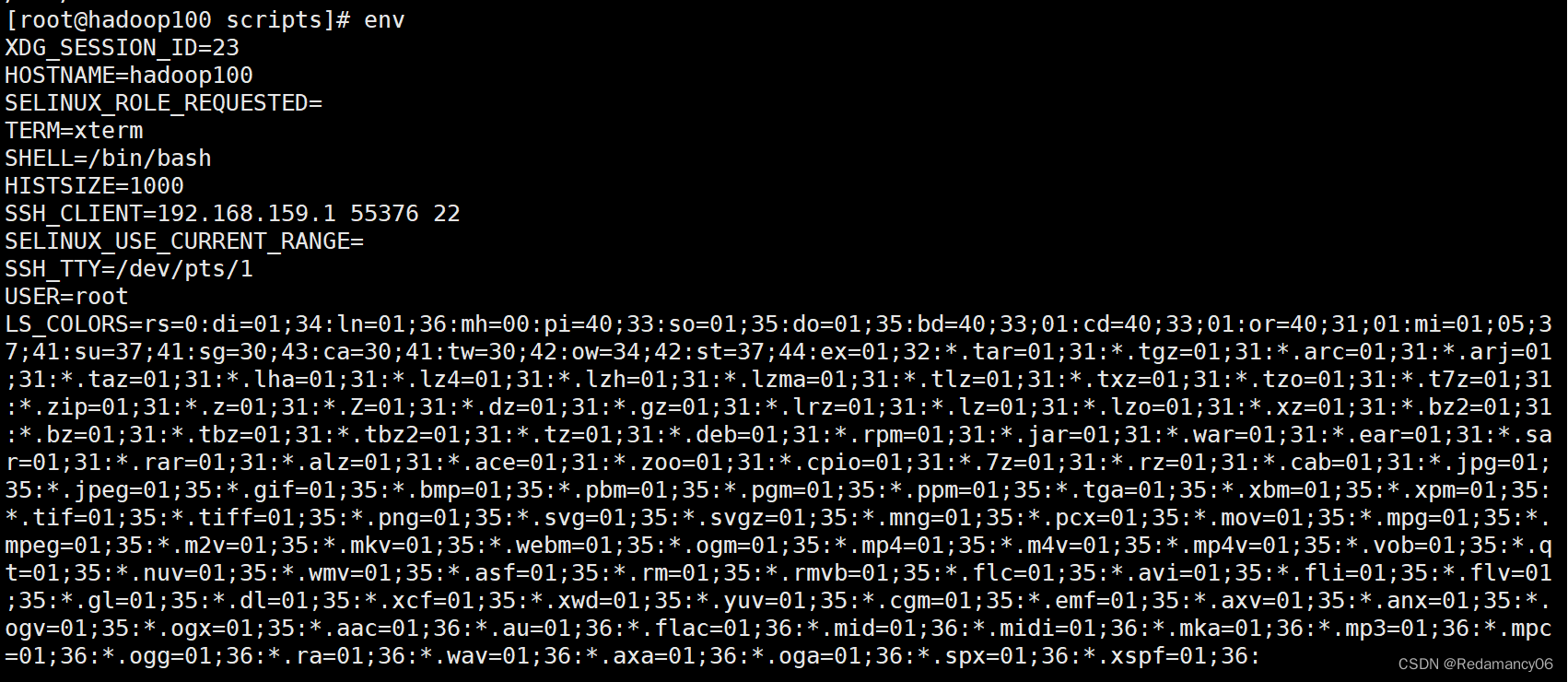
If you want to see it conveniently, you can add | less

[[email protected] scripts]# printenv
[[email protected] scripts]# printenv USER
There is no need to add $ Symbol , He can print all or part shell Environmental Science
[[email protected] scripts]# set

Look at all variables, including global variables and custom variables, local variables
1.2 Custom variable
1.2.1 Basic grammar
1) Defining variables : Variable name = A variable's value , Be careful ,= There must be no spaces before or after the sign
2) Revoke variables :unset Variable name
3) Declare static variables :readonly Variable , Be careful : You can't unset
1.2.2 Variable definition rules
1) Variable names can be alphabetized 、 Numbers and underscores , But it can't start with a number , Environment variable name is recommended to be capitalized .
2) No spaces on both sides of equal sign
3) stay bash in , Variable default type is string type , No direct numerical operation .
4) Value of variable if there is a space , Double or single quotes are required .
1.2.3 Case study
1.2.3.1 Defining variables a
[[email protected] scripts]# a=2

1.2.3.2 View undefined sssshell
[[email protected] scripts]# echo $sssshell
1.2.3.3“=” There are spaces before and after the sign

1.2.3.4 Change the value of the variable

1.2.3.5 When there are spaces in the content to be assigned, you need to add single quotation marks or double quotation marks
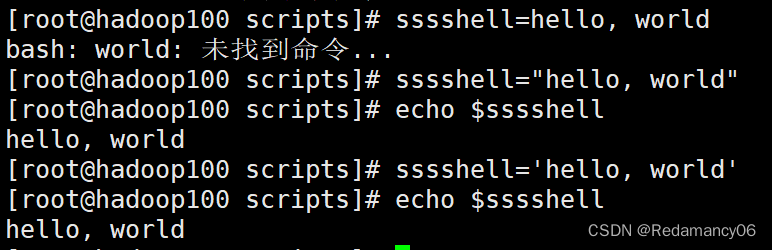
1.2.3.6 Local and global variables
env You can only check the global variables set by the system , and set You can view all defined variables , At this stage, I can't completely know ssshell Is it a local variable or a global variable? Go on 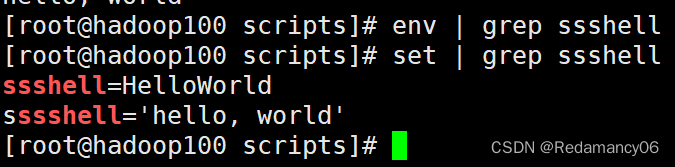
Open a sub shell
explain ssshell It's a local variable
1.2.3.7 take ssshell Define as global variable
When we need to be in the son shell Use in ssshell variable , We need to ssshell Define as global variable , Definition ssshell When it becomes a global variable, you need to create ssshell The father of shell change , Not in other places shell change 

1.2.3.8 In the child shell Change parent in shell Global variables are only in children shell It works , Back to the father shell It won't change

1.2.3.9 use vim Output the difference between global variables and local variables

stay hello.sh Add local variables to sssshell And then execute hello.sh As the result of the 
If the absolute path is used, there is no hello,linux This one is , because sssshell It's a local variable
hold sssshell When the variable becomes a global variable, the result is 
Both show
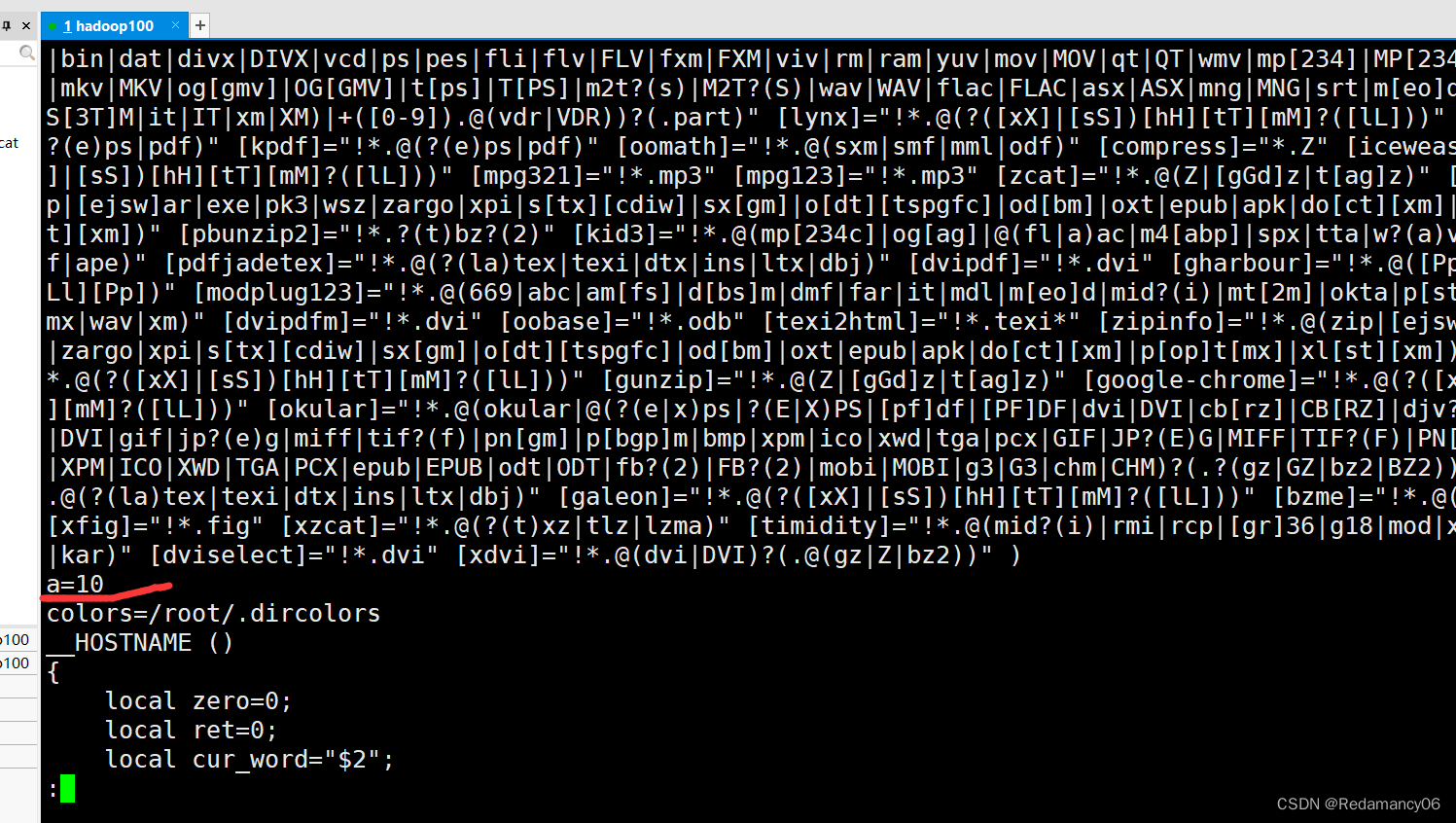
1.2.3.10 stay set Look at custom variables
Defined a Variable , stay set You can find

1.2.3.11 Declare static variables
[[email protected] ~]# readonly b=2

Both static and local variables are set Inside
1.2.3.12 Revoke variables a
[[email protected] ~]# unset a


set There's no a The variable
1.2.3.13 Static variables cannot be undone

1.2.3.14 stay bash in , Variable default type is string type , No direct numerical operation

1.2.3.15 If you need to use , Need to use shell Expression of operators in
[[email protected] ~]# a=$((1+4))

[[email protected] ~]# a=$[5+2]

1.3 Special variables
1.3.1$n
1.3.1.1 Basic grammar
$n ( Function description :n  Is the number ,$0  Represents the script name ,$1-$9  Represents the first to ninth parameters ,
 More than ten parameters , More than ten parameters need to be enclosed in braces , Such as ${10})
1.3.1.2 Case practice
1.3.1.2.1 stay vim Inside "" and ’' The difference between
 Enclose with double quotation marks $n And enclose with single quotation marks $n
 Double quotation mark expanding $n Code variables
 No matter what single quotation marks surround, the output is intact
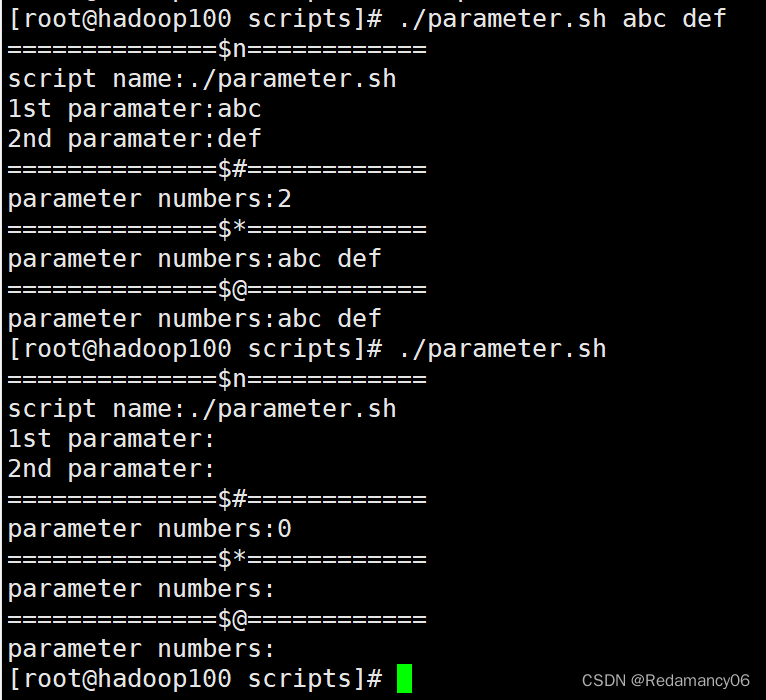
1.3.1.2.2$n Use


If you use the absolute path, you need to give parameter.sh Plus Execution Authority 
1.3.2$#
1.3.2.1 Basic grammar
$# ( Function description : Get the number of all input parameters ,
 Commonly used in cycles , Judge whether the number of parameters is correct and   Enhance the robustness of scripts ).
1.3.2.2$#


1.3.3 $*、[email protected]
1.3.3.1 Basic grammar
$* ( Function description : This variable represents all the parameters on the command line ,$* Treat all parameters as a whole )
[email protected] ( Function description : This variable also represents all the parameters on the command line , however [email protected] Treat each parameter differently )
1.3.3.2$*[email protected] Use


1.3.3$?
1.3.3.1 Basic grammar
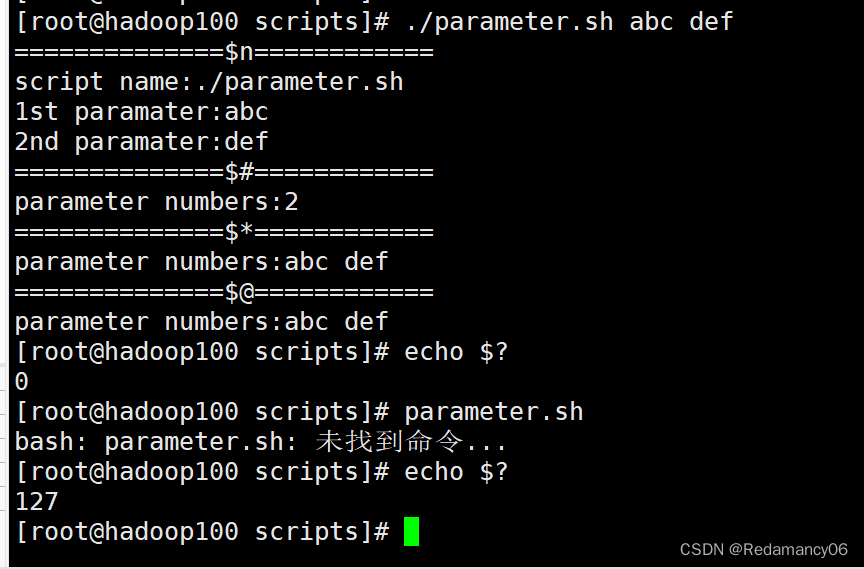
$? ( Function description : Return status of last executed command . If the value of this variable is  0, Prove the previous   A command is executed correctly ;
 If the value of this variable is not  0( Which number is it , It's up to the order itself ), Then prove   The last command was executed incorrectly .)
1.3.3.2 Judge parameter.sh Whether the script is executed correctly
边栏推荐
- Engineering survey simulation volume a
- 安装了HAL库如何恢复原来的版本
- LeetCode.565. 数组嵌套____暴力dfs->剪枝dfs->原地修改
- Cannot start after installing MySQL 5.7.27 in CentOS 7? (Language bash)
- [cloud native • Devops] master the container management tool rancher
- 食品安全 | 无糖是真的没有糖吗?这些真相要知道
- WordPress prohibits login or registration of plug-ins with a specified user name [v1.0]
- About getter/setter methods
- Food safety | are you still eating fermented rice noodles? Be careful these foods are poisonous!
- Dcgan paper improvements + simplified code
猜你喜欢

Sentinel ten thousand word tutorial | book delivery at the end of the text
二叉树习题总结
【云原生 • DevOps】一文掌握容器管理工具 Rancher
WGAN、WGAN-GP、BigGAN

Meeting seating function of conference OA project & Implementation of meeting submission for approval

StyleGAN论文笔记+修改代码尝试3D点云生成

LeetCode.1260. 二维网格迁移____原地暴力 / 降维+循环数组直接定位
open3d库的安装,conda常用指令,导入open3d时报这个错误Solving environment: failed with initial frozen solve. Retrying w

Shell流程控制(重点)、if 判断、case 语句、let用法、for 循环中有for (( 初始值;循环控制条件;变量变化 ))和for 变量 in 值 1 值 2 值 3… 、while 循环

一骑入秦川——浅聊Beego AutoRouter是如何工作
随机推荐
Fundamentals of Materials Engineering - key points
S switch stacking scheme configuration guide
PCL的ICP配准示例
Visual slam lecture notes (I): Lecture 1 + Lecture 2
Food safety | the kitchen board environment is very important. Do you know these use details?
When I went to oppo for an interview, I got numb
如何在树莓派上安装cpolar内网穿透
QT learning (II) -- a brief introduction to QT Creator
Brush the title "sword finger offer" day03
Interview JD T5, was pressed on the ground friction, who knows what I experienced?
Voice live broadcast system - Principles to be followed in developing push notifications
NFT系统开发-教程
食品安全 | 无糖是真的没有糖吗?这些真相要知道
面试必备:虾皮服务端15连问
【云原生 • DevOps】一文掌握容器管理工具 Rancher
Review summary of engineering surveying examination
WGAN、WGAN-GP、BigGAN
Concurrent thread state transition
Anchor Free检测器:CenterNet
Provincial Emergency Management Department: Guangzhou can strive to promote the experience of emergency safety education for children