当前位置:网站首页>Statistical machine learning code set
Statistical machine learning code set
2022-06-12 16:15:00 【Yeexxxx___】
P39 Exercise application 8
college = read.csv("./data/College.csv",sep = ',',header = TRUE);


rownames(college) = college[,1] #  Make the first column row name
# fix(college)
college = college[,-1]  #  Delete the first column
# fix(college)

college$Private=huaas.factor(college$Private)  # Private Is a character variable   So factorization

#  Data characteristics
summary(college)

#  Scatter matrix
pairs(college)

#  boxplot
plot(college$Private, college$Outstate)  # P Yes O Along the side of the box line diagram
   #  Abscissa for P Of Yes and NO , Ordinate for O The numerical

Elite = rep("No", nrow(college))  #  Create a list Elite, Duplicate assignment college Number of lines No
Elite[college$Top10perc>50]="Yes"   #  Greater than 50 assignment Y  Vector operations
Elite = as.factor(Elite)  #  Into factors
college = data.frame(college, Elite) #  Merge
summary(Elite)
plot(college$Elite, college$Outstate)


#  Histogram
par(mfrow = c(2,2)) #  Window partition
hist(college$Accept,breaks = 5, prob=T)
hist(college$Accept,breaks = 10, prob=T)
hist(college$Accept,breaks = 20, prob=T)
hist(college$Accept,breaks = 50, prob=T)
The second assignment
1. Artificial data : Generate 200 individual f(x)=sinx y=f(x)+ei~N(0,0.2) Generate a normal distribution random number rnorm
2. Linear regression fitting data : Output mean square error
3. Polynomial function poly(1,3,5,20,23) Fit points again
#  Generate sin+ Noise data
set.seed(11)  #  Set random seeds
x = runif(200,-10,10); # 200 individual -10 To 10 A random number evenly distributed between
x = sort(x)  #  Sort
y = sin(x)+rnorm(200,0,0.2)   # sinx+e,e The mean value of the normal distribution is 0, The variance of 0.2 Random disturbance of

#  drawing
plot(x,y,type = 'l',col = 'red',main = "Ganerate random data")
lines(x,sin(x),col = 'blue')
legend(x = 'bottomleft',
       legend = c(expression(y == sinx+e), expression(y == sinx)),
       lty =1,
       col = c('red', 'blue'),
       bty = 'n',
       horiz = T,
       cex = 0.8)

#  Calculation mse function
MSE_fit = function(y,fit,p){

  n=length(fit$residuals)
  rse = sqrt(sum(fit$residuals^2)/(n-p-1)) # https://www.cnblogs.com/HuZihu/p/9692814.html
  mse1 = rse^2*((n-p-1)/n);mse1
}

#  Linear regression
fit1 = lm(y~x)
summary(fit1)
MSE_fit(y,fit1,1)  #  Calculation mse

#  Make a comparison
plot(x,y,main = "Linear regression",cex = 0.8)
fit1_y = predict(fit1)
lines(x,fit1_y,col ='red')
legend(x = 'bottomleft',
       legend = c(expression(y == sinx+e), expression('Predicts')),
       lty =1,
       col = c('black', 'red'),
       bty = 'n',
       horiz = T,
       cex = 0.8)

#  Polynomial plot legend function
pr_plot = function(x,y,fit,main_num){

  plot(x,y,main = main_num, cex = 0.8)
  fit_y = predict(fit)
  lines(x,fit_y, col = 'red')
  legend(x = 'bottomleft',
        legend = c(expression(y == sinx+e), expression('Predicts')),
        lty =1,
        col = c('black', 'red'),
        bty = 'n',
        horiz = T,
        cex = 0.8)

#  Polynomial function fitting
#  Method 1 : Draw a picture each
mse = c()
for(i in seq(3,14)){

  fit = lm(y~poly(x, i))  #  Polynomial function
  pr_plot(x,y,fit,paste('Polynomial regression',i))
  mse = c(mse,MSE_fit(fit, i))
}
mse
}

#  Method 2 : The line is drawn on a diagram
mse = c()
plot(x,y)
for(i in seq(3,14)){

  fit = lm(y~poly(x, i))
  mse = c(mse,MSE_fit(fit, i))
  lines(x,predict(fit),col=i)
}
mse
# Simulated data  Generate the data
GenerateDataSin = function(n, sigma1, sigma2)
{

  x = seq(0,2*pi,length.out = n)  # x Range and output length n
  set.seed(1) #  Set random seeds
  r = rnorm(n, mean = 0, sd = sigma1) # x Random disturbance of   To obey the mean is 0, The variance of sigma1 Is a normal distribution
  X = x + r
  set.seed(2)
  epsilon = rnorm(n, mean = 0, sd = sigma2)  #  Random error term
  Y = sin(X) + epsilon
  dataAll = data.frame(X,Y) # x y  Merge into data frame
  return(dataAll)  #  Return to the data box
}

# Getting training and test data  Generating training sets and test sets
TrainData = GenerateDataSin(60, 0.1, 0.3)  #  Training set
par(mfrow = c(1, 2))
plot(TrainData$X, TrainData$Y, xlab = "X", ylab = "Y")
TestData = GenerateDataSin(30, 0.1, 0.3)  #  Test set
points(TestData$X, TestData$Y,col = "green") #  Test set points "Green" points represent the test data

#  Standard image rendering
xx = seq(0,2*pi, by = 0.1)   # 0 To 2pi, The interval is 0.1
lines(xx,sin(xx))  # sinx Standard image


# Fitting the model  Fitting model
ModelSin = function(Train, Test, k) # k Is the degree of a polynomial
{

  modelfit.lm = lm(Y~poly(X, k), data = Train)  #  Linear regression
  trainX = Train$X
  tstX = Test$X
  yhat.train = predict(modelfit.lm, data.frame(X = trainX))  #  Prediction on the training set
  yhat.tst = predict(modelfit.lm, data.frame(X = tstX))  #  Test set prediction
  lines(trainX, yhat.train, col = k) #  Training set fitting line
  trainMSE = mean((Train$Y - yhat.train)^2)  #  Training mse  Mean square error of training set
  tstMSE = mean((Test$Y - yhat.tst)^2)   #  Mean square error of test set
  Output = list(yhat.tst,trainMSE,tstMSE)  #  Returns the test set prediction   Training mean square error   Test mean square error
  return(Output)
}

Output1 = ModelSin(TrainData, TestData, 1) #  once   Simple linear regression
Output3 = ModelSin(TrainData, TestData, 3) #  Green curve
Output20 = ModelSin(TrainData, TestData, 20)  #  Blue
Output23 = ModelSin(TrainData, TestData, 23)  #  yellow

# MSE
TrainMSE = c(Output1[[2]], Output3[[2]], Output20[[2]], Output23[[2]])
TrainMSE  #  Mean square error of training set   With the increase of smoothness   Monotonic decline
TestMSE = c(Output1[[3]], Output3[[3]], Output20[[3]], Output23[[3]])
TestMSE  #  Mean square error of test set   As the smoothness increases u Shape distribution
plot(TestMSE,xlab = "Complexity of model", ylab = "MSE")
lines(TestMSE, col = "red")
points(TrainMSE)
lines(TrainMSE, col = "grey")

The third chapter Simple linear regression 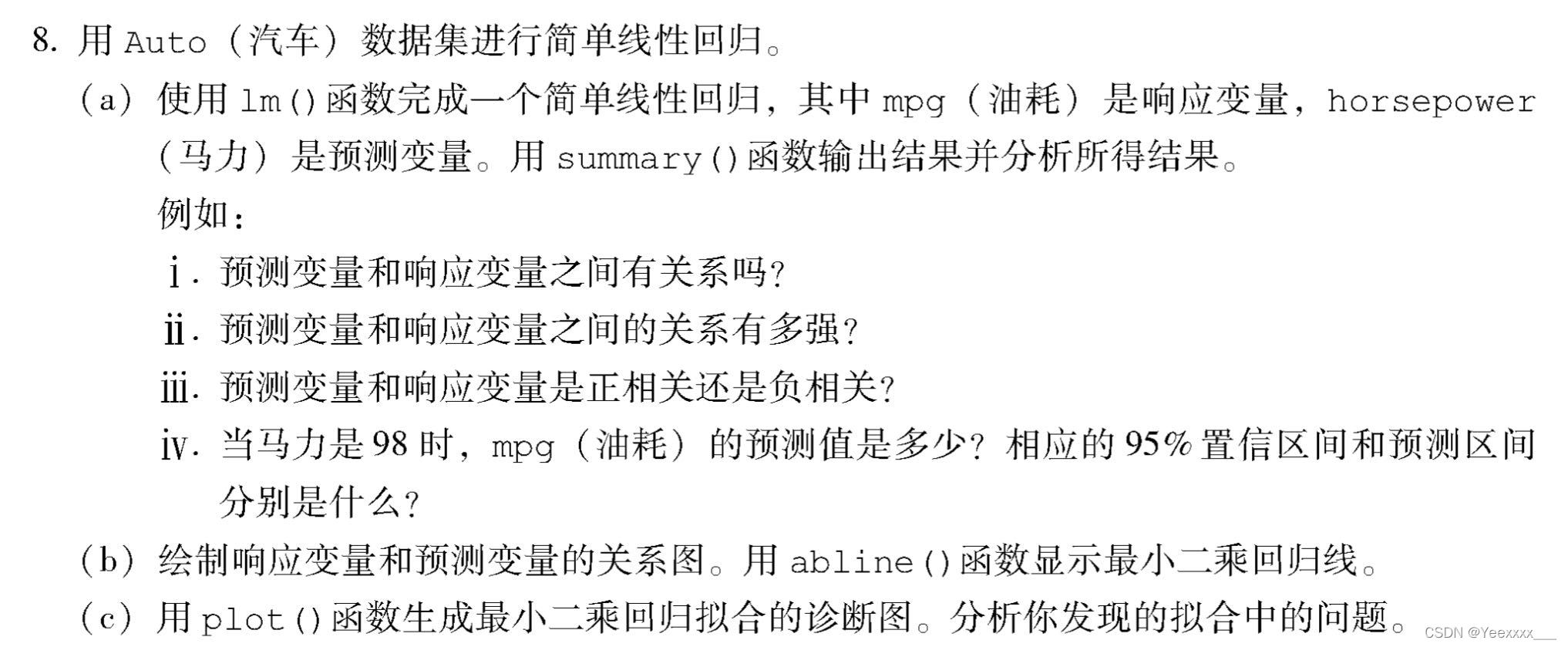
Auto = read.csv("./data/Auto.csv")
for(i in 1:length(Auto[,1])){

  if(Auto$horsepower[i] == "?"){

    Auto$horsepower[i] = NA
  }
}   #  In the data ? To deal with
Auto = na.omit(Auto)  #  Delete null
class(Auto$horsepower)  # "character"
Auto$horsepower = as.numeric(Auto$horsepower) #  The conversion type is numeric
attach(Auto)


# lm  Simple linear regression
  #  Whether there is a correlation between the two
cor.test(mpg,horsepower)
  # Pearson's product-moment correlation
  #
  # data: mpg and horsepower
  # t = -24.489, df = 390, p-value < 2.2e-16
  # alternative hypothesis: true correlation is not equal to 0
  # 95 percent confidence interval:
  # -0.8146631 -0.7361359
  # sample estimates:
  # cor
  # -0.7784268
    #  Judging from the correlation coefficient ,mpg And horsepower Has a highly negative correlation , The correlation coefficient is as high as 0.778
    #  Further, we can test the significance of correlation ,
    # H0 by X and Y There is no correlation between ,p Far less than 0.05, Rejection of null hypothesis , There must be a relationship between the two .

fit1 = lm(mpg~horsepower) #  Fitting a simple linear regression model
summary(fit1)  #  Details
coef(fit1)  #  Parameters
  #  The model is written in equation form  :mpg = 39.9358610 - 0.1578447 * horsepower
#  When horsepower=98 The predicted value is ?
a = as.data.frame(98)
colnames(a)=list("horsepower")
predict(fit1,a)  # 24.46708
#  When horsepower=98 when   The corresponding confidence interval is ?[23.97308 24.96108]
predict(fit1,a,interval = "confidence")
  # fit lwr upr
  # 1 24.46708 23.97308 24.96108
  #  Predictive value   Lower confidence interval / ceiling
#  When horsepower=98 when   The corresponding prediction interval is ?[14.8094 34.12476]
predict(fit1,a, interval = "prediction")
  # fit lwr upr
  # 1 24.46708 14.8094 34.12476

#  Plot the relationship between response variables and prediction variables , use abline() The function shows the least squares regression line
plot(horsepower,mpg,col="red")
abline(fit1,col="blue",lw=2)

#  Regression diagnosis diagram
par(mfrow = c(2, 2))
plot(fit1)
	# Residuals vs Fitted: The relationship between residuals and estimates , The data points should be roughly twice the standard deviation, that is 2、-2 And   between , And these points should not show any regular trend .
	# Normal QQ: If the normal hypothesis is satisfied , So the points on the graph should fall on the 45 On the line of the degree Angle ; If not , Then it violates the assumption of normality .
	# Scale-Location:GM The homovariance in the hypothesis can be diagnosed by this graph , The variance should be basically fixed or flat .
	# Cook’s distance:Cook distance , For diagnosis of strong influence points .

Auto$name = as.factor(name) #  Into factors
pairs(Auto)  #  Draw a matrix scatter
#  Calculate the correlation coefficient matrix between variables , Exclude qualitative variables name
cor(Auto[,1:8])

  #  Multiple linear regression
fit2 = lm(mpg~.-name,data = Auto)
summary(fit2)
  #(1) from F The statistical value is 254.4 You know , Far greater than  1, And  F  Statistical  p  The value is almost zero .  Explain that at least one prediction variable is related to the response variable .
  #(2) From the model information , Predictive variables displacement、weight、year、origin Of  p  Less value , It has a significant relationship with the response variables .
  #(3)year  The coefficient of is positive , It means that with the increase of vehicle age , Fuel consumption will increase . Increase the vehicle age by one year , The average mileage per barrel of oil has increased 0.7508 km
par(mfrow=c(2,2))
plot(fit2)

  #  Linear regression model fitting with interactive terms
fit3 = lm(mpg~.-name+horsepower*cylinders,data=Auto)
summary(fit3)
  #  There are statistically significant interactions , But the coefficient is small .

  #  Nonlinear transformation
fit4 = lm(mpg ~ .-name + log(horsepower), data=Auto)
summary(fit4)
  # horsepower  Logarithmic term of  p  The value is almost  0, It shows that there is a nonlinear relationship between some prediction variables and response variables .

fit5 = lm(mpg ~ .-name + sqrt(horsepower), data=Auto) #  Open the root
summary(fit5)
The fifth chapter Resampling method

### (a) Generate an analog data set as follows :
set.seed(1)
y=rnorm(100)
x=rnorm(100)
y=x-2*x^2+rnorm(100)
	# n = 100, p = 2.
	#  The model form is  $Y=X−2X^2+ϵ$.

### (b) do X Yes Y The scatter diagram of
plot(x, y)

### (c)LOOCV error
library(boot)
data = data.frame(x, y)  #  Define the data frame
	#  function : Leave one way to fit + Return error
Loocv_fit = function(seed,po){
      # po(poly)
  set.seed(seed)
  glm.fit = glm(y ~ poly(x, po))  #  Fitting model  glm and lm equally , It's just glm You can talk to cv.glm Together with
  cv.err = cv.glm(data, glm.fit) #  The first parameter is data   The second parameter is the model
  return(cv.err$delta)  #  Results of cross validation : The original result   And adjusted results
}

for(i in 1:4){

  print(i)
  print(Loocv_fit(11,i)) # 11 It's a random seed
}
#  The selected model is quadratic by cross validation

### (d)  Transform random seeds
for(i in 1:4){

  print(i)
  print(Loocv_fit(12,i))
}
# The results have not changed , because LOOCV There is no randomness in the segmentation between the training set and the verification set , So you always get the same result

### (e)
# ii. $Y= \beta_{0} + \beta_{1}X + \beta_{2}X^2 + ϵ$  There is the smallest LOOCV error , Consistent with the expected results , because (a) The form of the model that generates random numbers in is quadratic , It shows that we can pass LOOCV Choose a better model .

### (f) see t Check whether the selected features are consistent with the results of cross validation
fit = glm(y ~ poly(x, 4))
summary(fit)
#  Agreement , Of primary and secondary terms p Less than 0.05, Statistically significant , Three times and four times are not significant . The results of statistical tests are consistent with LOOCV Consistent result .
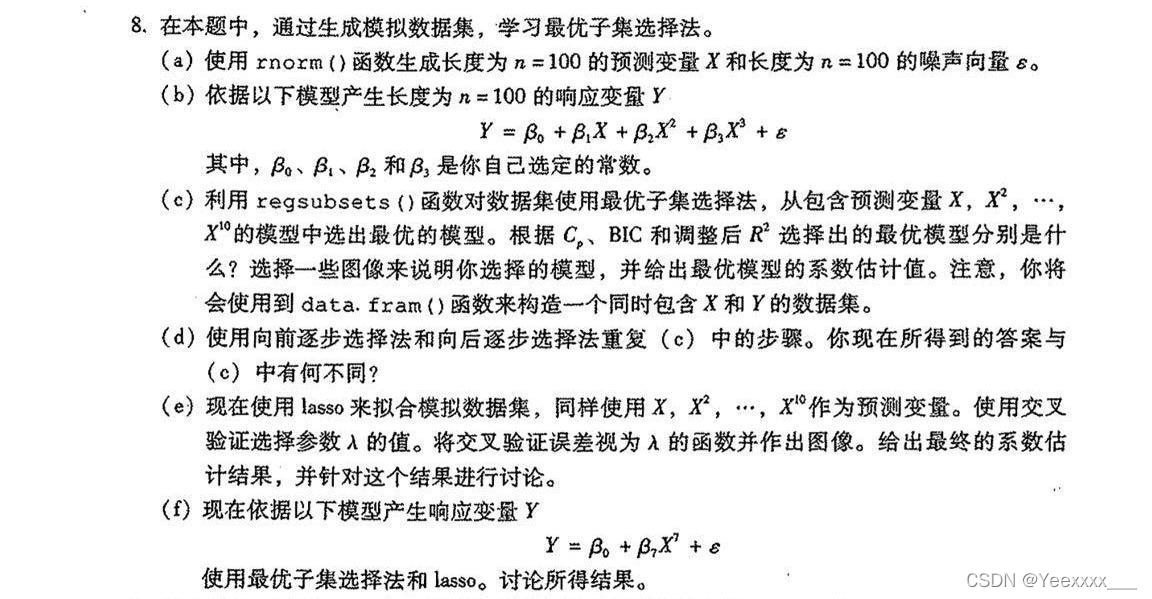
# P182 8 abcd
### (a) Generate x  and  $\epsilon$
set.seed(1) #  Set random seeds
X = rnorm(100)
eps = rnorm(100)

### (b)  Build a model , Generate response variables Y
beta0 = 1
beta1 = 3
beta2 = -2
beta3 = 0.5
Y = beta0 + beta1 * X + beta2 * X^2 + beta3 * X^3 + eps

library(leaps)
data = data.frame(y = Y, x = X)  #  The construct also contains X and Y Data set of 、 box
regfit.full = regsubsets(y ~ poly(x, 10, raw = T), data = data, nvmax = 10)  # ?raw  Optimal subset selection method  nvmax Is the maximum number of features selected
mod.summary = summary(regfit.full)
mod.summary

#  adopt cp、bic、adjust R^2 Decide which model is the best ,cp bic Minimum ,adjustR^2 Maximum
which.min(mod.summary$cp)
which.min(mod.summary$bic)
which.max(mod.summary$adjr2)
	#cp、bic Minimum ,adjust $R^2$ The biggest ones are 3

#  visualization cp
par(mfrow = c(1,2))
plot(mod.summary$cp, ylab = "Cp",type = "l")  #  Ten models cp Line chart of
points(3, mod.summary$cp[3],col = "red", lwd = 2)
plot(regfit.full,scale = 'Cp')
#  visualization bic
par(mfrow = c(1,2))
plot(mod.summary$bic, ylab = "BIC",type = "l")
points(3, mod.summary$bic[3],col = "red", lwd = 2)
plot(regfit.full,scale = 'bic')
#  visualization adjr2
par(mfrow = c(1,2))
plot(mod.summary$adjr2, ylab = "Adjusted R2",type = "l")
points(3, mod.summary$adjr2[3],col = "red", lwd = 2)
plot(regfit.full,scale = 'adjr2')

#  Fitting the cubic model
b_fit=lm(y ~ poly(x,3, raw = T), data = data)
summary(b_fit)
coef(b_fit)  #  The estimation coefficient of the optimal model   The true coefficient is  1 3 -2 0.5


### (d) Step forward and backward
mod.fwd = regsubsets(y ~ poly(x, 10, raw = T), data = data, nvmax = 10,
    method = "forward") #  forward
mod.bwd = regsubsets(y ~ poly(x, 10, raw = T), data = data, nvmax = 10,
    method = "backward")  #  backward
fwd.summary = summary(mod.fwd)
bwd.summary = summary(mod.bwd)

which.min(fwd.summary$cp)
which.min(fwd.summary$bic)
which.max(fwd.summary$adjr2)

which.min(bwd.summary$cp)
which.min(bwd.summary$bic)
which.max(bwd.summary$adjr2)

#  And (c) The results of optimal subset selection in are consistent , Are all 3 Time , Because this experiment p Is not big , The optimal subset selection method is still applicable , Step by step forward and backward, we also get consistent results , For the time being, the forward and backward step-by-step selection method is still very good , It's very efficient , It's also more accurate .
边栏推荐
- d结构用作多维数组的索引
- 连续八年包装饮用水市占率第一,这个品牌DTC是如何持续增长的?
- 为什么阿里巴巴不建议MySQL使用Text类型?
- Step by step to create a trial version of ABAP program containing custom screen
- Keep an IT training diary 067- good people are grateful, bad people are right
- 从斐波那契数列求和想到的俗手、本手和妙手
- 批量--04---移动构件
- Axure RP 9 for MAC (interactive product prototyping tool) Chinese version
- 【周赛复盘】LeetCode第80场双周赛
- 位运算例题(待续)
猜你喜欢

acwing795 前缀和(一维)

Golang collaboration scheduling (I): Collaboration Status

Multimix: small amount of supervision from medical images, interpretable multi task learning

Apache kylin Adventure

Step by step to create a trial version of ABAP program containing custom screen
![[browser principle] variable promotion](/img/19/f6b26d97c6024893a21dd40e2bbc47.jpg)
[browser principle] variable promotion
Multimix:从医学图像中进行的少量监督,可解释的多任务学习
![In 2020, the demand for strain sensors in China will reach 9.006 million, and the market scale will reach 2.292 billion yuan [figure]](/img/a8/dd5f79262fe6196dd44ba416a4baac.jpg)
In 2020, the demand for strain sensors in China will reach 9.006 million, and the market scale will reach 2.292 billion yuan [figure]

redis String类型常见命令

Read MHD and raw images, slice, normalize and save them
随机推荐
Applet: how to get the user's mobile number in the plug-in
Chapter I linear table
Project training of Software College of Shandong University rendering engine system basic renderer (VII)
Analysis on the development status and direction of China's cultural tourism real estate industry in 2021: the average transaction price has increased, and cultural tourism projects continue to innova
With a lamp inserted in the nostril, the IQ has risen and become popular in Silicon Valley. 30000 yuan is enough
Data analysis | kmeans data analysis
Project training of Software College of Shandong University rendering engine system basic renderer (V)
acwing 798二维差分(差分矩阵)
Saga architecture pattern: implementation of cross service transactions under microservice architecture
Interview: what are shallow copy and deep copy?
盒马,最能代表未来的零售
Review of the development of China's medical beauty (medical beauty) industry in 2021: the supervision is becoming stricter, the market scale is expanding steadily, and the development prospect is bro
Great God cracked the AMD k6-2+ processor 22 years ago and opened the hidden 128KB L2 cache
MYSQL---服务器配置相关问题
Thread pool execution process
(四)GoogleNet复现
Analysis of global and Chinese shipbuilding market in 2021: the global shipbuilding new orders reached 119.85 million dwt, with China, Japan and South Korea accounting for 96.58%[figure]
In 2020, the demand for strain sensors in China will reach 9.006 million, and the market scale will reach 2.292 billion yuan [figure]
Why doesn't Alibaba recommend MySQL use the text type?
同源?跨域?如何解决跨域?