当前位置:网站首页>ROS distributed communication
ROS distributed communication
2022-07-27 06:19:00 【Three assassins】
ROS Is a distributed computing environment . A running ROS The system can include multiple nodes distributed on multiple computers . According to the configuration mode of the system , Any node may need to communicate with any other node at any time .
therefore ,ROS There are some requirements for network configuration :
There must be a complete two-way connection between all machines on all ports .
Each computer must advertise itself by a name that all other computers can resolve .
Realization
1. Get ready Setting up IP
First, make sure that different computers are in the same network , It is best to set them separately Fix IP, If virtual machine , You need to change the network adapter to Bridging mode ;
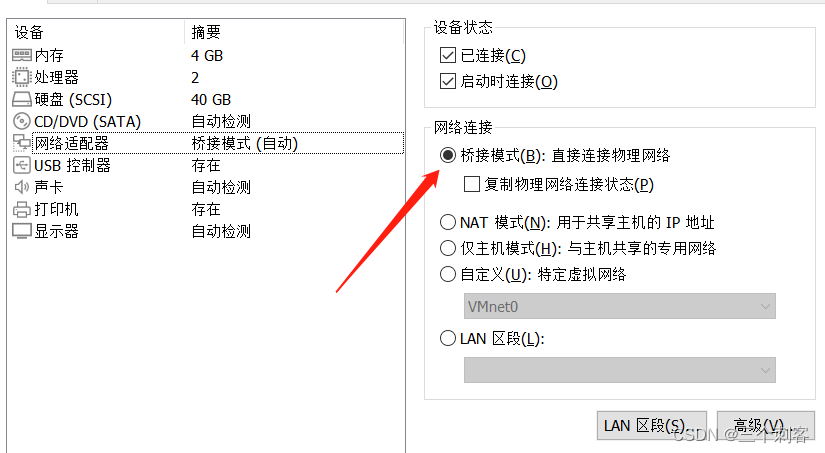

 see IP gateway Mask Fill in... Accordingly


After filling in , Click on Apply that will do
2. Configuration file modification
Modify the of different computers respectively /etc/hosts file , Add the other party's IP Address and computer name :

Host side :
Slave IP Slave computer name
192.168.50.171 ubuntu
 From the machine side :
The host IP Host computer name
192.168.50.172 ubuntu
Setup complete , Restart two virtual machines
After restart, you can pass ping Command to test whether the network communication is normal .
IP Address view name : ifconfig
Computer name view : hostname
ping IP
ping hostname


3. Configure the host IP
Configure the IP Address
~/.bashrc Additional
export ROS_MASTER_URI=http:// host IP:11311
export ROS_HOSTNAME= host IPexport ROS_MASTER_URI=http://192.168.50.172:11311
export ROS_HOSTNAME=192.168.50.172
The input terminal source .bashrc
4. Configure slave IP
Configure the of the slave IP Address , There can be more than one slave , Each set is set as follows :
~/.bashrc Additional
export ROS_MASTER_URI=http:// host IP:11311
export ROS_HOSTNAME= Slave IPexport ROS_MASTER_URI=http://192.168.50.172:11311
export ROS_HOSTNAME=192.168.50.171
The input terminal source .bashrc
test
1. The host starts roscore( must )
2. Host start subscription node
rosrun turtlesim turtlesim_node
Start the publishing node from the server , Test whether the communication is normal
rosrun turtlesim turtle_teleop_key

3. Reverse test , The host starts the publishing node , Start the subscription node from the machine , Test whether the communication is normal

边栏推荐
猜你喜欢

遥感影像识别-训练策略

Remote sensing image recognition misclassification under multi class recognition

ULCL功能--5GC

Unity practical tips (updating)
Ulcl function --5gc
![[Arduino] reborn Arduino monk (1)](/img/ce/67118ebd430a0ff3ef98ec8524ee4a.jpg)
[Arduino] reborn Arduino monk (1)

Basic concepts of software testing
Calculation of Huffman tree, code implementation and proof, graphic interpretation

网络原理的简单认识

How to choose the correct server backup method

随机推荐
导航相关消息
Leetcode one question per day 30. Concatenate substrings of all words
IP核之RAM
ROS分布式通信
力扣每日一题leetcode 513. 找树左下角的值
Man moon myth reading notes
Unity shader overview
C#文件的读写
UnityShader-LowPoly
Introduction to Wireshark graphical interface
力扣每日一题 剑指 Offer II 091. 粉刷房子
力扣每日一题(链表模拟)
shell script if嵌套for循环脚本
Solve binary tree (5)
Unity practical tips (updating)
Calculation of Huffman tree, code implementation and proof, graphic interpretation
UnityShader-高斯模糊
网络原理的简单认识
pycharm安装及导入项目注意事项
数据库的索引和事务(重点)