当前位置:网站首页>如何获取飞机穿过雷达两端的坐标
如何获取飞机穿过雷达两端的坐标
2022-07-05 17:59:00 【supermapsupport】
xkf
首先说一下大致的实现步骤:
- 创建雷达扫描的实体并定义飞机飞行的路线;
- 利用通视分析的接口找到飞机进入和穿出雷达侦测范围的位置坐标;
- 利用坐标构建线实体,雷达范围内为红色,范围外为绿色。
1. 创建雷达扫描的实体并定义飞机飞行的路线
首先创建雷达扫描实体,用添加实体的方式去添加雷达实体。
主要代码如下:
let sensorEntity = viewer.entities.add({
    position: Cesium.Cartesian3.fromDegrees(116.45093826887725, 39.90558654617389, 14.3030),
    rectangularSensor: new Cesium.RectangularSensorGraphics({
        radius: new Cesium.CallbackProperty(function () {
            return +self.radius;
        }, false),
        slice: 120,//切分程度
        xHalfAngle: new Cesium.CallbackProperty(function () {
            return Cesium.Math.toRadians(self.xHalfAngle);
        }, false),//左右夹角
        yHalfAngle: new Cesium.CallbackProperty(function () {
            return Cesium.Math.toRadians(self.yHalfAngle);
        }, false),//上下夹角
        lineColor: new Cesium.CallbackProperty(function () {
            return Cesium.Color.fromCssColorString(self.lineColor);
        }, false),//线颜色
        material: new Cesium.Color(0.0, 1.0, 1.0, 1),//统一材质
        showScanPlane: new Cesium.CallbackProperty(function () {
            return self.scanPlane;
        }, false),//显示扫描面
        scanPlaneColor: new Cesium.CallbackProperty(function () {
            return Cesium.Color.fromCssColorString(self.scanPlaneColor);
        }, false),//扫描面颜色
        scanPlaneMode: new Cesium.CallbackProperty(function () {
            return self.scanPlaneMode ? 'vertical' : 'horizontal';
        }, false),//垂直扫描模式
        scanPlaneRate: new Cesium.CallbackProperty(function () {
            return self.scanPlaneRate;
        }, false),//扫描速率
        showIntersection: true,//是否显示扫描与地球的线
        showThroughEllipsoid: false//是否穿过地球显示
    })
});
然后创建飞机飞行路线,让飞机沿线飞行。用的是时钟函数的方式去让飞机沿线飞行的。
主要代码:
// 飞机沿线飞行
var startTime = Cesium.JulianDate.fromDate(new Date(2019, 2, 25, 16));
var startPosition = Cesium.Cartesian3.fromDegrees(116.47326309033961, 39.90512322998635, 600);
var endTime = Cesium.JulianDate.addSeconds(startTime, 1000, new Cesium.JulianDate());
var endPosition = Cesium.Cartesian3.fromDegrees(116.4189181104128, 39.903026132659456, 600);
viewer.clock.startTime = startTime.clone();
viewer.clock.stopTime = endTime.clone();
viewer.clock.currentTime = startTime.clone();
viewer.clock.clockRange = Cesium.ClockRange.LOOP_STOP; //Loop at the end
viewer.clock.multiplier = 10;
viewer.timeline.zoomTo(startTime, endTime);
var carPositionProperty = new Cesium.SampledPositionProperty();
carPositionProperty.addSample(startTime, startPosition);
carPositionProperty.addSample(endTime, endPosition);
var carPosition = carPositionProperty.getValue(viewer.clock.currentTime);
var heading = Cesium.Math.toRadians(-3);
var pitch = 0;
var roll = 0;
var hpr = new Cesium.HeadingPitchRoll(heading, pitch, roll);
var orientation = Cesium.Transforms.headingPitchRollQuaternion(carPosition, hpr);
var carModel = viewer.entities.add({
    name: "gltf",
    position: new Cesium.CallbackProperty(function () {
        return carPosition;
    }, false),
    orientation: orientation,
    model: {
        uri: "./SampleData/gltf/客机模型/客机模型.gltf",
        scale: 60
    },
    viewFrom: new Cesium.Cartesian3(35, 70, 30)
});
viewer.clock.onTick.addEventListener(function () {
    var currentTime = Cesium.JulianDate.clone(viewer.clock.currentTime);
    carPosition = carPositionProperty.getValue(currentTime);
});
2. 利用通视分析的接口找到飞机进入和穿出雷达侦测范围的位置坐标
使用通视分析从起飞点到结束点进行分析得到靠近起飞点的第一个障碍点坐标;然后反过来进行通视分析得到远离起飞点的第二个障碍点坐标:
主要代码:
// 飞机起飞结束位置坐标:
takeOffposition = [116.47326309033961, 39.90512322998635, 560]
finishposition = [116.4189181104128, 39.903026132659456, 560]
setTimeout(function () {
    // 通视分析判断点位.
    sightline.build();
    sightline.lineWidth = 3
    //设置观察点
    sightline.viewPosition = takeOffposition;
    // 设置目标点
    var flag = sightline.addTargetPoint({
        position: finishposition,
        name: "point0"
    });
}, 200)
// 获取障碍点的方法延时运行,因为通视分析需要时间
setTimeout(function () {
    sightline.getBarrierPoint("point0", function (e) {
        positions.fisrtObstacle = e.position
    })
    // 清除第一次的通视分析结果.
    sightline.removeAllTargetPoint();
    sightline.viewPosition = finishposition;
    var flag1 = sightline.addTargetPoint({
        position: takeOffposition,
        name: "point1"
    });
}, 300)
setTimeout(function () {
    sightline.getBarrierPoint("point1", function (e) {
        positions.secondObstacle = e.position
    })
    sightline.removeAllTargetPoint();
}, 380)
3. 利用坐标构建线实体,雷达范围内为红色,范围外为绿色。
这个比较简单直接附代码:
// 结束位置到第二个穿出雷达范围实体
viewer.entities.add({
    id: "test1",
    polyline: {
        positions: Cesium.Cartesian3.fromDegreesArrayHeights([positions.secondObstacle.longitude * (180 / Math.PI), positions.secondObstacle.latitude * (180 / Math.PI), positions.secondObstacle.height, finishposition[0], finishposition[1], finishposition[2]]),
        width: 4.0,
        material: Cesium.Color.GREEN.withAlpha(0.9),
        depthFailMaterial: Cesium.Color.GREEN.withAlpha(0.9)
    }
});
// 开始位置到进入雷达范围实体
viewer.entities.add({
    id: "test2",
    polyline: {
        positions: Cesium.Cartesian3.fromDegreesArrayHeights([positions.fisrtObstacle.longitude * (180 / Math.PI), positions.fisrtObstacle.latitude * (180 / Math.PI), positions.fisrtObstacle.height, takeOffposition[0], takeOffposition[1], takeOffposition[2]]),
        width: 4.0,
        material: Cesium.Color.GREEN.withAlpha(0.9),
        depthFailMaterial: Cesium.Color.GREEN.withAlpha(0.9)
    }
});
// 构建两个点中间被发现的线实体
viewer.entities.add({
    id: "test3",
    polyline: {
        positions: Cesium.Cartesian3.fromDegreesArrayHeights([positions.secondObstacle.longitude * (180 / Math.PI), positions.secondObstacle.latitude * (180 / Math.PI), positions.secondObstacle.height, positions.fisrtObstacle.longitude * (180 / Math.PI), positions.fisrtObstacle.latitude * (180 / Math.PI), positions.fisrtObstacle.height]),
        width: 4.0,
        material: Cesium.Color.RED.withAlpha(0.9),
        depthFailMaterial: Cesium.Color.RED.withAlpha(0.9)
    }
});
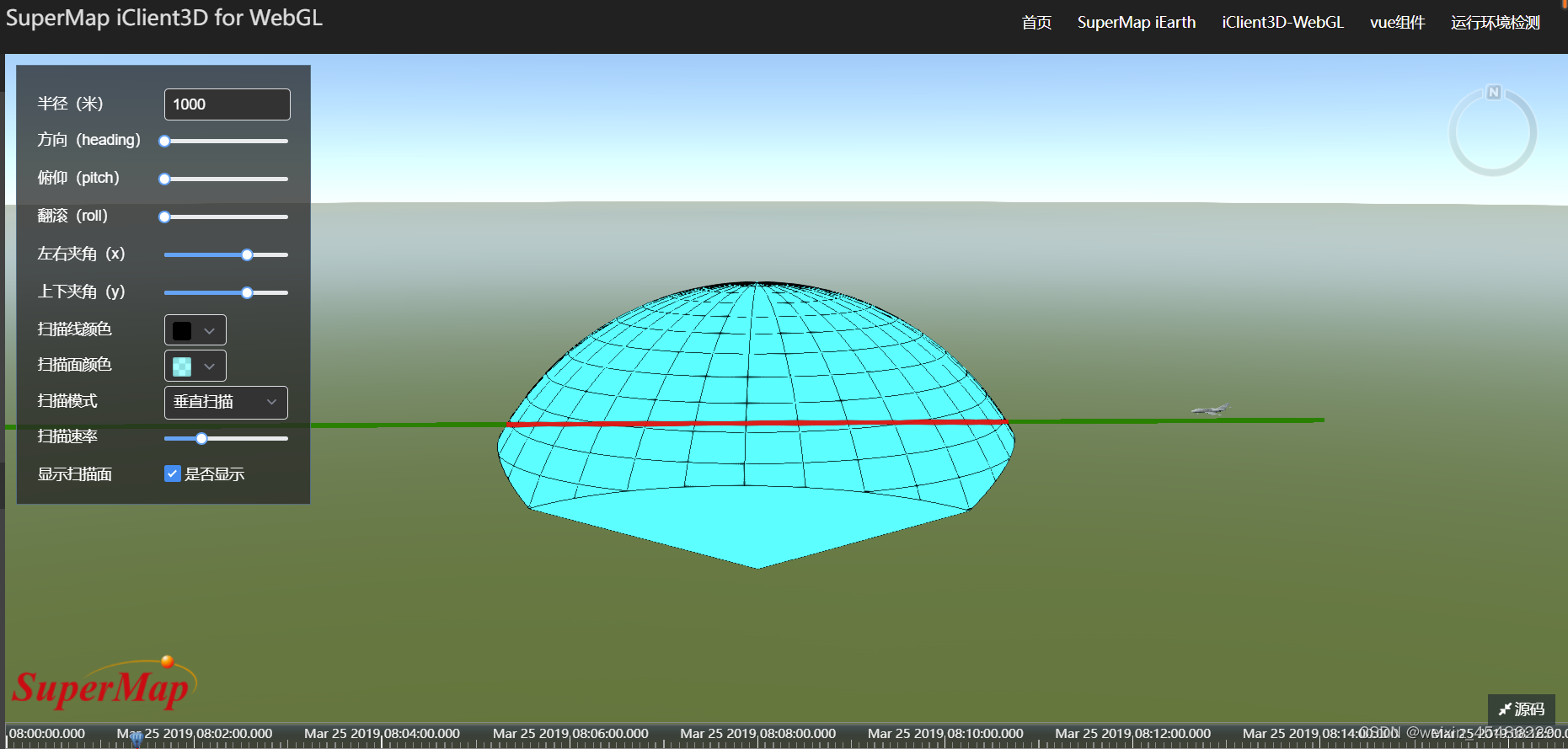
最终效果如下:
边栏推荐
- 通过SOCKS代理渗透整个内网
- What is the reason why the video cannot be played normally after the easycvr access device turns on the audio?
- 《力扣刷题计划》复制带随机指针的链表
- Sophon CE Community Edition is online, and free get is a lightweight, easy-to-use, efficient and intelligent data analysis tool
- mybash
- Leetcode daily question: merge two ordered arrays
- 分享:中兴 远航 30 pro root 解锁BL magisk ZTE 7532N 8040N 9041N 刷机 刷面具原厂刷机包 root方法下载
- pytorch yolov5 训练自定义数据
- 苹果手机炒股安全吗?打新债是骗局吗?
- About Estimation with Cross-Validation
猜你喜欢
Sophon CE Community Edition is online, and free get is a lightweight, easy-to-use, efficient and intelligent data analysis tool
nano的CAN通信
GFS分布式文件系统

ISPRS2022/云检测:Cloud detection with boundary nets基于边界网的云检测

Sophon autocv: help AI industrial production and realize visual intelligent perception
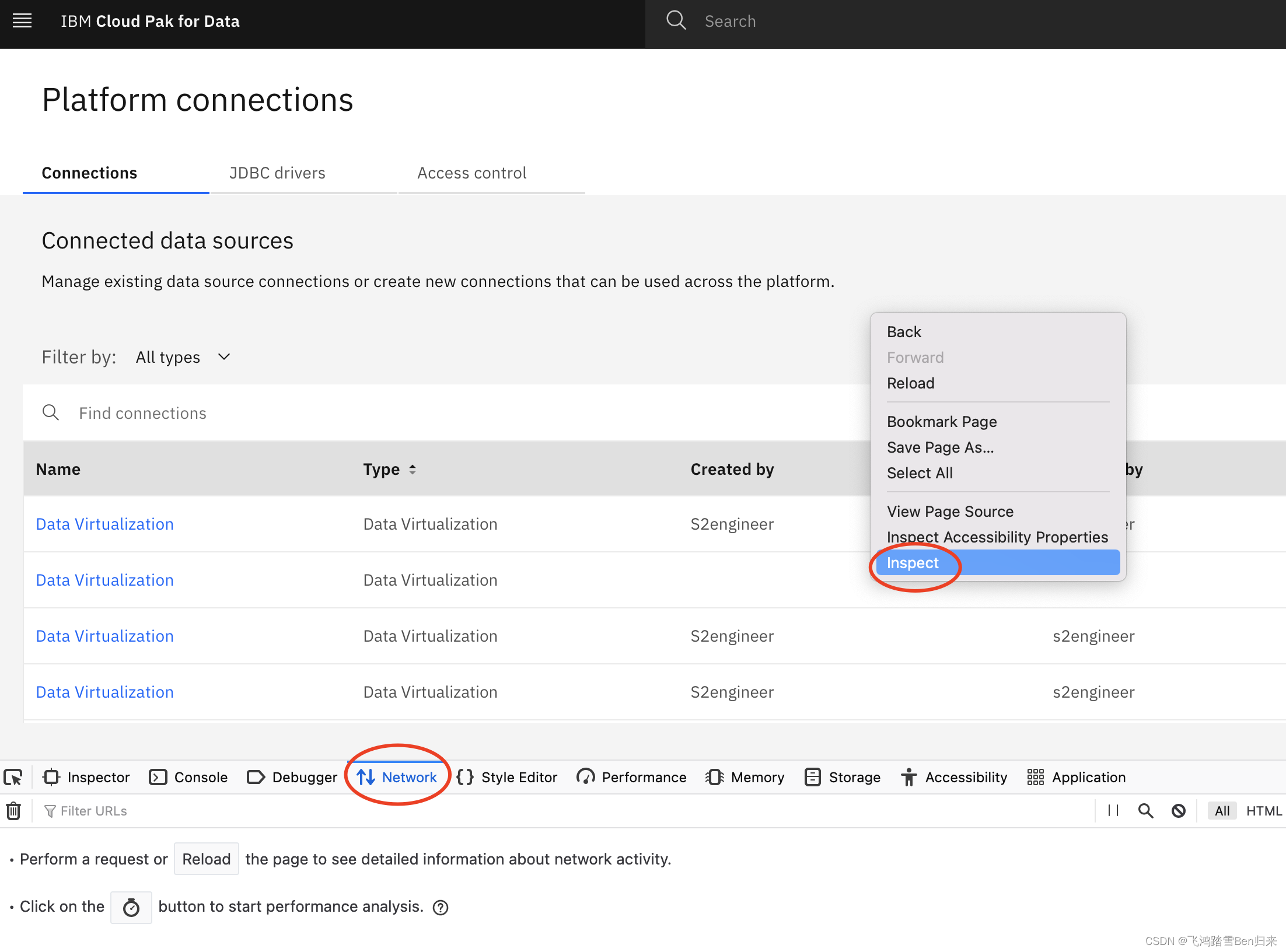
Failed to virtualize table with JMeter
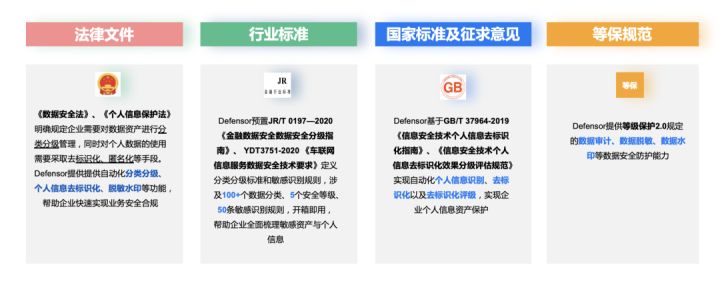
星环科技数据安全管理平台 Defensor重磅发布

“12306” 的架构到底有多牛逼?
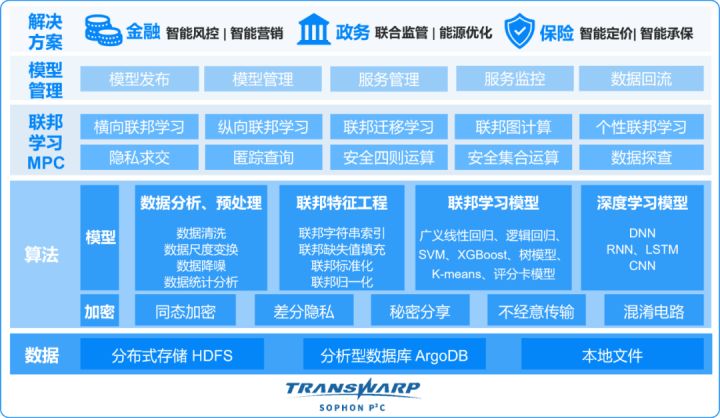
星环科技重磅推出数据要素流通平台Transwarp Navier,助力企业实现隐私保护下的数据安全流通与协作
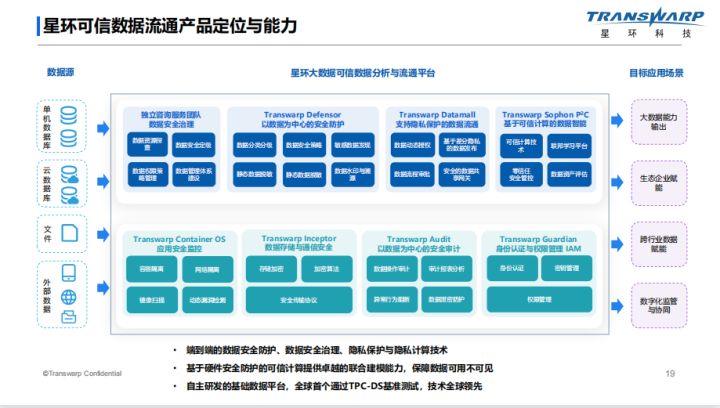
隐私计算助力数据的安全流通与共享
随机推荐
Sophon CE Community Edition is online, and free get is a lightweight, easy-to-use, efficient and intelligent data analysis tool
Leetcode daily practice: rotating arrays
钉钉开放平台小程序API的缓存接口都有哪些内容?
Daily exercise: a series of dates
Generate XML schema from class
ISPRS2022/雲檢測:Cloud detection with boundary nets基於邊界網的雲檢測
rsync
LeetCode笔记:Weekly Contest 300
【在優麒麟上使用Electron開發桌面應】
ELK日志分析系统
What are the requirements for PMP certification? How much is it?
node_exporter内存使用率不显示
含重复元素取不重复子集[如何取子集?如何去重?]
Numerical calculation method chapter8 Numerical solutions of ordinary differential equations
深拷贝与浅拷贝【面试题3】
使用QT遍历Json文档及搜索子对象
Tencent music launched its new product "quyimai", which provides music commercial copyright authorization
Nacos distributed transactions Seata * * install JDK on Linux, mysql5.7 start Nacos configure ideal call interface coordination (nanny level detail tutorial)
Compared with the loss of Wenxin, the performance is improved a lot
matlab内建函数怎么不同颜色,matlab分段函数不同颜色绘图