当前位置:网站首页>Complete set of typescript Basics
Complete set of typescript Basics
2022-06-12 07:15:00 【FeelTouch Labs】
Catalog
Chapter one TypeScript4 brief introduction
1.1、TypeScript4 brief introduction
1.3、TypeScript4 Project initialization
1.4、TypeScript4 development tool
Chapter two TypeScript4 data type
The third chapter TypeScript4 function
Chapter four TypeScript4 class
4.1、 The definition of a class
The fifth chapter TypeScript4 Interface
5.2、 The purpose of the interface
5.7、 Inheritance of interfaces
Chapter six TypeScript4 Generic
Chapter vii. TypeScript4 Decorators
7.6、 The order in which decorators are executed
Chapter viii. TypeScript4 modularization
8.1.1、 The benefits of modularity
8.1.6、 Deconstruct the assignment form
Chapter one TypeScript4 brief introduction
1.1、TypeScript4 brief introduction
TypeScript Is an open source programming language developed by Microsoft ,TypeScript yes Javascript Superset , Follow the latest ES6、ES5 standard ,TypeScript Expanded JavaScript The grammar of .TypeScript More like the back end Java、C# Such an object-oriented language , It can make JavaScript Develop large enterprise projects . Google is also strongly supporting Typescript Promotion of , Google's angular2.x+ Is based on Typescript grammar , Abreast of the times Vue 、React You can also integrate TypeScript.Nodejs In the framework Nestjs、midway What we use is TypeScript grammar .
A picture describes TypeScript and JavaScript Previous relationship :

Personally, the relationship between them is a little similar C and C++ The relationship between , The grammatical style is more similar to Java、C# .
1.2、TypeScript4 install
open CMD Command line , Enter the following code :
npm install -g [email protected]
1.3、TypeScript4 Project initialization
open CMD Command line , Enter the following code :
mkdir typescript-demo
cd typescript-demo
tsc --init

1.4、TypeScript4 development tool
Selection of development tools : Visual Studio Code, Sinicized plug-in installed
Development tool version : VSCodeSetup-x64-1.51.1.exe
Development environment version : node-v14.15.0-x64.msi
Development tools use :

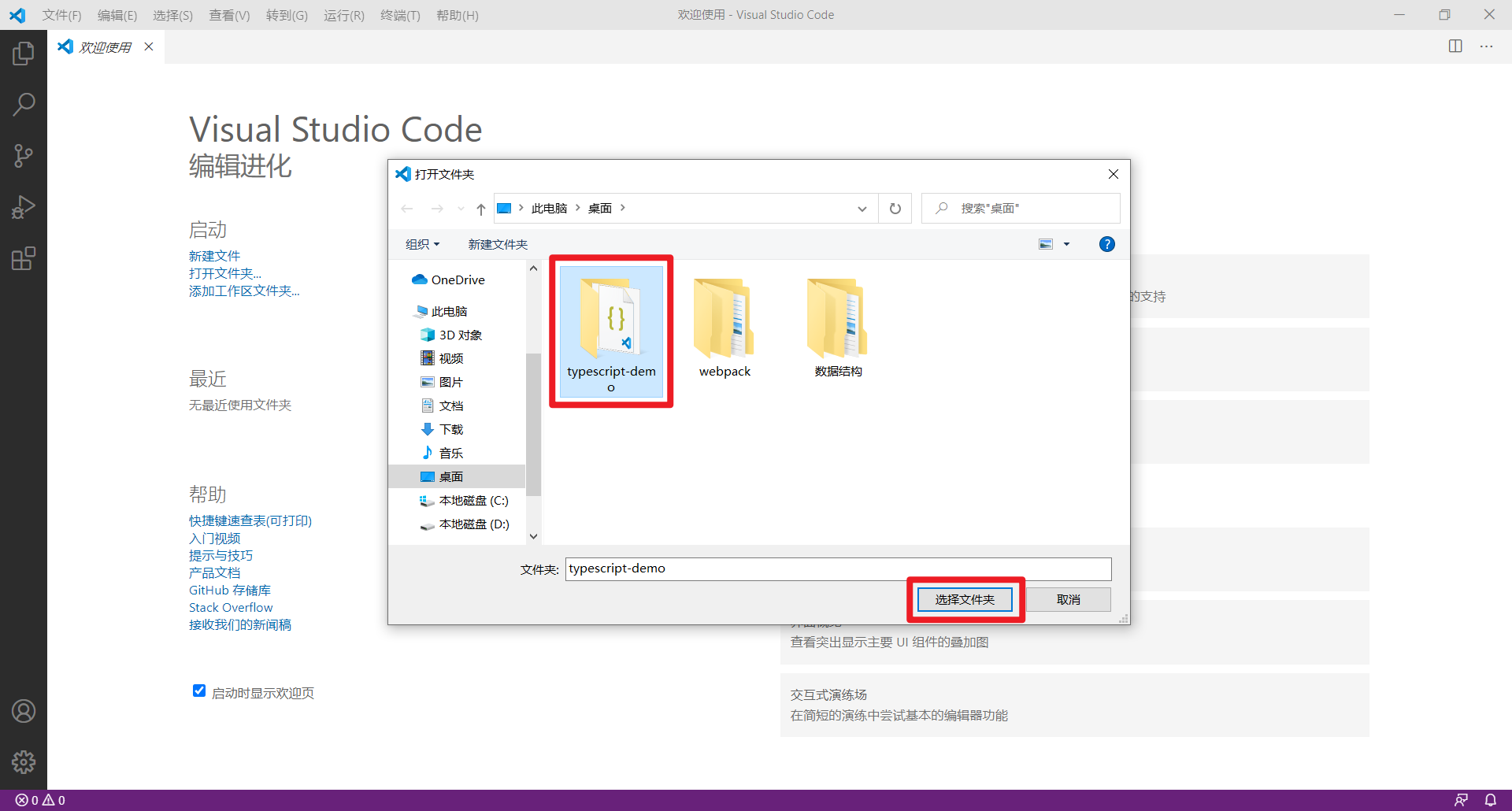


Press and hold the shortcut key CTRL + SHIFT + ~ Call up the terminal of the current project , We need to enter commands in the terminal , To execute js Catalog Compiled code in .


Chapter two TypeScript4 data type
Variable format 1 :
let Variable name : Variable type = initialize value ;
Variable format 2 :
let  Variable name :  Variable type  | undefined;
 Variable name  =  A variable's value ;
2.1、 Boolean type
let flag: boolean = true;
console.log(flag);
2.2、 Numeric type
Integer type :
let num: number = 123;
console.log(num);
floating-point :
let num: number = 3.1415926;
console.log(num);
2.3、 String type
let str: string = "Hello,TypeScript";
console.log(str);
2.4、 An array type
The first way to define an array : Take an array of numeric types as an example
let arr: number[] = [1, 2, 3, 4, 5, 6, 7, 8, 9, 0];
console.log(arr);
The second way to define an array : Take an array of numeric types as an example
let arr: Array<number> = [1, 2, 3, 4, 5, 6, 7, 8, 9, 0];
console.log(arr);
2.5、 A tuple type
Tuples belong to a kind of array , Elements in tuples may not all be of the same type !
let user: [number, string];
let userId = 10086;
let userName = "Nick";
let randomBoolean = true;

user = [userId, userName];      //  correct
user = [userId, randomBoolean]; //  error
2.6、 Enumeration type
Introduction to enumeration types :
With the popularity of computers , The program is not only used for numerical calculation , It's also more widely used to deal with non numerical data .
for example : Gender 、 month 、 What day 、 Color 、 Unit name 、 Education 、 Professional etc. , It's not numerical data .
In other programming languages , Generally, a numerical value is used to represent a certain state , This approach is not intuitive , Poor readability .
If we can use words with corresponding meaning in natural language to represent a certain state in the program , The program is easy to read and understand .
in other words , Consider the possible value of a variable in advance , Try to express each value with clear words in natural language , This method is called enumeration method , A type defined in this way is called an enumeration type .
Definition of enumeration type :
enum  Enum name  {
     identifier [=  Integer constant / character string ],
     identifier [=  Integer constant / character string ],
    ...
     identifier [=  Integer constant / character string ],
};
Examples of enumeration types :
enum Flag {
    success,
    error,
    overtime
};

let s: Flag = Flag.overtime;
console.log(s);//2
Code reading : If the identifier is not assigned , Its value is the subscript .
enum Flag {
    success = 200,
    error = 404,
    overtime = 500
};

let s: Flag = Flag.overtime;
console.log(s);//500
Code reading : If the identifier has been assigned , Its value is the assigned value .
enum Flag {
    success,
    error = 100,
    overtime
};

let s: Flag = Flag.overtime;
console.log(s);//101
Code reading : If the identifier is not assigned , Its value is the subscript , If a value is suddenly specified from the middle , Then its subsequent values will be recalculated from the current value .
enum Direction {
    Up = "UP",
    Down = "DOWN",
    Left = "LEFT",
    Right = "RIGHT",
}

let d: Direction = Direction.Up;
console.log(d);//UP
2.7、null type
let n: null = null;
2.8、undefined type
let u: undefined = undefined;
2.9、any type
TypeScript Medium any Type represents any data type .
enum Flag {
    success,
    error,
    overtime
};

let flag: any = true;// Boolean type
let num: any = 123;// Digital
let str: any = 'Hello,TypeScript';// Character
let arr: any = [1, 2, 3, 4, 5, 6, 7, 8, 9, 0];// Array type
let tuple: any = [10086, 'Nick'];// Metagroup type
let e: any = Flag.success;// enum
let n: any = null;//null type
let u: any = undefined;//undefined type
2.10、void type
TypeScript Medium void Type means there is no type , Generally, when defining a method, the method does not return a value .
function success(): void {
    console.log(' Execution succeeded , I don't need to return a value ');
}
2.11、never type
TypeScript Medium never A type is a subtype of any type , It can also be assigned to any type , But no type is never Can be assigned to never type , Even if any Type cannot be assigned to never. It means to declare never Variables of type can only be never Type .
function error(): never {
    throw new Error(' Throw a mistake ');
}
2.12、 Combination type
TypeScript A variable is supported in, which can be given many different variable types , Multiple variable types use | Separate .
let num: number | null | undefined;

num = 3;
console.log(num);

num = null;
console.log(num);

num = undefined;
console.log(num);
The third chapter TypeScript4 function
3.1、 Function definition
A subroutine is a series of subroutines ( Collection of statements ) Made up of , Can be called by external programs , After passing arguments to the function , Function can return a certain value .
Usually ,TypeScript The code is executed from top to bottom , However, the code inside the function body is not like this . If only the function is declared , The code does not execute , The code inside the function body is executed only when the function is called .
3.2、 Function format
Function format 1 :
function  Function name ( parameter list ):  return type  {
     The body of the function  ...
    [return  Return value ;]
}
Function format 2 :
let  Function name  = function ( parameter list ):  return type  {
     The body of the function  ...
    [return  Return value ;]
};
3.3、 Required parameters
Required parameters : When the function is called , Parameters that must be passed in , The parameters in the parameter list are required by default , As long as the parameter is written in the declaration , At the time of delivery , You have to pass in parameters , and , The number and type of arguments and formal parameters should be consistent .
function getInfo(name: string, age: number): string {
    return `${name} --- ${age}`;
}

console.log(getInfo(" Zhang San ", 28)); //  correct
console.log(getInfo(" Zhang San ")); //  error
console.log(getInfo(28)); //  error
3.4、 Optional parameters
Optional parameters : In order to solve the problem when passing parameters to a function , Some parameters can be passed without , We need optional parameters .
function getInfo(name: string, age?: number): string {
    return `${name} --- ${age}`;
}

console.log(getInfo(" Zhang San ", 28)); //  correct
console.log(getInfo(" Zhang San ")); //  correct
console.log(getInfo(28)); //  error
Be careful : Optional parameters must be configured to the end of the parameter .
3.5、 Default parameters
Default parameters : In order to solve the problem when passing parameters to a function , Some parameters can be passed without , But we need the value of this parameter , At this time, we need to set a default value for this parameter, also known as initialization value , You have to use the default parameters .
function getInfo(name: string, age: number = 20): string {
    return `${name} --- ${age}`;
}

console.log(getInfo(" Zhang San ", 28)); //  correct
console.log(getInfo(" Zhang San ")); //  correct
console.log(getInfo(28)); //  error
Be careful : Optional parameters cannot be set with initialization value .
3.6、 The remaining parameters
The remaining parameters : When the type of parameters is determined and the number of parameters is uncertain , We need to use the remaining parameters , It USES ... Pass the received parameters to an array of the specified type .
function sum(...result: number[]): number {
    let sum = 0;
    for (let i = 0; i < result.length; i++) {
        sum += result[i];
    }
    return sum;
}

console.log(sum(1, 2, 3, 4, 5, 6));
123456789
function sum(init: number, ...result: number[]): number {
    let sum = init;
    for (let i = 0; i < result.length; i++) {
        sum += result[i];
    }
    return sum;
}

console.log(sum(100, 1, 2, 3, 4, 5, 6));
Be careful : The remaining parameters must be configured to the end of the parameter .
3.7、 overloaded function
Overloading refers to two or more functions with the same name , But they have different parameters , In this case, there will be overloading of functions .
TypeScript Overloading in realizes the function of function overloading by providing multiple function type declarations for the same function .
// Overloaded function declaration
function getInfo(name: string): string;
function getInfo(name: string, age: number): string;
// Overloaded function signature : Is to write out all the parameters in the declaration , If optional , Use optional parameters , A variable name can use a combination of multiple types
function getInfo(name: string, age?: string | number): string {
    if (age) {

        return " My name is :" + name + ", Age :" + age;
    } else {

        return " My name is :" + name;
    }
}

console.log(getInfo("zhangsan"));//  correct
console.log(getInfo("lisi", 20));//  correct
console.log(getInfo(123));//  error
3.8、 Arrow function
The arrow function actually simplifies the writing of anonymous functions when functions are passed as parameters , For details, please refer to ES6 New characteristics .
setTimeout(function () {
    console.log(" Anonymous functions execute ...");
}, 1000);

setTimeout(() => {
    console.log(" The arrow function executes ...");
}, 1000);
Chapter four TypeScript4 class
4.1、 The definition of a class
class Person {
    name: string;// attribute , Omitted from the front public key word

    constructor(n: string) {// Constructors , Method triggered when class is instantiated
        this.name = n;// Use this Keyword is the of the current class name Attribute assignment
    }

    run(): void {// Method
        console.log(this.name+ " Running ");
    }
}

var p = new Person(" Zhang San ");
p.run();
4.2、 Class inheritance
Class inheritance : stay TypeScript In order to realize inheritance and use extends keyword , As long as the inheritance relationship is implemented , Then the subclass has the properties and methods of the parent class , And in the process of executing the method , Start with subclasses , If there is , Just use , without , Just look in the parent class . Class inheritance can only be one-way .
class Person {
    name: string;// Parent property , Omitted from the front public key word

    constructor(n: string) {// Constructors , The method triggered when instantiating the parent class
        this.name = n;// Use this Keyword is the of the current class name Attribute assignment
    }

    run(): void {// Parent class method
        console.log(this.name + " Running ");
    }
}

// The Chinese class inherits the human class
class Chinese extends Person {
    age: number;// Subclass properties

    constructor(n: string, a: number) {// Constructors , Methods triggered when instantiating subclasses
        super(n);// Use super Keyword to call the constructor in the parent class
        this.age = a;// Use this Keyword is the of the current class age Attribute assignment
    }

    speak(): void {// Subclass method
        super.run();// Use super Keyword to call a method in the parent class
        console.log(this.name + " Speak Chinese ");
    }
}

var c = new Chinese(" Zhang San ", 28);
c.speak();
4.3、 Modifier
TypeScript When defining attributes in it, it provides us with Three kinds of modifiers
- public: Public type , In the current class 、 Subclass 、 Class can be accessed outside
- protected: Type of protection , In the current class 、 The subclass can access , Can't access... Outside the class
- private: Private types , You can access... In the current class , Subclass 、 No access outside of class
Be careful : If the attribute is not decorated , The default is public (public).
4.4、 Static attribute
Static attribute : A property modified by a static modifier is a static property , Static properties can be called directly through the class name .
class Person {
    name: string;// attribute , Omitted from the front public key word
    static sex: string = " male ";// By static modifier static Decorated attributes

    constructor(n: string) {// Constructors , Method triggered when class is instantiated
        this.name = n;
    }

    run(): void {// Method
        console.log(this.name+ " Running ");
    }
}

console.log(Person.sex);
4.5、 Static methods
Static methods : The method modified by the static modifier is the static method , Static methods can be called directly through the class name , But inside static methods , You cannot directly call the non static properties of the current class 、 Non static methods .
class Person {
    name: string;// attribute , Omitted from the front public key word
    static sex: string = " male ";// By static modifier static Decorated attributes

    constructor(n: string) {// Constructors , Method triggered when class is instantiated
        this.name = n;
    }

    run(): void {// Method
        console.log(this.name + " Running ");
    }

    static print(): void {// By static modifier static The method of decoration
        // console.log(' full name :' + this.name);// error
        console.log(' Gender :' + Person.sex);// correct
        // this.run();// error
    }
}

Person.print();
4.6、 abstract class
TypeScript Abstract classes in : It is a base class that provides inheritance from other classes , Can't be instantiated directly .
use abstract Keywords define abstract classes and abstract methods , Abstract methods in abstract classes do not contain concrete implementations and must be in derived classes ( That is, its subclass ) To realize ,abstract Abstract methods can only be placed in abstract classes .
We often use abstract classes and abstract methods to define standards .
// Animal abstract class , All animals can run ( hypothesis ), But the food is different , So the method of eating is defined as an abstract method
abstract class Animal {
    name: string;
    constructor(name: string) {
        this.name = name;
    }
    abstract eat(): any;// Abstract methods do not contain concrete implementations and must be implemented in derived classes
    run() {
        console.log(this.name + " Can run ")
    }
}

class Dog extends Animal {
    constructor(name: string) {
        super(name);
    }
    eat(): any {// The subclass of an abstract class must implement the abstract methods in the abstract class
        console.log(this.name + " Eat bones ");
    }
}

var d: Dog = new Dog(" young but manly boyfriend ");
d.eat();

class Cat extends Animal {
    constructor(name: string) {
        super(name);
    }
    eat(): any {// The subclass of an abstract class must implement the abstract methods in the abstract class
        console.log(this.name + " Eating rats ");
    }
}

var c: Cat = new Cat(" Kitten ");
c.eat();
4.7、 polymorphic
polymorphic : A parent class defines a method that does not implement , Let the subclass that inherits it implement , Each subclass has a different representation , Polymorphism belongs to inheritance .
// Animal abstract class , All animals can run ( hypothesis ), But the food is different , So the method of eating is defined as an abstract method
abstract class Animal {
    name: string;
    constructor(name: string) {
        this.name = name;
    }
    abstract eat(): any;// Abstract methods do not contain concrete implementations and must be implemented in derived classes
    run() {
        console.log(this.name + " Can run ")
    }
}

class Dog extends Animal {
    constructor(name: string) {
        super(name);
    }
    eat(): any {// The subclass of an abstract class must implement the abstract methods in the abstract class
        console.log(this.name + " Eat bones ");
    }
}

var d: Animal = new Dog(" young but manly boyfriend ");
d.eat();

class Cat extends Animal {
    constructor(name: string) {
        super(name);
    }
    eat(): any {// The subclass of an abstract class must implement the abstract methods in the abstract class
        console.log(this.name + " Eating rats ");
    }
}

var c: Animal = new Cat(" Kitten ");
c.eat();
The fifth chapter TypeScript4 Interface
5.1、 Definition of interface
In object-oriented programming , An interface is a definition of a specification , It defines the norms of behavior and action , In programming , Interfaces play a role of limitation and specification . Interfaces define the specifications that a batch of classes need to adhere to , The interface doesn't care about the internal state data of these classes , I don't care about the implementation details of the methods in these classes , It only states that certain methods must be provided in these classes , The classes that provide these methods can meet the actual needs . typescrip The interface in is similar to java, It also adds more flexible interface types , Including attributes 、 function 、 Indexable and class etc .
5.2、 The purpose of the interface
The purpose of the interface is to standardize and restrict the behavior and action , It's a bit like an abstract class , however , Interface cannot have method body , Only method definitions are allowed .
5.3、 Property type interface
// Property constraints on incoming objects , The following is a property interface
interface FullName {
    firstName: string;
    secondName: string;
}

function printName(name: FullName) {
    console.log(name.firstName + "--" + name.secondName);
}

// The parameter passed in must contain firstName、secondName
var obj = {
    age: 20,
    firstName: ' Zhang ',
    secondName: ' 3、 ... and '
};
printName(obj);// correct
// printName("1213");// error
5.4、 Function type interface
// Encrypted function type interface
interface encrypt {
    (key: string, value: string): string;
}

var md5: encrypt = function (key: string, value: string): string {
    // Simulation operation
    return key + "----" + value;
}
console.log(md5("name", "zhangsan"));

var sha1: encrypt = function (key: string, value: string): string {
    // Simulation operation
    return key + "====" + value;
}
console.log(sha1("name", "lisi"));
5.5、 Indexable interface
An indexable interface is an array 、 Object constraints , Not commonly used .
// Indexable interface , Constraints on arrays
interface UserArr {
    [index: number]: string
}
var arr1: UserArr = ["aaa", "bbb"];
console.log(arr1[0]);

// Indexable interface , Constraints on objects
interface UserObj {
    [index: string]: string
}
var arr2: UserObj = { name: ' Zhang San ', age: '21' };
console.log(arr2);
5.6、 Class type interface
A class type interface is a constraint on a class , It is a bit similar to abstract class abstraction .
interface Animal {
    name: string;
    eat(str: string): void;
}

class Dog implements Animal {
    name: string;
    constructor(name: string) {
        this.name = name;
    }
    eat() {
        console.log(this.name + " Eat big bones ");
    }
}

var d = new Dog(" young but manly boyfriend ");
d.eat();

class Cat implements Animal {
    name: string;
    constructor(name: string) {
        this.name = name;
    }
    eat(food: string) {
        console.log(this.name + " eat " + food);
    }
}

var c = new Cat(" Kitten ");
c.eat(" Big mouse ");
5.7、 Inheritance of interfaces
Interface can inherit interface , The inheritance between interfaces and abstract classes is one-way single inheritance , But subclasses that implement interfaces can implement multiple interfaces .
Simply speaking , For classes 、 abstract class 、 Interface inheritance can only be single inheritance , But the interface can be implemented more .
// Human interface
interface Person {
    eat(): void;
}

// Programmer interface
interface Programmer extends Person {
    code(): void;
}

// Applet interface
interface Web {
    app(): void;
}

// Front end engineer
class WebProgrammer implements Person, Web {
    public name: string;
    constructor(name: string) {
        this.name = name;
    }
    eat() {
        console.log(this.name + " Dinner after work ")
    }
    code() {
        console.log(this.name + " Knock code at work ");
    }
    app() {
        console.log(this.name + " Developing small programs ");
    }
}

var w = new WebProgrammer(" petty thief ");
w.eat();
w.code();
w.app();
Chapter six TypeScript4 Generic
6.1、 Definition of generics
In Software Engineering , We don't just have to create consistent, well-defined API, Also consider reusability . Component can not only support the current data type , It can also support future data types , This provides you with very flexible features when creating large systems . In image C# and Java In such a language , You can use generics to create reusable components , A component can support multiple types of data , In this way, users can use components with their own data types .
Easy to understand : Generics are solving classes 、 Interface 、 The reusability of methods 、 And support for unspecified data types .
6.2、 Generic classes
Generic classes can support unspecified data types , The parameters passed in and returned must be consistent ,T For generics , The specific type is determined when calling this method .
// Generics of class
class MinClas<T>{
    public list: T[] = [];
    add(value: T): void {
        this.list.push(value);
    }
    min(): T {
        var minNum = this.list[0];
        for (var i = 0; i < this.list.length; i++) {
            if (minNum > this.list[i]) {
                minNum = this.list[i];
            }
        }
        return minNum;
    }
}
// Instantiate the class and formulate the class T The type of representation is number
var m1 = new MinClas<number>();
m1.add(11);
m1.add(3);
m1.add(2);
console.log(m1.min());
// Instantiate the class and formulate the class T The type of representation is string
var m2 = new MinClas<string>();
m2.add('c');
m2.add('a');
m2.add('v');
console.log(m2.min());
6.3、 Generic interface
// Generic interface
interface ConfigFn<T> {
    (value: T): T;
}

function getData<T>(value: T): T {
    return value;
}

var myGetData: ConfigFn<string> = getData;
console.log(myGetData('20'));
6.4、 Generic class interface
// Define generic classes that operate the database
class MysqlDb<T>{
    add(info: T): boolean {
        console.log(info);
        return true;
    }
}

// Want to give User Tables add data , Define a User Class and database
class User {
    username: string | undefined;
    pasword: string | undefined;
}
var user = new User();
user.username = " Zhang San ";
user.pasword = "123456";
var md1 = new MysqlDb<User>();
md1.add(user);

// Want to give ArticleCate Add data , Define a ArticleCate Class and database
class ArticleCate {
    title: string | undefined;
    desc: string | undefined;
    status: number | undefined;
    constructor(params: {
        title: string | undefined,
        desc: string | undefined,
        status?: number | undefined
    }) {
        this.title = params.title;
        this.desc = params.desc;
        this.status = params.status;
    }
}

var article = new ArticleCate({
    title: " This is a title, ",
    desc: " This is the description ",
    status: 1
});
var md2 = new MysqlDb<ArticleCate>();
md2.add(article);
Chapter vii. TypeScript4 Decorators
The experimental support function for the modifier may be changed in future versions .
stay “tsconfig” or “jsconfig” Set in “experimentalDecorators” Option to remove this warning .
“experimentalDecorators”: true // Enable pair ES7 Experimental support for decorators .
7.1、 Definition of modifier
A decorator is a special type of statement , It can be attached to a class 、 Method 、 Property or parameter , You can modify the behavior of the class , Generally speaking, decorator is a way , Can be injected into class 、 Method 、 Property or parameter to extend the class 、 Method 、 The function of a property or parameter . Common decorators are : Class decorator 、 Method decorator 、 Attribute decorator 、 Parameter decorator .
How to write a decorator : Ordinary decorator ( It's impossible to pass on the parameters )、 Decorator factory ( You can pass it on ), The decorator is in the past few years JS One of the greatest achievements , Already ES7 One of the standard features of .
7.2、 Class modifier
Class decorator : Ordinary decorator ( It's impossible to pass on the parameters )
function logClass(params: any) {
    console.log(params);//params Is the current class
    params.prototype.apiUrl = " I am a dynamically extended attribute ";
    params.prototype.run = function () {
        console.log(" I'm a dynamic extension method ");
    }
}

@logClass
class HttpClient {

}

var http: any = new HttpClient();
console.log(http.apiUrl);
http.run();
Class decorator : Decorator factory ( You can pass it on )
function logClass(params: string) {
    return function (target: any) {
        console.log(target);//target Is the current class
        console.log(params);//params Is the parameter passed in by the current class
        target.prototype.apiUrl = params;
    }
}

@logClass("http://www.baidu.com")
class HttpClient {

}

var http: any = new HttpClient();
console.log(http.apiUrl);
7.3、 Attribute modifier
The attribute decorator will be applied to the attribute description , It can be used to monitor 、 Modify or replace the value of the attribute .
The property decorator will pass in the following at run time 2 Parameters :
- For static members is the constructor of the class , For instance members are prototype objects of a class .
- Member's name .
// Attribute decorator
function logProperty(params: any) {//params Is the parameter passed in by the current class
    return function (target: any, attr: any) {
        console.log(target);
        console.log(attr);
        target[attr] = params;
    }
}

class HttpClient {
    @logProperty("http://www.baidu.com")
    public url: any | undefined;

    getData() {
        console.log(this.url);
    }
}

var http = new HttpClient();
http.getData();
7.4、 Method modifier
The method decorator will be applied to the method description , It can be used to monitor 、 Modify or replace the method definition .
The method decorator passes in the following at run time 3 Parameters :
- For static members is the constructor of the class , For instance members are prototype objects of a class .
- Member's name .
- The property descriptor of the member .
function get(params: any) {//params Is the parameter passed in by the current class
    return function (target: any, methodName: any, desc: any) {
        console.log(target);
        console.log(methodName);
        console.log(desc);
        target.apiUrl = params;
        target.run = function () {
            console.log("run");
        }
    }
}

class HttpClient {
    public url: any | undefined;
    constructor() {
    }
    @get("http://www.baidu.com")
    getData() {
        console.log(this.url);
    }
}

var http: any = new HttpClient();
console.log(http.apiUrl);
http.run();
7.5、 Parameter modifier
Parameter decorator expressions are called at run time as functions , You can use the parameter decorator to add some element data to the class prototype , In the following 3 Parameters :
- For static members is the constructor of the class , For instance members are prototype objects of a class .
- The name of the method .
- The index of the parameter in the function parameter list .
function logParams(params: any) {
    return function (target: any, methodName: any, paramsIndex: any) {
        console.log(target);
        console.log(methodName);
        console.log(paramsIndex);
        target.apiUrl = params;
    }
}

class HttpClient {
    getData(@logParams("10086") uuid: any) {
        console.log(uuid);
    }
}

var http: any = new HttpClient();
http.getData(123456);
console.log(http.apiUrl);
7.6、 The order in which decorators are executed
Decorator execution sequence : attribute > Method > Method parameter > class
Chapter viii. TypeScript4 modularization
8.1、 modularization
Modularization means that a large program file , Split into many small files , Then combine the small files .
8.1.1、 The benefits of modularity
- Prevent naming conflicts
- Code reuse
- High maintenance
8.1.2、 Modular products
CommonJS => NodeJS、Browserify
AMD => requireJS
CMD => seaJS
8.1.3、 Modular Syntax
Module function is mainly composed of two commands :export and import.
- export Command is used to specify the external interface of the module
- import The command is used to input the functions provided by other modules
8.1.4、 Modular exposure
model/m1.ts
// Mode one : Expose separately
export let school = " North China University of technology ";

export function study() {
    console.log(" We need to learn !");
}
123456
model/m2.ts
// Mode two : Unified exposure
let school = " North China University of technology ";

function findJob() {
    console.log(" We're looking for a job !");
}

export {school, findJob};
model/m3.ts
// Mode three : Default exposure
export default {
    school: " North China University of technology ",
    change: function () {
        console.log(" We need to change ourselves !");
    }
}
8.1.5、 Modular import
hello.ts
//  introduce  m1.js  Module content
import * as m1 from "./model/m1";
//  introduce  m2.js  Module content
import * as m2 from "./model/m2";
//  introduce  m3.js  Module content
import * as m3 from "./model/m3";

m1.study();
m2.findJob();
m3.default.change();
8.1.6、 Deconstruct the assignment form
hello.ts
//  introduce  m1.js  Module content
import {school, study} from "./model/m1";
//  introduce  m2.js  Module content
import {school as s, findJob} from "./model/m2";
//  introduce  m3.js  Module content
import {default as m3} from "./model/m3";

console.log(school);
study();

console.log(s);
findJob();

console.log(m3);
m3.change();
Be careful : For default exposure, you can also directly
import m3 from "./model/m3"
8.2、 Namespace
Namespace : In the case of a large amount of code , In order to avoid conflicting variable names , The functions with similar functions can be 、 class 、 Interfaces and so on are placed in the namespace , Same as Java My bag 、.Net It's the same as the namespace ,TypeScript The code can be wrapped up in a new namespace , Only expose objects that need to be accessed externally , Objects in a namespace are created by export Keyword exposure .
The difference between a namespace and a module :
- Namespace : Internal modules , Mainly used for organization code , Avoid naming conflicts .
- modular :ts Short for external module of , Focus on code reuse , There may be more than one namespace in a module .
namespace A {
    interface Animal {
        name: string;
        eat(): void;
    }
    export class Dog implements Animal {
        name: string;
        constructor(theName: string) {
            this.name = theName;
        }
        eat(): void {
            console.log(`${this.name}  Dog food .`);
        }
    }
    export class Cat implements Animal {
        name: string;
        constructor(theName: string) {
            this.name = theName;
        }
        eat(): void {
            console.log(`${this.name}  Eat cat food .`);
        }
    }
}

namespace B {
    interface Animal {
        name: string;
        eat(): void;
    }
    export class Dog implements Animal {
        name: string;
        constructor(theName: string) {
            this.name = theName;
        }
        eat(): void {
            console.log(`${this.name}  Dog food .`);
        }
    }
    export class Cat implements Animal {
        name: string;
        constructor(theName: string) {
            this.name = theName;
        }
        eat(): void {
            console.log(`${this.name}  Eat cat food .`);
        }
    }
}

var ac = new A.Cat(" floret ");
ac.eat();

var bc = new B.Cat(" floret ");
bc.eat();边栏推荐
- What is the difference between < t > and object?
- Detailed principle of 4.3-inch TFTLCD based on warship V3
- lambda 函数完美使用指南
- 库里扛起了勇士对凯尔特人的第四场
- 初中学历,从不到3K,到月薪30K+,不设限的人生有多精彩
- libprint2
- Why must coordinate transformations consist of publishers / subscribers of coordinate transformation information?
- Planning and design of 1000 person medium-sized campus / enterprise network based on ENSP and firewall (with all configuration commands)
- Matlab 6-DOF manipulator forward and inverse motion
- Meituan won the first place in fewclue in the small sample learning list! Prompt learning+ self training practice
猜你喜欢
Freshmen are worried about whether to get a low salary of more than 10000 yuan from Huawei or a high salary of more than 20000 yuan from the Internet

Jackson XML is directly converted to JSON without writing entity classes manually
The most understandable explanation of coordinate transformation (push to + diagram)
postman拼接替换参数循环调用接口

Explain in detail the use of dynamic parameter adjustment and topic communication in ROS (principle + code + example)

库里扛起了勇士对凯尔特人的第四场
应届生苦恼:是去华为拿1万多低薪,还是去互联网拿2万多高薪

6 functions

ROS dynamic parameter configuration: use of dynparam command line tool (example + code)

Junior high school education, less than 3k, to 30k+ monthly salary, how wonderful life is without restrictions
随机推荐
Pyhon的第四天
Beginners can't tell the difference between framework and class library
Planning and design of 1000 person medium-sized campus / enterprise network based on ENSP and firewall (with all configuration commands)
Day 4 of pyhon
Freshmen are worried about whether to get a low salary of more than 10000 yuan from Huawei or a high salary of more than 20000 yuan from the Internet
LVDS drive adapter
A journey of database full SQL analysis and audit system performance optimization
Demonstrate "topic communication, action communication, service communication and parameter server" with a small turtle case
3 strings, containers, and arrays
PowerDesigner connects to entity database to generate physical model in reverse
sql server2019安装到这步无法进行下一步了,如何解决?
Detailed explanation of 8086/8088 system bus (sequence analysis + bus related knowledge)
RT thread studio learning (I) new project
Embedded gd32 code read protection
Leetcode: Sword finger offer 63 Maximum profit of stock [record prefix minimum and or no brain segment tree]
Keil installation of C language development tool for 51 single chip microcomputer
TypeScript基础知识全集
libprint2
【图像去噪】基于非局部欧几里德中值 (NLEM) 实现图像去噪附matlab代码
Node, topic, parameter renaming and global, relative and private namespaces in ROS (example + code)