当前位置:网站首页>【Unity】编辑器扩展-01-拓展Project视图
【Unity】编辑器扩展-01-拓展Project视图
2022-07-31 07:52:00 【韩天衣】
【Unity】编辑器扩展-01-拓展Project视图
拓展右键菜单

编辑器使用的代码应该仅限编辑模式下,也就是说正式的游戏包不应该包含这些代码。Unity提供了一个规则:如果属于编辑模式下的代码,需要放在Editor文件夹下;如果属于运行时执行的代码,放在任意非Editor文件夹下即可。此外,Editor文件夹的位置比较灵活,他可以作为多个目录下的子文件夹存在,这样开发者就可以根据功能来划分,将不同功能的编辑代码放在不同的Editor目录下。
using System.Collections;
using System.Collections.Generic;
using UnityEngine;
using UnityEditor;

public class Script_01 : MonoBehaviour
{
  	//常规的Project视图菜单扩展(以Assets目录开头)
    [MenuItem("Assets/My Tools/Tools 1",false,2)]
    static void MyTools1()
    {
        Debug.Log(Selection.activeObject.name);
    }
    [MenuItem("Assets/My Tools/Tools 2", false, 1)]
    static void MyTools2()
    {
        Debug.Log(Selection.activeObject.name);
    }
  	//窗体菜单目录扩展
    [MenuItem("My Tools/Tools 2", false, 1)]
    static void MyTools3()
    {
        Debug.Log(Selection.activeObject.name);
    }
  	//Tools 2的验证函数,当该函数返回false时,Tools 2无法点击
    [MenuItem("Assets/My Tools/Tools 2", true, 1)]
    static bool MyTools2Validate()
    {
        return false;
    }
}
自定义菜单的参数需要在MenuItem方法中写入显示的菜单路径,第二个参数则表示该函数是否为验证函数,第三个参数则表示该菜单的排序,数字越小,排序越靠前。
拓展布局
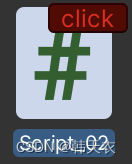
using System.Collections;
using System.Collections.Generic;
using UnityEngine;
using UnityEditor;

public class Script_02 : MonoBehaviour
{
    //表示此方法会在C#编译完成后首先调用
    [InitializeOnLoadMethod]
    static void InitializeOnLoadMethod()
    {
        EditorApplication.projectWindowItemOnGUI = delegate (string guid,Rect selectionRect){
            if(Selection.activeObject&& guid == AssetDatabase.AssetPathToGUID(AssetDatabase.GetAssetPath(Selection.activeObject)))
            {
                float width = 40f;
                float height = 15f;
                //注意,调用回调函数输入的位置参数,在Project视图的左上角为原点
                selectionRect.x += (selectionRect.width - width);
                selectionRect.y += 2f;
                selectionRect.width = width;
                selectionRect.height = height;
                GUI.color = Color.red;
                if (GUI.Button(selectionRect, "click"))
                {
                    Debug.LogFormat("click:{0}",Selection.activeObject);
                }
                GUI.color = Color.white;
            }
	};
    }
}
监听事件
Project视图中的资源比较多,如果不好好规划,资源就会很凌乱。有时候,我们需要借助程序来约束资源。
我们可以通过监听资源的创建、删除、移动和保存等事件来实现。例如,一个文件移动到错误的目录下,此时可以借助监听资源移动事件,判断移动的位置是否合法,从而决定是否要阻止本次移动。
using System.Collections;
using System.Collections.Generic;
using UnityEngine;
using UnityEditor;

public class Script_03 : UnityEditor.AssetModificationProcessor
{
    [InitializeOnLoadMethod]
    static void InitializeOnLoadMethod()
    {
        //全局监听资源变化
        EditorApplication.projectChanged += delegate ()
        {
            Debug.Log("change");
        };
    }
    //监听双击鼠标左键
    public static bool IsOpenForEdit(string assetPath,out string message)
    {
        message = null;
        //Debug.LogFormat("assetPath:{0}",assetPath);
        return true;
    }
    //监听资源创建事件
    public static void OnWillCreateAsset(string path)
    {
        Debug.LogFormat("path:{0}",path);
    }
    //监听资源即将被保存
    public static string[] OnWillSaveAssets(string[] paths)
    {
        if (paths != null)
        {
            Debug.LogFormat("path:{0}",string.Join(",",paths));
        }
        return paths;
    }
    //监听移动事件
    public static AssetMoveResult OnWillMoveAsset(string oldPath, string newPath)
    {
        Debug.LogFormat("from:{0} to : {1}", oldPath, newPath);
        return AssetMoveResult.DidMove;
    }
    //监听删除事件
    public static AssetDeleteResult OnWillDeleteAsset(string assetPath, RemoveAssetOptions option)
    {
        Debug.LogFormat("delete:{0}",assetPath);
        return AssetDeleteResult.DidDelete;
    }

}
边栏推荐
猜你喜欢

Small application project development, jingdong mall 】 【 uni - app custom search component (below) - search history

安装部署KubeSphere管理kubernetes
CY7C68013A之LED闪烁

【小程序项目开发-- 京东商城】uni-app之自定义搜索组件(中)-- 搜索建议

Cloud server deployment web project

开源|商品识别推荐系统

如何在一台机器上(windows)安装两个MYSQL数据库

全国中职网络安全B模块之国赛题远程代码执行渗透测试 PHPstudy的后门漏洞分析
First acquaintance with NK-RTU980 development board

Client navicat installation tutorial
随机推荐
How on one machine (Windows) to install two MYSQL database
MySQL 5.7 安装教程(全步骤、保姆级教程)
NK-RTU980烧写裸机程序
模块化规范
vscode输出中文乱码问题
关于@Autowired
Linux redis6.2.6 configuration file
How to upgrade nodejs version
一文读懂Elephant Swap,为何为ePLATO带来如此高的溢价?
【插值与拟合】
【云原生】微服务之Feign的介绍与使用
【MySQL功法】第3话 · MySQL中常见的数据类型
regex bypass
深度学习随机数设置,保证实验的可重复性
Read Elephant Swap in one article, why does it bring such a high premium to ePLATO?
MySql 5.7.38下载安装教程 ,并实现在Navicat操作MySql
7/28-7/29 Expectation + thinking + suffix array + ST table
Small application project development, jingdong mall 】 【 uni - app custom search component (below) - search history
全国中职网络安全B模块之国赛题远程代码执行渗透测试 PHPstudy的后门漏洞分析
Cloud server deployment web project