当前位置:网站首页>[004] [stm32] MDK project configuration and commissioning
[004] [stm32] MDK project configuration and commissioning
2022-06-26 06:44:00 【Cauchy's hesitation】
This paper is about Baiwen & Weidong mountain 【 IOT smart home training camp 】 Course notes
1 Engineering configuration
1.1 Device

1.2 Target
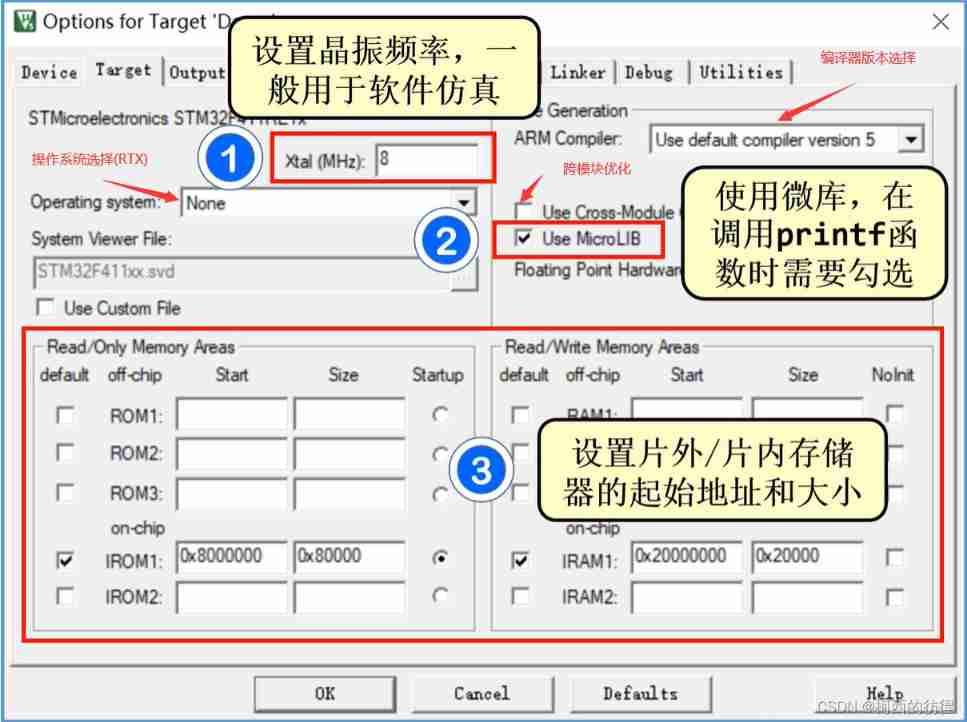
Without using software simulation, you can ignore Xtal Parameters .
MrcroLIB Yes C Library has been optimized , quite a lot C Library functions cannot be used directly , The following code can be added without using the micro library , Normal use printf and scanf Redirect to serial port and other output devices :
#pragma import(__use_no_semihosting)
struct __FILE
{

	int a;
};
FILE __stdout;
FILE __stdin;

void _sys_exit(int x)
{


}
1.3 Output

Don't check Browse Information unable F12 Jump .
1.4 ListIng

.LST:Listing file generated by the C Compiler or Assembler. C And the list file generated by the assembly compiler ..I: C Preprocessor Output File. Preprocessed files ..map: Store image files , More important , You can analyze the details of the generated code , Such as code size 、 Memory address occupied by variables, etc .
1.5 User
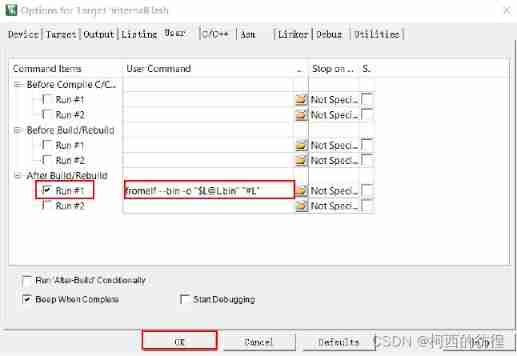
stay “After Build/Rebuild” add to fromelf --bin -o "[email protected]" "#L", Check... At the same time “Run #1”, Indicates that after compilation , perform fromelf Command to generate bin file .
1.6 C/C++

Use cubemx Generate MDK engineering , You do not need to add a file path .
1.7 Asm
Asm The interface is generally configured with assembly code , Not commonly used .
1.8 Linker
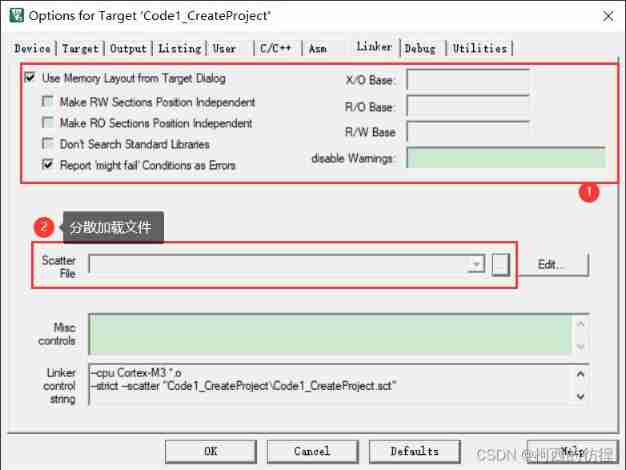
Use Memory Layout from Target Dialog: Use the distributed file load dialog Target pageMake RW Sections Position Independent: send RW Segment independence (–rwpi)Make RO Sections Position Independent: send RO Segment independence (–ropi)Don't Search Standard Libraries: Disable scanning of the default compiler runtime library (–noscanlib)Report 'might fail' Conditions as Errors: The reported condition may cause a failed error , Not a warning (–strict)xx BASE:X/O、R/O、R/W Base address (–xo_base=address)disable Warnings: Police warning (–diag_suppress)
1.9 Debug

Load Application at Startup: Load application at startup .Run to main(): When entering debug mode ,main(), That is, skip assembly code , Jump directly to main Function start simulation .- Reset debug session settings
Restore Debug Session Settings: If you check , Click on it. “ Reset ” Will return to the previous state . Include : The breakpoint Breakpoints、 window Watch Windows、 Performance Analyzer Performance Analyzer、 Memory window Memory Window、 hold-all Toolbox、 System Finder System Viewer etc. . Dialog DLL - Parameter: Conversation box DLL Documents and parameters ;CPU/Driver DLL - Parameter:CPU Driver files and parameters .
Dialog DLL Respectively : DARMSTM.DLL and TARMSTM.DLL Parameter Are all :pSTM32F103RC(p+ Specific chip signals ), Used to set the software and hardware simulation that supports the corresponding chip ( That is, it can be done through Peripherals Select the dialog box of corresponding peripherals and observe the simulation results ).Manage Component Viewer Description Files: Manage component description files ( Generally do not use )
Hardware simulation download configuration :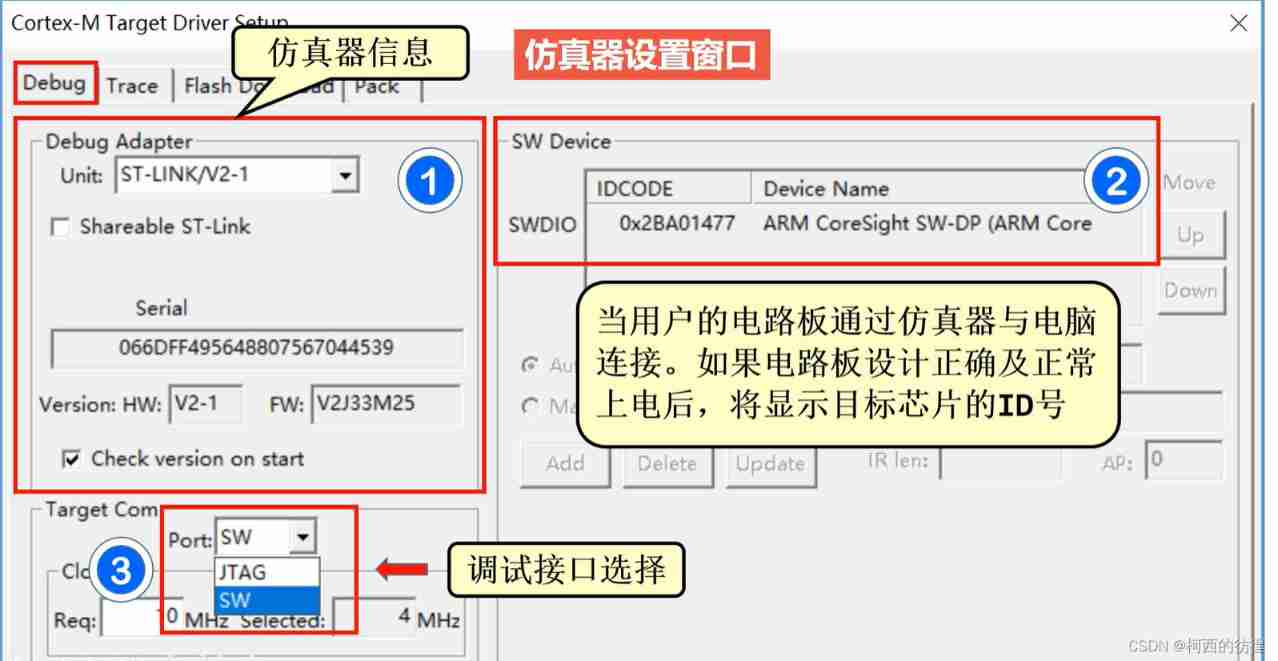

2 Simulation debugging

2.1 General debugging window
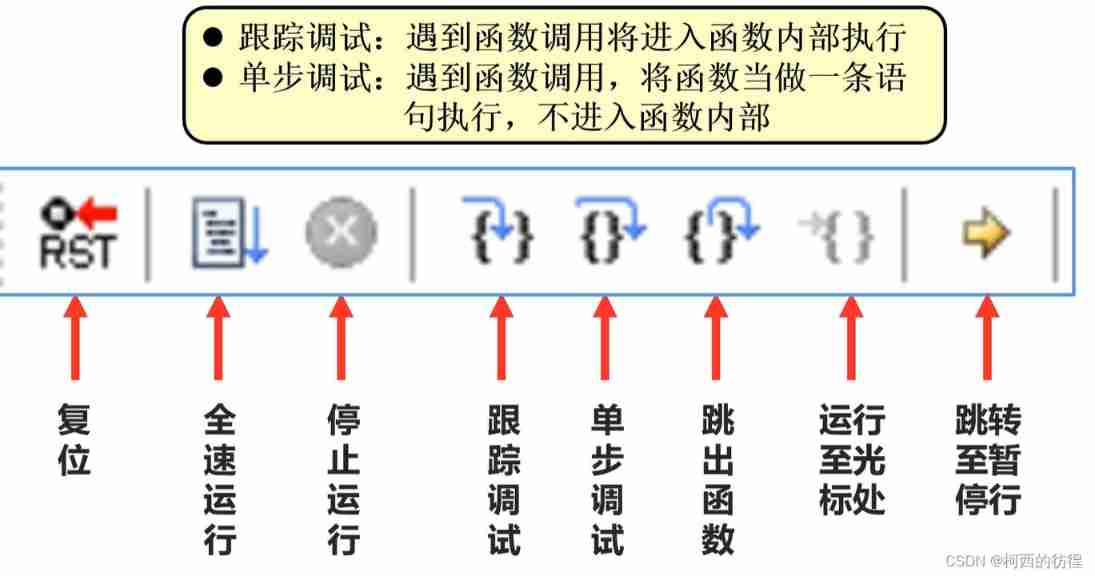
2.2 Observation window
Look at the value of the variable :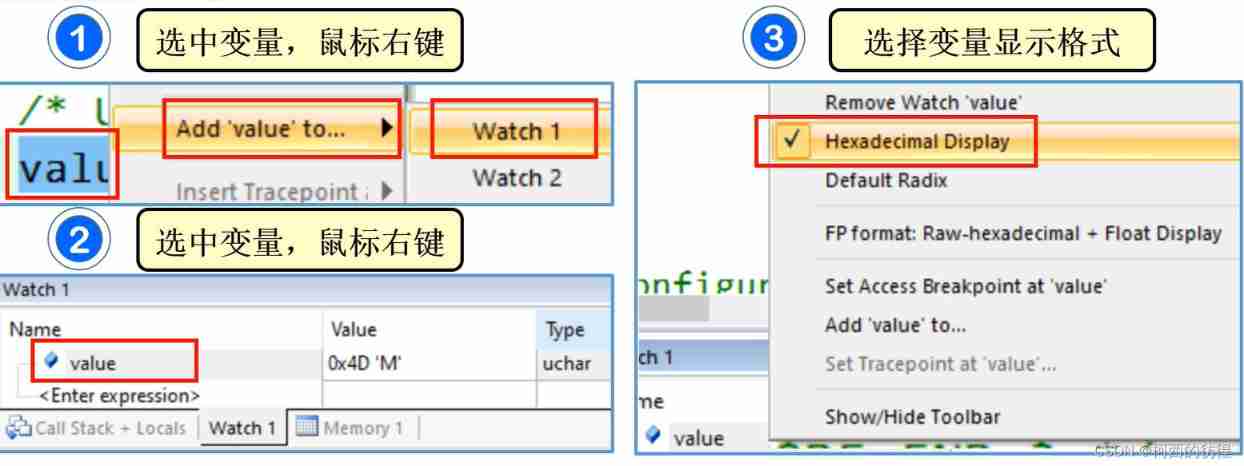
Default 16 Base display , Modifiable .
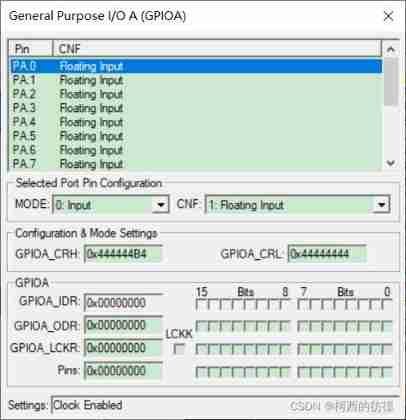
View kernel and peripheral register values :
If you look at GPIOA register :
Check the kernel peripheral registers NCIC:
- E: Can make / Disability interruption
- P: Whether the interrupt is suspended
- A: Whether the interrupt is responding
You can also click Peripherals Select the corresponding peripheral to view :
Look at the function call stack :
Be careful :
- Keil When software simulation occurs
no ‘write’ permission”,no ‘read’ permissionError of : No settings debug Options DLL. - Logic analyzer shall also be set DLL, And can only be used under software simulation , Cannot be used for hardware emulation , Otherwise prompt
Unknown Signal., Or the following error occurs :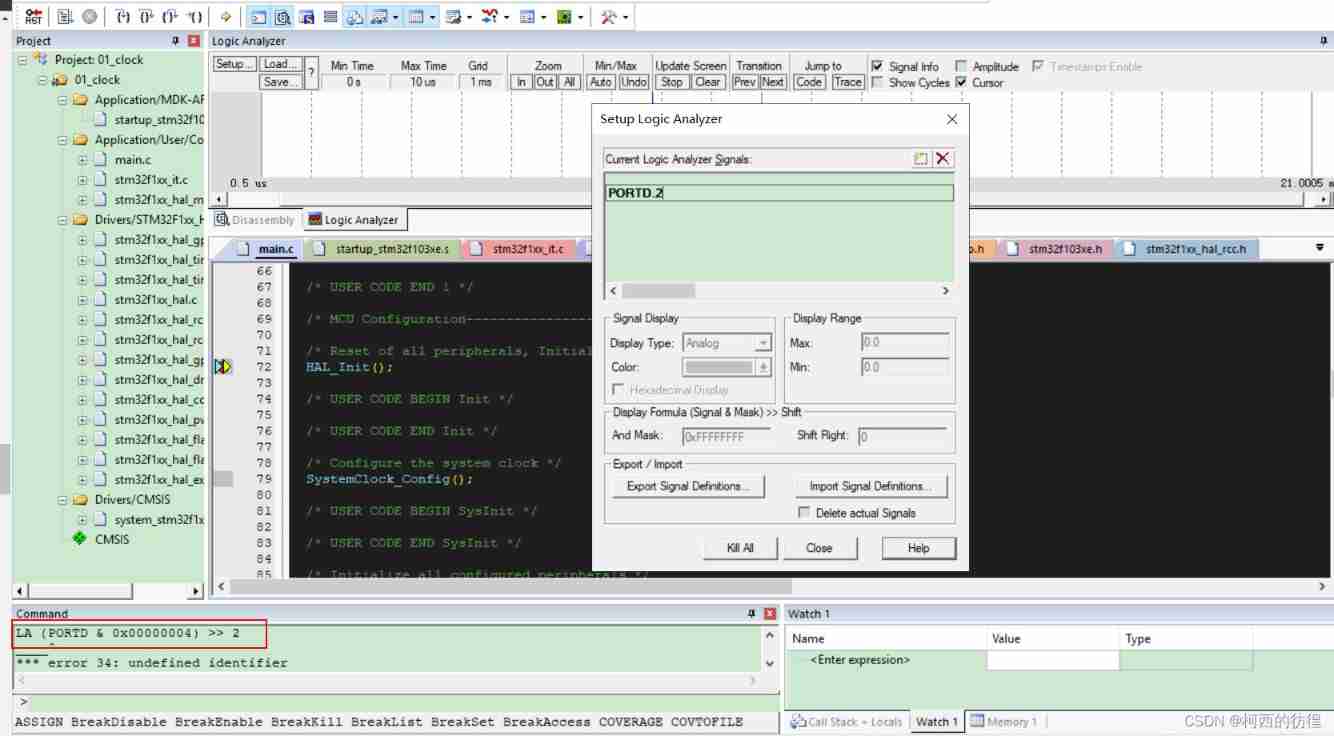
Keil Series of tutorial reference :
- Keil(MDK-ARM) Introduce 、 download 、 Installation and registration
- Keil(MDK-ARM) Series of tutorials ( One )_ New software engineering detailed process
- Keil(MDK-ARM) Series of tutorials ( Two )_ Detailed description of toolbar
- Keil(MDK-ARM) Series of tutorials ( 3、 ... and )_ Project target option configuration (Ⅰ)
- Keil(MDK-ARM) Series of tutorials ( Four )_ Project target option configuration (Ⅱ)
- Keil(MDK-ARM) Series of tutorials ( 5、 ... and )_Configuration(Ⅰ)
- Keil(MDK-ARM) Series of tutorials ( 6、 ... and )_Configuration(Ⅱ)
- Keil(MDK-ARM) Series of tutorials ( 7、 ... and )_ menu
END
边栏推荐
- JS download pictures
- SQL中空值的判断
- js-下载图片
- LabVIEW arduino TCP / IP Remote Intelligent Home System (Project section - 5)
- 浏览器的四大内核:Trident,Gecko,Webkit,Blink
- 【yolov4】基于yolov4深度学习网络目标检测MATLAB仿真
- Dpdk - tcp/udp protocol stack server implementation (I)
- Everything is a vector. The service practice of iqiyi online vector recall project
- Mysql delete in 不走索引的
- Type de Typescript
猜你喜欢

寶塔服務器搭建及數據庫遠程連接
Customer Stories | Netease spring breeze: the "spring breeze" of the fun industry, reaching out to all areas through in-depth interaction

MySQL 数据库的小白安装与登录

Phantom star VR equipment product details II: dark battlefield
When vs code uses prettier to format JS, there is a space between the name of the function definition and the parentheses, and ESLIt does not allow this space

【微服务系列】Protocol buffer动态解析

DS18B20详解

How to set MySQL triggers is a simple tutorial for novices
Web components series (10) -- realize the basic layout of mycard

Container with the most water


随机推荐
Pychart cannot run designer Exe (this application failed to start because no Qt platform plugin could be I appears)
Research Report on market supply and demand and strategy of Chinese amyl cinnamaldehyde (ACA) industry
Simple use of enum type in TS
Vulnerability discovery - API interface service vulnerability probe type utilization and repair
LightGBM--调参笔记
STM 32 使用cube 生成TIM触发ADC并通过DMA传输的问题
如何把数据库的数据传给复选框
Pytorch mixing accuracy principle and how to start this method
“试用期避免被辞退“ 指南攻略
Go语言学习笔记 1.1
Phantom star VR equipment product details II: dark battlefield
ts中枚举类型(enum)简单使用
Go learning notes 1.3- data types of variables
~94 zoom
Go language learning notes 1.2- variables
Pagoda server setup and database remote connection
Live broadcast Preview - fire safety instructor training "cloud class" is about to start!
Bugku exercise ---misc--- prosperity, strength and democracy
闭包问题C# Lua
Go学习笔记1.3-变量的数据类型篇