当前位置:网站首页>Adobe Premiere Foundation (track related) (V)
Adobe Premiere Foundation (track related) (V)
2022-06-10 18:49:00 【Hu Anmin】
Orbital concept
The orbit is something like ps Layers of the same thing , The high orbit will cover the low orbit ,v1<v2…
Priority selection of tracks 
When we want to copy or insert , It will be inserted into the corresponding track according to the priority
- When there are three audio and video tracks and the blue icon has been lit , When you insert or copy a video, you have priority V1 and A1 Audio and video tracks .
- When there are three audio and video tracks and only one audio and video track blue icon is lit , When inserting or copying video, priority should be given to the audio and video tracks that have been lit .
Track activation
If the track switch is not activated when using the track, then the track cannot be added 
Column : If you do not open the audio track, the audio will be cleared automatically when adding material 
Add and remove tracks
Manually add and remove tracks
Right click in the blank space of the track to add or delete the track 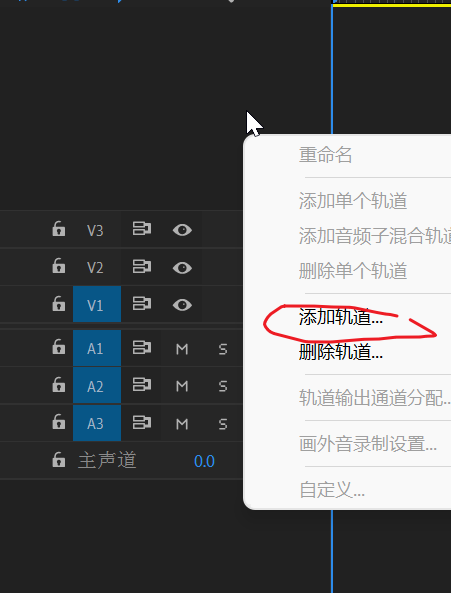
If you select the specified track, right click , You can delete and add the track 
Automatically add tracks
Dragging a video directly over a video without a track will automatically add a track

Track lock
When the track lock is activated , Then all contents of this track cannot be edited, deleted or modified 
Track hidden
When track concealment is activated , Then all the material of this track will not be displayed , It is generally used for material detection between multiple tracks , Because the material of multiple tracks will be merged together for display , And the high-level orbit will cover the low orbit , If you want to see the effect of low orbit, you need to hide the effect of high orbit material 
Mute
The principle is similar to that of track concealment , Disables the audio of the specified track , Do not play

solo
Contrary to mute , Mute disables the audio of a track , Other tracks can be heard , Solos can only listen to the audio of the specified track, and other tracks are forbidden ( You can choose more than one )
Video dubbing ( audio recording )
Is to add the sound recorded by your microphone to the video , Note that if you record sound on the track of the saved audio, the original audio will be overwritten , Just cover the period from the beginning of audio to the end of recording , The total audio length will not change There must be a recording device on your computer to use
The countdown will appear when the audio recording is turned on 3 Seconds preparation time then , Started recording , The video will continue to play during recording

Video and audio binding separation
The imported video and audio are bound together by default , Sometimes we don't want the audio of the source material , Instead, use your own audio , A lot of funny video and sound effects on Tiktok are made in this way , It's easy , Select the imported material in the track and right click to unlink it , You will find that audio and video can be separated 

Mono -> Two channel
Mono : It's just a sound track , With headphones on, there is sound in one left or right ear at the same time
Two channel : Both headphones have sound
Change to dual channel mode , Right click audio , Then select the audio channel 
The following figure shows the mono 
Then change it to 

边栏推荐
- Huawei cloud Kunpeng devkit code migration practice
- MySQL index invalidation scenario
- Adobe Premiere基础(动画制作-弹性动画)(八)
- 完全背包问题以及优化小技巧
- Rewrite clear Bayesian formula with base ratio
- TSMC liudeyin: do not worry about semiconductor inventory correction and cooperation between the United States, Japan and South Korea. This year's performance will increase by 30%!
- 企业数据质量管理:如何进行数据质量评估?
- [QNX hypervisor 2.2 user manual] 3.3 configure guest
- After the qtmqtt source code compilation is set to keepalive, the Ping package timeout error does not return a problem repair (qmqtt:: mqttnopingresponse, qmqtt:: clientprivate:: onpingtimeo)
- How can bi help enterprises reduce labor, time and management costs?
猜你喜欢

数据处理时代,数据分析成为基础建设

Group a large number of files in the same folder into multiple groups according to settings

锐捷x32pro刷openwrt开启无线160MHz

滑动窗口最值问题

如何正确理解商业智能BI的实时性?

Adobe Premiere基础(动画制作)(七)

Adobe Premiere基础-素材嵌套(制作抖音结尾头像动画)(九)

Form form of the uniapp uview framework, input the verification mobile number and verification micro signal

How to transform digital transformation? Which way?

Some summary about YUV format
随机推荐
单调栈结构
The value of Business Intelligence BI. Is visual report equal to Business Intelligence BI?
AGI基础,不确定性推理,主观逻辑一书ppt1
In the introductory study of data visualization, we should be alert to pitfalls and misunderstandings and grasp key nodes
3. Golang并发入门
How to realize the management "desire" of Business Intelligence BI service objects and enterprise managers?
Research on next generation distributed file system
TSMC liudeyin: do not worry about semiconductor inventory correction and cooperation between the United States, Japan and South Korea. This year's performance will increase by 30%!
[QNX hypervisor 2.2 user manual] 3.2.2 VM configuration example
JS Touch
换根呀呀啊呀
Ibox system development core functions and some core source codes
3. getting started with golang concurrency
AD18器件库导入简介
微信小程序,获取当前页面,判断当前页面是不是tabbar页面
What is Bi? Talk about the definition and function of Bi
阅读micropyton源码-添加C扩展类模块(2)
Developers changing the world - Yao Guang teenagers playing Tetris
AFL fuzzy multithreading
Dynamic SQL of DB2 SQL pl