当前位置:网站首页>Learn about Prometheus from 0 to 1
Learn about Prometheus from 0 to 1
2022-06-11 16:28:00 【jerry_ dyy】
Introduction to monitoring platform :
The unified monitoring platform is composed of seven roles : Monitoring source 、 Data collection 、 data storage 、 Data analysis 、 Data presentation 、 Early warning center 、CMDB( Enterprise software and hardware asset management )

- Monitoring source :
From the level of , It can be roughly divided into three layers , Business application layer 、 Middleware layer 、 Infrastructure layer . The business application layer mainly includes application software 、 Enterprise message bus, etc , The middleware layer includes the database 、 cache 、 Configuration center 、 And other system software , The infrastructure layer mainly includes physical machines 、 virtual machine 、 Containers 、 Network devices 、 Storage devices, etc .
- Data collection :
Data sources are so diverse , The task of data collection is not easy . Data collection can be divided into business indicators 、 Application indicators 、 System software monitoring indicators 、 System indicators . Apply monitoring indicators such as : Usability 、 abnormal 、 throughput 、 response time 、 Current number of waiting transactions 、 Resource utilization 、 Request quantity 、 Log size 、 performance 、 Queue depth 、 Number of threads 、 Number of service calls 、 Traffic volume 、 Service availability, etc , Business monitoring indicators such as large amount of running water 、 Flow area 、 Flow details 、 Number of requests 、 response time 、 Number of responses, etc , System monitoring indicators are as follows: :CPU load 、 Memory load 、 Disk load 、 The Internet IO、 disk IO、tcp The number of connections 、 Number of processes, etc .
In terms of acquisition mode, it can be generally divided into interface acquisition 、 client agent collection 、 Active capture through network protocol (http、snmp etc. )
- data storage :
The collected data is usually stored in the file system ( Such as HDFS)、 Index system ( Such as elasticsearch)、 Index library ( Such as influxdb)、 Message queue ( Such as kafka, Temporarily store or buffer messages )、 database ( Such as mysql)
- Data analysis :
For the collected data , Data processing . There are two types of processing : Real time processing and batch processing . Technology includes Map/Reduce Calculation 、 Full log retrieval 、 Flow computation 、 Index calculation, etc , The key point is to select different calculation methods according to different scenarios .
- Data presentation :
Display the processing results in a chart , In the multi screen era , Cross device support is essential .
- early warning :
If problems are found during data processing , An exception analysis is required 、 Risk estimation and event triggering or alarm .
- CMDB( Enterprise software and hardware asset management ):
CMDB It is a very important link in the unified monitoring platform , Although there are many kinds of monitoring sources , But most of them are related , For example, the application runs in the running environment , The normal operation of applications depends on the network and storage devices , An application also depends on other applications ( Business depends on ), Once any one of the links goes wrong , Will lead to the unavailability of the application .CMDB In addition to storing hardware and software assets , Also store such an association between assets , An asset has failed , We should be able to quickly know which other assets will be affected according to this relationship , Then solve the problem one by one .
Why choose Prometheus?
Prometheus VS Zabbix:
Time of issue | development language | performance | Community support | Container support | Enterprise use | Deployment difficulty | |
Prometheus | 2016 | go | Support ten thousand as a unit | Relatively inferior zabbix, But the number is increasing day by day | Not only support swarm Native clusters , And support Kubernetes Monitoring of container clusters , It is the best solution for container monitoring at present | Basically use Kubernetes With the container enterprise ,prometheus Is the best choice | There's only one core server Components , One command to start |
Zabbix | 2012 | c + php | Up to 10000 bytes | Widely applied , Support more mature , Any problems encountered can be found | Zabbix Appeared earlier , At that time, the container was not born , Naturally, the support for containers is also relatively poor | In traditional monitoring system , Especially in server related monitoring , Take the absolute advantage of | Multiple systems , A variety of monitoring information collection methods |
Framework principle :

- Prometheus Server:
Prometheus Sever yes Prometheus The core part of a component , Responsible for the acquisition of monitoring data , Storage and query .Prometheus Server You can monitor targets through static configuration management , It can also be used in combination with Service Discovery Dynamic management of monitoring objectives , And get data from these monitoring targets . secondly Prometheus Sever The collected data needs to be stored ,Prometheus Server It's a real-time database in itself , The collected monitoring data is stored in the local disk according to the time series .Prometheus Server It provides customized PromQL, Realize the query and analysis of data . in addition Prometheus Server The ability to federate clusters can be made from other Prometheus Server Get data from the instance .
- Exporters:
Exporter Pass the endpoint of monitoring data collection through HTTP The form of service is exposed to Prometheus Server,Prometheus Server By accessing the Exporter Provided Endpoint Endpoint , That is, the monitoring data that needs to be collected can be obtained . Can be Exporter It is divided into 2 class :
Collect directly : This kind of Exporter It's built in right Prometheus Monitoring support , such as cAdvisor,Kubernetes,Etcd,Gokit etc. , Both are built directly for Prometheus Expose endpoint of monitoring data .
Indirect acquisition : The original monitoring target does not directly support Prometheus, So it needs to pass Prometheus Provided Client Library Write the monitoring and acquisition program of the monitoring target . for example :Mysql Exporter,JMX Exporter,Consul Exporter etc. .
- AlertManager:
stay Prometheus Server Support based on Prom QL Create alarm rules , If meet Prom QL The rules of definition , An alarm will be generated . stay AlertManager from Prometheus server Termination received alerts after , There will be de duplication , grouping , And route to the corresponding acceptance method , Call the police . Common ways of receiving are : E-mail ,pagerduty,webhook etc. .
- PushGateway:
Prometheus Data collection is based on Prometheus Server from Exporter pull data , So when the network environment doesn't allow Prometheus Server and Exporter When communicating , have access to PushGateway To transit . adopt PushGateway Take the initiative of monitoring data of internal network Push To Gateway in ,Prometheus Server Using the Exporter Same way , Take the monitoring data from PushGateway pull To Prometheus Server.
- Prometheus The workflow of the :
1、Prometheus server Regularly from the configured jobs perhaps exporters Middle pull metrics, Or receive from Pushgateway Sent by metrics, Or from other Prometheus server Middle pull metrics;
2、Prometheus server Store the collected... Locally metrics, And run the defined alerts.rules, Record new time series or directions Alert manager Push alarm ;
3、Alertmanager According to the configuration file , Processing of received alarms , Give an alarm ;
4、 stay Web UI or Grafana in , adopt PromQL from Prometheus server Query and visualize the collected data .
Installation and deployment :
install Prometheus:

tar -zxvf prometheus-*.tar.gz Decompress it .
Get into prometheus-* Unpack the directory , To configure prometheus.yml:
# my global config
global:
scrape_interval: 15s # Set to every 15 Seconds from Target Collect data once , The default is 1 Minutes at a time
evaluation_interval: 15s # Set to every 15 Second evaluate the rules , The default is 1 Minutes at a time
# scrape_timeout is set to the global default (10s).
# Alertmanager configuration
alerting:
alertmanagers:
- static_configs:
- targets: ["localhost:9093"] # To configure alertmanager Address
# Load rules once and periodically evaluate them according to the global 'evaluation_interval'.
rule_files:
- "prometheus.rules.yml" # Configuration rules file
# - "first_rules.yml"
# - "second_rules.yml"
# A scrape configuration containing exactly one endpoint to scrape:
# Here it's Prometheus itself.
scrape_configs:
# The job name is added as a label `job=<job_name>` to any timeseries scraped from this config.
# To configure a job, This is where prometheus Do it yourself exporter, monitor prometheus own
- job_name: "prometheus"
# metrics_path defaults to '/metrics'
# scheme defaults to 'http'.
static_configs:
- targets: ["172.16.0.213:9090"]
labels:
instance: prometheus
# To configure mysql exporter, monitor mysql
- job_name: "mysqld_exporter"
static_configs:
- targets: ["localhost:9104"]
labels:
instance: mysql_208
# To configure linux exporter, monitor linux host
- job_name: "node_exporter"
static_configs:
- targets: ["localhost:9100"]
labels:
instance: linux_208
# monitor Visitor management this JVM process
- job_name: "vms"
metrics_path: /vms/actuator/prometheus
static_configs:
- targets: ["localhost:10109"]
To configure prometheus.rules.yml:
groups:
# Configure a rule , When the rules are met , Will push the alarm information to alertmanager
- name: InstanceDown
rules:
- alert: " The service process died "
expr: up == 0 # be based on Prom QL Alarm rule created by expression
for: 5m # If it's continuous 5 The test results within minutes are up == 0, Then push the alarm information to alertmanager
labels:
severity: critical # The severity of the alarm
annotations: # Alarm content
summary: "Instance { { $labels.instance }} down"
description: "{ { $labels.instance }} of job { { $labels.job }} has been down for more than 5 minutes."
- name: MemoryRule
rules:
- alert: " High memory usage alarm "
expr: ((node_memory_MemFree_bytes + node_memory_Buffers_bytes + node_memory_Cached_bytes)) / node_memory_MemTotal_bytes * 100 > 80 # be based on Prom QL Alarm rule created by expression
for: 5m # If it's continuous 5 The memory usage detected within minutes is higher than 80%, Then push the alarm information to alertmanager
labels:
severity: "High" # The severity of the alarm
annotations: # Alarm content
summary: " service name :{ {$labels.alertname}}"
description: " Business 500 Call the police : { { $value }}"
value: "{ { $value }}"
This is the alarm message received by the mailbox :
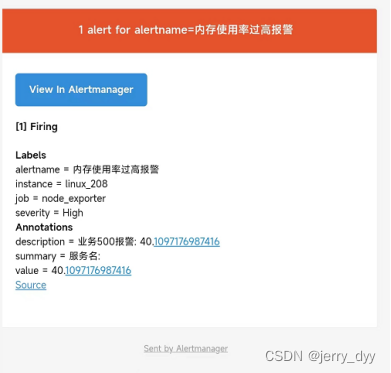
After configuration , Start it up .
Access address :localhost:9090
install Grafana:
With Grafana | Grafana documentation
Download Grafana | Grafana Labs
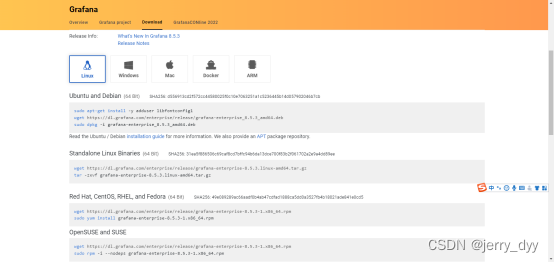
download , decompression , start-up .
Access address :172.16.0.213:3000
install AlertManager:

download , decompression , To configure alertmanager.yml file :
global:
smtp_smarthost: 'smtp.qq.com:465'
smtp_from: '1737***[email protected]'
smtp_auth_username: '1737***[email protected]'
smtp_auth_password: 'idhcsx***qoe***'
smtp_require_tls: false
route:
receiver: 'mail-dyy'
group_wait: 1s
group_interval: 5s
repeat_interval: 1h
group_by: ['alertname']
receivers:
- name: 'mail-dyy'
email_configs:
- to: '1737***[email protected]'
Subsequent extensions :
The monitoring platform expands with the expansion of the application platform . At present, we have made a minimum closed loop , contain prometheus、alertmanager、grafana、node_exporter、mysqld_exporter And so on , Can monitor linux The server 、 monitor mysql、 Monitor specific java project . But it needs a lot of horizontal expansion , For example monitoring MQ、 monitor Redis、 monitor Nginx wait . When doing these horizontal expansions , There are two main points to be grasped , namely Exporter、Grafana Templates , and Exporter Exposed monitoring items need to be consistent with Grafana Inside the template PromQL correspond , If there is no corresponding ready-made template , You need to create it manually .
Exporter:

Grafana Templates :
Search for the desired template by name :

Get the ID:
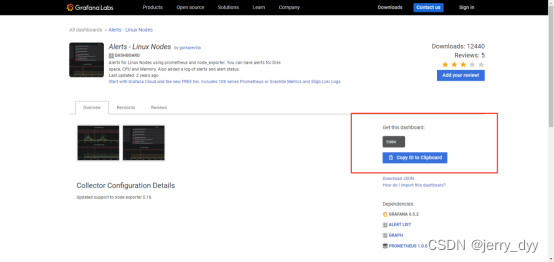
stay Grafana In the operation interface import dashboard, Enter... Above ID You can import a style template :

边栏推荐
- 1267_FreeRTOS启动第一个任务接口prvPortStartFirstTask实现分析
- laravel 8 使用passport 进行Auth验证及颁发token
- Go quick start of go language (I): the first go program
- Step 4 of installation in RF: an error is reported when installing the robotframework-selenium 2library
- Zhenxiang, Huawei gives n+1 for voluntary resignation
- Aaai2022 latest "time series data processing" report, 127 pages of PPT describing time series data processing and medical application progress
- 20 full knowledge maps of HD data analysis have been completed. It is strongly recommended to collect them!
- postgresql创建数据库
- Learn how to parse SQL from kernel code
- 回归预测 | MATLAB实现RBF径向基神经网络多输入单输出
猜你喜欢
![Enterprise purchase, sales and inventory management system based on SSM framework [source code + database + design]](/img/af/b5b5a69654a28d252cc5954b5e847a.png)
Enterprise purchase, sales and inventory management system based on SSM framework [source code + database + design]
Talk about data center network again

【剑指Offer】21.调整数组顺序使奇数位于偶数前面

Production problem troubleshooting reference

收藏 | 可解释机器学习发展和常见方法!

AutoRunner自动化测试工具如何创建项目-Alltesting|泽众云测试

What is a generic? Why use generics? How do I use generics? What about packaging?

2022安全员-C证特种作业证考试题库及答案

leetcode785. 判断二分图(中等)

Implementation of VGA protocol based on FPGA
随机推荐
Collection | can explain the development and common methods of machine learning!
学生网站模板棕色蛋糕甜品网站设计——棕色蛋糕甜品店(4页) 美食甜品网页制作期末大作业成品_生鲜水果网页设计期末作业
Talk about data center network again
再聊数据中心网络
leetcode417. Pacific Atlantic current problems (medium)
药物评价指标
PostgreSQL create table
Detailed explanation of MySQL binlog log and master-slave replication
The flat life of older farmers from Beijing to Holland
Factory calibrated gravity: working principle and installation position of carbon monoxide sensor, calibration standard description
Can I eat meat during weight loss? Will you get fat?
leetcode684. 冗余连接(中等)
Analysis of time complexity and space complexity
项目工作区创建步骤-泽众AR自动化测试工具
09-最小生成树 公路村村通
laravel 8 使用passport 进行Auth验证及颁发token
完整的测试流程【杭州多测师】【杭州多测师_王sir】
Go quick start of go language (I): the first go program
Streaking? Baa!
Time processing logic for the last 7 days, the last 10 days, and the last 90 days