当前位置:网站首页>halcon之区域:多种区域(Region)生成(4)
halcon之区域:多种区域(Region)生成(4)
2022-06-25 23:18:00 【无水先生】
一、提要
某些区域生成概念很多,初学者往往不得要领,如果不系统地学一下,几年下来,思想依然模糊,做项目感觉到“书到用时方恨少”,本篇是前几篇的后续,目的在于全面系统地渗透,达水滴石穿之功效。
二、基于区域的算子
2.1 轮廓线的点获取
算子:get_region_contour(region, Rows, Columns)
获取已知区域region的散点,保存在Rows, Columns内。
read_image (Image, 'f:/images/DOTS/block.jpg')
rgb1_to_gray(Image,gray)

get_image_size(gray,width,height)
* gen_rectangle1(rect,0,0,height,width)
fast_threshold (gray,rect,0, 50 , 7)
* get_region_chain(rect, Row, Column, Chain)
get_region_contour(rect, Rows, Columns)

gen_image_const(BlkImage,'byte',width,height)


for I:=0 to |Rows|-1 by 1
    tmpRow:=Rows[I]
    tmpClm:=Columns[I]
    set_grayval(BlkImage, tmpRow, tmpClm, 228)
endfor
dev_display(BlkImage)
2.2.获取线段区域
gen_region_line(regline,row1,col1,row2,col2)
获取一条线段的区域,注意,regline是个区域,不是像素列表;若要获取散列点需要如下步骤:
gen_region_line(RegionLines, 100, 50, 150, 250)
get_region_points(RegionLines, Rows, Columns)
2.3 获取区域的像素元组(见上小节)
gen_region_points(regin,rows,cos)
功能:将个别的像素存储为图像区域。
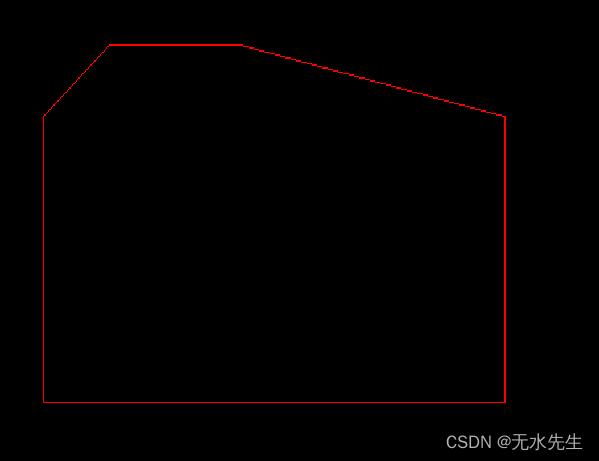
2.4 生成多边形
gen_region_polygon
功能:将一个多边形存储为一个区域。
gen_image_const(BlkImage,'byte',width,height)
gen_region_polygon(reg,[100,50,50,100,300,300,300,100],[50,100,200,400,400,200,50,50])
2.5 生成多边形实心
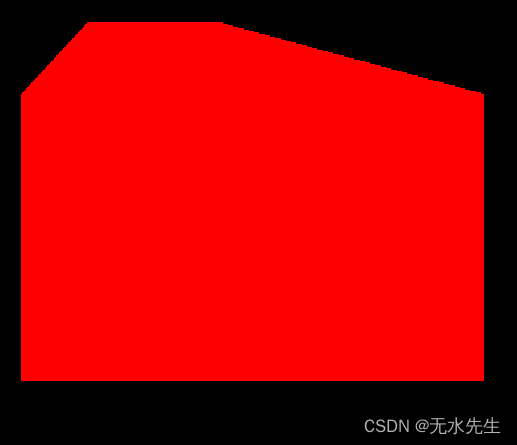
gen_region_polygon_filled(region,rows,cols)
功能:将一个多边形存储为一个已填充区域。
gen_image_const(BlkImage,'byte',width,height)
gen_region_polygon_filled(reg,[100,50,50,100,300,300,300,100],[50,100,200,400,400,200,50,50])
2.6 从区域获取xld
gen_contour_region_xld (reg, Contours, 'border')
reg是输入区域,Contours是得到的xld对象。
gen_image_const(BlkImage,'byte',width,height)
gen_region_polygon_filled(reg,[100,50,50,100,300,300,300,100],[50,100,200,400,400,200,50,50])
gen_image_const(xldImage,'byte',width,height)
gen_contour_region_xld (reg, Contours, 'border')
2.6. 生成多边形区域
gen_region_polygon_xld
功能:创建一个XLD多边形中的区域。
以下代码生成外轮廓的region边缘。
gen_image_const(BlkImage,'byte',width,height)
gen_region_polygon_filled(reg,[100,50,50,100,300,300,300,100],[50,100,200,400,400,200,50,50])
gen_image_const(xldImage,'byte',width,height)
gen_contour_region_xld (reg, Contours, 'border')
gen_polygons_xld(Contours,Polygons , 'ramer', 1 )

gen_region_polygon_xld( Polygons,Region,  'margin')
2.7.生成区域扫描线
gen_region_runs
功能:创建一个扫描宽度编码中的图像区域。
2.8. 标注相同灰度的区域
label_to_region
功能:提取一幅图像中灰度值相同的区域。
边栏推荐
- ADC acquisition noise and comparison between RMS filter and Kalman filter
- 接口的幂等性——详细谈谈接口的幂等即解决方案
- jarvisoj_ level2_ x64
- C#使用MySql进行操作
- C another new class is ICO? And app Use of config
- Recognize map
- New library launched | cnopendata wholesale price data of agricultural products
- Typescript for Web Learning
- Chapter VI exercises (678) [microcomputer principles] [exercises]
- Unified gateway
猜你喜欢

STM32 uses SPI mode to drive TFT-LCD optimization code of hx8347 scheme
返回值为Object型方法调用equals()

从查询数据库性能优化谈到redis缓存-谈一谈缓存的穿透、雪崩、击穿

ADC acquisition noise and comparison between RMS filter and Kalman filter
![Chapter VI exercises (678) [microcomputer principles] [exercises]](/img/20/b02bccebfb245d4710f6f48dd0f5e4.png)
Chapter VI exercises (678) [microcomputer principles] [exercises]

vite打包构建时 @charset utf-8警告问题处理;

Unified gateway

About the use of hc-12 radio frequency module

ETCD数据库源码分析——集群通信初始化

随便画画的
随机推荐
Unknown device ID does not appear on the STM32 st-link utility connection! Causes and Solutions
A sharp tool for information collection, Google hacker syntax
接口的幂等性——详细谈谈接口的幂等即解决方案
Case: drawing Matplotlib dynamic graph
Sword finger offer II 096 String interleaving
ASP. Net cache cache usage
关于EF翻页查询数据库
Phoenix index
从查询数据库性能优化谈到redis缓存-谈一谈缓存的穿透、雪崩、击穿
C#使用MySql进行操作
返回值为Object型方法调用equals()
新库上线 | CnOpenData中国新房信息数据
Containerd client comparison
马斯克 VS 乔布斯,谁是21世纪最伟大的创业家
多接口调用,使用Promise.all、Promise.race和Promise.any
Digital circuit - adder
智慧家——全家具功能
LabVIEW开发监控聚变实验脉冲电源
Is it safe for flush software to buy stocks for trading? How to open an account to buy shares
Redis之Strings命令