当前位置:网站首页>Development of uni app offline ID card identification plug-in based on paddleocr
Development of uni app offline ID card identification plug-in based on paddleocr
2022-07-25 14:20:00 【Tomato expert】
Catalog
2、Android Studio And configuration NDK
3、 be based on PaddleOCR Offline ID card identification plug-in for
1、 stay android sudio Create a project , And create a Module
2、 take ocr Plug ins and uniapp-v8-release.aar introduce libs Under the table of contents
3、 modify module Under bag build.gradle
5、 take module pack aar package
6、 open Hbuilder Create a new one uni-app project
7、 modify package.json Configuration in
8、 stay mainifest.json Our native plug-ins are introduced into the configuration
10、 Make a custom base, package it and run it on the mobile phone
Purpose
I did before be based on PaddleOCR Of DBNet ID card recognition of multi classification text detection network , You can get one that does not exceed 3M Models of size , By understanding PaddleOCR End to side deployment of , We can also transplant the ID card detection model to mobile phones , Make one uni-app Application of offline ID card recognition on mobile terminal .
preparation
In order not to take up too much space , There is no explanation here Android studio How to download and SDK To configure , Please find the information by yourself .
1、HbuilderX
2、Android Studio And configuration NDK
Please according to Android Studio Installation and configuration in the user guide NDK and CMake Content , Pre configured NDK .
3、 download be based on PaddleOCR Offline ID card identification plug-in for
Plug in package structure :


Start
1、 stay android sudio Create a project , And create a Module
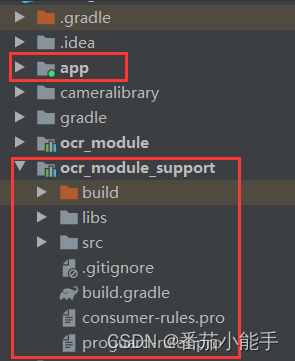
2、 take ocr Plug ins and uniapp-v8-release.aar introduce libs Under the table of contents

3、 modify module Under bag build.gradle
apply plugin: 'com.android.library'

android {
    compileSdkVersion 32

    defaultConfig {
        minSdkVersion 21
        targetSdkVersion 32
        versionCode 1
        versionName "1.0"

        testInstrumentationRunner "androidx.test.runner.AndroidJUnitRunner"
        consumerProguardFiles "consumer-rules.pro"
    }

    buildTypes {
        release {
            minifyEnabled false
            proguardFiles getDefaultProguardFile('proguard-android-optimize.txt'), 'proguard-rules.pro'
        }
    }

    sourceSets {
        main {
            jniLibs.srcDirs = ['libs']
        }
    }

    repositories {
        flatDir {
            dirs('libs')
        }
    }

    compileOptions {
        sourceCompatibility JavaVersion.VERSION_1_8
        targetCompatibility JavaVersion.VERSION_1_8
    }
}

dependencies {
    implementation fileTree(dir: "libs", include: ["*.jar"])
    implementation 'androidx.appcompat:appcompat:1.2.0'
    testImplementation 'junit:junit:4.12'
    androidTestImplementation 'androidx.test.ext:junit:1.1.3'
    androidTestImplementation 'androidx.test.espresso:espresso-core:3.4.0'

    compileOnly(name: 'uniapp-v8-release', ext: 'aar')
    compileOnly 'com.alibaba:fastjson:1.1.46.android'

    implementation(name: 'ocr', ext: 'aar')
}
4、 add to OCRModule.java file
public class OCRModule extends UniModule {
    private final String TYPE_IDCARD = "idcard";

    public OCRPredictor ocrPredictor = null;
    public UniJSCallback callback = null;

    @UniJSMethod(uiThread = true)
    public void ocrAsyncFunc(JSONObject options, final UniJSCallback callback) {
        Log.d("OCRModule", "ocrAsyncFunc--" + options);
        this.callback = callback;
        ocrPredictor = OCRPredictor.getInstance(mUniSDKInstance.getContext());
        if (TYPE_IDCARD.equals(options.getString("type"))) {
            idcard();
        } else {
            if (options.containsKey("filePath")) {
                String filePath = options.getString("filePath");
                if (!TextUtils.isEmpty(filePath) && filePath.contains("file://")) {
                    filePath = filePath.replace("file://", "");
                }
                ocrPredictor.predictor(filePath, new OnImagePredictorListener() {
                    @Override
                    public void success(String result, ArrayList<OCRResultModel> ocrResultModelList, Bitmap bitmap) {
                        JSONArray jsonArray = new JSONArray();
                        for (OCRResultModel ocrResultModel : ocrResultModelList) {
                            JSONObject jsonObject = new JSONObject();
                            if (!TextUtils.isEmpty(ocrResultModel.getLabel())) {
                                jsonObject.put("words", ocrResultModel.getLabel());

                                JSONArray objects = new JSONArray();
                                for (Point point : ocrResultModel.getPoints()) {
                                    JSONArray points = new JSONArray();
                                    points.add(point.x);
                                    points.add(point.y);
                                    objects.add(points);
                                }
                                jsonObject.put("location", objects);
                                jsonObject.put("score", ocrResultModel.getConfidence());
                                jsonArray.add(jsonObject);
                            }
                        }

                        String jsonString = jsonArray.toJSONString();
                        Log.d("OCRModule", "ocrResult--" + result);
                        Log.d("OCRModule", "ocrResult--" + jsonString);
                        callback.invoke(jsonString);
                    }
                });
            } else if (options.containsKey("base64")) {
                String base64 = options.getString("base64");
                ocrPredictor.predictorBase64(base64, new OnImagePredictorListener() {
                    @Override
                    public void success(String result, ArrayList<OCRResultModel> ocrResultModelList, Bitmap bitmap) {
                        JSONArray jsonArray = new JSONArray();
                        for (OCRResultModel ocrResultModel : ocrResultModelList) {
                            JSONObject jsonObject = new JSONObject();
                            if (!TextUtils.isEmpty(ocrResultModel.getLabel())) {
                                jsonObject.put("words", ocrResultModel.getLabel());

                                JSONArray objects = new JSONArray();
                                for (Point point : ocrResultModel.getPoints()) {
                                    JSONArray points = new JSONArray();
                                    points.add(point.x);
                                    points.add(point.y);
                                    objects.add(points);
                                }
                                jsonObject.put("location", objects);
                                jsonObject.put("score", ocrResultModel.getConfidence());
                                jsonArray.add(jsonObject);
                            }
                        }

                        String jsonString = jsonArray.toJSONString();
                        Log.d("OCRModule", "ocrResult--" + result);
                        Log.d("OCRModule", "ocrResult--" + jsonString);
                        callback.invoke(jsonString);
                    }
                });
            } else {
                this.callback.invoke("");
            }
        }
    }

    private static final int REQUEST_CODE_PICK_IMAGE = 200;
    private static final int REQUEST_CODE_PICK_IMAGE_FRONT = 201;
    private static final int REQUEST_CODE_PICK_IMAGE_BACK = 202;
    private static final int REQUEST_CODE_CAMERA = 102;

    private void idcard() {
        Intent intent = new Intent(mUniSDKInstance.getContext(), CameraActivity.class);
        intent.putExtra(CameraActivity.KEY_CONTENT_TYPE, CameraActivity.CONTENT_TYPE_ID_CARD);
        ((Activity) mUniSDKInstance.getContext()).startActivityForResult(intent, REQUEST_CODE_PICK_IMAGE);
    }

    @Override
    public void onActivityResult(int requestCode, int resultCode, Intent data) {
        if (REQUEST_CODE_PICK_IMAGE == requestCode) {
            if (data != null) {
                String result = data.getStringExtra(CameraActivity.KEY_CONTENT_RESULT);
                Log.d("OCRModule", "ocrResult--" + result);
                this.callback.invoke(result);
            } else {
                this.callback.invoke("");
            }
        } else {
            super.onActivityResult(requestCode, resultCode, data);
        }
    }
}
5、 take module pack aar package


6、 open Hbuilder Create a new one uni-app project
Match the plug-in package with us aar The package is placed as follows :
notes : here ocr_module_support-release.aar Renamed as TomatoOCR.aar, It doesn't matter whether you change your name or not .

7、 modify package.json Configuration in
Be careful :name Name is our plug-in name ,class It is the class that we write to identify the entry
"plugins": [
{
"type": "module",
"name": "YY-TomatoOCR",
"class": "com.tomato.ocr.OCRModule"
}
],
{
	"name": "YY-TomatoOCR",
	"id": "YY-TomatoOCR",
	"version": "1.0.3",
	"description": " Offline character recognition ",
	"_dp_type": "nativeplugin",
	"_dp_nativeplugin": {
		"android": {
			"plugins": [
				{
					"type": "module",
					"name": "YY-TomatoOCR",
					"class": "com.tomato.ocr.OCRModule"
				}
			],
			"hooksClass": "",
			"integrateType": "aar",
			"dependencies": [
			],
			"excludeDependencies": [],
			"compileOptions": {
				"sourceCompatibility": "1.8",
				"targetCompatibility": "1.8"
			},
			"abis": [
				"armeabi-v7a",
				"arm64-v8a"
			],
			"minSdkVersion": "21",
			"useAndroidX": true,
			"permissions": [
				"android.permission.CAMERA",
				"android.permission.READ_EXTERNAL_STORAGE",
				"android.permission.WRITE_EXTERNAL_STORAGE"
			]
		}
	}
}
8、 stay mainifest.json Our native plug-ins are introduced into the configuration

9、 To write uni-app Page code
<template>
	<div>
		<button type="primary" @click="takePhoto"> Taking pictures OCR distinguish </button>
		<button type="primary" @click="idcard"> ID card identification </button>
	</div>
</template>

<script>
	var ocrModule = uni.requireNativePlugin("YY-TomatoOCR")
	// var ocrModule = uni.requireNativePlugin("OCRModule")
	const modal = uni.requireNativePlugin('modal');
	export default {
		onLoad() {},
		methods: {
			takePhoto() {
				uni.chooseImage({
					count: 6, // Default 9
					sizeType: ['original', 'compressed'], // You can specify whether it is original or compressed , By default, both of them have
					sourceType: ['camera'], // Select from the album
					success: function(res) {
						console.log(JSON.stringify(res.tempFilePaths));

						uni.getImageInfo({
							src: res.tempFilePaths[0],
							success: function(image) {
								//  Call asynchronous methods
								ocrModule.ocrAsyncFunc({
										'filePath': image.path
									},
									(ret) => {
										modal.toast({
											message: ret,
											duration: 30
										});
									})
							}
						});
					}
				});
			},
			idcard() {
				ocrModule.ocrAsyncFunc({
						'type': 'idcard'
					},
					(ret) => {
						modal.toast({
							message: ret,
							duration: 30
						});
					})
			}
		}
	}
</script>
10、 Make a custom base, package it and run it on the mobile phone


complete !!!
summary
That's how it's made uni-app The whole process steps of offline character recognition and ID card recognition , Of course, if you don't Android Development doesn't matter , stay uni-app This plug-in has been released in the plug-in market .
Plug in market address : Local offline character recognition TomatoOCR - DCloud Plug in market
边栏推荐
- OKA通证权益解析,参与Okaleido生态建设的不二之选
- NAT/NAPT地址转换(内外网通信)技术详解【华为eNSP】
- Business analysis report and data visualization report of CDA level1 knowledge point summary
- filters获取data中的数据;filters使用data中的数据
- Deep understanding of pytorch distributed parallel processing tool DDP -- starting from bugs in engineering practice
- How to design a high concurrency system?
- Practical guide for network security emergency response technology (Qianxin)
- swiper 一侧或两侧露出一小部分
- VS2017大型工厂ERP管理系统源码 工厂通用ERP源码
- Keys and scan based on redis delete keys with TTL -1
猜你喜欢

Realize a family security and environmental monitoring system (II)

Acquisition data transmission mode and online monitoring system of wireless acquisition instrument for vibrating wire sensor of engineering instrument

Under the epidemic, the biomedical industry may usher in breakthrough development

PHP website design ideas

NUC980 设置SSH Xshell连接

Oka pass rights and interests analysis is the best choice to participate in okaleido ecological construction
~4.2 CCF 2021-12-1 sequence query

CDA level Ⅰ 2021 new version simulation question 2 (with answers)

Maya modeling exercise
![einsum(): operands do not broadcast with remapped shapes [original->remapped]: [1, 144, 20, 17]->[1,](/img/bb/0fd0fdb7537090829f3d8df25aa59b.png)
einsum(): operands do not broadcast with remapped shapes [original->remapped]: [1, 144, 20, 17]->[1,
随机推荐
Typora cannot open the prompt to install a new version solution
为什么中建、中铁都需要这本证书?究竟是什么原因?
thymeleaf通过样式控制display是否显示
VS2017大型工厂ERP管理系统源码 工厂通用ERP源码
Realsense-Ros安装配置介绍与问题解决
Comprehensive sorting and summary of maskrcnn code structure process of target detection and segmentation
Why do China Construction and China Railway need this certificate? What is the reason?
Digital Twins - cognition
机械制造业数字化新“引擎”供应链协同管理系统助力企业精细化管理迈上新台阶
Data analysis interview records 1-5
The security market has entered a trillion era, and the security B2B online mall platform has been accurately connected to deepen the enterprise development path
Tensorflow2 installation quick pit avoidance summary
opencv视频跟踪「建议收藏」
Reverse Integer
Throwing OutOfMemoryError “Could not allocate JNI Env“
基于PaddleOCR开发uni-app离线身份证识别插件
Bond0 script
CDA level1 double disk summary
Interpretation of featdepth self-monitoring model for monocular depth estimation (Part 2) -- use of openmmlab framework
Polymorphism and interface