当前位置:网站首页>POI, easyexcel framework use
POI, easyexcel framework use
2022-06-12 05:37:00 【Violence produces miracles】
POI
Related dependencies
	<dependencies>
        <!-- xls(03 edition ) -->
        <dependency>
            <groupId>org.apache.poi</groupId>
            <artifactId>poi</artifactId>
            <version>4.1.2</version>
        </dependency>
        <!-- xlsx(07 edition ) -->
        <dependency>
            <groupId>org.apache.poi</groupId>
            <artifactId>poi-ooxml</artifactId>
            <version>4.1.2</version>
        </dependency>
        <!--  Date formatting tool  -->
        <dependency>
            <groupId>joda-time</groupId>
            <artifactId>joda-time</artifactId>
            <version>2.10.6</version>
        </dependency>

        <!--  test  -->
        <dependency>
            <groupId>junit</groupId>
            <artifactId>junit</artifactId>
            <version>4.12</version>
        </dependency>
    </dependencies>
POI Simple write test (2 Kind of excel edition )
package com.zzf;

import org.apache.poi.hssf.usermodel.HSSFWorkbook;
import org.apache.poi.ss.usermodel.Cell;
import org.apache.poi.ss.usermodel.Row;
import org.apache.poi.ss.usermodel.Sheet;
import org.apache.poi.ss.usermodel.Workbook;
import org.apache.poi.xssf.usermodel.XSSFWorkbook;
import org.joda.time.DateTime;
import org.junit.Test;

import java.io.FileOutputStream;
import java.io.IOException;

/* * *@author:zzf *@time:2021-01-14 * */
public class PoiWriteTest {

    String PATH="D:\\idea project \\Study\\poi\\";

    @Test
    public void testWrite03() throws IOException {

        //1、 Create a workbook
        Workbook workbook = new HSSFWorkbook();
        //2、 Create a worksheet
        Sheet sheet = workbook.createSheet();
        //3、 Create a line (1,1)
        Row row = sheet.createRow(0);
        //4、 Create a cell
        Cell cell11 = row.createCell(0);
        cell11.setCellValue(" Content ");

        // establish (1,2)
        Cell cell12 = row.createCell(1);
        cell12.setCellValue(" Time ");

        // The second line
        Row row2 = sheet.createRow(1);
        Cell cell21 = row2.createCell(0);
        cell21.setCellValue(" Test content ");

        // establish (2,2)
        Cell cell22 = row2.createCell(1);
        String time=new DateTime().toString("yyyy-MM-dd HH:mm:ss");
        cell22.setCellValue(time);

        // Generate excel surface
        FileOutputStream fileOutputStream=new FileOutputStream(PATH+"03test.xls");

        workbook.write(fileOutputStream);

        // Closed flow
        fileOutputStream.close();

        System.out.println(" Generate complete ");
    }

    @Test
    public void testWrite07() throws IOException {

        //1、 Create a workbook
        Workbook workbook = new XSSFWorkbook();
        //2、 Create a worksheet
        Sheet sheet = workbook.createSheet();
        //3、 Create a line (1,1)
        Row row = sheet.createRow(0);
        //4、 Create a cell
        Cell cell11 = row.createCell(0);
        cell11.setCellValue(" Content ");

        // establish (1,2)
        Cell cell12 = row.createCell(1);
        cell12.setCellValue(" Time ");

        // The second line
        Row row2 = sheet.createRow(1);
        Cell cell21 = row2.createCell(0);
        cell21.setCellValue(" Test content ");

        // establish (2,2)
        Cell cell22 = row2.createCell(1);
        String time=new DateTime().toString("yyyy-MM-dd HH:mm:ss");
        cell22.setCellValue(time);

        // Generate excel surface
        FileOutputStream fileOutputStream=new FileOutputStream(PATH+"07test.xlsx");

        workbook.write(fileOutputStream);

        // Closed flow
        fileOutputStream.close();

        System.out.println(" Generate complete ");
    }
}
POI Write a lot of data
xls The file can be written to at most 65536 That's ok ,xlsx unlimited , And use SXSSFWorkbook Accelerate , The principle is to write part of the data into the cache first ( Default 100), If the limit is exceeded, write the previous one into the temporary file , So finally, you need to close the temporary file
	@Test
    public void testBigDataWrite03() throws IOException {

        // Starting time
        long begin=System.currentTimeMillis();
        // Create Workbook
        Workbook workbook = new HSSFWorkbook();
        // Create sheet
        Sheet sheet = workbook.createSheet();
        for(int rowNum=0;rowNum<65536;rowNum++){

            Row row = sheet.createRow(rowNum);
            for (int cellNum=0;cellNum<10;cellNum++){

                Cell cell=row.createCell(cellNum);
                cell.setCellValue(cellNum);
            }
        }
        System.out.println(" Write completion ");
        FileOutputStream fileOutputStream=new FileOutputStream(PATH+"testBigDataWrite03.xls");
        workbook.write(fileOutputStream);
        workbook.close();
        long end=System.currentTimeMillis();

        System.out.println(" when "+(double)(end-begin)/1000);
    }

    @Test
    public void testBigDataWrite07() throws IOException {

        // Starting time
        long begin=System.currentTimeMillis();
        // Create Workbook
        Workbook workbook = new SXSSFWorkbook();
        // Create sheet
        Sheet sheet = workbook.createSheet();
        for(int rowNum=0;rowNum<100000;rowNum++){

            Row row = sheet.createRow(rowNum);
            for (int cellNum=0;cellNum<10;cellNum++){

                Cell cell=row.createCell(cellNum);
                cell.setCellValue(cellNum);
            }
        }
        System.out.println(" Write completion ");
        FileOutputStream fileOutputStream=new FileOutputStream(PATH+"testBigDataWrite07.xlsx");
        workbook.write(fileOutputStream);
        workbook.close();
        // Clear temporary files
        ((SXSSFWorkbook)workbook).dispose();
        long end=System.currentTimeMillis();

        System.out.println(" when "+(double)(end-begin)/1000);
    }
POI Simple read operation
public class PoiReadTest {


    String PATH="D:\\idea project \\Study\\poi\\";

    @Test
    public void testRead03() throws IOException {


        FileInputStream fileInputStream=new FileInputStream(PATH+"03test.xls");

        // Create Workbook
        Workbook workbook=new HSSFWorkbook (fileInputStream);

        // Get worksheet
        Sheet sheet=workbook.getSheetAt(0);
        // Get the line
        Row row = sheet.getRow(1);
        // Get the column
        Cell cell = row.getCell(1);

        System.out.println(cell.getStringCellValue());
        // Shut off flow
        fileInputStream.close();
    }

    @Test
    public void testRead07() throws IOException {


        FileInputStream fileInputStream=new FileInputStream(PATH+"07test.xlsx");

        // Create Workbook
        Workbook workbook=new XSSFWorkbook(fileInputStream);

        // Get worksheet
        Sheet sheet=workbook.getSheetAt(0);
        // Get the line
        Row row = sheet.getRow(1);
        // Get the column
        Cell cell = row.getCell(0);

        System.out.println(cell.getStringCellValue());
        // Shut off flow
        fileInputStream.close();
    }
}
Read... With different data types excel form
	@Test
    public void testReadType03() throws IOException {

        FileInputStream fileInputStream=new FileInputStream(PATH+"03test.xls");

        // Create Workbook
        Workbook workbook=new HSSFWorkbook(fileInputStream);

        // Get form
        Sheet sheet=workbook.getSheetAt(0);

        // Get the title content
        Row rowTitle = sheet.getRow(0);
        if(rowTitle!=null){

            int cellCount=rowTitle.getPhysicalNumberOfCells();
            for (int cellNum=0;cellNum<cellCount;cellNum++){

                Cell cell=rowTitle.getCell(cellNum);
                if(cell!=null){

                    String cellValue=cell.getStringCellValue();
                    System.out.print(cellValue+"|");
                }
            }
        }

        System.out.println();
        // Get the contents of the table
        int rowCount=sheet.getPhysicalNumberOfRows();
        for (int rowNum=1;rowNum<rowCount;rowNum++){

            Row rowData = sheet.getRow(rowNum);
            if(rowData!=null){

                int cellCount=rowTitle.getPhysicalNumberOfCells();
                for (int cellNum=0;cellNum<cellCount;cellNum++){

                    Cell cell=rowData.getCell(cellNum);
                    if(cell!=null){

                        CellType cellType=cell.getCellType();
                        String cellValue="";
                        switch (cellType){

                            case STRING:
                                System.out.println("【string】");
                                cellValue=cell.getStringCellValue();
                                break;
                            case BOOLEAN:
                                System.out.println("【boolean】");
                                cellValue=String.valueOf(cell.getBooleanCellValue());
                                break;
                            case BLANK:// empty
                                System.out.println("【blank】");
                                break;
                            case NUMERIC:
                                System.out.println("【numeric】");
                                if(HSSFDateUtil.isCellDateFormatted(cell)){

                                    System.out.println("【 date 】");
                                    Date date=cell.getDateCellValue();
                                    cellValue=new DateTime(date).toString("yyyy-MM-dd");
                                }else {

                                    // Prevent numbers from being too long
                                    System.out.println("【 Turn the string 】");
                                    cell.setCellType(cellType.STRING);
                                    cellValue=cell.toString();
                                }
                                break;
                            case ERROR:
                                System.out.println("【 Type error 】");
                                break;

                        }
                        System.out.println(cellValue);
                    }
                }
            }
        }
        // Shut off flow
        fileInputStream.close();
    }
Test data 
EasyExcel frame
Than POI More lightweight , Easier to operate
Related dependencies
		<dependency>
            <groupId>com.alibaba</groupId>
            <artifactId>easyexcel</artifactId>
            <version>2.2.6</version>
        </dependency>
        <!-- https://mvnrepository.com/artifact/org.projectlombok/lombok -->
        <dependency>
            <groupId>org.projectlombok</groupId>
            <artifactId>lombok</artifactId>
            <version>1.18.12</version>
        </dependency>
        <!-- https://mvnrepository.com/artifact/com.alibaba/fastjson -->
        <dependency>
            <groupId>com.alibaba</groupId>
            <artifactId>fastjson</artifactId>
            <version>1.2.62</version>
        </dependency>
Simple write operation
Entity class
package com.zzf;

import com.alibaba.excel.annotation.ExcelIgnore;
import com.alibaba.excel.annotation.ExcelProperty;
import lombok.Data;

import java.util.Date;

/* * *@author:zzf *@time:2021-01-14 * */
@Data
public class DemoData {

    //@ExcelProperty(" String title ")
    private String string;
    //@ExcelProperty(" Date title ")
    private Date date;
    //@ExcelProperty(" Digital title ")
    private Double doubleData;
    /** *  Ignore this field  */
    @ExcelIgnore
    private String ignore;
}
test
package com.zzf;

import com.alibaba.excel.EasyExcel;
import com.alibaba.excel.write.style.column.LongestMatchColumnWidthStyleStrategy;
import org.junit.Test;

import java.util.ArrayList;
import java.util.Date;
import java.util.List;

/* * *@author:zzf *@time:2021-01-14 * */
public class EasyExcelTest {

    String PATH="D:\\idea project \\Study\\poi\\";

    // Header
    private  List<List<String>> head(String bigTitle){

        List<List<String>> head = new ArrayList<List<String>>();
        List<String> head0 = new ArrayList<>();
        head0.add(bigTitle);
        head0.add(" character string ");
        List<String> head1 = new ArrayList<>();
        head1.add(bigTitle);
        head1.add(" date ");
        List<String> head2 = new ArrayList<>();
        head2.add(bigTitle);
        head2.add(" Numbers ");
        head.add(head0);
        head.add(head1);
        head.add(head2);

        return head;
    }
    // General data generation
    private List<DemoData> data(){

        List<DemoData> list=new ArrayList<DemoData>();
        for (int i=0;i<10;i++){

            DemoData data=new DemoData();
            data.setString(" character string "+i);
            data.setDate(new Date());
            data.setDoubleData(0.56);
            list.add(data);
        }
        return list;
    }

    // write in excel
    @Test
    public void simpleWrite(){

        String fileName=PATH+"easyTest.xls";

        //write(fileName, Format class ( Entity class ))
        //sheet( Table name )
        //doWrite( data )
        EasyExcel.write(fileName,DemoData.class).
                head(head("XXX Information sheet ")).
                sheet(" Templates ").
                registerWriteHandler(new LongestMatchColumnWidthStyleStrategy()).// Adaptive column width
                doWrite(data());

    }
    @Test
    public void simpleRead() {

        //  There is a very important point  DemoDataListener  Can not be spring management , Every time you read excel Both new, And then it uses spring You can construct methods to pass in
        //  How to write it 1:
        String fileName = PATH+"easyTest.xls";
        //  here   You need to specify which to read class To read , Then read the first sheet  The file stream closes automatically
        EasyExcel.read(fileName, DemoData.class, new DemoDataListener()).sheet().doRead();
    }
}
Write repeatedly in multiple sheet
 		// Repeat the content in different sheet
        // establish ExcelWriter
        ExcelWriter excelWriter=EasyExcel.write(fileName,DemoData.class).build();
        for (int i=0;i<3;i++){

            WriteSheet writeSheet=EasyExcel.writerSheet(" Templates "+i).build();
            excelWriter.write(data(),writeSheet);
        }
        // close
        excelWriter.finish();
Read operations
increase DAO layer
package com.zzf;

/* * *@author:zzf *@time:2021-01-14 * */

import java.util.List;

/** *  Suppose this is your DAO Storage . Of course, this class also makes spring management , Of course, you don't have to store , You don't need this class either . **/
public class DemoDAO {

    public void save(List<DemoData> list) {


        // Persistence operation
        //  If it is mybatis, Try not to call directly more than once insert, Write one yourself mapper There's a new method batchInsert, All data is inserted at once
    }
}
Add a monitor , Execute when reading data invoke The operation
package com.zzf;

import com.alibaba.excel.context.AnalysisContext;
import com.alibaba.excel.event.AnalysisEventListener;
import com.alibaba.fastjson.JSON;
import org.slf4j.Logger;
import org.slf4j.LoggerFactory;

import java.util.ArrayList;
import java.util.List;

/* * *@author:zzf *@time:2021-01-14 * */
//  There is a very important point  DemoDataListener  Can not be spring management , Every time you read excel Both new, And then it uses spring You can construct methods to pass in
public class DemoDataListener extends AnalysisEventListener<DemoData> {

    private static final Logger LOGGER = LoggerFactory.getLogger(DemoDataListener.class);
    /** *  every other 5 Storage database , It can be used in practice 3000 strip , Then clean up list , Convenient for memory recycling  */
    private static final int BATCH_COUNT = 5;
    List<DemoData> list = new ArrayList<DemoData>();

    private DemoDAO demoDAO;
    public DemoDataListener() {

        //  Here is demo, So whatever new One . If it comes to spring, Please use the following parameter constructor
        demoDAO = new DemoDAO();
    }
    public DemoDataListener(DemoDAO demoDAO) {

        this.demoDAO = demoDAO;
    }

    @Override
    public void invoke(DemoData data, AnalysisContext context) {

        System.out.println(JSON.toJSONString(data));
        list.add(data);
        //  achieve BATCH_COUNT 了 , Need to store the database once , Prevent tens of thousands of data in memory , Easy to OOM
        if (list.size() >= BATCH_COUNT) {

            saveData();
            //  Storage complete cleaning  list
            list.clear();
        }
    }
    /** *  All data analysis is done   Will call  * * @param context */
    @Override
    public void doAfterAllAnalysed(AnalysisContext context) {

        //  We also need to save data here , Make sure that the last legacy data is also stored in the database
        saveData();
        LOGGER.info(" All data analysis completed !");
    }
    /** *  Plus the storage database  */
    private void saveData() {

        LOGGER.info("{} Data , Start storing the database !", list.size());
        demoDAO.save(list);
        LOGGER.info(" Storage database success !");
    }
}
test
 	@Test
    public void simpleRead() {

        //  There is a very important point  DemoDataListener  Can not be spring management , Every time you read excel Both new, And then it uses spring You can construct methods to pass in
        //  How to write it 1:
        String fileName = PATH+"easyTest.xls";
        //  here   You need to specify which to read class To read , Then read the first sheet  The file stream closes automatically
        EasyExcel.read(fileName, DemoData.class, new DemoDataListener()).sheet().doRead();
    }
Read all sheet Data in
// Read all sheet
        EasyExcel.read(fileName, DemoData.class, new DemoDataListener()).doReadAll();
Read some sheet
 // Read some sheet
        // structure ExcelReader object
        ExcelReader excelReader=EasyExcel.read(fileName).build();

        // Build concrete sheet Label object , For example, here read the first and third
        ReadSheet sheet1=EasyExcel
                .readSheet(0)
                .head(DemoData.class)
                .headRowNumber(2)// Read from the first few lines
                .registerReadListener(new DemoDataListener())
                .build();

        ReadSheet sheet2=EasyExcel
                .readSheet(2)
                .head(DemoData.class)
                .headRowNumber(2)
                .registerReadListener(new DemoDataListener())
                .build();
        excelReader.read(sheet1,sheet2);
        excelReader.finish();
notes
// Set header background
@HeadStyle(fillPatternType = FillPatternType.SOLID_FOREGROUND,fillForegroundColor = 10)
// Set header font
@HeadFontStyle(fontHeightInPoints = 20)
// Set content background color
@ContentStyle(fillPatternType = FillPatternType.SOLID_FOREGROUND,fillForegroundColor = 17)
// Set content font
@ContentFontStyle(fontHeightInPoints = 20)
@ContentRowHeight(30)// Set content height
@HeadRowHeight(40)// Set the title height
@ColumnWidth(25)// Set column width
@ExcelProperty(value = {
    "XXX Information sheet "," String title "},index = 0)// Set title , The order , Large header
// merge cell , For example, the second line to the third line , The first 2 Go to the third column , These cells merge
@OnceAbsoluteMerge(firstRowIndex = 1,lastRowIndex = 2,firstColumnIndex = 1,lastColumnIndex = 2)
@ContentLoopMerge(eachRow = 2)// Merge every two lines , Merge cells vertically
When reading ,Excel If you perform a number format operation , The numeric type of the entity class is String
fill
Single fill
Prepare template 
test
	@Test
    public void simpleFill() {

        // Templates
        String template=PATH+"template.xlsx";
        // After filling
        String fileName = PATH+"templateTest.xlsx";
        // Build a data
        FillDate fillDate=new FillDate();
        fillDate.setName(" Small T");
        fillDate.setNumber(100.91);

        EasyExcel.write(fileName).withTemplate(template).sheet().doFill(fillDate);


    }
Multiple fill
Prepare template 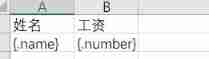
test
@Test
    public void MoreFill() {

        // Templates
        String template=PATH+"template2.xlsx";
        // After filling
        String fileName = PATH+"templateTest2.xlsx";
        // Build a data
        List<FillDate> dates=new ArrayList<>();
        for (int i=0;i<10000;i++){

            FillDate fillDate=new FillDate();
            fillDate.setName(" Small T"+i);
            fillDate.setNumber(100.91+i);
            dates.add(fillDate);
        }

        EasyExcel.write(fileName).withTemplate(template).sheet().doFill(dates);

    }
Download operation
Controller Core code
@RequestMapping("write")
    @ResponseBody
    public void writeExcel(HttpServletResponse response) throws IOException {

        response.setContentType("application//vnd.ms-excel");
        response.setCharacterEncoding("utf-8");
        // Prevent Chinese miscoding
        String fileName= URLEncoder.encode(" test ","UTF-8");
        response.setHeader("Content-Disposition","attachment;filename*=UTF-8''"+fileName+".xlsx");

        ServletOutputStream outputStream = response.getOutputStream();

        //write(fileName, Format class ( Entity class ))
        //sheet( Table name )
        //doWrite( data )
        EasyExcel.write(outputStream,Student.class).
                //head(head("XXX Information sheet ")).
                sheet(" Templates ").
                registerWriteHandler(new LongestMatchColumnWidthStyleStrategy()).// Adaptive column width
                        doWrite(GetData.data());
    }
边栏推荐
- Qs100 at command mqtt access thingsboard
- China's alternative sports equipment market trend report, technology dynamic innovation and market forecast
- Matlab: image rotation and interpolation and comparison of MSE before and after
- Nature | make an account of the new crown casualties in the world
- What is thinking
- tkinter使用WebView2网页组件(续篇)
- 51. reverse order pairs in the array
- 16. Somme des trois plus proches
- Project requirements specification
- 60. points of N dice
猜你喜欢

什么是工程预付款

Multi thread learning v. volatile visibility and cache inconsistency, instruction reordering

The combined application of TOPSIS and fuzzy borde (taking the second Dawan District cup and the national championship as examples, it may cause misunderstanding, and the Dawan District cup will be up

分公司负责人需要承担的法律责任

Introduction to Internet Protocol
![[getting to the bottom] five minutes to understand the combination evaluation model - fuzzy borde (taking the C question of the 2021 college students' numerical simulation national competition as an e](/img/2e/97310ec36aeb1fc1e9c82361141a36.jpg)
[getting to the bottom] five minutes to understand the combination evaluation model - fuzzy borde (taking the C question of the 2021 college students' numerical simulation national competition as an e

Multi thread learning III. classification of threads

Beginning is an excellent emlog theme v3.1, which supports emlog Pro

16. Somme des trois plus proches

Special materials | household appliances, white electricity, kitchen electricity
随机推荐
[untitled]
What is the project advance payment
Test work summary - performance test related issues
WiFi protocol and ieee905 protocol learning details
Deep understanding of asynchronous programming
ESP8266 Arduino OLED
【js小知识】轻松了解js防抖与节流
[gin] gin framework for golang web development
Halcon 3D 深度图转换为3D图像
Wireshark filter rule
beginning一款非常优秀的emlog主题v3.1,支持Emlog Pro
Detailed analysis of mathematical modeling problem a (vaccine production scheduling problem) of May Day cup in 2021
How long is the company's registered capital subscribed
DMA RDMA technology details
[JS knowledge] easily understand JS anti shake and throttling
Performance test - performance test tool analysis
Is the individual industrial and commercial door a legal person enterprise
Why can't NAND flash be used as RAM while nor flash can
The server time zone value ‘Ö Ð¹ ú±ê ×¼ ʱ ¼ ä‘ is unrecognized or represents more than one time zone. You
GRE protocol details