当前位置:网站首页>Use Baidu PaddlePaddle easydl to complete garbage classification
Use Baidu PaddlePaddle easydl to complete garbage classification
2022-07-28 12:06:00 【Paddlepaddle】
One 、EasyDL Product introduction
EasyDL from 2017 year 11 From the middle of the month , Take the lead in launching targeted AI Zero algorithm basis or zero threshold for enterprise users pursuing efficient development AI Development platform , Provide data collection from 、 mark 、 Cleaning to model training 、 One stop shop for deployment AI Development capability . Customized for all walks of life AI For enterprise users who need , Whether you have AI Basics ,EasyDL Simple design , Easy to understand , The fastest 5 You can learn it in minutes ,15 Minutes to complete model training .
Collected original pictures 、 Text 、 Audio 、 video 、OCR、 Tables and other data , after EasyDL machining 、 Study 、 After deployment , Through public cloud API call , Or deployed on a local server 、 Small equipment 、 On the special adaptation hardware of the software hardware integration scheme , Through offline SDK Or private API Further integration , The process is as follows :

Two 、 Dataset creation
To complete the garbage classification model training , First you need to prepare the dataset , Import data , Data analysis , Train again , After the model is obtained, it can be verified .
Use EasyDL front , First, you have to create a baidu account , After completing the real name authentication, proceed to the following steps .
(1) Click use now

EasyDL Official website address :https://ai.baidu.com/easydl/
(2) Select image classification
Garbage classification data experience address :https://aistudio.baidu.com/aistudio/datasetdetail/108025
Other types of data sets can also be searched on this website : https://aistudio.baidu.com/aistudio/datasetoverview

(3) Create a dataset


Set dataset name , Set to garbage classification . The dataset has been classified in different folders , It belongs to marked information , Classify by folder name .


(4) Data analysis


3、 ... and 、 Training models
After the dataset annotation is completed , Next, create the model , Start training .
(1) Click create model

(2) Fill in information

(3) Choose training

(4) Configure training parameters
EasyDL Support multiple deployment methods , You can choose according to the environment you use .
I need to use my local training equipment here , Here I choose to deploy locally , Choose a universal small device . Select the data set just marked .

Then start training . At present, there is free computing power , You can also spend money on higher computing power , The training speed will be much faster , Of course , Free is generally enough , Time is also fast .

Then wait for training , When the training is finished, email 、 You'll get a reminder by SMS .
Put the mouse cursor here , You can see the progress of the training .

(5) Training done
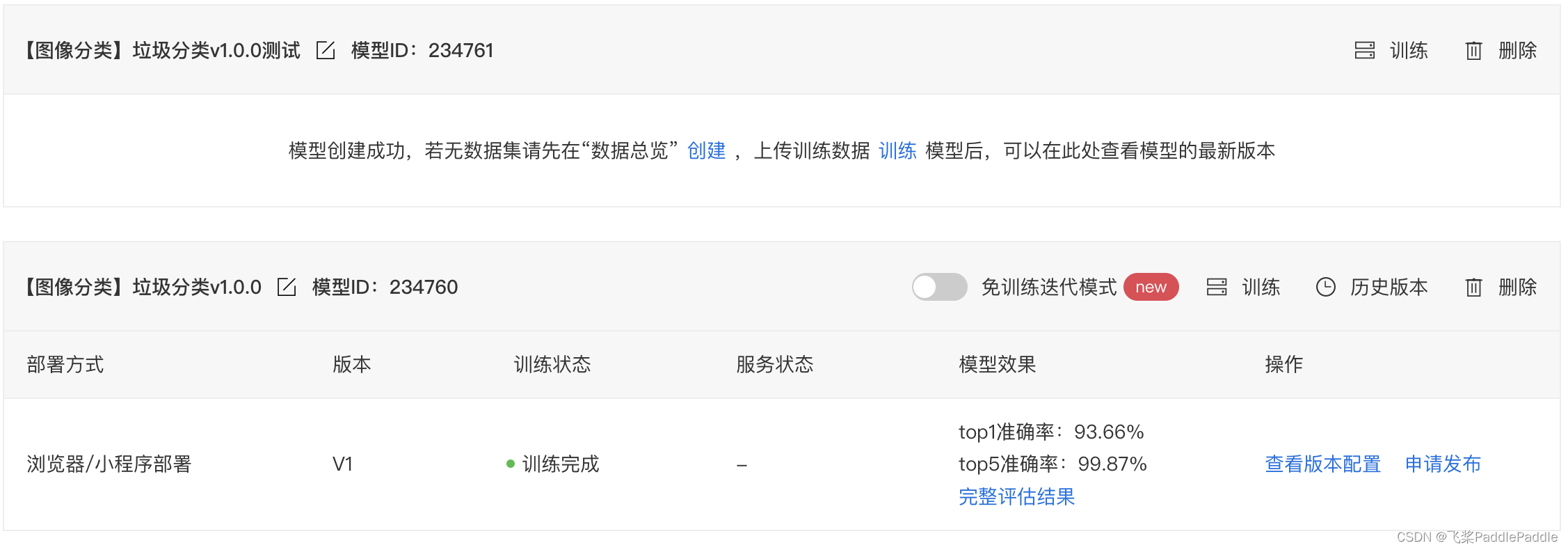
After a period of waiting , The model has been trained .
Through the training results, we can see , My model accuracy is 93.66%, The result of the training is very good .
Four 、 Publish model
After training , Then release the model , After the model is released, it can be downloaded and used .

My environment here needs to be used locally and offline , Here it will be published as a browser / Applet .

The released platform supports a variety of systems ,Windows,MacOS, Android.
Then it was released , Wait for a while , After publishing, you can download .
5、 ... and 、 Download the model for testing
(1) Applet experience
Select the left option bar browser / Applet deployment —> browser / The applet service finds the list of published models , Download the corresponding model . I'll download the most accurate acceleration model here .

Click on the applet experience , Use baidu APP Scan QR code and upload pictures to quickly experience .

Applet results

(2) Browser deployment experience


Here we are , The whole training process has been completed .
6、 ... and 、 summary
Through this tutorial , You can see EasyDL It is very convenient to use , From the analysis of data 、 Model training to the final model deployment , One stop solution AI All the problems of application . Even Xiaobai users can easily complete model training to deployment , And the iteration speed is very fast . Last , I hope everyone is in AI Use... On applications EasyDL Develop more functions , come on. !
This article is shared in Blog “ Flying propeller PaddlePaddle”(CSDN).
If there is any infringement , Please contact the [email protected] Delete .
Participation of this paper “OSC Source creation plan ”, You are welcome to join us , share .
边栏推荐
- consul安装与配置
- 什么是WordPress
- 301. Delete invalid brackets
- Database advanced learning notes - system package
- Let me think about Linear Algebra: a summary of basic learning of linear algebra
- 14、用户web层服务(二)
- 使用百度飞桨 EasyDL 完成垃圾分类
- Flash point list of cross platform efficiency software
- SkiaSharp 之 WPF 自绘 拖曳小球(案例版)
- Style conversion model style_ Transformer project instance pytorch implementation
猜你喜欢


随机推荐
如何让照片中的人物笑起来?HMS Core视频编辑服务一键微笑功能,让人物笑容更自然
Final modifier attribute
tolua之wrap文件的原理与使用
多线程与高并发(三)—— 源码解析 AQS 原理
The reflect mechanism obtains the attribute and method information of class
Simple selection sort and heap sort
OsCache缓存监控刷新工具
PFP会是数字藏品的未来吗?
Article summary of MinGW installation and use
Opencv notes sorting [Hough transform]
从零开始Blazor Server(2)--整合数据库
Hcip (condition matching and OSPF packet related knowledge)
How is the JS code compiled and executed by the browser engine?
学会使用MySQL的Explain执行计划,SQL性能调优从此不再困难
Character function and string function (Part 1)
程序的存储态与运行态
Hcip day 1
Techniques for visualizing large time series.
移动端人脸风格化技术的应用
R language ggplot2 visualization: ggdensity function of ggpubr package visualizes density graph and uses stat_ overlay_ normal_ Density function superimposes positive distribution curve, custom config