当前位置:网站首页>【Pygame小游戏】这款“打地鼠”小游戏要火了(来来来)
【Pygame小游戏】这款“打地鼠”小游戏要火了(来来来)
2022-06-10 22:42:00 【程序员梨子】
前言
作者 :“程序员梨子”
**文章简介 **:本篇文章主要利用pygame做一款打地鼠小游戏拉。
**文章源码获取 **: 为了感谢每一个关注我的小可爱每篇文章的项目源码都是无偿分
享滴
点这里蓝色这行字体自取,需要什么源码记得说标题名字哈!私信我也可!
欢迎小伙伴们 点赞、收藏、留言

正文
玩儿打地鼠吗?
嘻嘻,大家还记得小时候玩儿的那些游戏呢!《贪吃蛇》、《纸牌》......
前几天偶然看到家里的小孩儿还在玩儿打地鼠,这不,今天的素材就来了,教大家制作一款简单好
玩儿的《Python版打地鼠游戏》送给大家拉!
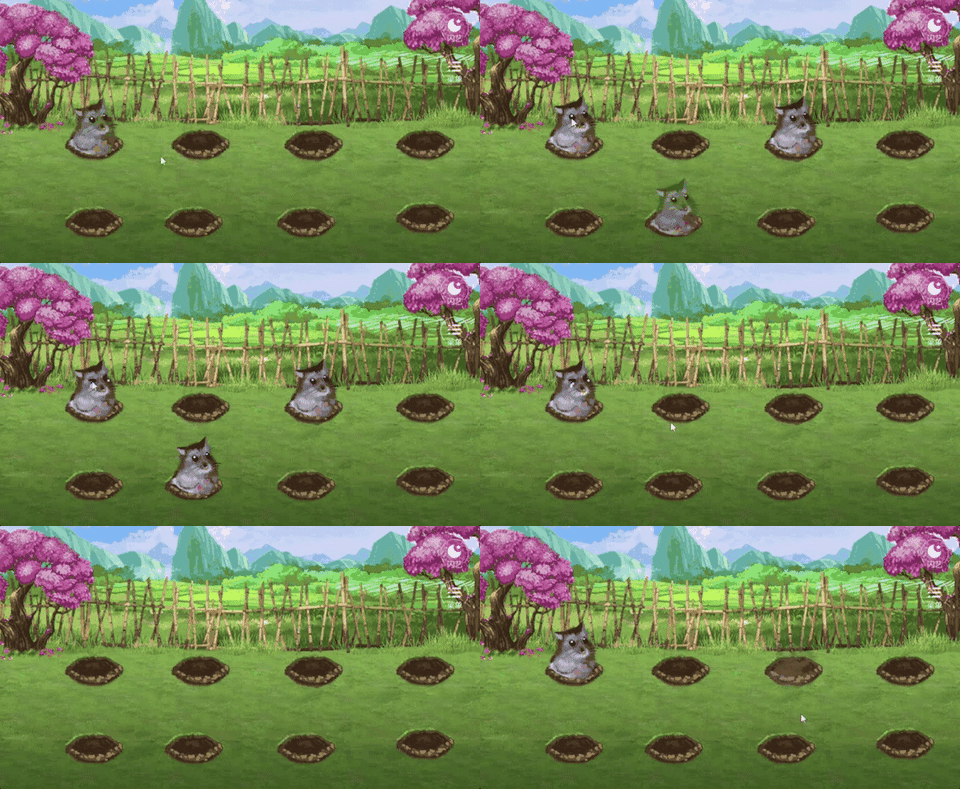
1)效果展示
开始界面:欢乐

游戏界面:
2)代码实现
开始界面
import sys
import pygame


'''游戏开始界面'''
def startInterface(screen, begin_image_paths):
    begin_images = [pygame.image.load(begin_image_paths[0]), pygame.image.load(begin_image_paths[1])]
    begin_image = begin_images[0]
    while True:
        for event in pygame.event.get():
            if event.type == pygame.QUIT:
                pygame.quit()
                sys.exit()
            elif event.type == pygame.MOUSEMOTION:
                mouse_pos = pygame.mouse.get_pos()
                if mouse_pos[0] in list(range(419, 574)) and mouse_pos[1] in list(range(374, 416)):
                    begin_image = begin_images[1]
                else:
                    begin_image = begin_images[0]
            elif event.type == pygame.MOUSEBUTTONDOWN:
                mouse_pos = pygame.mouse.get_pos()
                if event.button == 1 and mouse_pos[0] in list(range(419, 574)) and mouse_pos[1] in list(range(374, 416)):
                    return True
        screen.blit(begin_image, (0, 0))
        pygame.display.update()
主程序
import cfg
import sys
import pygame
import random
from modules import *


'''游戏初始化'''
def initGame():
    pygame.init()
    pygame.mixer.init()
    screen = pygame.display.set_mode(cfg.SCREENSIZE)
    pygame.display.set_caption('打地鼠')
    return screen


'''主函数'''
def main():
    # 初始化
    screen = initGame()
    # 加载背景音乐和其他音效
    pygame.mixer.music.load(cfg.BGM_PATH)
    pygame.mixer.music.play(-1)
    audios = {
        'count_down': pygame.mixer.Sound(cfg.COUNT_DOWN_SOUND_PATH),
        'hammering': pygame.mixer.Sound(cfg.HAMMERING_SOUND_PATH)
    }
    # 加载字体
    font = pygame.font.Font(cfg.FONT_PATH, 40)
    # 加载背景图片
    bg_img = pygame.image.load(cfg.GAME_BG_IMAGEPATH)
    # 开始界面
    startInterface(screen, cfg.GAME_BEGIN_IMAGEPATHS)
    # 地鼠改变位置的计时
    hole_pos = random.choice(cfg.HOLE_POSITIONS)
    change_hole_event = pygame.USEREVENT
    pygame.time.set_timer(change_hole_event, 800)
    # 地鼠
    mole = Mole(cfg.MOLE_IMAGEPATHS, hole_pos)
    # 锤子
    hammer = Hammer(cfg.HAMMER_IMAGEPATHS, (500, 250))
    # 时钟
    clock = pygame.time.Clock()
    # 分数
    your_score = 0
    flag = False
    # 初始时间
    init_time = pygame.time.get_ticks()
    # 游戏主循环
    while True:
        # --游戏时间为60s
        time_remain = round((61000 - (pygame.time.get_ticks() - init_time)) / 1000.)
        # --游戏时间减少, 地鼠变位置速度变快
        if time_remain == 40 and not flag:
            hole_pos = random.choice(cfg.HOLE_POSITIONS)
            mole.reset()
            mole.setPosition(hole_pos)
            pygame.time.set_timer(change_hole_event, 650)
            flag = True
        elif time_remain == 20 and flag:
            hole_pos = random.choice(cfg.HOLE_POSITIONS)
            mole.reset()
            mole.setPosition(hole_pos)
            pygame.time.set_timer(change_hole_event, 500)
            flag = False
        # --倒计时音效
        if time_remain == 10:
            audios['count_down'].play()
        # --游戏结束
        if time_remain < 0: break
        count_down_text = font.render('Time: '+str(time_remain), True, cfg.WHITE)
        # --按键检测
        for event in pygame.event.get():
            if event.type == pygame.QUIT:
                pygame.quit()
                sys.exit()
            elif event.type == pygame.MOUSEMOTION:
                hammer.setPosition(pygame.mouse.get_pos())
            elif event.type == pygame.MOUSEBUTTONDOWN:
                if event.button == 1:
                    hammer.setHammering()
            elif event.type == change_hole_event:
                hole_pos = random.choice(cfg.HOLE_POSITIONS)
                mole.reset()
                mole.setPosition(hole_pos)
        # --碰撞检测
        if hammer.is_hammering and not mole.is_hammer:
            is_hammer = pygame.sprite.collide_mask(hammer, mole)
            if is_hammer:
                audios['hammering'].play()
                mole.setBeHammered()
                your_score += 10
        # --分数
        your_score_text = font.render('Score: '+str(your_score), True, cfg.BROWN)
        # --绑定必要的游戏元素到屏幕(注意顺序)
        screen.blit(bg_img, (0, 0))
        screen.blit(count_down_text, (875, 8))
        screen.blit(your_score_text, (800, 430))
        mole.draw(screen)
        hammer.draw(screen)
        # --更新
        pygame.display.flip()
        clock.tick(60)
    # 读取最佳分数(try块避免第一次游戏无.rec文件)
    try:
        best_score = int(open(cfg.RECORD_PATH).read())
    except:
        best_score = 0
    # 若当前分数大于最佳分数则更新最佳分数
    if your_score > best_score:
        f = open(cfg.RECORD_PATH, 'w')
        f.write(str(your_score))
        f.close()
    # 结束界面
    score_info = {'your_score': your_score, 'best_score': best_score}
    is_restart = endInterface(screen, cfg.GAME_END_IMAGEPATH, cfg.GAME_AGAIN_IMAGEPATHS, score_info, cfg.FONT_PATH, [cfg.WHITE, cfg.RED], cfg.SCREENSIZE)
    return is_restart


'''run'''
if __name__ == '__main__':
    while True:
        is_restart = main()
        if not is_restart:
            break
结束界面
import sys
import pygame


'''结束界面'''
def endInterface(screen, end_image_path, again_image_paths, score_info, font_path, font_colors, screensize):
    end_image = pygame.image.load(end_image_path)
    again_images = [pygame.image.load(again_image_paths[0]), pygame.image.load(again_image_paths[1])]
    again_image = again_images[0]
    font = pygame.font.Font(font_path, 50)
    your_score_text = font.render('Your Score: %s' % score_info['your_score'], True, font_colors[0])
    your_score_rect = your_score_text.get_rect()
    your_score_rect.left, your_score_rect.top = (screensize[0] - your_score_rect.width) / 2, 215
    best_score_text = font.render('Best Score: %s' % score_info['best_score'], True, font_colors[1])
    best_score_rect = best_score_text.get_rect()
    best_score_rect.left, best_score_rect.top = (screensize[0] - best_score_rect.width) / 2, 275
    while True:
        for event in pygame.event.get():
            if event.type == pygame.QUIT:
                pygame.quit()
                sys.exit()
            elif event.type == pygame.MOUSEMOTION:
                mouse_pos = pygame.mouse.get_pos()
                if mouse_pos[0] in list(range(419, 574)) and mouse_pos[1] in list(range(374, 416)):
                    again_image = again_images[1]
                else:
                    again_image = again_images[0]
            elif event.type == pygame.MOUSEBUTTONDOWN:
                mouse_pos = pygame.mouse.get_pos()
                if event.button == 1 and mouse_pos[0] in list(range(419, 574)) and mouse_pos[1] in list(range(374, 416)):
                    return True
        screen.blit(end_image, (0, 0))
        screen.blit(again_image, (416, 370))
        screen.blit(your_score_text, your_score_rect)
        screen.blit(best_score_text, best_score_rect)
        pygame.display.update()
总结
嘻嘻,这款小游戏,喜欢的找我拿哈!
注小编获取更多精彩内容!记得点击传送门哈
记得三连哦! 如需打包好的源码+素材免费分享滴!!传送门
边栏推荐
- LabVIEW open other exe programs
- [new version] new pseudo personal homepage v2.0- starze V Club
- LabVIEW phase locked loop (PLL)
- Leetcode 501: mode in binary search tree
- Vs tomato assistant add header comments and usage
- 【 pygame Games 】 don't find, Leisure Games Theme come 丨 Bubble Dragon applet - - Leisure Games Development recommendation
- Hyperleger fabric installation
- 都说验证码是爬虫中的一道坎,看我只用五行代码就突破它。
- Fiddler simulates low-speed network environment
- How to generate automatic references (simple drawings)
猜你喜欢

LabVIEW错误“内存已满 - 应用程序停止在节点”

It is known that the transverse grain pressure resistance of a certain wood obeys n (x, D2). Now ten specimens are tested for transverse grain pressure resistance, and the data are as follows: (unit:

【Pygame合集】回忆杀-“童年游戏”,看看你中几枪?(附五款源码自取)

IGBT与三代半导体SiC双脉冲测试方案

LabVIEW用高速数据流盘
![[mathematics] [continuum mechanics] symmetry tensor, strain tensor and stress tensor in fluid mechanics](/img/13/210ed249dfa3010bf69fead8e06f1b.png)
[mathematics] [continuum mechanics] symmetry tensor, strain tensor and stress tensor in fluid mechanics

LabVIEW编程规范

基于CenterOS7安装Redis及常见问题解决(带图讲解)
![[paper sharing] pata: fuzzing with path aware Taint Analysis](/img/f6/627344c5da588afcf70302ef29d134.png)
[paper sharing] pata: fuzzing with path aware Taint Analysis
IGBT and third generation semiconductor SiC double pulse test scheme
随机推荐
flutter 如何去掉listview顶部空白的问题
curl导入postman报错小记
Data and information resource sharing platform (VII)
VS 番茄助手添加头注释 以及使用方式
LeetCode 501 :二叉搜索树中的众数
LabVIEW pictures look bright or dark after being cast from 16 bits to 8 bits
Is it safe for changtou school to open an account? Is it reliable?
LabVIEW编程规范
[paper sharing] pata: fuzzing with path aware Taint Analysis
2022 college entrance examination quantitative paper | please answer the questions for quantitative candidates
Usage of C tryparse
Is qiniu's securities account true? Is it safe?
[pyGame games] don't look for it. Here comes the leisure game topic - bubble dragon widget - recommendation for leisure game research and development
Unity script cannot display Chinese comments of C # source code or the script created by vs does not have comments of C # source code
Vs tomato assistant add header comments and usage
【 pygame Games 】 don't find, Leisure Games Theme come 丨 Bubble Dragon applet - - Leisure Games Development recommendation
苹果CMS采集站源码-搭建教程-附带源码-全新源码-开发文档
csdn每日一练——找出最接近元素并输出下标
LabVIEW错误“内存已满 - 应用程序停止在节点”
LabVIEW displays the time and date on the waveform chart or waveform chart