当前位置:网站首页>[modulebuilder] GP service realizes the intersection selection of two layers in SDE
[modulebuilder] GP service realizes the intersection selection of two layers in SDE
2022-06-25 23:11:00 【DORIC. MA】
0 demand
SDE Save two feature classes in , One is the range line data , One is the target element data . Need to use GP The service implements a function , That is, specify a feature in the scope line feature class , Automatically filter out the features in the target feature class that intersect with the range line , And return the attribute information of intersecting elements .
1 Ideas
Several problems need to be solved :
- What analysis method is used to judge the intersection relationship between elements ?
- How to make
GPService can callSDEData in ?
About the problem 1:
The most straightforward way to judge the intersection relationship is to use 【 Analysis tools - Superposition analysis - The intersection 】 Tools , There is no big problem with this approach , But it needs to generate intermediate feature classes , And it takes a relatively long time , Not a good solution . One recommended way is to use 【 Data management tools - Layer and table views - Select layers by spatial location 】 Tools , The tool can also realize complex spatial relationship selection , No intermediate feature classes are generated and the time is short .
One more thing to pay attention to when judging the intersection relationship , In the use of 【 Select layers by spatial location 】 When the tool judges intersecting elements , Feature classes that share edges with the scope line are also judged to intersect , It is necessary to eliminate this special case from the search results .
About the problem 2:
call SDE The premise of the data in is Connect SDE, Can generate SDE Save the connection file to a specific path and assign the absolute path to GP Tools .
2 Realization
GP The tool flow is shown in the figure :

In this tool flow , The upper edge is the target feature class , The lower edge is the scope line feature class . The two intersect at 【 Select layers by spatial location 】, Then remove the common edge feature class , Get the target results . Detail the steps :
step 1: Specify the feature layer
Make Feature Layer The tool assigns the feature layer , Convert feature classes to feature layers , Make it a follow-up 【 Select layers by spatial location 】 Input class of the tool .
In the upper branch Dest_Name As Make Feature Layer Preconditions for tools , Represents the name of the target feature class , Used to dynamically specify the use of SDE Which feature class in is the target feature , Can improve the whole of GP Reusability of tools .
 In the upper branch
 Dest Is a string variable , Used for setting up SDE Location of the feature class , The content is SDE The absolute path to the connection file and its internal feature classes .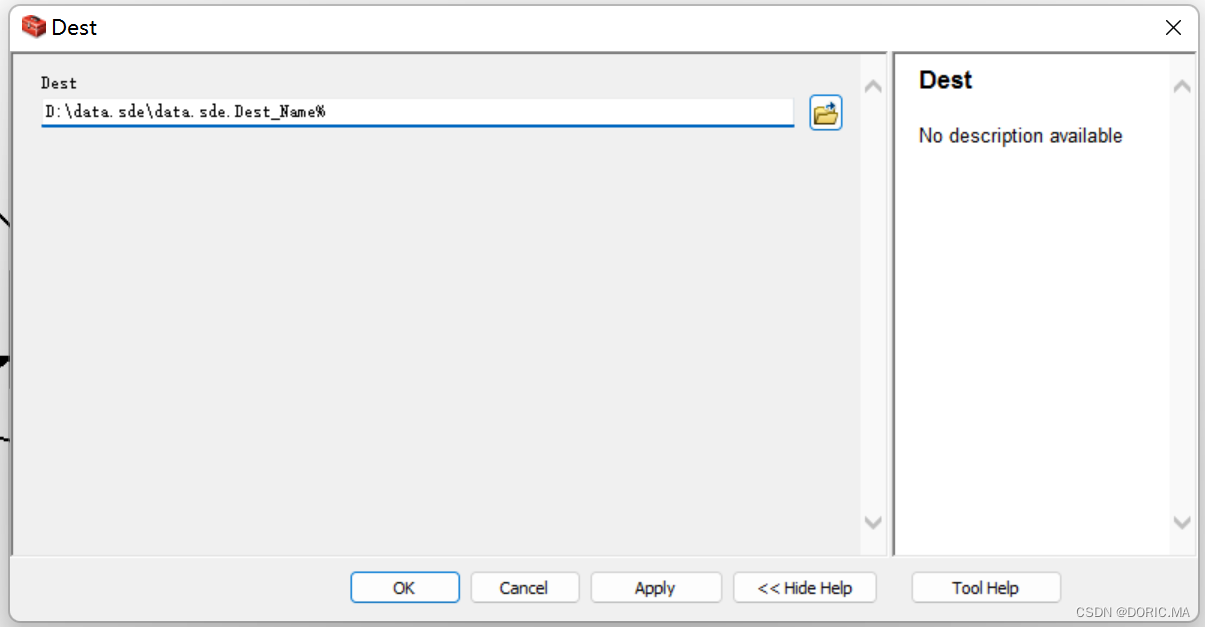 In the upper branch
 Make Feature Layer The input variable is Dest, Output Dest_Layer. The overall idea of the upper branch is similar to that of the upper branch , The only difference is to increase
 Code Variable input , This variable is used to construct SQL Statement to filter a specific feature in the scope line feature class . This variable is specified as GP Input parameters of the tool , Ensure that this parameter can be specified from the front end after the service is published .
step 2: Select layers by location
This link will Dest_Layer and Extent_Layer Select as input , Spatial relationship selection INTERSECT.
step 3: Remove common edge features
Input steps 2 The result of our choice , Spatial relationship selection 【 Edge intersection 】, Enter the range line again , The selection type is 【 Remove from the selected results 】. Set the processing result of this step as the output parameter , Ensure release GP After the service, the front end can obtain the processing results .

step 4: Execute tools and publish Services
Complete step by step GP Service release
3 Example GP Download tool
边栏推荐
- 实战:typora里面如何快捷改变字体颜色(博客分享-完美)-2022.6.25(已解决)
- 荣耀推出积分商城,支持兑换各种荣耀产品
- Flex & Bison 开始
- Another breakthrough! Alibaba cloud enters the Gartner cloud AI developer service Challenger quadrant
- ORACLE - 数据查询
- Unity的Ping类使用
- APP-新功能上线
- pdm导入vscode的实现方式
- 2022-2028 global extrusion coating and lamination production line industry research and trend analysis report
- STM32开发板+机智云AIoT+家庭监测控制系统
猜你喜欢

1281_ FreeRTOS_ Implementation analysis of vtaskdelayuntil
2. What is the geometric meaning of a vector multiplying its transpose?

Oracle -- table operation

What is 5g? What can 5g do? What will 5g bring in the future?
Unity的Ping类使用
论文笔记: 多标签学习 MSWL

ES7/ES9 -- 新特性与正则
Es7/es9 -- new features and regularities

How to design a complex business system? From the understanding of domain design, cloud native, micro service, and middle platform
LM小型可编程控制器软件(基于CoDeSys)笔记十七:pto脉冲功能块

随机推荐
Es7/es9 -- new features and regularities
【EOSIO】EOS/WAX签名错误 is_canonical( c ): signature is not canonical 问题
Unity的Ping類使用
ES6 -- 形参设置初始值、拓展运算符、迭代器、生成函数
Trillions of hot money smashed into the space economy. Is it really a good business?
ADB common commands
Flex & Bison 开始
【ModuleBuilder】GP服务实现SDE中两个图层相交选取
2. What is the geometric meaning of a vector multiplying its transpose?
2022-2028 global industrial touch screen industry research and trend analysis report
2022-2028 global carbon fiber unidirectional tape industry research and trend analysis report
2022-2028 global variable frequency compressor technology industry research and trend analysis report
String deformation (string case switching and realization)
Canoe: the fifth simulation project: simulation + test
Oracle -- table operation
2、一个向量乘它的转置,其几何意义是什么?
OSPF - detailed explanation of GRE tunnel (including configuration command)
adb常用命令
The Ping class of unity uses
Unity技术手册 - GetKey和GetAxis和GetButton