当前位置:网站首页>调试H5页面-weinre及spy-debugger真机调试
调试H5页面-weinre及spy-debugger真机调试
2022-06-29 08:24:00 【CamilleZJ】
以下是weinre及spy-debugger真机调试方式,spy-debugger内嵌了weinre,所以首选spy-debugger,weinre大致了解一下即可。
一、Weinre
Weinre(WebInspector Remote)是一款基于Web Inspector(Webkit)的远程调试工具,借助于网络,可以在PC上直接调试运行在移动设备上的远程页面。
Weinre作为一种远程调试工具,在结构上分为三层:
- 目标页面(target):被调试的页面,页面已嵌入weinre的远程js,下文会介绍;
- Debug客户端(client):本地的Web Inspector调试客户端;
- Debug服务端(agent):一个HTTP Server,为目标页面与Debug客户端建立通信。
三层结构如下图所示:

Weinre的debug客户端是基于Web Inspector开发,而Web Inspector只与以WebKit为核心的浏览器兼容,所以Weinre的客户端只能用基于WebKit内核的浏览器:
- Google Chrome
- Apple Safari
- Other recent-ish WebKit-based browsers
Weinre的Debug服务端:在pc端本地构建服务器,用来运行调试的项目,需要手机可以访问pc端本地的该项目(手机怎样可以访问电脑本地项目,需自行百度,一般需要在同一个网段下,并且需设置防火墙允许通过,如下本地服务器采用nginx,开启通过防火墙)

weinre有5大功能
- Element: 查看/修改dom,查看/修改 dom CSS
- Resources:查看/修改 localStorage, sessionStorage
- Network:查看网络请求
- Timeline:
- Console:查看控制台输出
安装:weinre调试服务器基于node.js实现,因此先安装node 运行环境。
- 全局安装: npm install –g weinre
- 局部安装: npm install weinre
启动:
weinre启动参数说明:
- httpPort: 设置Wninre使用的端口号,默认是8080
- boundHost: [hostname | Ip | -all-]: 默认是 ‘localhost’.
- debug [true | false] : 这个选项与–verbose类似, 会输出更多的信息。默认为false。
- readTimeout [seconds] : Server发送信息到Target/Client的超时时间, 默认为5s。
- deathTimeout [seconds] : 默认为3倍的readTimeout, 如果页面超过这个时间都没有任何响应, 那么就会断开连接。
命令:
- weinre --httpPort 8090 --boundHost -all-
- 如果是局部安装的话,需要在前面加上 node_modules/.bin/
因为下面用到了本机ip,所以用ip打开"http://本地ip:8090" 启动了weinre之后,在浏览器中输入http://本地ip:8090。显示如下界面,表示已经启动成功:

点击第一行debug client user interface后的连接,即调试入口链接,进入调试页面:

如上 Targets为none,暂时还没有调试的页面。
在我们要调试的页面中,增加一个脚本,即拷贝上面需要嵌入页面的代码:(若上面用到的是localhost,需将localhost换成你的IP地址,所以需要使用ip打开weinre服务器)
<script src="http://172.20.23.124:8090/target/target-script-min.js#anonymous"></script>搭建本地服务器,并用手机访问该本地项目需要调试的网页,使调试页面可以正常访问。之后在weinre服务端进入debug client查看targets,如下target:

选中需要调试的target,之后点击Elements就可以调试页面dom及css,此时手机和pc是双向控制,修改样式时,会在手机端即时生效,并且也可以查看控制台信息:
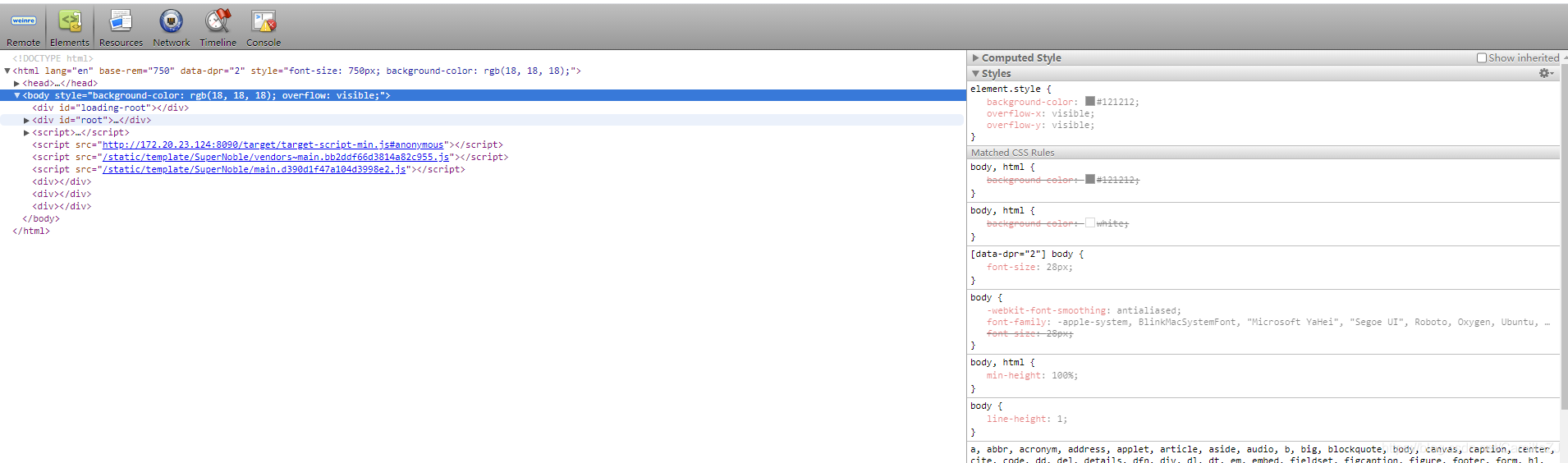 注意:在调试结束之后,别忘记删除嵌入的script。
说明:
- 不能进行断点调试
- weinre支持多targets的,不同target通过debug id区分的,target js的完整格式:<script src="{代理服务地址}:{代理服务端口}/target/target-script-min.js#{debug id}"></script>,debug id参数就是用来区分各targetd ,如果不传的话用"anonymous"代替,一般用IP地址作为debug id。

二、spy-debugger
上面需要手动插入和删除脚本,且需要构建本地服务器用来收集访问,比较麻烦。Spy-debugger仍需要手机和pc在同一个网段下,最简单就是连接同一个wifi,本人采用360wifi,不再需要构建本地服务器,按照以下配置后手机端打开任意调试页面即可。
Spy-debugger内部集成了weinre,通过代理的方式拦截所有html自动注入weinre所需的js代码。简化了weinre需要给每个调试的页面添加js代码。spy-debugger原理是拦截所有html页面请求注入weinre所需要的js代码。让页面调试更加方便。
特性:
- 页面调试+抓包
- 操作简单
- 支持HTTPS。
- spy-debugger内部集成了weinre、node-mitmproxy、AnyProxy。
- 自动忽略原生App发起的https请求,只拦截webview发起的https请求。对使用了SSL pinning技术的原生App不造成任何影响。
- 可以配合其它代理工具一起使用(默认使用AnyProxy)
安装与使用
- 安装:
//全局安装
npm install –g spy-debugger- 启动:spy-debugger

- 设置手机的HTTP代理
代理的地址为 PC的IP地址 ,代理的端口为spy-debugger的启动端口(默认端口为:9888)默认端口是 9888。如果要指定端口: spy-debugger –p 8888
Android设置步骤:设置 - WLAN - 长按选中网络 - 修改网络 - 高级 - 代理设置 - 手动
iOS设置代理步骤:设置 - 无线局域网 - 选中网络 - HTTP代理手动


- 手机安装证书(node-mitmproxy CA根证书)
第一步:生成证书: 生成CA根证书,根证书生成在 /Users/XXX/node-mitmproxy/ 目录下。
spy-debugger initCA
第二步:安装证书:把node-mitmproxy文件夹下的 node-mitmproxy.ca.crt 传到手机上,点击安装即可。
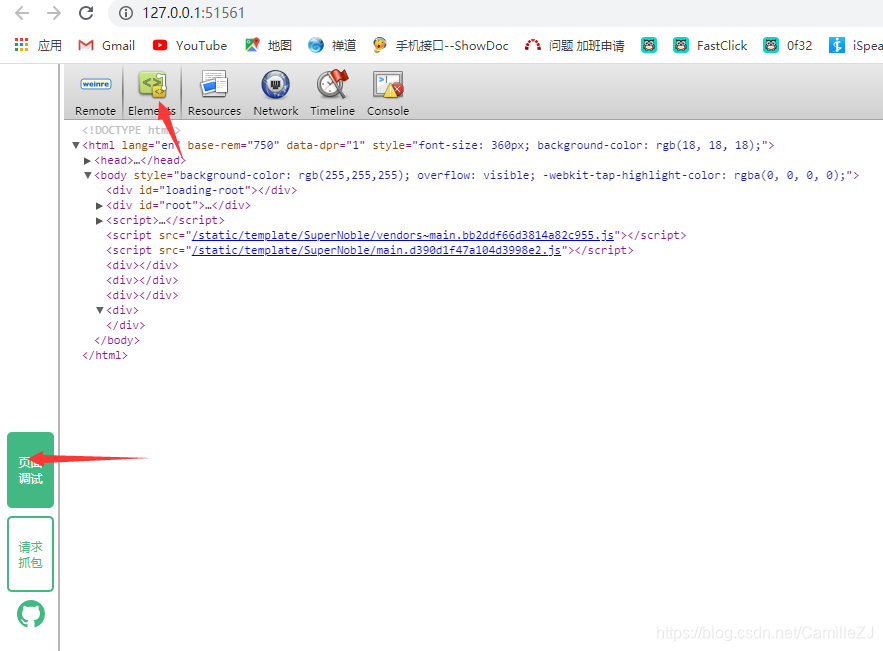
Spy-debugger重新启动界面,打开手机至需要调试的页面(任意,不再需要访问pc本地项目)

最后,点击Elements进行调试:
边栏推荐
- 2022年7月系统集成项目管理工程师认证招生简章
- 对比HomeKit、米家,智汀家庭云版有哪些场景化的体验
- The difference and usage of JS for in loop and for of loop
- 递归方法 rbac菜单层级显示 无限极分类
- 51单片机中断与定时器计数器,基于普中科技HC6800-ESV2.0
- General multiplier design, verilog code
- ES6 data type map & set
- npm常用命令
- 手写VirtualDOM
- Memoirs of actual combat: breaking the border from webshell
猜你喜欢

闭关修炼(二十五)基础web安全

July 2022 (advanced soft test) information system project manager certification enrollment Brochure

Let's make a summary
![[untitled]](/img/6e/5dd5dcff89a74f7d367c9186a77268.png)
[untitled]

机器人代码生成器之Robcogen使用教程

Compare homekit, MI family, and zhiting family cloud edition for what scene based experiences

手写VirtualDOM

Leetcode(142)——环形链表 II

uniapp引入组件不生效解决方法

Calculus Learning
随机推荐
verilog 移位操作符
Dialogue | prospects and challenges of privacy computing in the digital age
2022第六季完美童模 合肥賽區 决賽圓滿落幕
TypeScript 变量声明 —— 类型断言
Is it safe for the top ten securities companies to open accounts? Is it reliable?
编程语言
[most complete] download and installation of various versions of PS and tutorial of small test ox knife (Photoshop CS3 ~ ~ Photoshop 2022)
PointNet/Pointnet++训练及测试
51单片机中断与定时器计数器,基于普中科技HC6800-ESV2.0
随心玩玩(三)Mirai框架QQ机器人
闭关修炼(二十五)基础web安全
ActiveMQ message component publish subscribe redelivery message redelivery
【最全】PS各个版本下载安装及小试牛刀教程(PhotoShop CS3 ~~ PhotoShop 2022)
verilog 等价操作符
2022第六季完美童模 海口赛区 选拔赛圆满落幕
Development tips - Image Resource Management
New paid Tarot calculation source code (with building tutorial)
2022年7月(软考高级)信息系统项目管理师认证招生简章
Official reply on issues related to the change of children's names after parents' divorce
Batch processing of experimental contact angle data matlab analysis