当前位置:网站首页>[microservice] Nacos cluster building and loading file configuration
[microservice] Nacos cluster building and loading file configuration
2022-07-29 00:04:00 【Goose goose goose】

?? Here is 【 Microservices 】, Pay attention to me to learn micro services without getting lost
?? If it helps you , Give the blogger a free praise to show encouragement
Welcome to ?? give the thumbs-up ?? Comment collection
?? Column introduction
【 Microservices 】 At present, it mainly updates micro services , Learn together and progress together .
?? Introduction to this issue
This issue focuses on Nacos Cluster setup and loading file configuration
List of articles
Catalog
nacos To configure DataId Introduce
To configure yml In the document DataId
To configure console Medium DataId
Multi environment configuration
Service cluster
demand
Service providers build clusters
Service caller , Display the information of each service in the cluster in turn

build
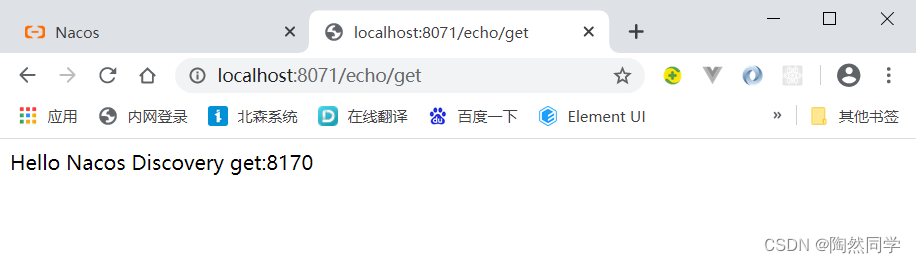
1) Modify service provider's controller, Print the server port number

package com.czxy.controller;

import org.springframework.web.bind.annotation.*;

import javax.annotation.Resource;
import javax.servlet.http.HttpServletRequest;


@RestController
public class EchoController {

    @Resource
    private HttpServletRequest request;

    @RequestMapping(value = "/echo/{string}", method = RequestMethod.GET)
    public String echo(@PathVariable String string) {
        int serverPort = request.getServerPort();
        return "Hello Nacos Discovery " + string + ":" + serverPort;
    }
}
2) To write yml To configure

# Port number
server:
  port: 8170

spring:
  application:
    name: service-provider          # service name
  cloud:
    nacos:
      discovery:
        server-addr: 127.0.0.1:8848   #nacos Service address


# Port number
server:
  port: 8270

spring:
  application:
    name: service-provider          # service name
  cloud:
    nacos:
      discovery:
        server-addr: 127.0.0.1:8848   #nacos Service address
3) To configure idea Start item
-Dspring.profiles.active=8170

test
- start-up 3 A service (2 Service offerings ,1 Service consumption )

- see nacos Console

Load profile order
Yes
3.4.5 chapter / The first 4 StepExplain the content in detailThe order in which the configuration files are loaded ( The first 4 Step by step )
nacos To configure DataId Introduce
- nacos Provides 3 Ways of planting , To configure dataId Loading order of
A: Shared configuration :
spring.cloud.nacos.config.shared-dataids
spring.cloud.nacos.config.refreshable-dataidsB: Load multiple configurations :
spring.cloud.nacos.config.ext-config[n]C: Internal rule splicing :
spring.cloud.nacos.config.prefix
spring.cloud.nacos.config.file-extension
spring.cloud.nacos.config.group
To configure yml In the document DataId
spring:
  application:
    name: config-service              #  service name
  cloud:
    nacos:
      config:
        server-addr: 127.0.0.1:8848     # nacos  Service address
        shared-dataids: test1.yml       # 1.1  Shared configuration
        refreshable-dataids: test1.yml  # 1.2  Shared configuration , Dynamic refresh
        ext-config:                     # 2.  Configure multiple
          - data-id: test2-1.yml
            group: DEFAULT_GROUP
            refresh: true
          - data-id: test2-2.yml
            group: DEFAULT_GROUP
            refresh: true
        prefix: test3                   # 3.1  Prefix , Default  ${spring.application.name}
        file-extension: yaml            # 3.2  suffix
        group: DEFAULT_GROUP            # 3.3  Group name
To configure console Medium DataId
- nacos Console configuration

test
Loaded later dataId Will overwrite the previously loaded dataId What to set up
Check the log

Located property source: [
BootstrapPropertySource {name='bootstrapProperties-test3-demo.yaml'}, BootstrapPropertySource {name='bootstrapProperties-test3.yaml'}, BootstrapPropertySource {name='bootstrapProperties-test2-2.yml'}, BootstrapPropertySource {name='bootstrapProperties-test2-1.yml'}, BootstrapPropertySource {name='bootstrapProperties-test1.yml'}]
Multi environment configuration
- stay Nacos For different environments ( Development 、 test 、 Production etc. ) in , It provides several concepts at different levels of management , Include :
Data ID、Group、Namespace.
Concept
describe
Data ID
Unique identification of data , Can be understood as Spring Cloud The profile name of the application
Group
Used to correct Data ID Do collection management , Equivalent to small classification
Namespace
Used for tenant granularity configuration isolation . Equivalent to a large classification
- Group group To configure
spring.cloud.nacos.config.group= # Group name
- Namespace namespace To configure
spring.cloud.nacos.config.namespace= #namespace Of ID
边栏推荐
- Those "experiences and traps" in the data center
- Oracle create tablespaces and users
- PowerCLi VMware vCenter 通过自建的PXE Server一键批量部署常规New-VM
- 【C】 Drink soda and find a single dog
- PIP image download
- 实时数仓:美团点评Flink的实时数仓应用分享
- EN 1935建筑五金.单轴铰链—CE认证
- Servlet运行原理_API详解_请求响应构造进阶之路(Servlet_2)
- EN 12101-8:2011烟雾和热量控制系统防烟挡板—CE认证
- Do you know any formal part-time platforms?
猜你喜欢

ISO 13400(DoIP)标准解读

【C】 Introduction and Simulation Implementation of ATOI and offsetof

CANoe应用案例之DoIP通信

Worthington RNA determination detailed introduction

研发效能的道法术器

Leetcode60. 排列序列

GhostNets on Heterogeneous Devices via Cheap Operations

With the help of rpa+lcap, the enterprise treasurer management can be upgraded digitally

实时数仓:美团基于Flink的实时数仓建设实施

pycharm新建项目
随机推荐
【MySQL 8】Generated Invisible Primary Keys(GIPK)
Pycharm configuring the running environment
【C】替换空格,宏实现整数的二进制奇偶位交换
Multi sensor fusion positioning (II) -- map based positioning
Oracle create tablespaces and users
【MySQL系列】MySQL数据库基础
pycharm配置运行环境
RHCE the next day
Leetcode59. 螺旋矩阵 II
Worthington RNA determination detailed introduction
Yolov5 learning notes (I) -- principle overview
laptop外接显示器
Apple's official website is being updated to maintain the apple store. Products such as the iPhone 13 / pro of the Bank of China will enjoy a maximum discount of 600 yuan
centos7安装mysql8
Where is the DP interface of desktop computer (what if the host has no DP interface)
器利而工善,以RPA+LCAP赋能企业司库管理数字化升级
实时数仓:网易严选基于Flink的实时数仓实践
多传感器融合定位(三)——惯性技术
有效供应链管理的八大绩效分析指标(上)
[detailed and super simple] how to use websocket links