当前位置:网站首页>Summary of fluent systemchrome
Summary of fluent systemchrome
2022-07-03 22:25:00 【nicepainkiller】
Fix App toward
* Single direction
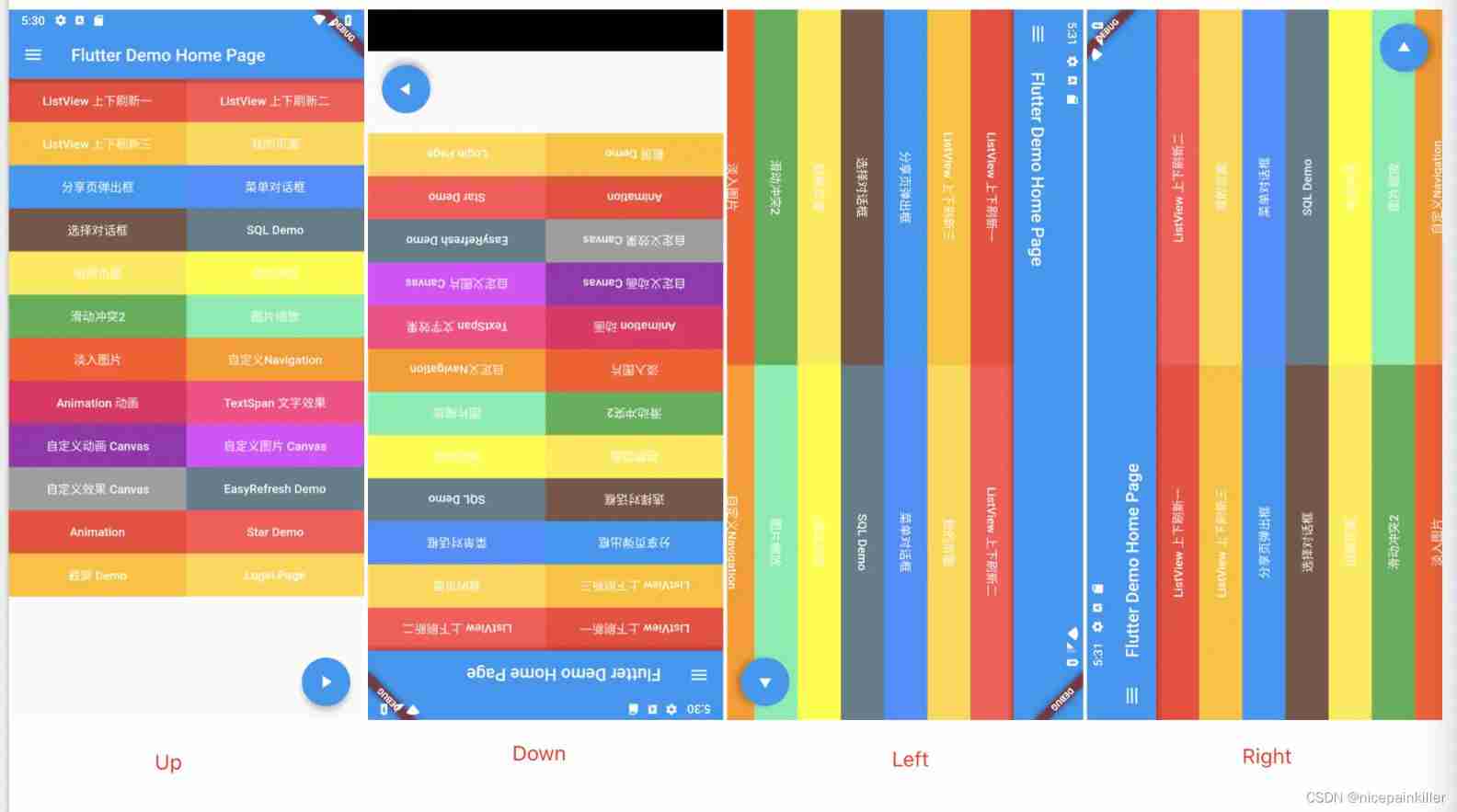
If it is necessary to fix the application in a single direction , Just set the required direction attribute ;
//  Vertically
SystemChrome.setPreferredOrientations([DeviceOrientation.portraitUp]);
//  Vertical down
SystemChrome.setPreferredOrientations([DeviceOrientation.portraitDown]);
//  Horizontal left
SystemChrome.setPreferredOrientations([DeviceOrientation.landscapeLeft]);
//  Horizontal right
SystemChrome.setPreferredOrientations([DeviceOrientation.landscapeRight]);
* Multidirectional
If required, the direction of application varies with gravity induction , Multiple direction attributes need to be set ;
//  In the vertical direction
SystemChrome.setPreferredOrientations([DeviceOrientation.portraitUp, DeviceOrientation.portraitDown]);
//  horizontal direction
SystemChrome.setPreferredOrientations([DeviceOrientation.landscapeLeft, DeviceOrientation.landscapeLeft]);
//  Multidirectional
SystemChrome.setPreferredOrientations([DeviceOrientation.landscapeLeft, DeviceOrientation.landscapeLeft, DeviceOrientation.portraitUp]);
Tips:
- portraitDown Properties, please note , It usually doesn't work in multiple directions , The system will not reverse by default ;
- In multi-directional setting, the initial direction can be divided into two cases , The first one is : The current gravity sensing direction is not in the set multi direction list , The initial direction is the first setting method in the list ; The second kind : The current gravity sensing direction is in the set multi direction list , Regardless of the order , By default, the current gravity sensing direction is displayed ( Not portraitDown)
Set the top status bar and Bottom system key
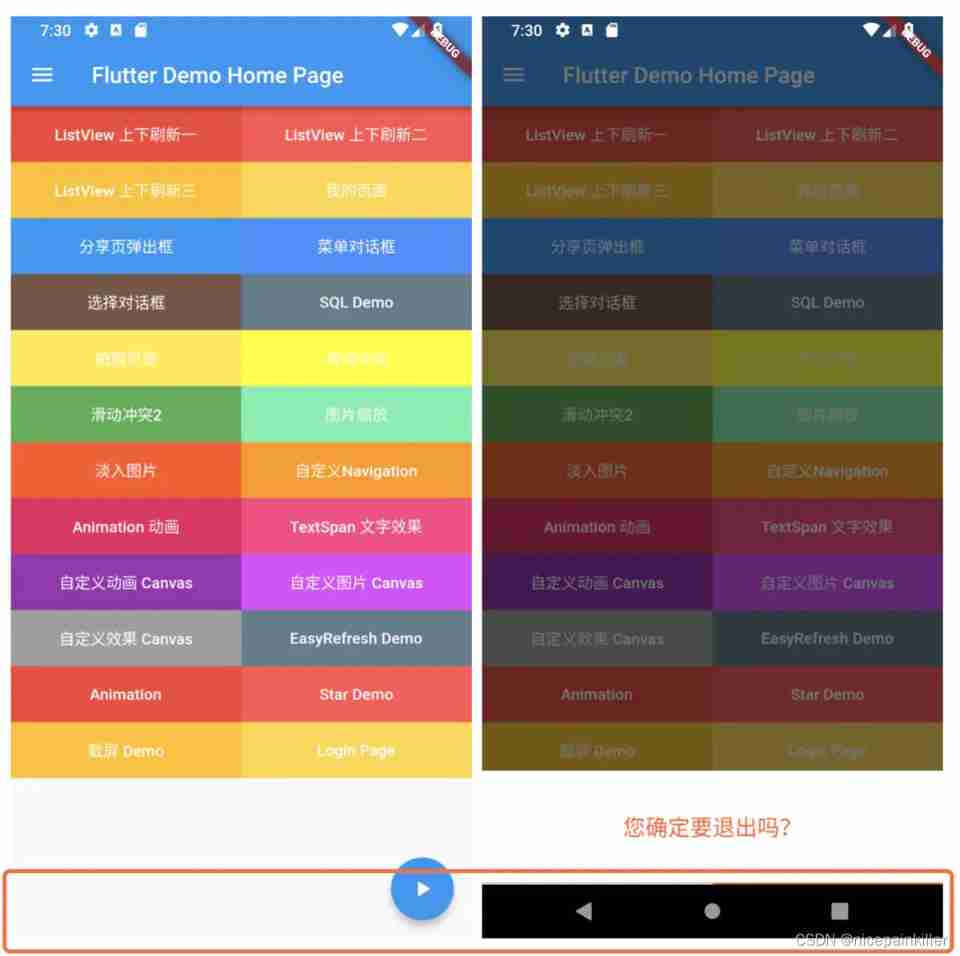
Top status bar Top status bar Time Electric quantity Display of operator and other information hide
**setEnabledSystemUIOverlays** Is to specify the system overlay that is visible when the application is running , Mainly for the operation of the status bar , It's hard to read , But it's clear from the test cases ; Parameters are divided into **top Top / bottom Bottom ** Two kinds of ;
* Only the top status bar SystemUiOverlay.top
SystemChrome.setEnabledSystemUIOverlays([SystemUiOverlay.top]);
* Only bottom system buttons SystemUiOverlay.bottom
SystemChrome.setEnabledSystemUIOverlays([SystemUiOverlay.bottom]);
* Both have
SystemChrome.setEnabledSystemUIOverlays([SystemUiOverlay.top, SystemUiOverlay.bottom]);

Set status bar color Top + Bottom
setSystemUIOverlayStyle: Used to style the top and bottom of the status bar , The default is **light** and **dark** Pattern , You can also customize the style according to your needs ;
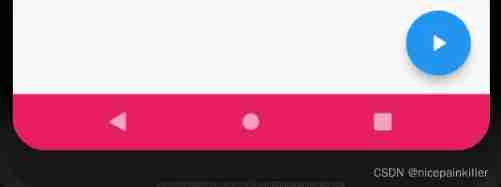
* Bottom status bar color systemNavigationBarColor
 This attribute is only used for  **Android**  Equipment and  **SDK >= O**  when , Bottom status bar color ;

SystemChrome.setSystemUIOverlayStyle(SystemUiOverlayStyle(systemNavigationBarColor: Colors.pink));
* Bottom status bar and main content split line color systemNavigationBarDividerColor
 This attribute is only used for  **Android**  Equipment and  **SDK >= P**  when , Bottom status bar and main content split line color , The effect is not obvious ;

SystemChrome.setSystemUIOverlayStyle(SystemUiOverlayStyle(systemNavigationBarDividerColor: Colors.yellow));

* Bottom status bar icon style systemNavigationBarIconBrightness
 This attribute is only used for  **Android**  Equipment and  **SDK >= O**  when , Bottom status bar icon style , Mainly three key colors

SystemChrome.setSystemUIOverlayStyle(SystemUiOverlayStyle(systemNavigationBarColor: Colors.pink));

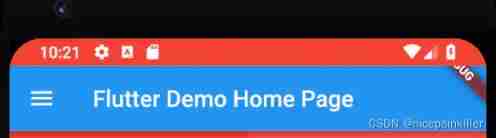
* Top status bar background color statusBarColor
 This attribute is only used for  **Android**  Equipment and  **SDK >= M**  when , Top status bar color ;

SystemChrome.setSystemUIOverlayStyle(SystemUiOverlayStyle(statusBarColor: Colors.red));
* Top status bar icon color statusBarIconBrightness
 This attribute is only used for  **Android**  Equipment and  **SDK >= M**  when , The brightness of the top status bar icon ; But the side dish doesn't feel obvious ;

SystemChrome.setSystemUIOverlayStyle(SystemUiOverlayStyle(statusBarIconBrightness: Brightness.dark));
* Top status bar color SystemUiOverlayStyle; This state Yes, there are gray and Bright colors Two kinds of
SystemChrome.setSystemUIOverlayStyle(SystemUiOverlayStyle.dark);

SystemChrome.setSystemUIOverlayStyle(SystemUiOverlayStyle.dark);
边栏推荐
- Cognitive fallacy: what is dimensional curse
- How to switch between dual graphics cards of notebook computer
- On my first day at work, this API timeout optimization put me down!
- Blue Bridge Cup Guoxin Changtian single chip microcomputer -- led lamp module (V)
- Niuke winter vacation training camp 4 g (enumeration optimization, Euler power reduction)
- Harbor integrated LDAP authentication
- Awk getting started to proficient series - awk quick start
- 1068. Consolidation of ring stones (ring, interval DP)
- [actual combat record] record the whole process of the server being attacked (redis vulnerability)
- Rest参考
猜你喜欢

Leetcode: a single element in an ordered array
Data consistency between redis and database
![[Android reverse] application data directory (files data directory | lib application built-in so dynamic library directory | databases SQLite3 database directory | cache directory)](/img/b8/e2a59772d009b6ee262fb4807f2cd2.jpg)
[Android reverse] application data directory (files data directory | lib application built-in so dynamic library directory | databases SQLite3 database directory | cache directory)

string
![[secretly kill little partner pytorch20 days] - [day3] - [example of text data modeling process]](/img/55/309c9d52e503405b289bcfc4912be9.jpg)
[secretly kill little partner pytorch20 days] - [day3] - [example of text data modeling process]
Summary of basic knowledge of exception handling
![[golang] leetcode intermediate - alphabetic combination of island number and phone number](/img/40/a664ea866ce355c1f5e9305fe91780.jpg)
[golang] leetcode intermediate - alphabetic combination of island number and phone number

Quick one click batch adding video text watermark and modifying video size simple tutorial

Wisdom tooth technology announced that it had completed the round D financing of US $100million and had not obtained a valid patent yet
Bluebridge cup Guoxin Changtian single chip microcomputer -- detailed explanation of schematic diagram (IV)
随机推荐
[template summary] - binary search tree BST - Basics
Codeforces Round #768 (Div. 1)(A-C)
1 Introduction to spark Foundation
SDNU_ ACM_ ICPC_ 2022_ Winter_ Practice_ 4th [individual]
The difference between SRAM and DRAM
[Android reverse] use DB browser to view and modify SQLite database (download DB browser installation package | install DB browser tool)
China's Call Center Industry 14th five year plan direction and operation analysis report Ⓔ 2022 ~ 2028
How to solve the problem of computer networking but showing no Internet connection
STM32 multi serial port implementation of printf -- Based on cubemx
Analysis report on the development trend and Prospect of global and Chinese supercontinuum laser source industry Ⓚ 2022 ~ 2027
Niuke winter vacation training camp 4 g (enumeration optimization, Euler power reduction)
[dynamic programming] Jisuan Ke: Jumping stake (variant of the longest increasing subsequence)
Cognitive fallacy: what is dimensional curse
Exclusive interview with the person in charge of openkruise: to what extent has cloud native application automation developed now?
Development mode and Prospect of China's IT training industry strategic planning trend report Ⓣ 2022 ~ 2028
webAssembly
6.0 kernel driver character driver
[sg function] 2021 Niuke winter vacation training camp 6 h. winter messenger 2
Pooling idea: string constant pool, thread pool, database connection pool
Leetcode problem solving - 230 The k-th smallest element in the binary search tree