当前位置:网站首页>PXE efficient batch network installation
PXE efficient batch network installation
2022-07-27 06:28:00 【Small Shimmer】

Install the required installation package
vsftpd // Used to place the installation image , adopt ftp Access the image installation
dhcp.x86_64 12:4.2.5-7pd-3.0.2-27.el7.x86_64.r9.el7.centos // Used to assign... To clients ip
syslinux-4.05-15.el7.x86_64.rpm // To provide with pxe The boot program of
tftp-server.x86_64 0:5.2-22.el7.rpm // Used to download boot image files
xinetd.x86_64 2:2.3.15-14.el7 // For hosting tftp
system-config-kickstart.noarch 0:2.9.7-1.el7.rpm // For unattended installation
Then configure dual network cards One function is dhcp, One is to use the network source to install the environment package
nat 192.168.122.129
vmnet1192.168.10.5
And then modify vmnet1 Configure the network card and restart the network
So let's start using DHCP service , To configure DHCP After the network segment and address pool gateway , Restart again DHCP service , And it is set to start automatically 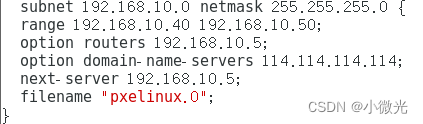
Get into TFTP service , modify disable =no, To open TFTP service
# Get ready tftp Files that need to be shared
mount /dev/cdrom /mnt
cd /mnt/images/pxeboot/
# Kernel files The kernel initializes the image file /var/lib/tftpboot/ Site
cp initrd.img vmlinuz /var/lib/tftpboot/
Get ready PXE Bootstrap pxelinux.0
pxelinux.0 It's a binary , The main function is equivalent to the guidance of a system installation step , Guide the client how to install the system
yum provides /pxelinux.0 // Find out which package this file is installed by , Use when not a path and a package /
yum -y install syslinux
rpm -ql syslinux | grep pxelinux # lookup pxe The location of the bootstrap
cp /usr/share/syslinux/pxelinux.0 /var/lib/tftpboot/ # copy to tftp Under the root directory of , System boot file
notes , Only installed system-config-kickstart software package , Just can have /usr/share/syslinux/ Directory and files in the directory
Configure the Startup menu file
The Startup menu is used to guide the boot process of the client , Including how to call the kernel , How to load drivers . The default Startup menu file is default, Should be placed in tftp Root directory pxelinux.cfg subdirectory , The typical Startup menu configuration can be established automatically or manually by referring to the following operations .
As for why /var/lib/tftpboot/pxelinux.cfg/default file , Because it was pxelinux.0 This document determines the good
mkdir /var/lib/tftpboot/pxelinux.cfg // Default pxelinux.cfg There is no need to manually create , Note that it is a directory, not a directory .cfg ending
The following is purely manual configuration default Menu file
vim /var/lib/tftpboot/pxelinux.cfg/default
install ftp service , Get ready CentOS 7 Install source
yum -y install vsftpd
mount /dev/cdrom /mnt
mkdir /var/ftp/centos7
cp -rf /mnt/* /var/ftp/centos7 # Copy the image into it
systemctl start vsftpd
Realization Kickstart Unattended installation
1. Prepare to install the answer file
(1) install system-config-kickstart Tools yum install -y system-config-kickstart
(2) open "Kickstart Configuration program ” window
From the Desktop Menu " Applications "–>“ System tools ”–>"Kickstart” Open or execute "system-config-kickstart” Command to open
(3) To configure kickstart Options
If you need to configure the software package yourself , You need to edit ks.cfg file
vim ks.cfg
add to ks Boot parameters to boot menu file
vi /var/lib/tftpboot/pxelinux.cfg/default
default auto
prompt 0 ## The value is “0” When, it means automatic execution ks.cfg file ( Nobody is on duty )、 by “1” Indicates manual configuration ( Someone on duty )
It can be done to ks To optimize 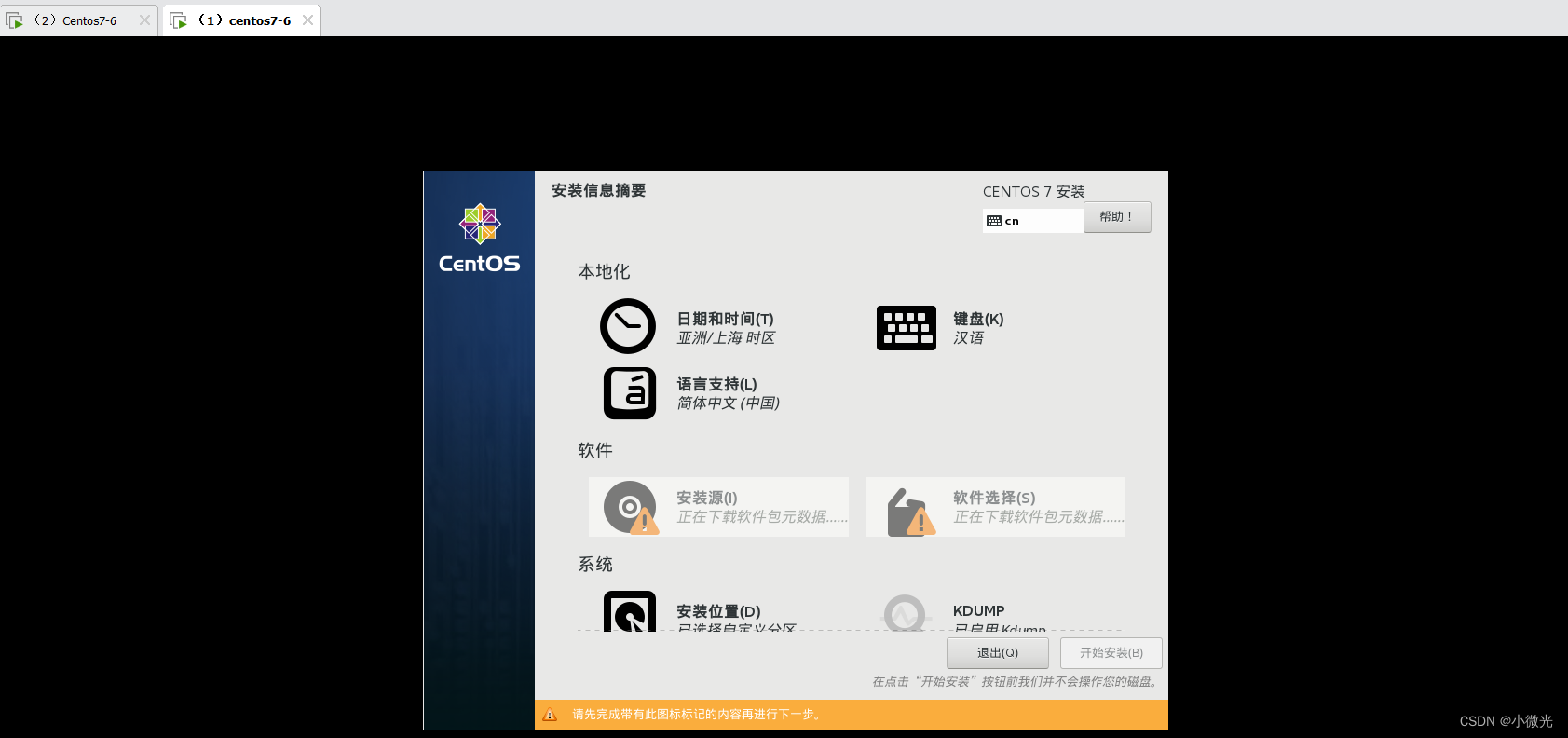

边栏推荐
- 文件内容的读写——数据流
- Allow or prohibit connecting to a non domain and a domain network at the same time
- Learning records of programming -- Lesson 2 [first knowledge of C language]
- 数组及下标索引
- Tangent space and TBN matrix
- 通信机制比较
- Thesis writing (harvest)
- Unable to start program, access denied?
- jmeter简介
- Li Kou's first week's wrong question set
猜你喜欢


随机推荐
Shell script if nested for loop script
ROS node name duplicate
Learning records of programming -- Lesson 2 [first knowledge of C language]
Non photorealistic rendering (NPR) paper understanding and reproduction (unity) - stylized highlights for cartoon rendering and animation
数据库在终端的基础操作
Basic file operation of cmder
多线程CAS、synchronized锁原理 、JUC以及死锁
Socket long link
Navigation related messages
Basic concepts of software testing
Shell脚本编写格式
英语基础知识:定语使用规则下篇
How to distinguish an independent server from a VPS host?
Chapter for software testing
ROS运行管理之launch文件
机器人导航实现
TF coordinate transformation
Programming learning record -- recursively solving the tower of Hanoi problem
Reading and writing of file content - data flow
wireshark功能介绍