当前位置:网站首页>Navigation related messages
Navigation related messages
2022-07-27 06:18:00 【Three assassins】
Map of navigation
There are two main messages related to maps :
nav_msgs/MapMetaData
- Map metadata , Including the width of the map 、 Height 、 Resolution, etc .
nav_msgs/OccupancyGrid
- Map grid data , Usually in rviz It is displayed graphically in .
1.nav_msgs/MapMetaData
call rosmsg info nav_msgs/MapMetaData The message displayed is as follows :
time map_load_time
float32 resolution # Map resolution
uint32 width # Map width
uint32 height # Map height
geometry_msgs/Pose origin # Map pose data
  geometry_msgs/Point position
    float64 x
    float64 y
    float64 z
  geometry_msgs/Quaternion orientation
    float64 x
    float64 y
    float64 z
    float64 w
2.nav_msgs/OccupancyGrid
call rosmsg info nav_msgs/OccupancyGrid The message displayed is as follows :
std_msgs/Header header
  uint32 seq
  time stamp
  string frame_id
#---  Map metadata
nav_msgs/MapMetaData info
  time map_load_time
  float32 resolution
  uint32 width
  uint32 height
  geometry_msgs/Pose origin
    geometry_msgs/Point position
      float64 x
      float64 y
      float64 z
    geometry_msgs/Quaternion orientation
      float64 x
      float64 y
      float64 z
      float64 w
#---  Map content data , The length of the array  = width * height
int8[] data
Navigation odometer
The relevant message of odometer is :nav_msgs/Odometry, call rosmsg info nav_msgs/Odometry The message displayed is as follows :
std_msgs/Header header
  uint32 seq
  time stamp
  string frame_id
string child_frame_id
geometry_msgs/PoseWithCovariance pose
  geometry_msgs/Pose pose # Odometer attitude
    geometry_msgs/Point position
      float64 x
      float64 y
      float64 z
    geometry_msgs/Quaternion orientation
      float64 x
      float64 y
      float64 z
      float64 w
  float64[36] covariance
geometry_msgs/TwistWithCovariance twist
  geometry_msgs/Twist twist # Speed
    geometry_msgs/Vector3 linear
      float64 x
      float64 y
      float64 z
    geometry_msgs/Vector3 angular
      float64 x
      float64 y
      float64 z
  #  Covariance matrix
  float64[36] covariance
Coordinate transformation of navigation
The message about coordinate transformation is : tf/tfMessage, call rosmsg info tf/tfMessage The message displayed is as follows :
geometry_msgs/TransformStamped[] transforms # An array containing relative relationship data of multiple coordinate systems
  std_msgs/Header header
    uint32 seq
    time stamp
    string frame_id
  string child_frame_id
  geometry_msgs/Transform transform
    geometry_msgs/Vector3 translation
      float64 x
      float64 y
      float64 z
    geometry_msgs/Quaternion rotation
      float64 x
      float64 y
      float64 z
      float64 w
Navigation positioning
The location related message is :geometry_msgs/PoseArray, call rosmsg info geometry_msgs/PoseArray The message displayed is as follows :
std_msgs/Header header
  uint32 seq
  time stamp
  string frame_id
geometry_msgs/Pose[] poses # An array of estimated positions and poses
  geometry_msgs/Point position
    float64 x
    float64 y
    float64 z
  geometry_msgs/Quaternion orientation
    float64 x
    float64 y
    float64 z
    float64 w
Target point and path planning of navigation
The relevant message of the target point is :move_base_msgs/MoveBaseActionGoal, call rosmsg info move_base_msgs/MoveBaseActionGoal The message displayed is as follows :
std_msgs/Header header
  uint32 seq
  time stamp
  string frame_id
actionlib_msgs/GoalID goal_id
  time stamp
  string id
move_base_msgs/MoveBaseGoal goal
  geometry_msgs/PoseStamped target_pose
    std_msgs/Header header
      uint32 seq
      time stamp
      string frame_id
    geometry_msgs/Pose pose # Target point pose
      geometry_msgs/Point position
        float64 x
        float64 y
        float64 z
      geometry_msgs/Quaternion orientation
        float64 x
        float64 y
        float64 z
        float64 w
The message about path planning is :nav_msgs/Path, call rosmsg info nav_msgs/Path The message displayed is as follows :
std_msgs/Header header
  uint32 seq
  time stamp
  string frame_id
geometry_msgs/PoseStamped[] poses # An array of points
  std_msgs/Header header
    uint32 seq
    time stamp
    string frame_id
  geometry_msgs/Pose pose
    geometry_msgs/Point position
      float64 x
      float64 y
      float64 z
    geometry_msgs/Quaternion orientation
      float64 x
      float64 y
      float64 z
      float64 w
Navigation lidar
The relevant news of lidar is :sensor_msgs/LaserScan, call rosmsg info sensor_msgs/LaserScan The message displayed is as follows :
std_msgs/Header header
  uint32 seq
  time stamp
  string frame_id
float32 angle_min # Starting scanning angle (rad)
float32 angle_max # End scanning angle (rad)
float32 angle_increment # Angular distance between measured values (rad)
float32 time_increment # Measurement interval (s)
float32 scan_time # Scan interval (s)
float32 range_min # Minimum effective distance value (m)
float32 range_max # Maximum effective distance value (m)
float32[] ranges # One cycle of scanning data
float32[] intensities # Scan intensity data , If the device does not support strength data , The array is empty
Navigation camera
The relevant news of depth camera is :sensor_msgs/Image、sensor_msgs/CompressedImage、sensor_msgs/PointCloud2
sensor_msgs/Image Corresponding general image data ,sensor_msgs/CompressedImage Corresponding to the compressed image data ,sensor_msgs/PointCloud2 The corresponding point cloud data ( Image data with depth information ).
call rosmsg info sensor_msgs/Image The message displayed is as follows :
std_msgs/Header header
  uint32 seq
  time stamp
  string frame_id
uint32 height # Height
uint32 width  # Width
string encoding # Coding format :RGB、YUV etc.
uint8 is_bigendian # Image size side storage mode
uint32 step # The number of bytes of a row of image data , As a step parameter
uint8[] data # Image data , The length is equal to  step * height
call rosmsg info sensor_msgs/CompressedImage The message displayed is as follows :
std_msgs/Header header
  uint32 seq
  time stamp
  string frame_id
string format # Compression coding format (jpeg、png、bmp)
uint8[] data # Compressed data
call rosmsg info sensor_msgs/PointCloud2 The message displayed is as follows :
std_msgs/Header header
  uint32 seq
  time stamp
  string frame_id
uint32 height # Height
uint32 width  # Width
sensor_msgs/PointField[] fields # Data type of each point
  uint8 INT8=1
  uint8 UINT8=2
  uint8 INT16=3
  uint8 UINT16=4
  uint8 INT32=5
  uint8 UINT32=6
  uint8 FLOAT32=7
  uint8 FLOAT64=8
  string name
  uint32 offset
  uint8 datatype
  uint32 count
bool is_bigendian # Image size side storage mode
uint32 point_step # Single point data byte step
uint32 row_step   # Byte step size of a row of data
uint8[] data      # Store an array of point clouds , The total length of  row_step * height
bool is_dense     # Is there any invalid point
Depth image to laser data
This section describes ROS A feature pack in :depthimage_to_laserscan, seeing the name of a thing one thinks of its function , This function package can convert depth image information into lidar information , The application scenario is as follows :
In many SLAM In the algorithm, , Generally, you need to subscribe to lidar data to build maps , Because lidar can sense the depth information of the surrounding environment , The depth camera also has the function of sensing depth information , And at first, the price of lidar was relatively expensive , Can we choose depth camera to replace laser radar in sensor selection ?
The answer is yes , However, the types of messages released by the two are completely different , If you want to replace the sensor , Then it is necessary to convert the three-dimensional graphic information released by the depth camera into two-dimensional lidar information , This function is through depthimage_to_laserscan To achieve .
1.depthimage_to_laserscan brief introduction
1.1 principle
depthimage_to_laserscan The principle of realizing the conversion between depth image and radar data is relatively simple , Radar data is two-dimensional 、 Flat , The depth image is three-dimensional , Are several two-dimensional ( level ) Vertical superposition of data , If you convert 3D data into 2D data , Just take a certain layer of the depth map , In order to understand , Please see the official example :
Figure 1 : Depth camera and external environment ( A physical picture )

Figure 2 : Picture information released by depth camera , The colored lines in the figure correspond to the data to be converted into radar information
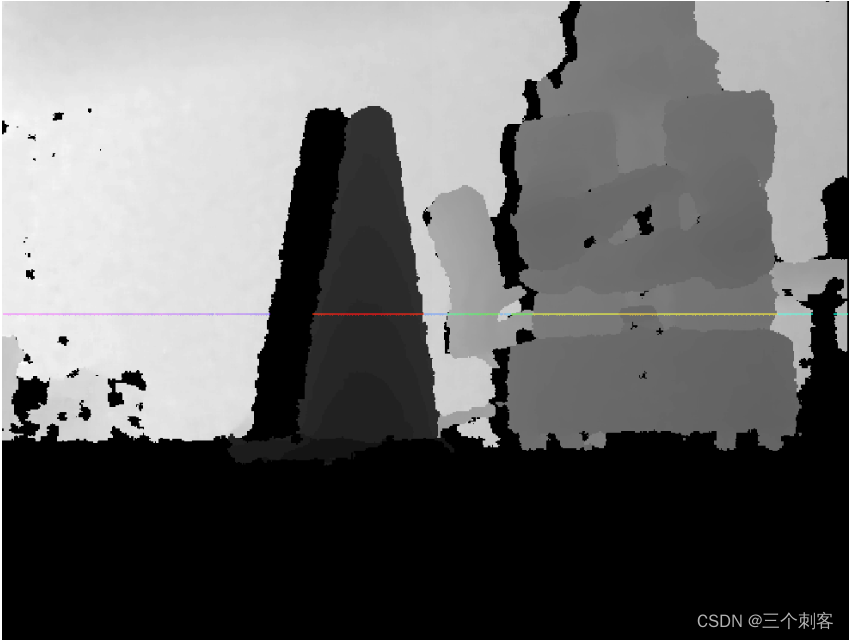
Figure 3 : It is more intuitive to display figure 2 in the form of point cloud , The colored lines in the figure still correspond to the data to be converted into radar information
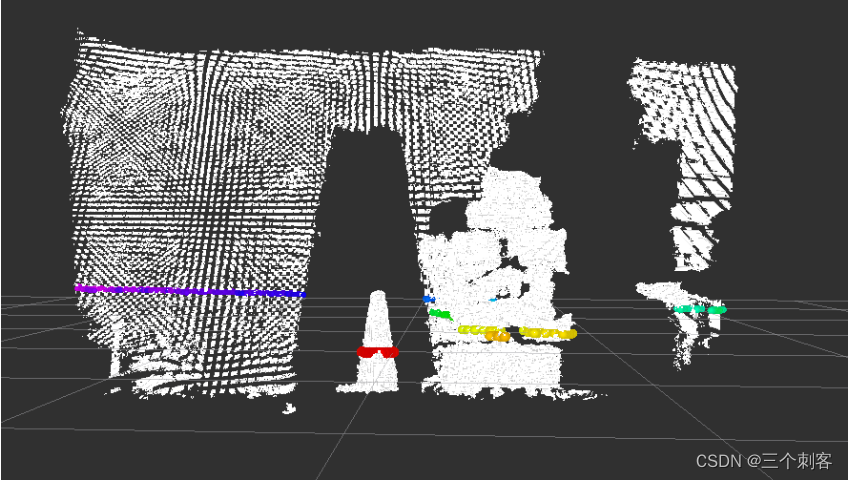
Figure 4 : The result graph after conversion ( Overlook )

1.2 Advantages and disadvantages
advantage : The cost of depth camera is generally lower than that of lidar , It can reduce the hardware cost ;
shortcoming : There is a big gap between depth camera and laser radar in terms of detection range and accuracy ,SLAM The effect may not be as ideal as lidar .
1.3 install
Please install... Before use , The order is as follows :
sudo apt-get install ros-melodic-depthimage-to-laserscan
2.depthimage_to_laserscan Node description
depthimage_to_laserscan The core node of the function package is :depthimage_to_laserscan , For ease of invocation , You need to know the topic subscribed by this node first 、 Published topics and related parameters .
2.1 Subscribe to the Topic
image(sensor_msgs/Image)
- Input image information .
camera_info(sensor_msgs/CameraInfo)
- Camera information of the associated image . There is usually no need to remap , because camera_info Will start with image Subscribe in the same namespace .
2.2 released Topic
scan(sensor_msgs/LaserScan)
- Release the converted lidar type data .
2.3 Parameters
This node has fewer parameters , There are only the following , Generally, you need to set : output_frame_id.
~scan_height(int, default: 1 pixel)
- Set the number of pixel lines used to generate lidar information .
~scan_time(double, default: 1/30.0Hz (0.033s))
- The time interval between two scans .
~range_min(double, default: 0.45m)
- The minimum range returned . combination range_max Use , Only get range_min And range_max Data between .
~range_max(double, default: 10.0m)
- The maximum range returned . combination range_min Use , Only get range_min And range_max Data between .
~output_frame_id(str, default: camera_depth_frame)
- Laser information ID.
3.depthimage_to_laserscan Use
3.1 To write launch file
To write launch File execution , Convert depth information into radar information
<launch>
    <node pkg="depthimage_to_laserscan" type="depthimage_to_laserscan" name="depthimage_to_laserscan">
        <remap from="image" to="/camera/depth/image_raw" />
        <param name="output_frame_id" value="camera"  />
    </node>
</launch>
The subscribed topics need to be set according to the topics published by the depth camera ,output_frame_id It needs to be consistent with the coordinate system of the depth camera .
3.2 modify URDF file
After information conversion , The depth camera will also release radar data , In order not to cause confusion , You can comment out xacro Part of the document about lidar .
3.3 perform
1. start-up gazebo Simulation environment , as follows :

2. start-up rviz And add related components (image、LaserScan), give the result as follows :

4.SLAM application
Now we have realized and tested the conversion of depth image information into lidar information , Next is the practice stage , Through the depth camera SLAM, The process is as follows :
1. Start... First Gazebo Simulation environment ;
2. Start the transformation node ;
3. Start map drawing again launch file ;
4. Start the keyboard control node , It is used to control robot motion mapping ;
rosrun teleop_twist_keyboard teleop_twist_keyboard.py
5. stay rviz Add components to , Show grid map last , It can be controlled by keyboard gazebo Robot motion in , meanwhile , stay rviz Can be shown in gmapping Published grid map data , however , I also introduced , Due to accuracy and detection range , In particular, there are few characteristic points of the environment , The effect of drawing may not be ideal , There will even be map offset in map building .
边栏推荐
猜你喜欢





随机推荐
【动态规划----钢条切割问题】
导航相关消息
Pzk learns data types, binary conversion, input and output, operators, branch statements, ifelse of C language
UnityShader-高斯模糊
socket 长链接
Pzk's first understanding of pointer in learning C language
Automated Deployment Project
[headline] Rebirth: the basis of CNN image classification
Unity hub login no response
5g network identity - detailed explanation of 5g Guti
Li Kou 236. the nearest common ancestor of binary tree
[song] rebirth of me in py introductory training (10): numpy
Acwing the number of square arrays of one question per day
1 semi automatic crawler
遥感影像识别-成像合成
Unity 桌面7.6 版本解读
允许或者禁止同时连接到一个non-domain和一个domain网络
Unity 实用小技巧(更新ing)
学习软件测试时需要配备的运行环境需求搭建
通信机制案例