当前位置:网站首页>Dark horse notes - Common APIs
Dark horse notes - Common APIs
2022-06-26 13:04:00 【Xiaofu knocks the code】
Catalog
Object Common methods of class
summary : Why splice , To invert a string, it is recommended to use StringBuilder?
Case study : Print the contents of the shaping array
System Common methods of class
1.Object
Object The role of classes :
1.Object The method of class is that all subclass objects can be used directly ;
2. A class either inherits by default Object class , Or indirectly inherited Object class ,Object Class is Java Ancestors in .
Object Common methods of class

toString Meaning of existence
Parent class toString() The meaning of method is to be overridden by subclasses , In order to return the content information of the object , Not address information !
equals Meaning of existence
Parent class equals The meaning of method is to be overridden by subclasses , So that the subclass can customize the comparison rules by itself .
The following is a specific code description toString and equals Method :
import java.util.Objects;

public class Student { //extends Object{
    private String name;
    private char sex;
    private int age;

    public Student() {
    }

    public Student(String name, char sex, int age) {
        this.name = name;
        this.sex = sex;
        this.age = age;
    }

    public String getName() {
        return name;
    }

    public void setName(String name) {
        this.name = name;
    }

    public char getSex() {
        return sex;
    }

    public void setSex(char sex) {
        this.sex = sex;
    }

    public int getAge() {
        return age;
    }

    public void setAge(int age) {
        this.age = age;
    }

    /**
      Custom equality rules .
      If the contents of two objects are the same, they are considered equal
     s1.equals(s2)
      Comparator :s1 == this
      The comparee : s2 ==> o
     */
    @Override
    public boolean equals(Object o) {
        // 1、 Determine whether the same object is compared , If it's a return true.
        if (this == o) return true;
        // 2、 If o yes null return false   If o Not a student type, return false  ...Student !=  ..Pig
        if (o == null || this.getClass() != o.getClass()) return false;
        // 3、 explain o It must be a student type and not null
        Student student = (Student) o;
        return sex == student.sex && age == student.age && Objects.equals(name, student.name);
    }


    /**
        Rewrite yourself equals, Customize your own equality rules .
         If the contents of two objects are the same, they are considered equal
     s1.equals(s2)
      Comparator :s1 == this
      The comparee : s2 ==> o
     */
 /*   @Override
    public boolean equals(Object o){
        // 1、 Judge o Is it the type of student
        if(o instanceof Student){
            Student s2 = (Student) o;
            // 2、 Judge 2 Whether the contents of the objects are the same .
//            if(this.name.equals(s2.name) &&
//                 this.age == s2.age && this.sex == s2.sex){
//                return true;
//            }else {
//                return false;
//            }
            return this.name.equals(s2.name) && this.age == s2.age
                    && this.sex == s2.sex ;

        }else {
            //  Students can only compare with students , Otherwise, the result must be false
            return false;
        }
    }*/


    @Override
    public String toString() {
        return "Student{" +
                "name='" + name + '\'' +
                ", sex=" + sex +
                ", age=" + age +
                '}';
    }
}
/**
     The goal is : master Object Class toString Use of methods .
 */
public class Test1 {
    public static void main(String[] args) {
        Student s = new Student(" Zhou Xiong ", ' male ', 19);
        // String rs = s.toString();
        // System.out.println(rs);

        // System.out.println(s.toString());

        //  Output object variables directly , It can be omitted by default toString Call not written
        System.out.println(s);
    }
}
import java.util.Objects;

/**
     The goal is : master Object Class equals Use of methods .
 */
public class Test2 {
    public static void main(String[] args) {
        Student s1 = new Student(" Zhou Xiong ", ' male ', 19);
        Student s2 = new Student(" Zhou Xiong ", ' male ', 19);
        // equals The default is comparison 2 Whether the addresses of two objects are the same , After subclass rewriting, it will call the of subclass rewriting to compare whether the content is the same .
        System.out.println(s1.equals(s2));
        System.out.println(s1 == s2);

        System.out.println(Objects.equals(s1, s2));
    }
}
2.Objects
Objects summary
Objects Is a utility class , Provides some methods to complete some functions .
When comparing strings, the official , There is no string object equals Method , They chose to Objects Of equals Method to compare .
Objects Common ways to do it :

The following is a specific code description equals and isNull Method :
import java.util.Objects;

/**
     The goal is : master objects Common methods of class :equals
 */
public class Test {
    public static void main(String[] args) {
        String s1 = null;
        String s2 = new String("itheima");

        // System.out.println(s1.equals(s2));   //  Left a hidden danger , The pointer may be null .

        System.out.println(Objects.equals(s1, s2)); //  More secure , The result is also right !

        /**
             Objects:
             public static boolean equals(Object a, Object b) {
                     return (a == b) || (a != null && a.equals(b));
             }
         */

        System.out.println(Objects.isNull(s1)); // true
        System.out.println(s1 == null); // true

        System.out.println(Objects.isNull(s2)); // false
        System.out.println(s2 == null); // false

    }
}
summary : What is recommended for content comparison of objects ? Why? ?
1. It is recommended to use Objects Provided equals Method .
2. The result of the comparison is the same , But it's safer .
3.StringBuilder
StringBuilder summary
StringBuilder Is a variable string class , We can think of it as an object container .
effect : Improve string operation efficiency , Such as splicing 、 Modify etc. .
StringBuilder Constructors

/**
     The goal is : Learn how to use StringBuilder Operation string , Finally, you need to know why it works well
 */
public class StringBuilderDemo1 {
    public static void main(String[] args) {
        StringBuilder sb = new StringBuilder(); // ""
        sb.append("a");
        sb.append("b");
        sb.append("c");
        sb.append(1);
        sb.append(false);
        sb.append(3.3);
        sb.append("abc");
        System.out.println(sb);

        StringBuilder sb1 = new StringBuilder();
        //  Support chain programming
        sb1.append("a").append("b").append("c").append(" I love you China ");
        System.out.println(sb1);

        //  reverse
        sb1.reverse().append("110");
        System.out.println(sb1);

        System.out.println(sb1.length());

        //  Be careful :StringBuilder Just a means of splicing strings : Efficient .
        //  The ultimate goal is to restore String type .
        StringBuilder sb2 = new StringBuilder();
        sb2.append("123").append("456");
        //  Return to String type
        String rs = sb2.toString();
        check(rs);
    }

    public static void check(String data){
        System.out.println(data);
    }
}
Main idea : First use StringBuilder Complete the stitching , modify , And then use toString() take StringBuilder The address of the object is returned to String Variable , complete StringBuilder Type to String type .
StringBuilder Common methods
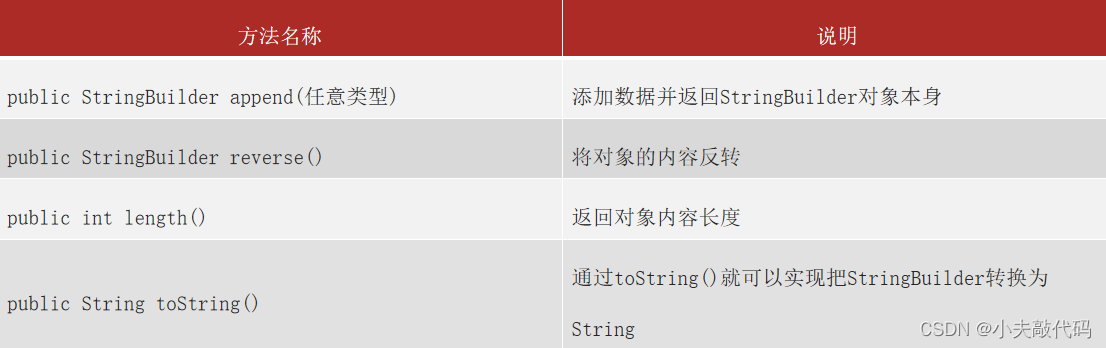
Why? String Use “+” Splicing strings is not as good as using StringBuilder Method ?
Pictured :


summary : Why splice , To invert a string, it is recommended to use StringBuilder?
1.String : Content is immutable 、 Poor string splicing performance .
2.StringBuilder: The content is variable 、 Splicing string has good performance 、 Elegant code .
3. Define the string using String.
4. Splicing 、 Modify the operation string and use StringBuilder
Case study : Print the contents of the shaping array
demand :
Design a method to output the contents of any integer array , The output is required to be in the following format :
“ The contents of the array are :[11, 22, 33, 44, 55]”
analysis :
1、 Define a method , This method is required to receive an array , And output the contents of the array . ---> Do you need parameters ? Do you need a return value type declaration ?
2、 Define a statically initialized array , Call the method , And pass in the array .
public class StringBuilderTest2 {
    public static void main(String[] args) {
        int[] arr1 = null;
        System.out.println(toString(arr1));

        int[] arr2 = {10, 88, 99};
        System.out.println(toString(arr2));

        int[] arr3 = {};
        System.out.println(toString(arr3));
    }

    /**
       1、 Define a method to receive any integer array , Returns the format of the contents of the array
     */
    public static String toString(int[] arr){
       if(arr != null){
            // 2、 Start splicing content .
           StringBuilder sb = new StringBuilder("[");
           for (int i = 0; i < arr.length; i++) {
               sb.append(arr[i] ).append(i == arr.length - 1 ? "" : ", ");
           }
           sb.append("]");
           return sb.toString();
       }else {
           return null;
       }
    }
}
4.Math
Math class
1. Contains methods for performing basic number operations ,Math Class does not provide an exposed constructor .
2. How do I use members in a class ? See if the members of the class are static , If it is , Through the class name, you can directly call .

/**
     The goal is :Math The use of the class .
    Math Used to do mathematical operations .
    Math The methods in the class are all static methods , Call directly with the class name .
     Method :
           Method name                                            explain
          public static int abs(int a)                    To obtain parameters a The absolute value of :
          public static double ceil(double a)             Rounding up
          public static double floor(double a)            Rounding down
          public static double pow(double a, double b)    obtain a Of b The next power
          public static long round(double a)              Round to the nearest whole
     Summary :
           remember .
 */
public class MathDemo {
    public static void main(String[] args) {
        // 1. Take the absolute value : Return positive number
        System.out.println(Math.abs(10)); // 10
        System.out.println(Math.abs(-10.3)); // 10.3

        // 2. Rounding up : 5
        System.out.println(Math.ceil(4.00000001)); // 5.0
        System.out.println(Math.ceil(4.0)); // 4.0
        // 3. Rounding down :4
        System.out.println(Math.floor(4.99999999)); // 4.0
        System.out.println(Math.floor(4.0)); // 4.0

        // 4. Find the exponential power
        System.out.println(Math.pow(2 , 3)); // 2^3 = 8.0
        // 5. rounding  10
        System.out.println(Math.round(4.49999)); // 4
        System.out.println(Math.round(4.500001)); // 5

        System.out.println(Math.random());  // 0.0 - 1.0 ( Not before, not after )

        //  expand : 3 - 9  Random number between   (0 - 6) + 3
        //  [0 - 6] + 3
        int data =  (int)(Math.random() * 7) + 3;
        System.out.println(data);


    }
}
5.System
System Class Overview
System It's also a tool class , Represents the current system , Provides some system related methods .
System Common methods of class

import java.math.BigDecimal;
import java.math.RoundingMode;
import java.text.SimpleDateFormat;
import java.util.Arrays;

/**
     The goal is :System Use of system classes .
    System Represents the current system .( Virtual machine system )
     Static methods :
        1.public static void exit(int status): End JVM virtual machine , Not 0 Is an abnormal termination .
        2.public static long currentTimeMillis(): Get the current system time in milliseconds .( a key )
        3. You can make a copy of the array .
             arraycopy(Object var0, int var1, Object var2, int var3, int var4);
             *  Parameter one : Original array
             *  Parameter two : From which position in the original array to start the assignment .
             *  Parameter 3 : Target array
             *  Parameter 4 : To which position in the target array
             *  Parameter 5 : Assign several .
 */
public class SystemDemo {
    public static void main(String[] args) {
        System.out.println(" Program starts ...");

        // System.exit(0); // JVM End !

        // 2、 Computers believe that time has a origin : return 1970-1-1 00:00:00  The total number of milliseconds to this moment : Time in milliseconds .
        long time = System.currentTimeMillis();
        System.out.println(time);

        long startTime = System.currentTimeMillis();
        //  Calculate the time : Performance analysis
        for (int i = 0; i < 100000; i++) {
            System.out.println(" Output :" + i);
        }
        long endTime = System.currentTimeMillis();
        System.out.println((endTime - startTime)/1000.0 + "s");


        // 3、 Make an array copy ( understand )
        /**
         arraycopy(Object src,  int  srcPos,
         Object dest, int destPos,
         int length)
          Parameter one : The copied array
          Parameter two : Which index location to copy from
          Parameter 3 : Copy target array
          Parameter 4 : Paste position
          Parameter 5 : Number of copied elements
         */
        int[] arr1 = {10, 20, 30, 40, 50, 60, 70};
        int[] arr2 = new int[6]; // [0, 0, 0, 0, 0, 0] ==>  [0, 0, 40, 50, 60, 0]
        System.arraycopy(arr1, 3, arr2, 2, 3);
        System.out.println(Arrays.toString(arr2));

        System.out.println("-------------------");
        double i = 10.0;
        double j = 3.0;

//
//        System.out.println(k1);

        System.out.println(" Program end ....");
    }
}
6.BigDecimal
BigDecimal effect
Used to solve the problem of precision distortion of floating-point operation .

BigDecima Commonly used API
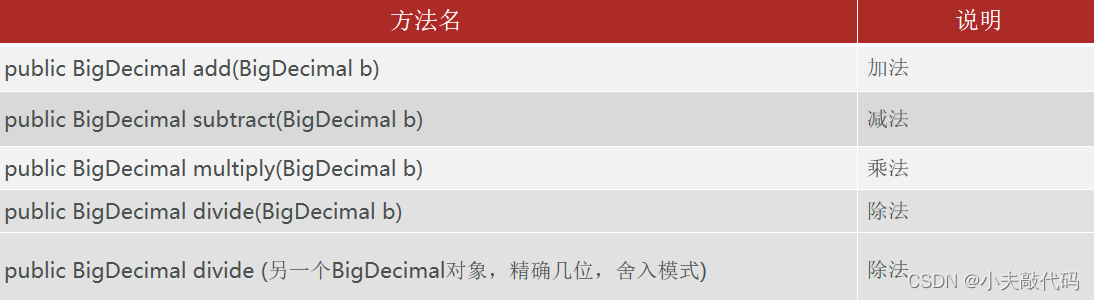
import java.math.BigDecimal;
import java.math.RoundingMode;
import java.text.NumberFormat;

/**
     The goal is :BigDecimal Big data .

     introduce :
         Floating point arithmetic directly +  * /  Data distortion may occur ( Precision problem ).
        BigDecimal It can solve the problem of data distortion of floating-point operation .

    BigDicimal class :
         package :java.math.
         How to create objects ( The best way :)
              public static BigDecimal valueOf(double val) : Wrapping floating-point numbers into big data objects .
         Method statement
              public BigDecimal add(BigDecimal value)        Addition operation
              public BigDecimal subtract(BigDecimal value)   Subtraction
              public BigDecimal multiply(BigDecimal value)   Multiplication
              public BigDecimal divide(BigDecimal value)     Division operations
              public double doubleValue():  hold BigDecimal convert to double type .
 */
public class BigDecimalDemo {
    public static void main(String[] args) {
        //  Floating point arithmetic directly +  * /  Data distortion may occur ( Precision problem ).
        System.out.println(0.09 + 0.01);
        System.out.println(1.0 - 0.32);
        System.out.println(1.015 * 100);
        System.out.println(1.301 / 100);

        System.out.println("-------------------------");
        double a = 0.1;
        double b = 0.2;
        double c = a + b;
        System.out.println(c);
        System.out.println("--------------------------");
        //  Wrap floating-point data into big data objects  BigDeciaml
        BigDecimal a1 = BigDecimal.valueOf(a);
        BigDecimal b1 = BigDecimal.valueOf(b);
        BigDecimal c1 = a1.add(b1);
        // BigDecimal c1 = a1.subtract(b1);
        // BigDecimal c1 = a1.multiply(b1);
        // BigDecimal c1 = a1.divide(b1);
        System.out.println(c1);

        //  Purpose :double
        double rs = c1.doubleValue();
        System.out.println(rs);

        //  matters needing attention :BigDecimal Precision operation is a must
        BigDecimal a11 = BigDecimal.valueOf(10.0);
        BigDecimal b11 = BigDecimal.valueOf(3.0);
        /**
            Parameter one : Divisor   Parameter two : Keep the decimal places    Parameter 3 : rounding mode
         */
        BigDecimal c11 = a11.divide(b11, 2, RoundingMode.HALF_UP); // 3.3333333333
        System.out.println(c11);


        System.out.println("-------------------");
    }
}
Main idea : First create BigDecimal Encapsulate floating point data ( The best way is to call methods ), The result is BigDecimal type , Using variable names .doubleValue() It can be transformed into double type .
边栏推荐
- Openlayers drawing dynamic migration lines and curves
- A must for programmers, an artifact utools that can improve your work efficiency n times
- 倍福PLC基于NT_Shutdown实现控制器自动关机重启
- I - Dollar Dayz
- Go 结构体方法
- opencv高速下载
- Adobe Acrobat prevents 30 security software from viewing PDF files or there are security risks
- code force Party Lemonade
- 倍福PLC基于CX5130实现数据的断电保持
- Electron official docs series: Best Practices
猜你喜欢

Chapter 01_ Installation and use of MySQL under Linux

机组实践实验8——使用CMStudio设计基于基本模型机微程序指令(1)

倍福CX5130换卡对已有的授权文件转移操作

Redis learning - 05 node JS client operation redis and pipeline pipeline

National standard gb28181 protocol easygbs cascaded universal vision platform, how to deal with live message 403?
Echart堆叠柱状图:色块之间添加白色间距效果设置

国标GB28181协议EasyGBS视频平台TCP主动模式拉流异常情况修复

使用SSH密钥对登陆服务器

Solution of Splunk iowait alarm

Software testing - Fundamentals
随机推荐
Explain C language 10 in detail (C language series)
第十章 设置结构化日志记录(二)
ES6模块
First knowledge - Software Testing
【网络是怎么连接的】第二章(中):一个网络包的发出
National standard gb28181 protocol easygbs video platform TCP active mode streaming exception repair
Electron official docs series: Distribution
openlayers 绘制动态迁徙线、曲线
P5733 [deep foundation 6. example 1] automatic correction
UVA5009 Error Curves三分
国标GB28181协议EasyGBS级联宇视平台,保活消息出现403该如何处理?
Vivado 错误代码 [DRC PDCN-2721] 解决
Redis learning - 05 node JS client operation redis and pipeline pipeline
Solution of Splunk iowait alarm
黑马笔记---常用API
使用SSH密钥对登陆服务器
倍福PLC实现绝对值编码器原点断电保持---bias的使用
深度解析当贝盒子B3、腾讯极光5S、小米盒子4S之间的区别
国标GB28181协议EasyGBS视频平台TCP主动模式拉流异常情况修复
面试题积累