当前位置:网站首页>SOC的第一个Hello_World实验
SOC的第一个Hello_World实验
2022-07-23 11:53:00 【YouthBlood9】
录
一、准备工作
在进行这些操作前需要提醒一下的是:我们电脑上应该已经安装好Quartus18.1的标准版、SOC的安装及相应附带需要安装好的 Arm Ds-5 等。
下载各种需要用到的文件或工具
① 黄金工程:
C5MB_GHRD
链接:https://pan.baidu.com/s/1Idyqe4SknBN4Q12f4ZCaaQ
提取码:0000②烧录镜像工具:
Win32DiskImager
链接:https://pan.baidu.com/s/1hCwLOSN1MAxxoVRi–9kqQ
提取码:0000③驱动文件:
CP210x_Universal_Windows_Driver
链接:https://pan.baidu.com/s/1duyk91SvPUcxP96gzlXo4w
提取码:0000④连接板子的显示屏工具:
MobaXterm10.4
链接:https://pan.baidu.com/s/15JUK8ioeDYXSi2zg6-J2ug
提取码:0000镜像文件:
sdcard.img
链接:https://pan.baidu.com/s/1380y-tBCypgKvnz2qTDUdQ
提取码:0000
二、SOC相关镜像写入SD卡
2.1 SD卡格式化
- 首先对拿到的SD卡进行格式化:
插上读卡器→在电脑左下角开始处→右键磁盘管理
将插入的SD卡的所有分区右键→删除卷

- 删除后:

- 之后将卡格式化
2.2 Win32DiskImager
- 解压烧录镜像工具Win32DiskImager,双击.exe 文件

- 选择镜像文件,write(因为我这里是在未插卡时截图,所以有些是灰的,不可用的)

- 之后再看分区中就是再次分好的。
- 因为自己去创建镜像的话耗时很长,所以这里用现成的老师给的镜像。
三、黄金工程文件操作
下载黄金工程文件
双击 .qpf 文件到Quartus中去全编译,大概耗时7-15分钟

在该工程的输出文件夹内,找到sof_to_rbf.bat文件,双击,soc_system.rbf文件更新,修改日期会变成当前时间。

在上一级目录找到generate_hps_qsys_header.sh文件。

打开Soc EDS Command Shell,执行以下操作(注意找到自己文件的位置)

最后将soc_system.rbf复制粘贴到SD卡分出来的最后一个区,替换原来的文件。
四、HelloWorld工程
4.1 工程建立
- 在黄金工程目录下新建一个APP文件夹,用于存放hello_world工程的相关文件

- 打开Soc EDS Command Shell,使用命令eclipse&

- 选择刚刚的app文件夹→ok

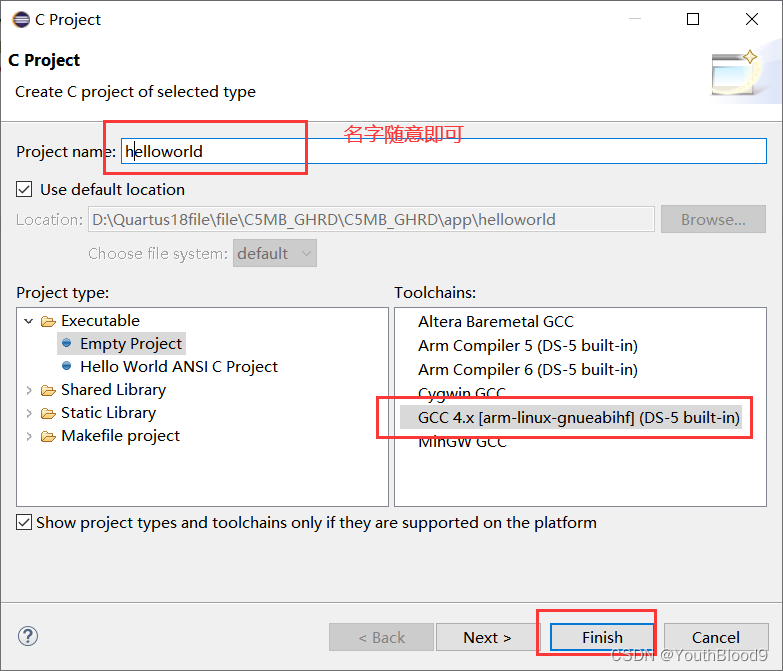
- File → New → C project
- 如下操作
4.2 代码与配置
- 工程右键如下选择

- 填写.c文件,名字随意

- 写入如下代码:
#include <stdio.h>
int main()
{

	while(1)
	{

		printf("Hello World!\n");
	}
}
- 仍旧右键工程,如下选择

- 添加两个文件夹
- D:\intelFPGA\18.1\embedded\ip\altera\hps\altera_hps\hwlib\include\soc_cv_av
- D:\intelFPGA\18.1\embedded\ip\altera\hps\altera_hps\hwlib\include
- 注意自己的路径


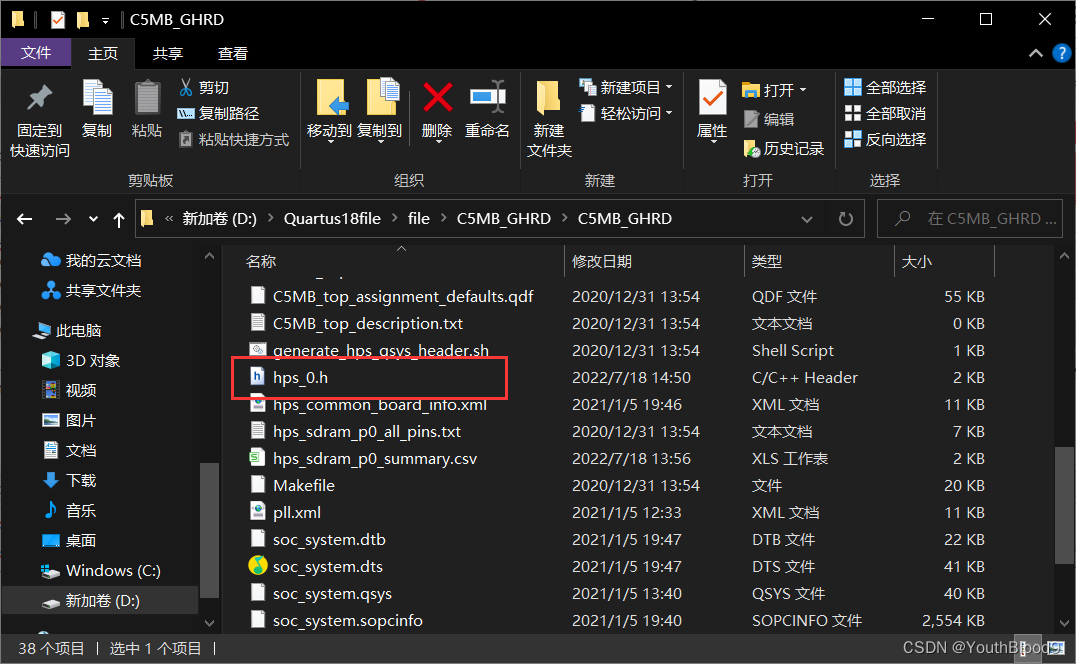
- 之后将黄金工程中 hps_0.h 文件复制到刚刚的工程下
- 点击小锤锤进行编译

- 编译后会生成二进制文件
五、上板准备
5.1 MobaXterm10.4操作
打开 MobaXterm10.4 ,双击 .exe 文件

连接好板子,如下图先添加设备


按下板子上的复位键
登录
然后配置临时ip
ifconfig eth0 192.168.0.1

- 进入vim编辑器后 键盘按下i 即可进行编辑


- 编辑完成后 ESC
输入:wq 保存退出
然后reboot或者复位 - 还要修改电脑ip 选择以太网端口

5.2 eclipse中操作
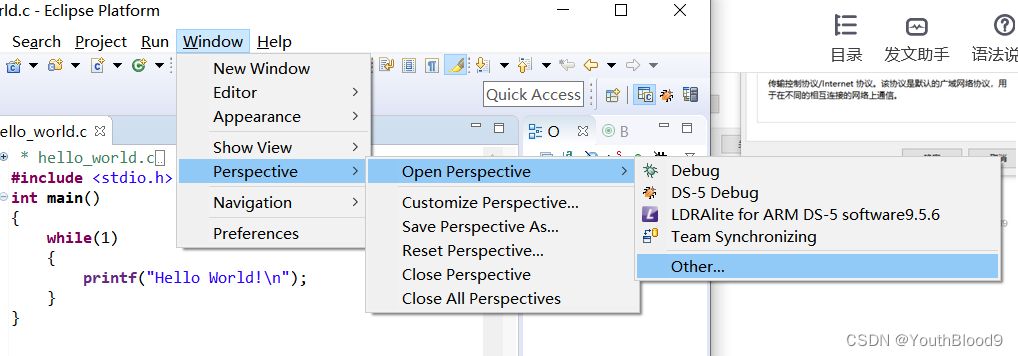
- 如下选择

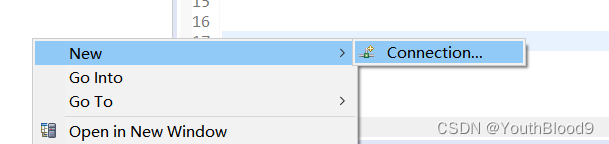
- 进入新界面后,右键new→connection
- SSH →next

- 刚刚配置的板子的IP

- 之后随便点击一下,就会进入

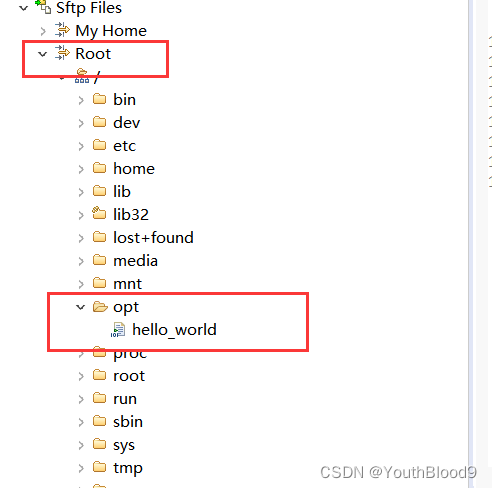
- 之后将之前生成的二进制hello_world文件复制到root apt中
- 右键进入终端

- 在终端输入以下命令
- chmod 777 hello_world
./hello_world - 输出如下
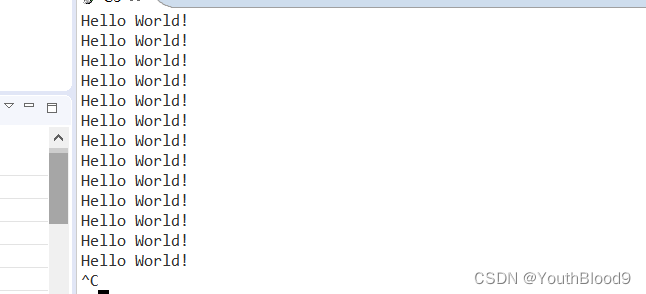
Ctrl+C强制退出
工程完成
六、配置静态ip
同样如上打开MobaXterm10.4
cd /
cd etc
vi network/interfaces
打开编辑器后 点击键盘I添加以下
auto eth0
iface eth0 inet static
address 192.168.0.1    //板子
netmask 255.255.255.0
gateway 192.168.0.2    //电脑
dns-nameserve 114.114.114.114
- ESC退出,:wq保存退出即可。
文章写得仓促,有诸多不完善,有什么问题可以留言。
边栏推荐
- Packaging and use of fmdb
- It's too hard! Tencent T4 boss was still staying up late at 4 a.m. and was actually sorting out the distributed transaction notes
- 忘记oracle密码,如何解决
- 封面 - 电脑知识指南
- Find the minimum value and location in multiple numbers (with repetition)
- [untitled]
- 任务切换的细节
- Exclusive interview | open source Summer Star Niu Xuewei
- 手机使用多了可能会丢掉工作
- 链表合并(暑假每日一题 3)
猜你喜欢

服务器性能调优经验总结

MySQL-字符串按照数值排序

After Effects 教程,如何在 After Effects 中创建动画?
Cloud native (11) | kubernetes chapter kubernetes principle and installation

Comparison of functional characteristics and parameters of several solar panel battery charging management ICs cs5363, cs5350 and cs5328

Bean Validation入门篇----02

New infrastructure of enterprise data in the era of digital transformation | love Analysis Report
黑马程序员-接口测试-四天学习接口测试-第三天-postman高级用法,newman例集导出导入,常用断言,断言json数据,工作原理,全局,环境变量,时间戳,请求前置脚本,关联,批量执行测试用例

Redis installation

C语言学习笔记
随机推荐
中年危机,35岁被退休,打工人拿什么来抗衡资本家?
Backup content hahaha
Vim到底可以配置得多漂亮?
Umijs - data transmission between main and sub applications of Qiankun
md5强碰撞,二次解码,
SharedPreferences数据储存
How to become an elegant Hardware Engineer?
黑马程序员-接口测试-四天学习接口测试-第三天-postman高级用法,newman例集导出导入,常用断言,断言json数据,工作原理,全局,环境变量,时间戳,请求前置脚本,关联,批量执行测试用例
虚拟主播、偶像代言产品出问题谁负责?律师解析
[try to hack] SQL injection less7 (into outfile and Boolean blind annotation)
How beautiful can VIM be configured?
远程系统命令执行
再获殊荣 | OpenSCA获选中国软博会“全球十大开源软件产品”
Design idea of initializing page input parameters
C # close current computer command
Dark horse programmer - interface test - four day learning interface test - third day - advanced usage of postman, export and import of Newman case set, common assertions, assertion JSON data, working
[attack and defense world web] difficulty Samsung 9 points introductory question (Part 2): shrink, lottery
[cloud native] install MySQL and redis services in the docker environment
[operation and maintenance] SSH tunneling relies on the 22 port of SSH to realize the interface service of accessing the remote server
24 道几乎必问的 JVM 面试题,我只会 7 道,你能答出几道?