当前位置:网站首页>AI assisted paper drawing of PPT drawing
AI assisted paper drawing of PPT drawing
2022-06-25 12:52:00 【Yancexi】
PPT Drawing AI Help paper chart
Preface
Before in order to in the boundary PPT Inside drawing paper map , Revised office The registry , Set the export resolution to 600dpi, But this method has one disadvantage : You need to resize the page in advance , And you can only draw one slide at a time , Then select Save as .jpg, This is useful for drawing multiple graphs at once , And it's very uncomfortable for salt dogs with uncertain picture size in the drawing process . see PPT Draw the resolution of the paper
So this time , Introduce a method that you feel comfortable with ——PPT Plot export PDF after , With the help of Adobe Illustrator (AI) Edit and save .
One 、 Tool preparation
Office Power Point; AI
Here is a recommended location for obtaining and installing software resources , WeChat official account 【 Software think tank 】, You can find it in the software library below AI CC Resources for .

Two 、PPT Plot export
1. draw
When drawing , There is no need to consider the size size , Don't worry about one or two . Take two pages as an example :
choice file >> export >> establish PDF, It is not recommended to choose Save as PDF, Because the export mode can select the export range , If you only want to export one , Just choose one , Select all when exporting all , Comparative freedom .
2.AI Help with post-processing
open AI, Basic knowledge is not introduced here ( I am also Xiaobai ), Open and create a new document as follows :
choice file >> Implantation , Navigate to the... You want to import PDF file , then Clip to media box ( You can also try other options , But after importing, you need to The embedded To continue editing ).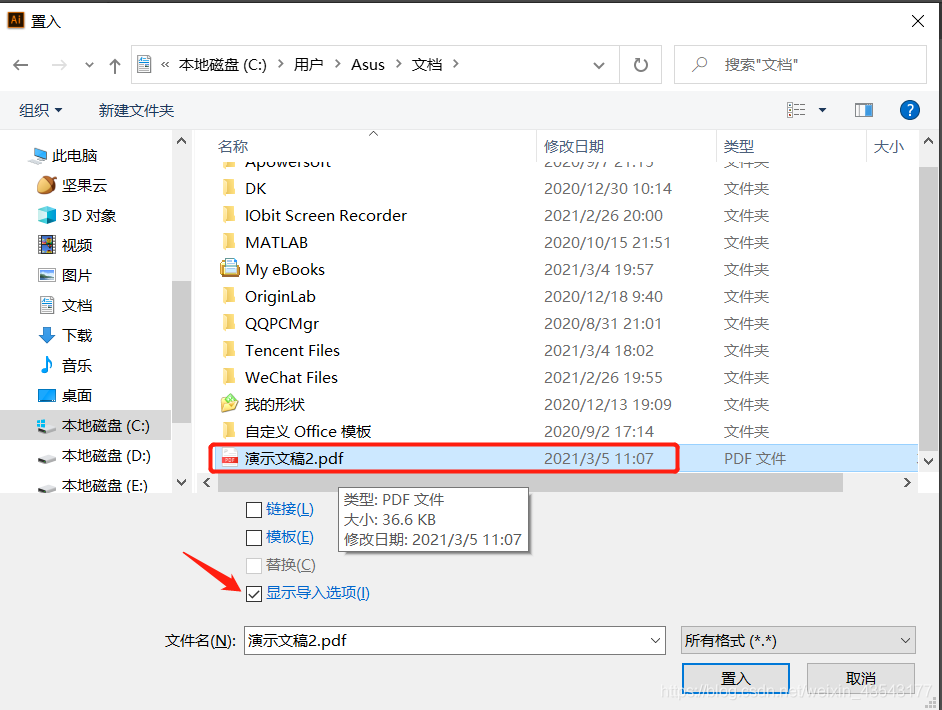

After import : Release the mask >> Ungroup >> Release the mask >> wait , You can edit .
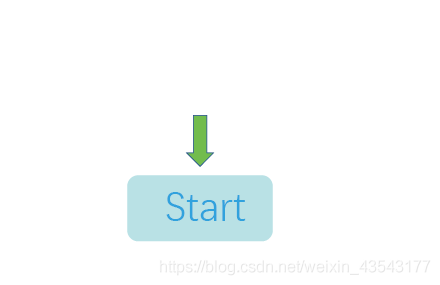
Of course , In most cases, it will not be edited again , Just remove some borders to ensure that the smallest graphic area is like this .
Not like this , In this case, the export may also have a white edge 
Select export as jpg, Resolution selection 600dpi that will do . It should be noted that , This import method is generally used after clicking OK , Place the drawing in AI In the middle of the day , Click the mouse directly , According to 1:1 Scale placement of , If you left click the frame , Will be scaled according to the size of the drawn box . If in PPT When drawing in , The size of the graph has been considered , At this time, the placement is based on 1:1 The proportion of .
If according to file >> open >>PDF file How to import , Naturally 1:1 The proportion of , The import result is the same as above . If other opening methods cannot be edited , Click... In the quick operation on the right The embedded Before editing .
summary
That's what we're going to record today , This article only briefly introduces PPT+AI Use , Have to say AI Really powerful , If you use it skillfully, you can put it aside PPT direct AI mapping .
边栏推荐
- PHP replaces the key of a two-dimensional array with a specified element value
- (2) Pyqt5 tutorial -- > using qtdesigner to separate interface code
- 为何数据库也云原生了?
- (6) Pyqt5--- > window jump (registration login function)
- Parse JSON format data and save it to entity class
- Possible problems when idea encounters errors occurred while compiling module (solved)
- Wechat full-text search technology optimization
- Some fields are ignored in tp6 query
- Laravel excel export
- PPT绘图之AI助力论文图
猜你喜欢

Laravel excel export

GNSS receiver technology and application review

初识CANOpen

Meichuang was selected into the list of "2022 CCIA top 50 Chinese network security competitiveness"

二叉树之_哈夫曼树_哈弗曼编码

地理空间搜索 ->R树索引
First acquaintance with CANopen

【AI助力科研】loss曲线傻瓜式绘制
Geospatial search - > R tree index

Zhangxiaobai's way of penetration (V) -- detailed explanation of upload vulnerability and parsing vulnerability
随机推荐
Some fields are ignored in tp6 query
torch.tensor拼接与list(tensors)
RESTful和RPC
2021-09-02
JS array length is defined
Laravel excel export
阿里稳定性之故障应急处理流程
PHP parsing QR code content
laravel 9
Common software numerical filtering methods (I) have been applied
Geospatial search: implementation principle of KD tree
Tp6 exception handling try catch writing method
Penetration tool environment -- use of cknife Chinese kitchen knife
PHP appends the same elements to a two-dimensional array
Meichuang was selected into the list of "2022 CCIA top 50 Chinese network security competitiveness"
1251- Client does not support authentication protocol MySql错误解决方案
2021-10-21
@Scheduled implementation of scheduled tasks (concurrent execution of multiple scheduled tasks)
2021-09-30
Embedded software development written examination and interview notes (latest update: February 17, 2022)