当前位置:网站首页>Teach you how to install the latest version of mysql8.0 database on windows, nanny level teaching
Teach you how to install the latest version of mysql8.0 database on windows, nanny level teaching
2022-06-29 17:36:00 【Operation and maintenance home】
One 、 Advance cognition
If you want to be in windows Run in mysql, need 32 Bits or 64 Of windows operating system , for example :windows10、windows11 etc. ;
windows Two installation methods are provided under the platform :
mysqlBinary distribution version (.msiThe installation files );Installation free version (
.zipCompressed files )
Generally, we use binary distribution to install .
The environment I use here is :
windows11-64 position
mysql Binary distribution version
Two 、 download mysql Installation package
1、 Open the browser , visit mysql Download address on the official website
https://dev.mysql.com/downloads/installer/
2、 Click the download button , Download the installation package to local
The installer has two versions , Respectively mysql-installer-web-community and mysql-installer-communityl, among mysql-installer-web-community Install version for online ,mysql-installer-communityl Install version for offline . Here, of course, we choose the offline installation version .

Then click... In the following interface (No thanks, just start my download.) mean , We don't log in or register , Just download an installation package .

Then it will start our download , When we finish downloading , You'll get the following mysql Software installation package ;

3、 ... and 、 install mysql
double-click mysql Installation package , After a while , The following installation interface appears ;

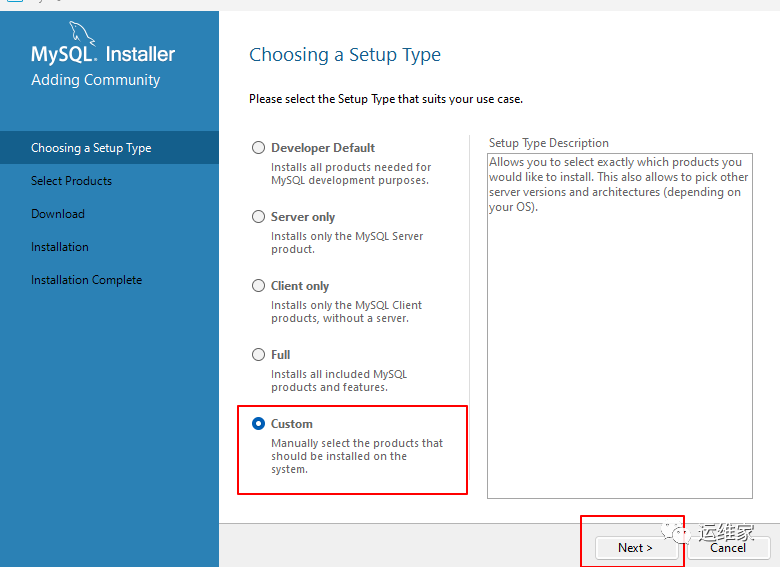
You can see that there is 5 Installation type in , Namely :
Developer Default: Default installation typeServer only: Just as a serverClient only: Just as a clientFull: Completely installedCustom: Custom installation
Here we choose Custom, That is, custom installation , And then click Next;
The following interface appears ;

We do selective installation ;
Our option MySQL Server 8.0.29-X64、MYSQL Documentation 8.0.29-X86 and Samples and Examples 8.0.29-X86 that will do .

And then click Next Interface , Appear below , We click Execute( perform ):

Then the installation will be performed , Here's the picture :

Then we waited patiently , Until the following interface appears , We click Next;
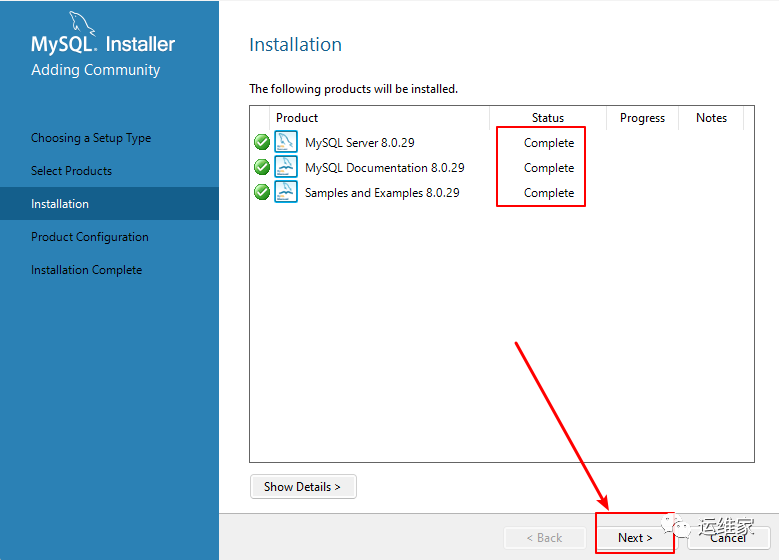
Appear below , We still click Next;

Four 、 To configure mysql
The server type configuration window appears , Pictured :

When we click Config Type When , You can see several options appear ;

The above meanings are :
Development Machine( Developing machines ): This option represents a typical personal desktop workstation . Suppose there are multiple desktop applications running on the machine , takeMySQLThe server is configured to use the least system resources .Server Machine( The server ): This option represents the server ,MySQLThe server can run with other applications , for exampleFTP、EmailandWebThe server .MySQLThe server is configured to use the appropriate proportion of system resources .Dedicated Machine( Dedicated server ): This option represents run onlyMySQLServers served . Assuming no other service program is running ,MySQLThe server is configured to use all available system resources .
Here we use Development Machine( Developing machines ), Easy to use , Other default configurations are not changed , Just click Next.
As shown in the figure Permission setting method window , The first single option means MySQL 8.0 New ways of Authorization , use SHA256 Basic cryptographic methods ; The second single option means traditional authorization methods ( Retain 5.x Version compatibility ). Here's the second single option .

Click on Next after , We are in the new pop-up interface , To configure mysql Database root User name login information , What I'm setting up here is Yunweijia0909, We need to input twice ;
Of course , We can also add other users to this interface , This can be configured according to the actual situation ;

Once configured , Let's continue to click Next Button ;
Then you can configure the database name , Here we configure MySQL;

Click on Next, Then click Execute, Pictured :

The system automatically configures MySQL The server . When the configuration is complete , single click Finish( complete ) Button , A new dialog box will pop up ;

Next, click... In the interface Next after , The following interface appears :
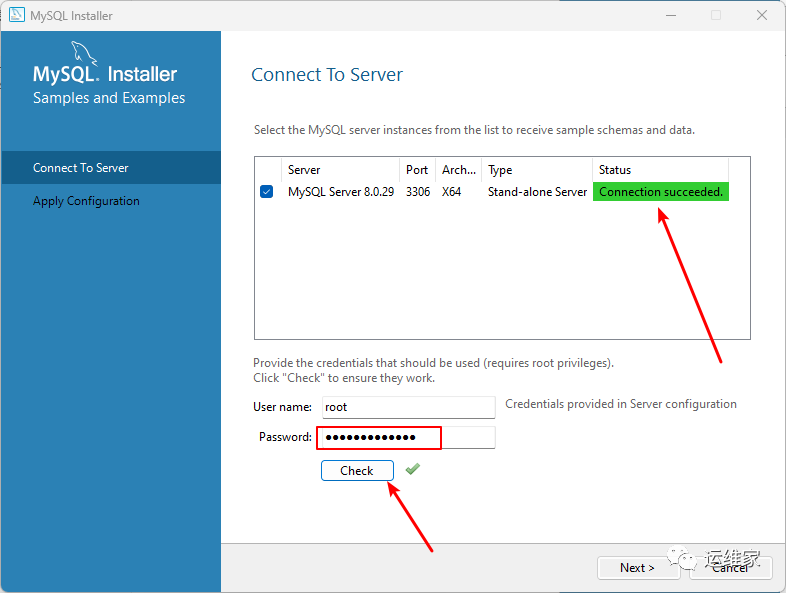
Here we enter the previously configured user information , namely Yunweijia0909, And then click Check Button , You'll find him in the upper right corner Status Turned into Connection succeeded, Indicates that the connection is successful . When you're sure , Click on Next;
Click... In the new interface Execute;
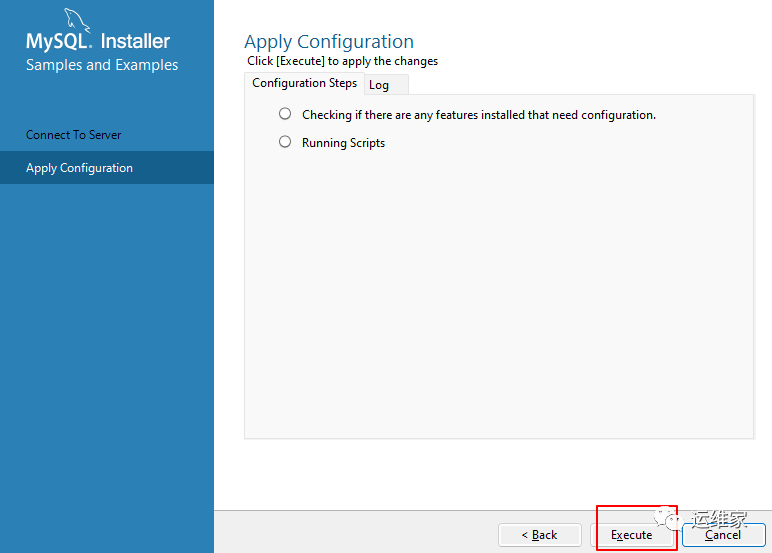
After the operation is completed, the Finish Button , Click to ;

Then click... In the lower right corner of the new interface Next, appear :

our Mysql The installation is complete .
5、 ... and 、 verification
1、 Task manager
When you open the task manager, you will also find a mysql.exe The process of , Pictured :

2、 Command line
PS C:\Users\22768> mysql -uroot -p
Enter password: *************
Welcome to the MySQL monitor.  Commands end with ; or \g.
Your MySQL connection id is 18
Server version: 8.0.29 MySQL Community Server - GPL

Copyright (c) 2000, 2021, Oracle and/or its affiliates.

Oracle is a registered trademark of Oracle Corporation and/or its
affiliates. Other names may be trademarks of their respective
owners.

Type 'help;' or '\h' for help. Type '\c' to clear the current input statement.

mysql>
thus , In this paper, the end .
For more information, go to VX official account “ Operation and maintenance home ” , Get the latest article .
------ “ Operation and maintenance home ” ------
------ “ Operation and maintenance home ” ------
------ “ Operation and maintenance home ” ------
Interview with system operation and maintenance engineer , Nominations for excellent staff of operation and maintenance engineer ,tr O & M Engineer , I'm calling the operation and maintenance engineer for daily work ,IT Senior operation and maintenance engineer ;
Intelligent manufacturing operation and maintenance engineer training course , Remote office operation and maintenance engineer , Salary of Mindray medical operation and maintenance engineer , What does the backstage O & M engineer do ;
How about the wind operation and maintenance engineer , Inspur cloud operation and maintenance engineer , Sample certificate of medical equipment operation and maintenance engineer , Boyfriend of operation and maintenance engineer , The O & M engineer is grumpy .
边栏推荐
- Bags of Binary Words for Fast Place Recognition in Image Sequenc
- Sectigo ov pan domain name certificate is 1590 yuan a year easy to use
- 基于STM32F103ZET6库函数定时器中断实验
- Kali installation tutorial 2020
- KUKA子程序/函数怎么建立和使用方法
- R语言使用自定义函数编写深度学习Leaky ReLU激活函数、并可视化Leaky ReLU激活函数
- R language uses user-defined functions to write deep learning leaky relu activation functions and visualize leaky relu activation functions
- MySQL highly available cluster – MHA
- Graduation season | Huawei experts teach interview tips: how to get a high salary offer from a large factory?
- Mysql高可用集群–MHA
猜你喜欢

mysql支持外键吗

如何使用B/S开发工具DevExtreme的图表控件 - 自定义轴位置?

Tencent cloud released orbit, an automated delivery and operation and maintenance product, to promote enterprise applications to be fully cloud native

Redis 原理 - Sorted Set (ZSet)

linux中mysql 1045错误如何解决

Industry application of smart city based on GIS 3D visualization

【WebDriver】使用AutoIt上传文件
![[the sixth operation of modern signal processing]](/img/49/7844a00077e56fd4d73e3ba515f8a6.png)
[the sixth operation of modern signal processing]

How to create a virtual image

mysql如何查询表的字符集编码
随机推荐
What are the advantages of SaaS services
How to create a virtual image
Custom handlerinterceptor interceptor for user authentication
MySQL highly available cluster – MHA
Kubernetes deployment dashboard (Web UI management interface)
Interrupt怎么用
Industry application of smart city based on GIS 3D visualization
自定义HandlerInterceptor拦截器实现用户鉴权
The aggregate function in the epidisplay package of R language divides numerical variables into different subsets based on factor variables, and calculates the summary statistics and aggregate data. W
Kali installation tutorial 2020
Can MySQL views create indexes
Bags of Binary Words for Fast Place Recognition in Image Sequenc
PCB板框的绘制——AD19
传承中华美德,关注中老年大健康,育润奶粉敬老情浓
First batch! Tencent cloud's ability to pass the solution of the government affairs collaboration platform of the China Academy of ICT
开源仓库贡献 —— 提交 PR
How to use interrupt
Development of freedom free agreement pledge mining system
分割回文串[dp + dfs组合]
Opencv+YOLO-V3实现目标跟踪