当前位置:网站首页>Basic knowledge points in js - BOM
Basic knowledge points in js - BOM
2022-07-30 17:42:00 【Matcha_ice_cream】
整理学习过程中的 js 知识点,防遗忘 !!!
JavaScript 基础知识点
一、BOM
BOM :Browser Object Model 为浏览器对象模型.
BOM gives us some objects,用来完成浏览器的操作.
对于Navigator、Location、History、Screen 这些对象,是通过window.属性的形式调用的.
1. Window
Window:表示整个浏览器窗口,同时Window也是网页中的全局对象
2. Navigator
Navigator:NavigatorIndicates browser information,Can be used to identify different browsers
1)直接使用
代码展示:直接输出navigator
<!DOCTYPE html>
<html lang="en">
<head>
  <meta charset="UTF-8">
  <meta http-equiv="X-UA-Compatible" content="IE=edge">
  <meta name="viewport" content="width=device-width, initial-scale=1.0">
  <title>BOM</title>
</head>
<script> console.log("navigator",navigator); console.log("window.navigator", window.navigator); </script>
<body>
</body>
</html>
显示效果:

2)userAgent 属性
代码展示:使用navigator.userAgent
userAgent 属性:It returns what the client sent to the server user- agent 头部的值
<!DOCTYPE html>
<html lang="en">
<head>
  <meta charset="UTF-8">
  <meta http-equiv="X-UA-Compatible" content="IE=edge">
  <meta name="viewport" content="width=device-width, initial-scale=1.0">
  <title>BOM</title>
</head>
<script> console.log("userAgent", navigator.userAgent); </script>
<body>
</body>
</html>
显示效果:Displayed differently in different browsers.
1.在chromeThe return value in the browser
userAgent Mozilla/5.0 (Linux; Android 6.0; Nexus 5 Build/MRA58N) AppleWebKit/537.36 (KHTML, like Gecko) Chrome/101.0.0.0 Mobile Safari/537.36
2.在firefoxThe return value in the browser
userAgent Mozilla/5.0 (Windows NT 10.0; Win64; x64; rv:103.0) Gecko/20100101 Firefox/103.0
3.在Microsoft EdgeThe return value in the browser
userAgent Mozilla/5.0 (Windows NT 10.0; Win64; x64) AppleWebKit/537.36 (KHTML, like Gecko) Chrome/103.0.5060.134 Safari/537.36 Edg/103.0.1264.71
4.在IE11The return value in the browser
userAgent Mozilla/5.0 (Windows NT 10.0; WOW64; Trident/7.0; .NET4.0C; .NET4.0E; .NET CLR 2.0.50727; .NET CLR 3.0.30729; .NET CLR 3.5.30729; rv:11.0) like Gecko
5.IE10The return value in the browser
userAgent Mozilla/5.0 (compatible; MSIE 10.0; Windows NT 10.0; WOW64; Trident/7.0; .NET4.0C; .NET4.0E; .NET CLR 2.0.50727; .NET CLR 3.0.30729; .NET CLR 3.5.30729)
6.IE9The return value in the browser
userAgent Mozilla/5.0 (compatible; MSIE 9.0; Windows NT 10.0; WOW64; Trident/7.0; .NET4.0C; .NET4.0E; .NET CLR 2.0.50727; .NET CLR 3.0.30729; .NET CLR 3.5.30729)
7.IE8The return value in the browser
userAgent Mozilla/4.0 (compatible; MSIE 8.0; Windows NT 10.0; WOW64; Trident/7.0; .NET4.0C; .NET4.0E; .NET CLR 2.0.50727; .NET CLR 3.0.30729; .NET CLR 3.5.30729)
8.IE7The return value in the browser
userAgent Mozilla/4.0 (compatible; MSIE 7.0; Windows NT 10.0; WOW64; Trident/7.0; .NET4.0C; .NET4.0E; .NET CLR 2.0.50727; .NET CLR 3.0.30729; .NET CLR 3.5.30729)
通过使用 navigator.userAgent 判断浏览器的类型
<!DOCTYPE html>
<html lang="en">
<head>
  <meta charset="UTF-8">
  <meta http-equiv="X-UA-Compatible" content="IE=edge">
  <meta name="viewport" content="width=device-width, initial-scale=1.0">
  <title>BOM</title>
</head>
<script type="text/javascript"> var ua = navigator.userAgent; if(/chrome/i.test(ua)) {
       alert("这里是Chrome浏览器!!!"); } else if(/firefox/i.test(ua)) {
       alert("Here is the Firefox browser!!!"); } else if(/mise/i.test(ua)) {
       console.log("这里是IE浏览器!!!"); //注意,这里不包括IE11,Therefore, using this method may not be able to correctly determine the corresponding browser information } </script>
<body>
</body>
</html>
如果使用userAgentThe type of browser cannot be determined,我们可以使用 ActiveXObject来判断 (对于IE)
<!DOCTYPE html>
<html lang="en">
<head>
  <meta charset="UTF-8">
  <meta http-equiv="X-UA-Compatible" content="IE=edge">
  <meta name="viewport" content="width=device-width, initial-scale=1.0">
  <title>BOM</title>
</head>
<script type="text/javascript"> var ua = navigator.userAgent; if(/chrome/i.test(ua)) {
       alert("这里是Chrome浏览器!!!"); } else if(/firefox/i.test(ua)) {
       alert("Here is the Firefox browser!!!"); } else if("ActiveXObject" in window) {
       alert("这里是IE浏览器!!!"); //进行 ActiveXObject attribute judgment } </script>
<body>
</body>
</html>
注意:in judging whether it belongsIE浏览器时,不能够直接使用 window.ActiveXObject 来进行判断,因为在 ie11 中,虽然有ActiveXObject属性,But its boolean value seems to be false
3. Location
Location:浏览器的地址信息
1)直接使用location
代码展示:
<!DOCTYPE html>
<html lang="en">
<head>
  <meta charset="UTF-8">
  <meta http-equiv="X-UA-Compatible" content="IE=edge">
  <meta name="viewport" content="width=device-width, initial-scale=1.0">
  <title>location</title>
</head>
<script> window.onload = function() {
       var btn = document.getElementById("btn"); btn.onclick = function() {
       alert(location); } } </script>
<body>
  <button id="btn">location按钮</button>
  <h1>location</h1>
</body>
</html>
显示效果:

2)更改 location的值
location的值更改之后,The page will automatically jump to the changed new one location的地址
代码展示:
<!DOCTYPE html>
<html lang="en">
<head>
  <meta charset="UTF-8">
  <meta http-equiv="X-UA-Compatible" content="IE=edge">
  <meta name="viewport" content="width=device-width, initial-scale=1.0">
  <title>location</title>
</head>
<script> window.onload = function() {
       var btn = document.getElementById("btn"); btn.onclick = function() {
       location = "https://www.baidu.com/"; } } </script>
<body>
  <button id="btn">location按钮</button>
  <h1>location</h1>
</body>
</html>
展示效果:

3)location的 assign() 方法
assign()方法:Indicates loading a new document.This method is the same as direct modification location的效果一样.
代码展示:
<!DOCTYPE html>
<html lang="en">
<head>
  <meta charset="UTF-8">
  <meta http-equiv="X-UA-Compatible" content="IE=edge">
  <meta name="viewport" content="width=device-width, initial-scale=1.0">
  <title>location</title>
</head>
<script> window.onload = function() {
       var btn = document.getElementById("btn"); btn.onclick = function() {
       location.assign("https://www.baidu.com/"); } } </script>
<body>
  <button id="btn">location按钮</button>
  <h1>location</h1>
</body>
</html>
显示效果:
4)location的 reload()方法
reload()方法,Indicates to reload the current document.(相当于刷新按钮)
代码展示:
<!DOCTYPE html>
<html lang="en">
<head>
  <meta charset="UTF-8">
  <meta http-equiv="X-UA-Compatible" content="IE=edge">
  <meta name="viewport" content="width=device-width, initial-scale=1.0">
  <title>location</title>
</head>
<script> window.onload = function() {
       var btn = document.getElementById("btn"); btn.onclick = function() {
       location.reload(); } } </script>
<body>
  <button id="btn">location按钮</button>
  <h1>location</h1>
  <input type="text">
</body>
</html>
显示效果:

5)location的 replace()方法
代码展示:
<!DOCTYPE html>
<html lang="en">
<head>
  <meta charset="UTF-8">
  <meta http-equiv="X-UA-Compatible" content="IE=edge">
  <meta name="viewport" content="width=device-width, initial-scale=1.0">
  <title>location</title>
</head>
<script> window.onload = function() {
       var btn = document.getElementById("btn"); btn.onclick = function() {
       location.replace("https://www.baidu.com/"); } } </script>
<body>
  <button id="btn">location按钮</button>
  <h1>location</h1>
</body>
</html>
显示效果: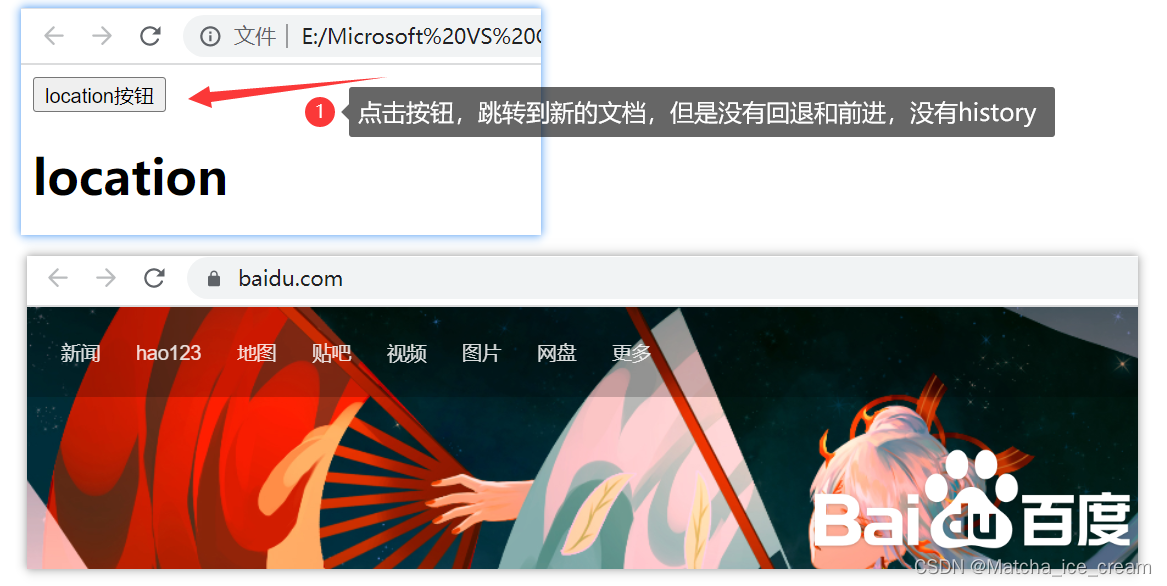
注意:使用replace()方法时,是没有history的,Forward and backward are not supported.
4. History
History:浏览器的历史记录,The browser's history can be manipulated through this object,But for privacy reasons,historyMainly for forward or backward page change
1)length 属性
history中具有 length 属性,It returns the number in the browser history list
//Overall creation3个页面
1.history.html页面
<!DOCTYPE html>
<html lang="en">
<head>
  <meta charset="UTF-8">
  <meta http-equiv="X-UA-Compatible" content="IE=edge">
  <meta name="viewport" content="width=device-width, initial-scale=1.0">
  <title>history</title>
</head>
<script type="text/javascript"> alert(history.length); </script>
<body>
  <h1>History</h1>
  <a href="historypart.html">去historypart页面</a>
</body>
</html>


2.historypart.html页面
<!DOCTYPE html>
<html lang="en">
<head>
  <meta charset="UTF-8">
  <meta http-equiv="X-UA-Compatible" content="IE=edge">
  <meta name="viewport" content="width=device-width, initial-scale=1.0">
  <title>historypart</title>
</head>
<body>
  <h1>Historypart</h1>
  <a href="historypart01.html">去historypart01界面</a>
</body>
</html>

3.historypart01.html页面
<!DOCTYPE html>
<html lang="en">
<head>
  <meta charset="UTF-8">
  <meta http-equiv="X-UA-Compatible" content="IE=edge">
  <meta name="viewport" content="width=device-width, initial-scale=1.0">
  <title>historypart01</title>
</head>
<body>
  <h1>historypart01</h1>
</body>
</html>
显示效果:
2)back()方法
history.back()method can be used to rewind the page
在 3.historypart01.html 页面中,添加一个按钮,Used to complete the back function
代码展示:
<!DOCTYPE html>
<html lang="en">
<head>
  <meta charset="UTF-8">
  <meta http-equiv="X-UA-Compatible" content="IE=edge">
  <meta name="viewport" content="width=device-width, initial-scale=1.0">
  <title>historypart01</title>
</head>
<script type="text/javascript"> window.onload = function() {
       var btn = document.getElementById("button"); btn.onclick = function() {
       history.back(); } } </script>
<body>
  <h1>historypart01</h1>
  <button id="button">后退</button>
</body>
</html>
展示效果:
3)forward() 方法
history.forward()method is used to advance one page.
在2.historypart.htmlA forward button has been added to the page,通过forward()method to complete the forward operation
代码展示:
<!DOCTYPE html>
<html lang="en">
<head>
  <meta charset="UTF-8">
  <meta http-equiv="X-UA-Compatible" content="IE=edge">
  <meta name="viewport" content="width=device-width, initial-scale=1.0">
  <title>historypart</title>
</head>
<script> window.onload = function() {
       var btn = document.getElementById("btn"); btn.onclick = function() {
       history.forward(); } } </script>
<body>
  <button id="btn">前进</button>
  <h1>Historypart</h1>
  <a href="historypart01.html">去historypart01界面</a>
</body>
</html>
展示效果:
4)go() 方法
在1.history.html页面中添加按钮,进行history.go()方法的操作
代码展示:
<!DOCTYPE html>
<html lang="en">
<head>
  <meta charset="UTF-8">
  <meta http-equiv="X-UA-Compatible" content="IE=edge">
  <meta name="viewport" content="width=device-width, initial-scale=1.0">
  <title>history</title>
</head>
<script type="text/javascript"> window.onload = function() {
       var btn = document.getElementById("btn"); btn.onclick = function() {
       history.go(2); //跳转2个页面,That is to say, the third page is reached //可以随意设置go的参数,A positive value is forward,负值为后退 //eg:history.go(-1):表示后退一个页面 } } </script>
<body>
  <button id="btn">随意</button>
  <h1>History</h1>
  <a href="historypart.html">去historypart页面</a>
</body>
</html>
展示效果:
5. Screen
Screen:User's screen information,The information on the user's display can be read
6. 浏览器内核简介
The browser kernel refers to the core program that the browser runs.分为两个部分:渲染引擎和JS引擎
The current mainstream browsers have IE/Edge、Chrome、Firefox、Opera、Safari等
| 浏览器 | 渲染内核 | JS引擎 |
|---|---|---|
| IE / Edge | Trident(<= IE10); EdgeHTML | JScript(<IE9); Chakra(IE9+及Edge) |
| Chrome | Chromium(Webkit); Blink | V8 |
| Firefox | Gecko | SpiderMonkey(< 3.0); TraceMonkey(< 3/6);JaegerMonkey(4.0+) |
| Safari | Webkit/Webkit2 | JSCore/Nitro(4+) |
| Opera | blink | Futhark(9.5-10.2); Carakan(10.5) |
边栏推荐
- X射线的应用是什么?
- C陷阱与缺陷 第6章 预处理器 6.1 不能忽视宏定义中的空格
- bean的生命周期
- 升级 MDK 5.37 后的问题处理: AC6编译选项, printf, 重启失效等
- 图卷积神经网络的数学原理——谱图理论和傅里叶变换初探
- olap——入门ClickHouse
- Moralis去中心化Web3应用开发教程
- Daily practice------Generate 13-digit bar, Ean-13 code rule: The thirteenth digit is the check code obtained by the calculation of the first twelve digits.
- PLSQL Developer安装和配置
- Express framework connects MySQL and ORM framework
猜你喜欢

Wanhua chemical fine chemical industry innovation product assembly

17.机器学习系统的设计

Promise入门到精通(1.5w字详解)

torch.optim.Adam() function usage

Tensorflow模型量化(Quantization)原理及其实现方法

WeChat applet picker scroll selector use detailed explanation

躲避雪糕刺客?通过爬虫爬取雪糕价格

matlab simulink锂离子电池智能充电策略研究

un7.30:Linux——如何在docker容器中显示MySQL的中文字符?

关于内和调试无法查看ntdll内存的问题
随机推荐
腾讯专家献上技术干货,带你一览腾讯广告召回系统的演进
C陷阱与缺陷 第7章 可移植性缺陷 7.3 整数的大小
莫队--优雅的暴力
C陷阱与缺陷 第7章 可移植性缺陷 7.4 字符是有符号数还是无符号数
S7-200SMART中定时器的使用方法和常见注意事项汇总
C陷阱与缺陷 第7章 可移植性缺陷 7.5 移位运算符
Wincc报表教程(SQL数据库的建立,wincc在数据库中保存和查询数据,调用Excel模板把数据保存到指定的位置和打印功能)
Research on intelligent charging strategy of matlab simulink lithium-ion battery
升级 MDK 5.37 后的问题处理: AC6编译选项, printf, 重启失效等
【AAAI2020】阿里DMR:融合Matching思想的深度排序模型
知识蒸馏3:YOLOV5项目准备
数据库系统原理与应用教程(064)—— MySQL 练习题:操作题 51-61(八):查询条件的构造、通配符
升级Win11后不喜欢怎么退回Win10系统?
Error EPERM operation not permitted, mkdir ‘Dsoftwarenodejsnode_cache_cacach两种解决办法
【云商店公告】关于7月30日帮助中心更新通知
Redis缓存穿透-热点缓存并发重建-缓存与数据库双写不一致-缓存雪崩
一个 15 年 SAP ABAP 开发人员分享的 SAPGUI 一些个性化设置和实用小技巧试读版
PyTorch 猫狗分类源代码及数据集
bean的生命周期
Microsoft Office 2019 软件下载安装详细教程!