当前位置:网站首页>First experience of tryme in opengauss
First experience of tryme in opengauss
2022-07-27 08:22:00 【openGauss】
stay openGauss2022 At the developer conference ,openGauss The community has launched an online experience and learning platform TryMe.TryMe The platform aims to provide a lightweight online operation platform for database enthusiasts , be based on openGauss Community openGauss-webclient Open source project creation , use Go Language development , With web The way of service provides services for developers , Help want to know and learn openGauss Quick contact with users openGauss.
As a programmer with a strong curiosity for new things , Of course, the author also went to play TryMe platform . Now the author will share with the majority of friends the first use TryMe Some experience of the platform .
TryMe The official website of the platform is https://tryme.opengauss.org, After logging into the official website, the first thing you see is the login page , As shown below :

You can see from the login page ,TryMe Provides a variety of login authentication methods ,BUT, As a procedural ape , Of course, the first choice is to Gitee Login by authentication . Input Gitee Your account and password , After authorization, I entered TryMe The operation page of .

First you can see TryMe The page of is very clear and concise , For the author who has a paranoid aesthetic hobby , The page looks quite pleasing . Now let me lead you to experience TryMe The function of .
Get into TryMe Behind the platform , The first thing I see is SQL Operation page . At the top of the page is a big SQL Edit window area , Several function buttons in the middle , The lower part is the execution result display area . stay SQL There is data on the left side of the operation 、 Table structure 、 Index and constraint tabs , On the right side, there are two tabs, operation history and session .
Click the data tab , The prompt box shown below pops up , Prompt the user to select a table first .

Try clicking on the table structure 、 Index and constraint tabs , The same prompt message pops up . That's understandable , After all, these attributes are related to specific tables . Of course , It also shows that ,TryMe Display database or Schema Level index and constraint statistics .
Click the operation history on the right , You can see that the display operation history is empty , That's for sure , I haven't done anything yet .

Then click the session tab , You can see which sessions are currently connected to the database . As shown in the figure below , From the information shown, you can see the database connected by the session , The start time of the query in the session 、 Query execution status and query statement .

After reading the tab , Let's take a look at the functions of the sidebar .
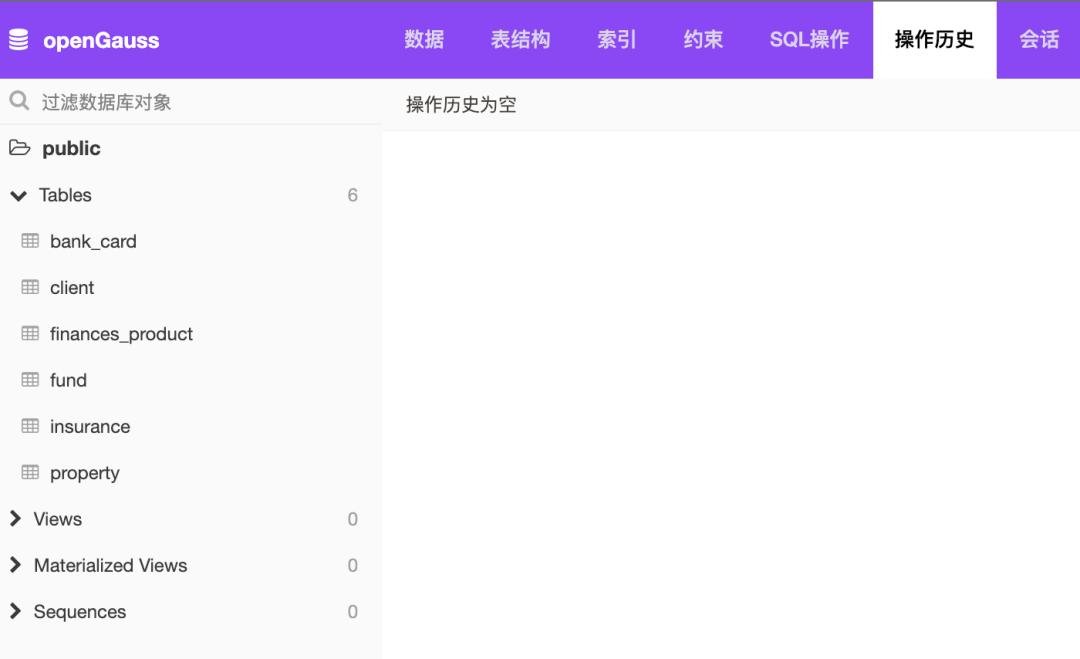
As shown in the figure above , The sidebar provides for tables 、 View 、 Materialized view and menu display of sequence . You can see ,TryMe For the convenience of users , Preset in advance 6 A watch . The author clicks on one of them named bank_card After the table of , The data tab on the right automatically displays except bank_card Table data , meanwhile , Below the sidebar , It also shows some statistical information of the current table .

The data page provides the function of selecting and filtering data , You can select the columns to be filtered 、 Filter method and set filter value , For example, for b_type The column after filtering out the savings card is shown as follows .

Right click on the sidebar to display bank_card Table name , You can see TryMe The function of exporting data and the functions of emptying and deleting tables are provided for tables . Data can be exported as JSON、CSV as well as XML Three formats , It also supports exporting to SQL file .

Click export as SQL file , See what this function is . Open the exported SQL Results file , You can see that its content is to use gs_dump Exported logical backup statement . This file can be used gs_restore Directly in another openGauss Execution on node , To recover completely consistent data .

Let's use what we first saw SQL Operation function . Let's check client In the customer information listed in the table , Bank card account number and account category of each customer , stay SQL Enter the query statement in the edit window
```select client.c_name, client.c_phone, bank_card.b_number from client join bank_card on client.c_id = bank_card.b_c_id;```
In the process of entering a statement , The author was pleasantly surprised to find ,TryMe Of SQL In the operation window , Unexpectedly, it provides the function of Lenovo completion , It can be said to be very convenient and easy to use .
Enter the query statement and click execute , You can see the specific query results . And the result of the query , You can click in the middle JSON、CSV、XML Three buttons , Export the result value to the corresponding file format .

Explain queries and analyze queries , They correspond to each other openGauss Medium explain and analyze Two ways of execution . For example, select and click analysis query , In the result display box, you can see the execution plan of the query statement , And click csv Export the query results as CSV file .

The functions of explanation query and analysis query are SQL It is very useful in the development process , In particular, it needs to be positioned SQL The performance bottleneck of statement execution , The output of the execution plan can support developers to locate and repair problems quickly and effectively .
Okay , The above is about TryMe Simple experience of the platform for the first time , Welcome to login TryMe After experiencing on the platform , Scan the QR code below to enter openGauss TryMe Use the exchange group to discuss the experience of using the platform .

openGauss TryMe The platform uses communication groups
Welcome to visit openGauss Official website

openGauss Open source community official website :
https://opengauss.org
openGauss Organization warehouse :
https://gitee.com/opengauss
openGauss Mirror warehouse :
https://github.com/opengauss-mirror

Scan the code and follow us
WeChat official account |openGauss
Wechat community assistant |openGauss-bot
This article is from WeChat official account. - openGauss(openGauss).
If there is any infringement , Please contact the [email protected] Delete .
Participation of this paper “OSC Source creation plan ”, You are welcome to join us , share .
边栏推荐
- Digital transformation driven by enterprise architecture!
- Lua iterator
- STM32小bug汇总
- Virtual machine cloning
- [applet] how to get wechat applet code upload key?
- Notes in "PHP Basics" PHP
- All in one 1329 cells (breadth first search)
- containerd拉取私库镜像失败(kubelet)
- 1178 questions of Olympiad in informatics -- ranking of grades
- My senior
猜你喜欢

2020 International Machine Translation Competition: Volcano translation won five championships
SSTI template injection

Prevent cookies from modifying ID to cheat login
Virtual machine cloning

OSI seven layer model and tcp/ip four layer (TCP and UDP) (notes)

Interviewer: what is scaffolding? Why do you need scaffolding? What are the commonly used scaffolds?

Use of string type "PHP Basics"

All in one 1353 -- expression bracket matching (stack)

IBM3650M4实体机安装VCenter7.0

Risk control and application of informatization project
随机推荐
Record a PG master-slave setup and data synchronization performance test process
Dormitory access control system made by imitating the boss (III)
Local Oracle reported ora-12514: tns: the listener cannot recognize the requested service at present
[target detection] yolov6 theoretical interpretation + practical test visdrone data set
regular expression
Map structure
开怀一笑
ERP production operation control Huaxia
Luogu super Mary game
Virtual machine cloning
File name wildcard rules for kettle
QPushButton 按钮的创建与简单应用
关于数据库的接口响应非常慢
A quick overview of transformer quantitative papers in emnlp 2020
Vcenter7.0 managing esxi7.0 hosts
"PHP Basics" uses echo statements to output information
Containerd failed to pull private database image (kubelet)
面试官:什么是脚手架?为什么需要脚手架?常用的脚手架有哪些?
Vcenter7.0 installation of ibm3650m4 physical machine
Dirsearch[directory scanning tool]