当前位置:网站首页>OSPF comprehensive experiment
OSPF comprehensive experiment
2022-07-26 15:39:00 【Wuhao9_】

1.R4 by ISP, Can only be configured on it IP Address ;R4 Use public with all other directly connected devices IP Address ;
2.R3-R5/6/7 by MGRE Environmental Science ,R3 For the central site ;
3. Whole OSPF Environmental Science IP The address is 172.16.0.0/16;
4. All devices are accessible R4 The loopback of ;
5. Reduce LSA Update quantity of , Speed up convergence , To ensure the security of updates ;
6. Network wide accessibility
One 、 Address planning
172.16.0.0/16
Altogether 5 individual OSPF Area and a RIP Area , So we need to divide 6 Network segments come out , Excuse me
172.16.0.0/19 A0
172.16.32.0/19 A1
172.16.64.0/19 A2
172.16.96.0/19 A3
172.16.128.0/19 A4
172.16.160.0/19 RIP
172.16.192.0/19
172.16.224.0/19
We just need to take it out 6 Just use a network segment !
Then continue to divide according to the network segment and loopback required by each area :
172.16.0.0/19
Continue to lend five digits to the user network segment division
172.16.0.0/24—— user
Borrow 29or30 Bits divide the backbone links
172.16.0.0/29—— If the backbone link is MA The netmask is 29
172.16.0.0/30—— If the backbone link is P2P The netmask is 30
172.16.32.0/19——A1
172.16.64.0/19——A2
172.16.96.0/19——A3
172.16.128.0/19——A4
172.16.160.0/19——RIP
Continue to borrow a division
172.16.160.0/20
172.16.176.0/20
192.168.1.192/19 reserve
192.168.1.224/19 reserve

Two 、 Give to separately area0\1\2\3\4 To configure
1、 To configure area0:
R4:
<Huawei>sys
[Huawei]sys r4
[r4]int s4/0/0
[r4-Serial4/0/0]ip add 34.0.0.2 24
[r4-Serial4/0/0]int g0/0/0
[r4-GigabitEthernet0/0/0]ip add 47.0.0.2 24
[r4-GigabitEthernet0/0/0]int s3/0/0
[r4-Serial3/0/0]ip add 46.0.0.2 24
[r4-Serial3/0/0]int s4/0/1
[r4-Serial4/0/1]ip add 45.0.0.2 24
[r4-Serial4/0/1]int l0
[r4-LoopBack0]ip add 4.4.4.4 24
because R3-R5/6/7 by MGRE Environment and R3 For the central site , therefore :
r3【 center !】
<Huawei>sys
[r3]int s4/0/0
[r3-Serial4/0/0]ip add 34.0.0.1 24
[r3-Serial4/0/0]q
[r3]ip route-static 0.0.0.0 0 34.0.0.2
[r3]int t0/0/0
[r3-Tunnel0/0/0]ip add 172.16.1.1 29
[r3-Tunnel0/0/0]tunnel-protocol gre p2mp
[r3-Tunnel0/0/0]source 34.0.0.1
[r3-Tunnel0/0/0]nhrp network-id 100
[r3-Tunnel0/0/0]nh entry multicast dynamic


r5:
<Huawei>sys
Enter system view, return user view with Ctrl+Z.
[Huawei]sys r5
[r5]int s4/0/0
[r5-Serial4/0/0]ip add 45.0.0.1 24
[r5-Serial4/0/0]int l0
[r5-LoopBack0]ip add 192.16.2.1 24
[r5-LoopBack0]int t0/0/0
[r5-Tunnel0/0/0]ip add 172.16.1.2 29
[r5-Tunnel0/0/0]tunnel-protocol gre p2mp
[r5-Tunnel0/0/0]source s4/0/0
[r5-Tunnel0/0/0]nhrp network-id 100
[r5-Tunnel0/0/0]nhrp entry 172.16.1.1 34.0.0.1 register
[r5]ip route-static 0.0.0.0 0 45.0.0.2

r6:
<Huawei>sys
Enter system view, return user view with Ctrl+Z.
[Huawei]sys r6
[r6]int s4/0/0
[r6-Serial4/0/0]ip add 46.0.0.1 24
[r6-Serial4/0/0]int t0/0/0
[r6-Tunnel0/0/0]ip add 172.16.1.3 29
[r6-Tunnel0/0/0]int l0
[r6-LoopBack0]ip add 172.16.3.1 24
[r6-LoopBack0]q
[r6]ip route-static 0.0.0.0 0 46.0.0.2
[r6]int s4/0/0
[r6-Serial4/0/0]int t0/0/0
[r6-Tunnel0/0/0]tunnel-protocol gre p2mp
[r6-Tunnel0/0/0]source s4/0/0
[r6-Tunnel0/0/0]nhrp network-id 100
[r6-Tunnel0/0/0]nhrp entry 172.16.1.1 34.0.0.1 register

r7:
<Huawei>sys
Enter system view, return user view with Ctrl+Z.
[Huawei]sys r7
[r7]int g0/0/0
[r7-GigabitEthernet0/0/0]ip add 47.0.0.1 24
[r7-GigabitEthernet0/0/0]int l0
[r7-LoopBack0]ip add 172.16.4.1 24
[r7-LoopBack0]int t0/0/0
[r7-Tunnel0/0/0]tunnel-protocol gre p2mp
[r7]ip route-static 0.0.0.0 0 47.0.0.2
[r7]int t0/0/0
[r7-Tunnel0/0/0]ip add 172.16.1.4 29
[r7-Tunnel0/0/0]source g0/0/0
[r7-Tunnel0/0/0]nhrp network-id 100
[r7-Tunnel0/0/0]nhrp entry 172.16.1.1 34.0.0.1 register 
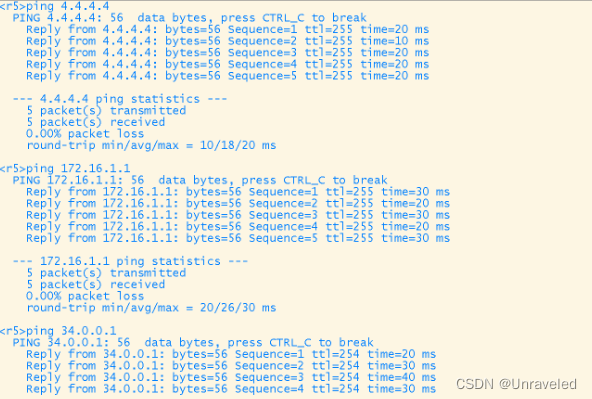
Inspection company 、 Can the routers between private networks ping through .
2、 To configure area2
r6:
<r6>sys
Enter system view, return user view with Ctrl+Z.
[r6]int g0/0/0
[r6-GigabitEthernet0/0/0]ip add 172.16.65.9 29
Jul 14 2022 19:29:36-08:00 r6 %%01IFNET/4/LINK_STATE(l)[0]:The line protocol IP on the interface GigabitEthernet0/0/0 has entered the UP state.

r11:
<Huawei>sys
Enter system view, return user view with Ctrl+Z.
[Huawei]sys r11
[r11]int g0/0/0
[r11-GigabitEthernet0/0/0]ip add 172.16.65.2 29
[r11-GigabitEthernet0/0/0]int g0/0/1
[r11-GigabitEthernet0/0/1]ip add 172.16.65.9 29
Error: The specified address conflicts with another address.
[r11-GigabitEthernet0/0/1]int l0
[r11-LoopBack0]ip add 172.16.66.1 24

r12:
<Huawei>sys
Enter system view, return user view with Ctrl+Z.
[Huawei]sys r12
[r12]int g0/0/0
[r12-GigabitEthernet0/0/0]ip add 172.16.65.10 29
[r12-GigabitEthernet0/0/0]q
3、 To configure area3:
<r7>sys
Enter system view, return user view with Ctrl+Z.
[r7]int g0/0/1
[r7-GigabitEthernet0/0/1]ip add 172.16.97.1 29
Jul 14 2022 19:48:02-08:00 r7 %%01IFNET/4/LINK_STATE(l)[0]:The line protocol IP on the interface GigabitEthernet0/0/1 has entered the UP state.
[r7-GigabitEthernet0/0/1]


<Huawei>sys
Enter system view, return user view with Ctrl+Z.
[Huawei]sys r8
[r8]int g0/0/0
[r8-GigabitEthernet0/0/0]ip add 172.16.97.2 29
[r8-GigabitEthernet0/0/0]
Jul 14 2022 19:48:36-08:00 r8 %%01IFNET/4/LINK_STATE(l)[0]:The line protocol IP on the interface GigabitEthernet0/0/0 has entered the UP state.
[r8-GigabitEthernet0/0/0]int g0/0/1
[r8-GigabitEthernet0/0/1]ip add 172.16.97.9 29
Jul 14 2022 19:49:18-08:00 r8 %%01IFNET/4/LINK_STATE(l)[1]:The line protocol IP on the interface GigabitEthernet0/0/1 has entered the UP state.
[r8-GigabitEthernet0/0/1]int l0
[r8-LoopBack0]ip add 172.16.98.1 24
[r8-LoopBack0


<Huawei>sys
Enter system view, return user view with Ctrl+Z.
[Huawei]sys r9
[r9]int g0/0/0
[r9-GigabitEthernet0/0/0]ip add 172.16.97.10 29
Jul 14 2022 19:50:03-08:00 r9 %%01IFNET/4/LINK_STATE(l)[0]:The line protocol IP on the interface GigabitEthernet0/0/0 has entered the UP state.
[r9-GigabitEthernet0/0/0]
4、 To configure area4:
[r9-GigabitEthernet0/0/0]int g0/0/1
[r9-GigabitEthernet0/0/1]ip add 172.16.129.1 29
Jul 14 2022 19:53:18-08:00 r9 %%01IFNET/4/LINK_STATE(l)[1]:The line protocol IP on the interface GigabitEthernet0/0/1 has entered the UP state.
[r9-GigabitEthernet0/0/1]int l0
[r9-LoopBack0]ip add 172.16.130.1 24
[r9-LoopBack0]


<Huawei>sys
Enter system view, return user view with Ctrl+Z.
[Huawei]sys r10
[r10]int g0/0/0
[r10-GigabitEthernet0/0/0]ip add 172.16.129.2 29
Jul 14 2022 19:53:44-08:00 r10 %%01IFNET/4/LINK_STATE(l)[0]:The line protocol IP on the interface GigabitEthernet0/0/0 has entered the UP state.
[r10-GigabitEthernet0/0/0]int l0
[r10-LoopBack0]ip add 172.16.131.1 24
[r10-LoopBack0]
5、 To configure area 0
<Huawei>sys
Enter system view, return user view with Ctrl+Z.
[Huawei]sys r1
[r1]int g0/0/0
[r1-GigabitEthernet0/0/0]ip add 172.16.33.1 29
Jul 14 2022 20:00:44-08:00 r1 %%01IFNET/4/LINK_STATE(l)[0]:The line protocol IP on the interface GigabitEthernet0/0/0 has entered the UP state.
[r1-GigabitEthernet0/0/0]int l0
[r1-LoopBack0]ip add 172.16.34.1 24
[r1-LoopBack0]

<Huawei>sys
Enter system view, return user view with Ctrl+Z.
[Huawei]sys  r2
[r2]int g0/0/0
[r2-GigabitEthernet0/0/0]ip add 172.16.33.2 29
[r2-GigabitEthernet0/0/0]
Jul 14 2022 20:01:17-08:00 r2 %%01IFNET/4/LINK_STATE(l)[0]:The line protocol IP on the interface GigabitEthernet0/0/0 has entered the UP state.
[r2-GigabitEthernet0/0/0]int l0
[r2-LoopBack0]ip add 172.16.35.1 24
[r2-LoopBack0]


<r3>sys
Enter system view, return user view with Ctrl+Z.
[r3]int g0/0/0
[r3-GigabitEthernet0/0/0]ip add 172.16.33.3 29
Jul 14 2022 20:01:47-08:00 r3 %%01IFNET/4/LINK_STATE(l)[0]:The line protocol IP on the interface GigabitEthernet0/0/0 has entered the UP state.
[r3-GigabitEthernet0/0/0]int l0
[r3-LoopBack0]ip add 172.16.36.1 24
[r3-LoopBack0]
6、 To configure RIP
<r12>sys
Enter system view, return user view with Ctrl+Z.
[r12]int l0
[r12-LoopBack0]int l1
[r12-LoopBack1]ip add 172.16.176.1 20
[r12-LoopBack1]int l0
[r12-LoopBack0]ip add 172.16.160.1 20
[r12-LoopBack0]
3、 ... and 、 To configure OSPF
R1
[R1]ospf 1 router-id 1.1.1.1
[R1-ospf-1]area 1
[R1-ospf-1-area-0.0.0.1]network 172.16.0.0 0.0.255.255

R2
[R2]ospf 1 router-id 2.2.2.2
[R2-ospf-1]area 1
[R2-ospf-1-area-0.0.0.1]network 172.16.0.0 0.0.255.255

R3
[R3]ospf 1 router-id 3.3.3.3
[R3-ospf-1]area 1
[R3-ospf-1-area-0.0.0.1]network 172.16.32.0 0.0.255.255
[R3-ospf-1-area-0.0.0.1]q
[R3-ospf-1]area 0
[R3-ospf-1-area-0.0.0.0]network 172.16.1.1 0.0.0.0

R5
[R5]ospf 1 router-id 5.5.5.5
[R5-ospf-1]area 0
[R5-ospf-1-area-0.0.0.0]network 172.16.0.0 0.0.255.255

R6
[R6]ospf 1 router-id 6.6.6.6
[R6-ospf-1]area 0
[R6-ospf-1-area-0.0.0.0]network 172.16.0.0 0.0.255.255
[R6-ospf-1-area-0.0.0.0]q
[R6-ospf-1]area 2
[R6-ospf-1-area-0.0.0.2]network 172.16.65.1 0.0.0.0

R7
[R7]ospf 1 router-id 7.7.7.7
[R7-ospf-1]area 0
[R7-ospf-1-area-0.0.0.0]network 172.16.0.0 0.0.255.255
[R7-ospf-1-area-0.0.0.0]q
[R7-ospf-1]area 3
[R7-ospf-1-area-0.0.0.3]network 172.16.97.1 0.0.0.0

R8
[R8]ospf 1 router-id 8.8.8.8
[R8-ospf-1]area 3
[R8-ospf-1-area-0.0.0.3]network 172.16.0.0 0.0.255.255

R9
[R9]ospf 1 router-id 9.9.9.9
[R9-ospf-1]area 3
[R9-ospf-1-area-0.0.0.3]network 172.16.97.10 0.0.0.0
[R9-ospf-1-area-0.0.0.3]q
[R9-ospf-1]q
[R9]ospf 2 router-id 9.9.9.9
[R9-ospf-2]area 4
[R9-ospf-2-area-0.0.0.4]network 172.16.128.0 0.0.255.255

R10
[R10]ospf 1 router-id 10.10.10.10
[R10-ospf-1]area 4
[R10-ospf-1-area-0.0.0.4]network 172.16.0.0 0.0.255.255

R11
[R11]ospf 1 router-id 11.11.11.11
[R11-ospf-1]area 2
[R11-ospf-1-area-0.0.0.2]network 172.16.0.0 0.0.255.255

R12
[R12]ospf 1 router-id 12.12.12.12
[R12-ospf-1]area 2
[R12-ospf-1-area-0.0.0.2]network 172.16.65.10 0.0.0.0
[R12]rip 1
[R12-rip-1]version 2
[R12-rip-1]network 172.16.0.0 ---  Summary announcement
Four 、 because P2P Type is unable to establish neighbor relationship with other routes , You need to change MGRE type --- P2MP type .


R7 Like
area4 Areas and rip Missing routing information between regions , We need to import manually by republishing rip Routing and area4 Routing information for
[R12]ospf 1
[R12-ospf-1]import-route rip 1

[R9]ospf 1
[R9-ospf-1]import-route ospf 2
R10 There will be no other routing information , At this time, we can send a default route to our R9

5、 ... and 、 In order to reduce the LSA Update quantity of , We need to do summary and special areas
Be careful : In order to avoid loops, we also need to configure empty interface routes .
<r3>sys
Enter system view, return user view with Ctrl+Z.
[r3]os
[r3]ospf 1
[r3-ospf-1]area 1
[r3-ospf-1-area-0.0.0.1]ab
[r3-ospf-1-area-0.0.0.1]abr-summary 172.16.32.0 255.255.224.0
[r3-ospf-1-area-0.0.0.1]q
[r3-ospf-1]q
[r3]ip route-static 172.16.32.0 19 NULL 0


<r6>sys
Enter system view, return user view with Ctrl+Z.
[r6]os
[r6]ospf 1
[r6-ospf-1]ar 2
[r6-ospf-1-area-0.0.0.2]abr-summary 172.16.64.0 255.255.224.0
[r6-ospf-1-area-0.0.0.2]q
[r6-ospf-1]q
[r6]ip route-static 172.16.64.0 19 NULL 0
[r6]

<r7>sys
Enter system view, return user view with Ctrl+Z.
[r7]os
[r7]ospf 1
[r7-ospf-1]area 3
[r7-ospf-1-area-0.0.0.3]abr-summary 172.16.96.0 255.255.224.0
[r7-ospf-1-area-0.0.0.3]q
[r7-ospf-1]q
[r7]ip route-static 172.16.96.0 19 NULL 0


<r9>sys
Enter system view, return user view with Ctrl+Z.
[r9]os
[r9]ospf 1
[r9-ospf-1]asbr-summary 172.16.128.0 255.255.224.0
[r9-ospf-1]q
[r9]q
[r9]ip route-static 172.16.128.0 19 NULL 0


<r12>sys
Enter system view, return user view with Ctrl+Z.
[r12]os
[r12]ospf 1
[r12-ospf-1]asbr-summary 172.16.160.0 255.255.224.0
[r12-ospf-1]q
[r12]ip route-static 172.16.160.0 19 NULL 0
[r12]
Special area area 0:
[r1]os
[r1]ospf 1
[r1-ospf-1]area 1
[r1-ospf-1-area-0.0.0.1]stub


[r2]ospf 1
[r2-ospf-1]area 1
[r2-ospf-1-area-0.0.0.1]stub

[r3]ospf 1
[r3-ospf-1]area 1
[r3-ospf-1-area-0.0.0.1]stub no-summary
area 2:
[r6]ospf 1
[r6-ospf-1]area 2
[r6-ospf-1-area-0.0.0.2]nssa no-summary

[r11]ospf 1
[r11-ospf-1]area 2
[r11-ospf-1-area-0.0.0.2]nssa

[r12]ospf 1
[r12-ospf-1]area 2
[r12-ospf-1-area-0.0.0.2]nssa
6、 ... and 、 To configure NET, Make it accessible R4 Loopback .
R3

[r3]acl 2000
[r3-acl-basic-2000]rule permit source 172.16.0.0 0.0.255.255
[r3-acl-basic-2000]q
[r3]int Serial 4/0/0
[r3-Serial4/0/0]nat outbound 2000

R7

[r7]acl 2000
[r7-acl-basic-2000]rule permit source 172.16.0.0 0.0.255.255
[r7-acl-basic-2000]q
[r7]int g 0/0/0
[r7-GigabitEthernet0/0/0]nat outbound 2000

R6

[r6]acl 2000
[r6-acl-basic-2000]rule permit source 172.16.0.0 0.0.255.255
[r6-acl-basic-2000]q
[r6]int s 4/0/0
[r6-Serial4/0/0]nat outbound 2000
7、 ... and : Speed up convergence , Need to change HELLO Time , To change the hello The time of death will also change automatically
[r3]int t 0/0/0
[r3-Tunnel0/0/0]ospf timer hello 5

[r5]int t 0/0/0
[r5-Tunnel0/0/0]ospf timer hello 5

[r6]int t 0/0/0
[r6-Tunnel0/0/0]ospf timer hello 5

[r7]int t 0/0/0
[r7-Tunnel0/0/0]ospf timer hello 5
8、 ... and : Conduct manual certification , Regional certification ( In fact, it is also interface authentication ), The purpose is to update security .
[r1]ospf 1
[r1-ospf-1]area 1
[r1-ospf-1-area-0.0.0.1]authentication-mode md5 1 000000

[r2]ospf 1
[r2-ospf-1]area 1
[r2-ospf-1-area-0.0.0.1]authentication-mode md5 1 cipher 000000

[r3]ospf 1
[r3-ospf-1]area 1
[r3-ospf-1-area-0.0.0.1]authentication-mode md5 1 cipher 000000边栏推荐
- sqlDeveloper工具快速入门
- No module named ‘win32gui‘
- QT is the most basic layout, creating a window interface
- 超简单!只需简单几步即可为TA定制天气小助理!!
- The R language uses the histogram function in the lattice package to visualize the histogram (histogram plot), the col parameter to customize the fill color, and the type parameter to customize the hi
- If food manufacturing enterprises want to realize intelligent and collaborative supplier management, it is enough to choose SRM supplier system
- Chapter 7 supporting CORS in rest services
- 777. Exchange adjacent characters in LR string
- Operation method of abbkine elikine human alpha fetoprotein (AFP) ELISA quantitative Kit
- 组件化开发基本规范、localStorage 和 sessionStorage、对象数据转基本值、原型链使用
猜你喜欢
NAT/NAPT地址转换(内外网通信)技术详解【华为eNSP】

Google tries to introduce password strength indicator for chromeos to improve online security

二叉树的创建以及遍历
全志A40i工业核心板,100%国产4核ARM Cortex-A7,支持“双屏异显”【显示接口能力,工业HMI首选方案】

If food manufacturing enterprises want to realize intelligent and collaborative supplier management, it is enough to choose SRM supplier system

【EXPDP导出数据】expdp导出23行记录,且不包含lob字段的表,居然用时48分钟,请大家帮忙看看

信用卡数字识别(opencv,代码分析)

Glyphs V3 Font Icon query

Vs add settings for author information and time information

Digital warehouse: iqiyi digital warehouse platform construction practice
随机推荐
【五分钟Paper】基于参数化动作空间的强化学习
cs224w(图机器学习)2021冬季课程学习笔记5
R language uses LM function to build multiple linear regression model, writes regression equation according to model coefficient, and uses fitted function to calculate y value (response value) vector
SettingWithCopyWarning: A value is trying to be set on a copy of a slice from a DataFrame
What is the transport layer protocol tcp/udp???
[leetcode daily question] - 121. The best time to buy and sell stocks
R language tests the significance of correlation coefficient: use Cor The test function calculates the value and confidence interval of the correlation coefficient and its statistical significance (if
关于我写的IDEA插件能一键生成service,mapper....这件事(附源码)
Tool skill learning (I): pre skills -makfile, make,.Mk
R语言ggplot2可视化:使用ggpubr包的ggdotplot函数可视化点阵图(dot plot)、设置add参数添加均值和标准差竖线、设置error.plot参数实际显示箱体
Remote desktop on Jetson nano
第七章 在 REST 服务中支持 CORS
[leave some code] Apply transformer to target detection, and understand the model operation process of the model through debug
线程和进程
使用两个栈实现一个队列
Sqldeveloper tools quick start
About the selection of industrial control gateway IOT serial port to WiFi module and serial port to network port module
白话详解决策树模型之使用信息熵构建决策树
Qt最基本的布局,创建window界面
Cs224w (Figure machine learning) 2021 winter course learning notes 5