当前位置:网站首页>Host your own website with Vercel
Host your own website with Vercel
2022-08-02 04:36:00 【GentleTK】
Whether you want to have a blog of your own, or you want to publish your own small project to the outside world for everyone to access, Vercel is definitely an affordable option.
Note, make sure you have Git and Node.js installed before using Vercel.
1 Sign up and install
First go to Vercel official website to register an account, now registering new users must use GitHub, GitLab or BitBucket account to authorize and bind the mobile phone number. After registration, you can modify your email address on the configuration page.
# Install Vercelnpm i -g vercel# Log in to Vercel, vc is the abbreviation of Vercel, you can also use Vercel insteadvc login YourEmailAddressVercel will send an email to your mailbox, after confirmation, you can log in:

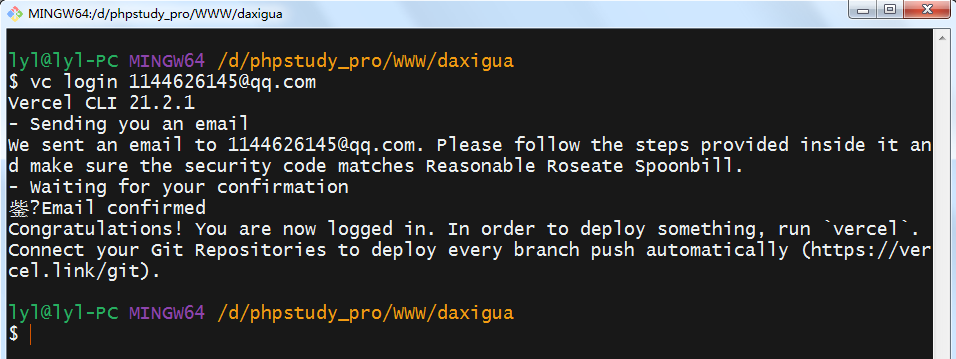
2 Publish your website/project
# Post site/projectvc --prodThe project configuration is basically all the way to enter. My project here is a small game of synthesizing a big watermelon:

After publishing, you will get two URLs, just open one and you can enter the game, but this URL does not look particularly elegant. If you have a domain name, you may wish to set it up with me.
Synthetic large watermelon URL 1
Synthetic large watermelon URL 2
3 Bind your domain name
If you have a domain name, you can bind it to Vercel:
# Bind your own domain namevc domains add YourDomainsAfter running the command, you may be prompted to enter a project name (my project name is daxigua):

According to the prompt information, Vercel let us change the server address of DNS resolution and send an email to us. According to the email prompt, there are two ways to achieve the goal:
# Method 1@ A 76.76.21.21# Method 2ns1.vercel-dns.comns2.vercel-dns.comI directly choose the first one here, first enter the console where the domain name is purchased, then find the DNS resolution service, and add a record set:
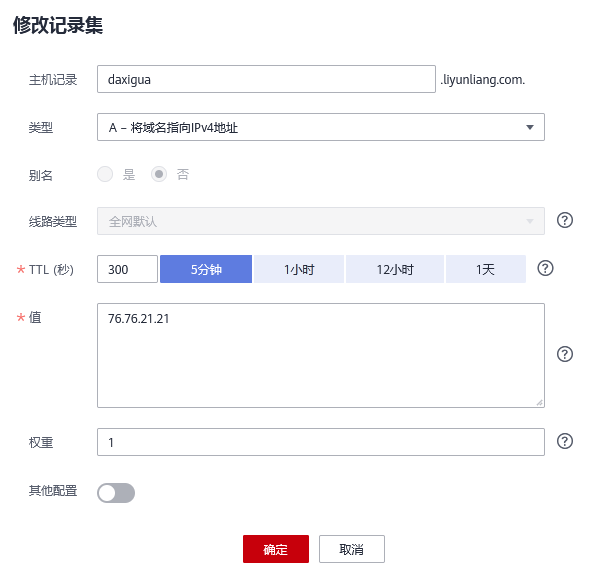
After the configuration is complete, you will receive an email prompting you to use the vc --prod command on the terminal to publish it again:

I found that I can access Synthetic Big Watermelon through my own domain name.
Article author:GentleTK
Original link:
边栏推荐
猜你喜欢







随机推荐
Arduino点亮数码管
redo log与binlog间的破事
深度学习理论:model.fit 函数参数详解
Type c PD 电路设计
案例|工业物联网解决方案·智慧钢厂高性能安全数采
Anaconda(Jupyter)里发现不能识别自己的GPU该怎么办?
[DS3231 RTC real-time clock module and Arduino interface to build a digital clock]
蓝桥杯:国二选手经验贴 附蓝桥杯历年真题
Temporal Segment Networks:Towards Good Practices for Deep TSN论文精读笔记
AD8307对数检波器
振芯科技GM8285C:功能TTL转LVDS芯片简介
振芯科技GM8285C:功能TTL转LVDS芯片简介
USB_ID介绍
[Spark]-LSH局部敏感哈希
【萌新解题】斐波那契数列
Vision Transformer(ViT)论文精读和Pytorch实现代码解析
Website development plan research
LT8918L LVDS转MIPI芯片技术支持资料
GM7150,振芯科技,视频解码器,CVBS转BT656/601,QFN32,替换TVP5150/CJC5150
Typora use