当前位置:网站首页>Teach you to learn dapr - 3 Run the first with dapr Net program
Teach you to learn dapr - 3 Run the first with dapr Net program
2022-06-26 16:45:00 【Masa technical team】
Be careful :
The command line tool mentioned in this article is
Windows Terminal/PowerShell/cmdOne of them , RecommendedWindows TerminalIt is recommended to run the command line tool as an administrator , Avoid trampling
In order to ensure smooth operation , It is recommended to use PowerShell So let's do that
set-ExecutionPolicy RemoteSigned
install Docker
because Dapr CLI The default will be Docker Start inside redis、zipkin、placement.
Of course, these are not necessary to install , It is only recommended that you can experience Dapr Complete capability of , Facilitate the learning of subsequent chapters .
Download and install Docker Desktop
install WSL2, Use the command line tool to execute the command
wsl --instalIf you can't use wsl If you install it directly, you can install it manually , function
PowerShellAnd execute the following two commandsdism.exe /online /enable-feature /featurename:Microsoft-Windows-Subsystem-Linux /all /norestartdism.exe /online /enable-feature /featurename:VirtualMachinePlatform /all /norestartIf you encounter an error again :0x800f080c The name of the function VirtualMachinePlatform Unknown .
Please ensure that your operating system version is Windows 10 build 18917 above
Restart the computer and download WSL2 kernel
https://wslstorestorage.blob.core.windows.net/wslblob/wsl_update_x64.msi
Run the command line , Set default usage WSL2
wsl --set-default-version 2download Ubuntu 20.04
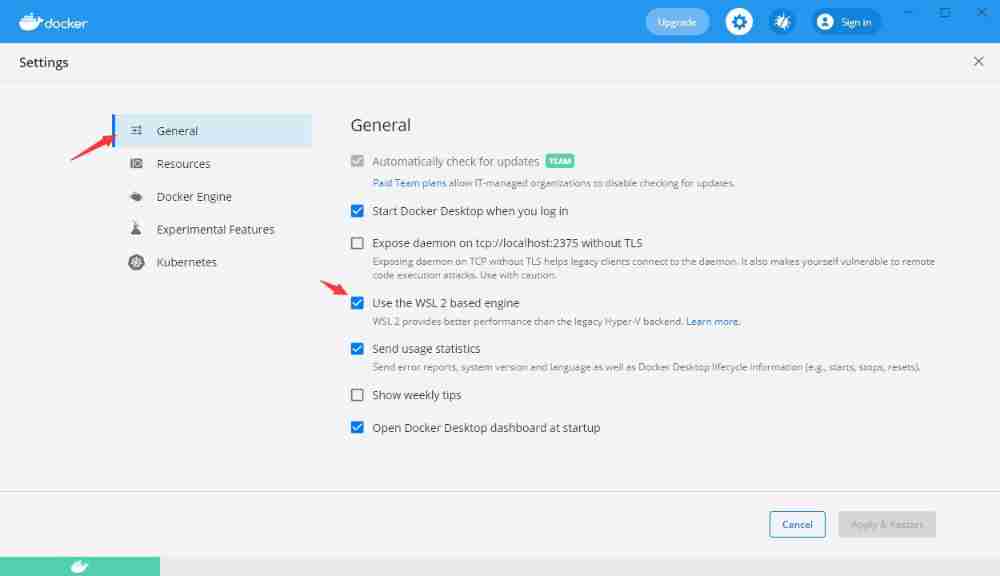
Set up Docker Use WSL2
you “ Probably ” Need a gadget
A secret that can't be said , Look at the file name guessing function
https://github.com.cnpmjs.org/dotnetcore/FastGithub/releases/download/2.0.4/fastgithub_win-x64.zip
install Dapr CLI
Official explanation :Dapr CLI You use it for all kinds of Dapr The main tools for related tasks . You can use it to run a program with Dapr sidecar Applications for , And view sidecar journal 、 List running services 、 function Dapr instrument panel .
CLI Is it necessary to install ? It's not , But novices are not recommended to experience these operations . The following articles will explain dapr cli Work .
function
Windows TerminalorPowerShell, Carry out orders , Wait patiently hereiwr -useb https://raw.githubusercontent.com/dapr/cli/master/install/install.ps1 | iexIf it is
cmdExecute the following command :powershell -Command "iwr -useb https://raw.githubusercontent.com/dapr/cli/master/install/install.ps1 | iex"Verify the installation , Reopen Command line tools execute commands
dapr, See the following prompt that the installation is correct__ ____/ /___ _____ _____ / __ / __ '/ __ \/ ___/ / /_/ / /_/ / /_/ / / \__,_/\__,_/ .___/_/ /_/===============================Distributed Application RuntimeUsage: dapr [command]Available Commands: completion Generates shell completion scripts components List all Dapr components. Supported platforms: Kubernetes configurations List all Dapr configurations. Supported platforms: Kubernetes dashboard Start Dapr dashboard. Supported platforms: Kubernetes and self-hosted help Help about any command init Install Dapr on supported hosting platforms. Supported platforms: Kubernetes and self-hosted invoke Invoke a method on a given Dapr application. Supported platforms: Self-hosted list List all Dapr instances. Supported platforms: Kubernetes and self-hosted logs Get Dapr sidecar logs for an application. Supported platforms: Kubernetes mtls Check if mTLS is enabled. Supported platforms: Kubernetes publish Publish a pub-sub event. Supported platforms: Self-hosted run Run Dapr and (optionally) your application side by side. Supported platforms: Self-hosted status Show the health status of Dapr services. Supported platforms: Kubernetes stop Stop Dapr instances and their associated apps. . Supported platforms: Self-hosted uninstall Uninstall Dapr runtime. Supported platforms: Kubernetes and self-hosted upgrade Upgrades a Dapr control plane installation in a cluster. Supported platforms: KubernetesFlags: -h, --help help for dapr -v, --version version for daprUse "dapr [command] --help" for more information about a command.
initialization Dapr
Use the command line tool to execute the command
dapr initIn addition, there is a simplified installation method
dapr init --slimLook at the official explanation slim
Two different binaries are installed in this mode
daprdandplacement.placementIt's for actor With , It was mentioned before .In this mode , Will not manage or publish for status / Subscribe to install any default components ( Such as Redis), Then you can only use service calls . Others require users to set their own environment and custom components .
To put it bluntly , You only use service calls , that slim Yes. , Otherwise, you need to configure it manually to solve CLI Take your place of that part of the work .
verification Dapr edition
dapr --versionAt the current time , My version is
CLI version: 1.4.0Runtime version: 1.4.3Verify container
docker psdapr initThe container is made up of dapr_placement, dapr_redis, dapr_zipkinVerify component Directory , Open Directory
%USERPROFILE%\.dapr\, See the following structure, which means that the installation is completed
Run a sample code to see the effect
Operation environment preparation
vs 2022/2019, It is suggested to go straight to VS2022 Experience 64 position VS
https://visualstudio.microsoft.com/zh-hans/vs/preview/#download-preview
.net 6, If you don't use it vs2022, Self installation required .net 6
from Github Download sample code
Use the command line tool to clone the code base to the local
ssh( recommend ) Use the following command
git clone [email protected]:doddgu/dapr-study-room.githttps Use the following command
git clone https://github.com/doddgu/dapr-study-room.gitNo, git You need to install it first git, Specific tutorials can be self Baidu
https://github.com/git-for-windows/git/releases/download/v2.33.1.windows.1/Git-2.33.1-64-bit.exe
Use Dapr function .Net Sample code
Use command line tools , Jump to the source directory
dapr-study-room\Assignment03\Assignment.ServerTips: Find the source directory in Explorer
Win 11 You can right-click the blank area -> stay Windows Just open it in the terminal
Win 11 Enter the following in Explorer cmd
Carry out orders
dapr run --app-id assignment-server --app-port 5038 dotnet runYou don't have to understand the meaning of the command line , The following chapters will explain
See the input as follows, that is, the operation is successful
== APP == info: Microsoft.Hosting.Lifetime[14]== APP == Now listening on: https://localhost:7038== APP == info: Microsoft.Hosting.Lifetime[14]== APP == Now listening on: http://localhost:5038== APP == info: Microsoft.Hosting.Lifetime[0]== APP == Application started. Press Ctrl+C to shut down.== APP == info: Microsoft.Hosting.Lifetime[0]== APP == Hosting environment: Development== APP == info: Microsoft.Hosting.Lifetime[0]== APP == Content root path: D:\Project\OpenSource\dapr-study-room\Assignment03\Assignment.Servertime="2021-10-27T18:06:11.8422605+08:00" level=info msg="application discovered on port 5038" app_id=assignment-server instance=SSHZ014 scope=dapr.runtime type=log ver=1.4.3time="2021-10-27T18:06:11.8788949+08:00" level=info msg="application configuration loaded" app_id=assignment-server instance=SSHZ014 scope=dapr.runtime type=log ver=1.4.3time="2021-10-27T18:06:11.8803982+08:00" level=info msg="actor runtime started. actor idle timeout: 1h0m0s. actor scan interval: 30s" app_id=assignment-server instance=SSHZ014 scope=dapr.runtime.actor type=log ver=1.4.3time="2021-10-27T18:06:11.8844485+08:00" level=info msg="dapr initialized. Status: Running. Init Elapsed 1830.3305ms" app_id=assignment-server instance=SSHZ014 scope=dapr.runtime type=log ver=1.4.3time="2021-10-27T18:06:11.8920835+08:00" level=info msg="placement tables updated, version: 0" app_id=assignment-server instance=SSHZ014 scope=dapr.runtime.actor.internal.placement type=log ver=1.4.3There is another verification method , Use the command line tool to execute the command
dapr listamong APP ID,APP PORT,COMMAND It is the same. , The rest is changed
APP ID HTTP PORT GRPC PORT APP PORT COMMAND AGE CREATED PID
assignment-server 49948 49949 5038 dotnet run 13m 2021-10-27 18:06.09 22596
call Dapr API
Reopen a command line tool
test Dapr API, Open another command line tool
dapr invoke --app-id assignment-server --method helloVerify that the operation was successful
perform dapr inovoke The output of the command line window is as follows
App invoked successfully
perform dapr run The output of the command line window is as follows
== APP == Hello World!
This Hello World Namely Assignment.Server Of API
/helloPrinted , At this point, your environment has ok, And the first example runs successfully
Give yourself a compliment
In the process of building this environment , You can see dapr Still some “ Immature ”, After all, it's only now 1.4 edition , There is still a long way to go
But this does not hinder some of the ideological progress he brought , If you miss the first wave of microservices , Also missed Service Mesh, that Distributed application runtime (Dapr) It can be your new starting point
Source code of this chapter
Assignment03
https://github.com/doddgu/dapr-study-room
We are acting , New framework 、 New ecology
Our goal is The freedom of the 、 Easy-to-use 、 Highly malleable 、 functional 、 Robust .
So we learn from Building blocks Design concept of , Working on a new framework MASA Framework, What are its characteristics ?
- Native support Dapr, And allow Dapr Replace with traditional means of communication
- Unlimited architecture , Single application 、SOA、 Micro services support
- Support .Net Native framework , Reduce the burden of learning , In addition to the concepts that must be introduced in a specific field , Insist on not making new wheels
- Rich ecological support , In addition to the framework, there are component libraries 、 Authority Center 、 Configuration center 、 Troubleshooting center 、 A series of products such as Alarm Center
- Unit test coverage of the core code base 90%+
- Open source 、 free 、 Community driven
- What is the ? We are waiting for you , Come together and discuss
After several months of production project practice , Completed POC, At present, the previous accumulation is being refactored into new open source projects
At present, the source code has been synchronized to Github( The document site is under planning , Will gradually improve ):
QQ Group :7424099
Wechat group : Plus technology operation wechat (MasaStackTechOps), Remarks , Invite in

Reprinted from :( guiguzi )
边栏推荐
- 1-12Vmware新增SSH功能
- 《软件工程》期末重点复习笔记
- Least squares system identification class II: recursive least squares
- Acid of redis
- Dialogue with the senior management of Chang'an Mazda, new products will be released in Q4, and space and intelligence will lead the Japanese system
- 【小5聊】毕业8年,一直在追梦的路上
- Redis overview
- In a bad mood, I just write code like this
- Teach you to learn dapr - 5 Status management
- Learn about common functional interfaces
猜你喜欢

进军AR领域,这一次罗永浩能成吗?

基於Kubebuilder開發Operator(入門使用)

Stm32h7b0 replaces the h750 program, causing the MCU to hang up and unable to burn the program
Scala 基礎 (二):變量和數據類型

经典同步问题

Learn about common functional interfaces
Arduino uno + DS1302 simple time acquisition and serial port printing

Niuke Xiaobai monthly race 50

Qt 5.9.8 安装教程

C language --- basic function realization of push box 01

随机推荐
Constructors and Destructors
Exquisite makeup has become the "soft power" of camping, and the sales of vipshop outdoor beauty and skin care products have surged
Day10 daily 3 questions (1): sum gradually to get the minimum value of positive numbers
Développer un opérateur basé sur kubebuilder (démarrer)
108. 简易聊天室11:实现客户端群聊
C language -- legal identifier and integer
建立自己的网站(16)
Redis 概述整理
Scala Foundation (2): variables et types de données
国内首款开源 MySQL HTAP 数据库即将发布,三大看点提前告知
【从删库到跑路】JDBC 完结篇(一天学完系列!!学完赶紧跑!)
【MATLAB项目实战】基于卷积神经网络与双向长短时(CNN-LSTM)融合的锂离子电池剩余使用寿命预测
Solution for filtering by special string of microservice
Overall context of concurrent programming
proxy
Scala 基础 (二):变量和数据类型
用Attention和微调BERT进行自然语言推断-PyTorch
Knowing these commands allows you to master shell's own tools
R329 (maix-ii-a (M2A) data summary
Toupper function