当前位置:网站首页>frp实现内网穿透
frp实现内网穿透
2022-06-27 23:58:00 【BluePROT】
记录一下内网穿透,现在有两个方案,一个是直接向日葵,虽然有免费版,但是还得买他的葵域名,我的免费域名早就没了,而且好像不是很稳定的样子;还有一个就是使用frp,用一个公网服务器做一个反向代理,把请求转发到内网上;其实还有其他一些开源软件,但是好像不是很好用都。
我有一个树莓派和一个腾讯云服务器,这次试试frp穿透一下。
frp原理
公网服务器作为服务端,内网服务器作为客户端,服务器端主动监听端口;
客户端主动连接服务器端的主端口,并且告知服务器监听的端口和转发的类型等;
服务端会fork新的进程监听客户端指定的监听端口;
外网有连接到服务端的时候,特定进程会将连接转发给内网服务器;
客户端再把请求发给服务,进行处理;
服务端:ubuntu 20.04 x86_64
客户端:ubuntu 22.04 arm64
frp是开源的,点击这里下载对应架构的包
我这里下载上述两个架构的,给服务端下载amd64架构的
安装
服务端
先解压
tar -xzvf frp_0.43.0_linux_amd64.tar.gz
进入目录,修改配置文件frps.ini,端口可以自由修改,授权码在客户端会使用到
[common]
# frp监听的端口,默认是7000,可以改成其他的
bind_port = 7000
# 授权码,请改成更复杂的
token = admin

# frp管理后台端口,请按自己需求更改
dashboard_port = 7500
# frp管理后台用户名和密码,请改成自己的
dashboard_user = admin
dashboard_pwd = admin
enable_prometheus = true

# frp日志配置
log_file = /var/log/frps.log
log_level = info
log_max_days = 3
复制文件
mkdir -p /etc/frp
cp frps /etc/frp
cp frps.ini /etc/frp
设置并启动,老版本好像有服务文件.service,我这个好像没有,可以直接启动
cd /etc/frp
./frps -c frps.ini
然后在控制台配置一下安全组,允许7500和7000端口
在电脑访问ip:7500使用配置文件里面的admin和admin登录就可以了
客户端
同样先解压
tar -zvxf frp_0.43.0_linux_arm64.tar.gz
这里需要配置frpc.ini,这个ip写上面服务器的公网ip。token就是配置文件里面的token,在地下可以按照这样配置一下服务端口,这里面ssh这个名字其实是可以变的,如果有多个,可以写成ssh2、ssh3,端口也得唯一
# 客户端配置
[common]
server_addr = ip
server_port = 7000
token = admin

# 配置ssh服务
[ssh]
type = tcp
local_ip = 127.0.0.1
local_port = 22
remote_port = 6000  # 这个自定义,之后再ssh连接的时候要用

# 配置http服务,可用于小程序开发、远程调试等,如果没有可以不写下面的
[web]
type = http
local_ip = 127.0.0.1
local_port = 8000
subdomain = test.hijk.pw
remote_port = 6010
启动客户端./frpc -c frpc.ini
有小问题,报错
failed to parse proxy web, err: custom_domains and subdomain should set at least one of them
如果需要配置http的话,好像必须得有这两个的一个字段填写域名,可是我没有
先删除http以后启动,如下就是成功了
2022/06/08 07:53:41 [I] [service.go:349] [57e3621506cf6912] login to server success, get run id [57e3621506cf6912], server udp port [0]
2022/06/08 07:53:41 [I] [proxy_manager.go:144] [57e3621506cf6912] proxy added: [ssh]
2022/06/08 07:53:41 [I] [control.go:181] [57e3621506cf6912] [ssh] start proxy success
使用
先看一下端口,在ip:7500里面可以看到建立的连接,这里写的端口是13649,云服务器需要开启一个13649的防火墙,这个端口就是对外使用的端口,我不知道为什么不是客户端配置的6000
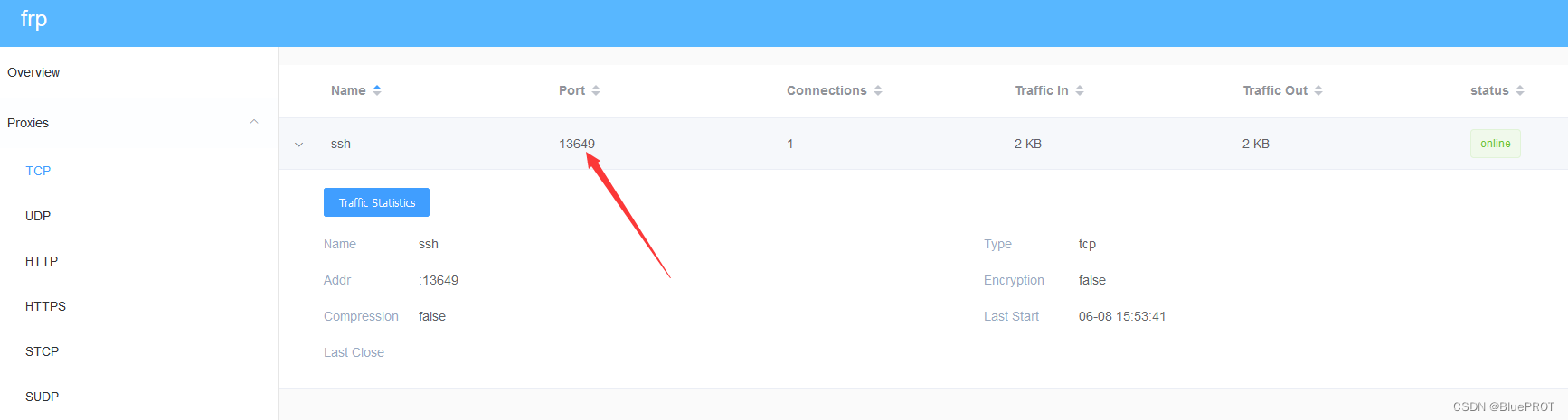
总之,在ssh使用的时候,要这么写ssh {内网用户名}@{服务器ip} -p 13649
密码就是内网用户的密码
穿透HTTP
然后我整了个域名,现在可以弄一下穿透了
我觉得我白给了,域名需要备案才能用,然后我发现http配置其实不需要域名,写成IP就好了
修改服务器端frps.ini,添加vhost_http_port,这个端口就是用来外网IP访问的
[common]
# frp监听的端口,默认是7000,可以改成其他的
bind_port = 7000
vhost_http_port = 7600
# 授权码,请改成更复杂的
token = admin

# frp管理后台端口,请按自己需求更改
dashboard_port = 7500
# frp管理后台用户名和密码,请改成自己的
dashboard_user = admin
dashboard_pwd = admin
enable_prometheus = true

# frp日志配置
log_file = /var/log/frps.log
log_level = info
log_max_days = 3
客户端配置frpc.ini,添加如下的web块,domains如果有域名可以写域名,没有的话就是IP地址,local_port就是内网的端口
# 客户端配置
[common]
server_addr = 124.223.101.27
server_port = 7000
token = admin

# 配置ssh服务
[ssh]
type = tcp
local_ip = 127.0.0.1
local_port = 22
remote_port = 6000  # 这个自定义,之后再ssh连接的时候要用

# 配置http服务,可用于小程序开发、远程调试等,如果没有可以不写下面的
[web]
type = http
local_ip = 127.0.0.1
local_port = 80
custom_domains = 124.223.101.27
之后要记得打开服务器的防火墙开放端口
访问ip:7600即可看到转发的内网页面了,我这里是把内网80端口的apache转发到外网的7600了,成功的。
穿透多个http
外网端口始终是由vhost_http_port决定的,好像内网frpc是通过域名来决定访问。
比如还是上面的7600端口,如果现在需要访问内网80端口,就得要cd.xxx.cn:7600,不能用www了。
[common]
server_addr = {
    外网ip}
server_port = 7000

[ssh]
type = tcp
local_ip = 127.0.0.1
local_port = 22
remote_port = 6008

[web01]
type = http
local_port = 8080
custom_domains = www.xxx.cn


[web02]
type = http
local_port = 80
custom_domains = cd.xxx.cn # 使用二级域名进行配置
边栏推荐
- 零基礎多圖詳解圖神經網絡
- 数据库的新选择 Amazon Aurora
- ionic4实现半星评分
- 一张图弄懂 MIT,BSD,Apache几种开源协议之间的区别
- How to study efficiently
- Evaluation - grey correlation analysis
- 深入解析kubernetes controller-runtime
- 9. Openfeign service interface call
- Comprehensive evaluation of free, easy-to-use and powerful open source note taking software
- [Yocto RM] 2 - Yocto Project Terms
猜你喜欢

. Mp4 video test address

【说明】Jmeter乱码的解决方法

How to optimize the "message" list of IM
![The number of nodes of a complete binary tree [non-O (n) solution > Abstract dichotomy]](/img/56/768f8be9f70bf751f176e40cbb1df2.png)
The number of nodes of a complete binary tree [non-O (n) solution > Abstract dichotomy]

评价——秩和比综合评价

What is the application scope and function of the conductive slip ring of single crystal furnace

1382. balancing binary search tree - General method

面试官问:JS的继承

声网 VQA:将实时互动中未知的视频画质用户主观体验变可知
完全二叉树的节点个数[非O(n)求法 -> 抽象二分]
随机推荐
界面组件Telerik UI for WPF入门指南 - 如何使用主题切换自定义样式
I/o limit process and CPU limit process
How to study efficiently
Chapitre 4: redis
要搞清楚什么是同步,异步,串行,并行,并发,进程,线程,协程
Implementation of timed tasks in laravel framework
美团动态线程池实践思路已开源
[Yocto RM]9 - QA Error and Warning Messages
药物发现综述-01-药物发现概述
Adobe Premiere基础-常用的视频特效(裁剪,黑白,剪辑速度,镜像,镜头光晕)(十五)
Interview guide for data person | prepare these points to be prepared!
Database query optimization: master-slave read-write separation and common problems
Cloud assisted privacy collection intersection (server assisted psi) protocol introduction: Learning
SQL Server 2016 detailed installation tutorial (with registration code and resources)
The interviewer asked: this point of JS
MySQL十种锁,一篇文章带你全解析
ionic4实现半星评分
[Yocto RM]8 - OpenEmbedded Kickstart (.wks) Reference
同花顺上能炒股开户吗?安全吗?
TI AM3352/54/59 工业核心板硬件说明书