当前位置:网站首页>Node (express) implements interfaces such as adding, deleting, modifying, and paging
Node (express) implements interfaces such as adding, deleting, modifying, and paging
2022-06-10 20:38:00 【Rulyc】
https://blog.csdn.net/CuiCui_web/article/details/107042226 This article describes how to connect to the database , I don't want to make too many introductions here .
1、 First we install two packages , One is to solve cross domain problems , The other one is node in post Request parameters will not be available , You need plug-ins
npm i cors --save  Solving cross domain problems
npm i body-parser --save post Request parameters
2、 stay app.js Introduction in
const bodyParser=require('body-parser');
const cors = require('cors'); //  Solving cross domain problems
var app = express();

app.use(cors()); //  Solving cross domain problems
app.use( bodyParser.urlencoded({

  extended:false
}) );
3、 Write the interface in the interface file , Such as index.js In this paper, , Get ready
var express = require('express');
var router = express.Router();
const connection = require('../db/database')
connection.getConnection(function (err,connection) {
     //  Use connection pool
  if(err){

    console.log(' And MySQL Database connection failed !');
    console.log(' The error message is :' + err);
  }
  else{

    console.log(' And MsSQL Database connection established successfully !');
  }
});

//  Insert the interface code in the middle
.........

module.exports = router;
…/db/database Is the configuration of the database 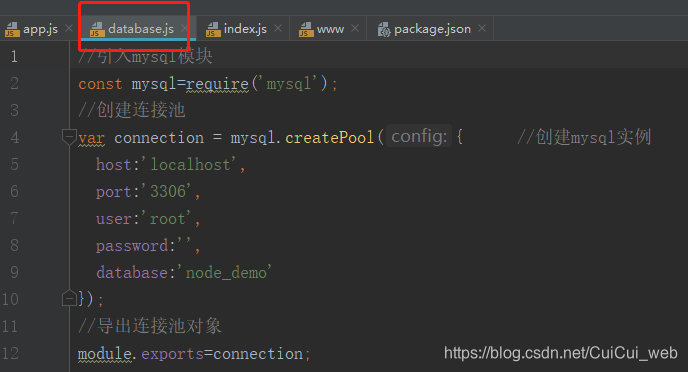
Now officially index.js Write interfaces in
Query interface get request ( No paging and parameters )
router.get('/demo', (req, res, next)=> {

  connection.query('SELECT * FROM student_info', function(err,result){

    // resolve();
    console.log(result)
    res.send(result);
  });
});
We can type... In the browser http://localhost:3000/demo To view the
Query interface post request ( With parameters and paging conditions )
router.post('/demo', (req, res, next)=> {

  console.log(req.body)
  let name = req.body.name
  let pageSize = req.body.pageSize //  Page size
  let pageCurrent = req.body.pageCurrent //  The current page
  let start=(pageCurrent-1)*pageSize; //  The starting position
  connection.query(`SELECT * FROM student_info WHERE name LIKE '%${
      name}%' LIMIT ${
      start},${
      pageSize}`,function(err,result){

    if(err) throw err;
    let list = result
    connection.query(`SELECT COUNT(*) AS total FROM student_info`,function(err,result1){

      if(err) throw err;
      console.log(result1[0].total)
      let obj = {

        pageSize: pageSize,
        pageCurrent: pageCurrent,
        total:result1[0].total,
        list: list
      }

      res.send(obj);
    })
  })
});
Be careful , There is a hole ,sql Data cannot be obtained after execution , Because I'm here sql The operation expression is written in SELECT * FROM student_info WHERE name LIKE '%${name}%' LIMIT ${(pageCurrent-1)}*${pageSize},${pageSize}, Lead to undefined. Bring up the operation ,let start=(pageCurrent-1)*pageSize; // The starting position , Just fine
The new data get request
router.get('/demo_add', function(req, res, next) {

  let params = req.query;
  if(params){

    console.log(params.name,params.age,params.address,params.id)
    params.id = 'NULL';
    console.log(params)
    connection.query(`INSERT INTO student_info VALUES(${
      params.name},${
      params.age},${
      params.address},${
      params.id});`, function(err,result){

      if(err){

        res.send(" Add failed "+err);
      }else {

        res.send(" Added successfully ");
      }
    });
  }
});
The new data post request
router.post('/demo_add',(req, res, next)=> {

  let params = req.body.val;
  console.log(params)
  if(params){

    params.id = 'NULL';
    connection.query(`INSERT INTO student_info VALUES('${
      params.name}',${
      params.age},'${
      params.address}',${
      params.id});`, function(err,result){

      if(err){

        res.send(" Add failed "+err);
      }else {

        console.log(result,' newly added ')
        res.send(" Added successfully ");
      }
    });
  }
});
Modifying data post request
router.post('/demo_update', (req, res, next)=> {

  let params = req.body.val;
  if(params){

    connection.query(`UPDATE student_info SET name='${
      params.name}',age=${
      params.age},address='${
      params.address}' WHERE id=${
      params.id} ;`, function(err,result){

      if(err){

        res.send(" Modification failed "+err);
      }else {

        console.log(result,' modify ')
        res.send(" Modification successful ");
      }
    });
  }
});
Delete interface delete
router.delete('/demo_del',(req, res, next)=> {

  let params = req.body.id;
  if(params){

    connection.query(`DELETE FROM student_info WHERE id = ${
      params} ;`, function(err,result){

      if(err){

        res.send(" Delete failed "+err);
      }else {

        console.log(result,' Delete ')
        res.send(" Delete successful ");
      }
    });
  }
})
The front-end code of this article is shown in react+element To write , The article links https://blog.csdn.net/CuiCui_web/article/details/107108677
边栏推荐
- 20192407 2021-2022-2 《网络与系统攻防技术》实验八实验报告
- [Legendre] polynomial
- HM3416H降压IC芯片PWM/PFM 控制 DC-DC 降压转换器
- SBC chip 35584 data manual pre regulator translation
- KP522201A采用 SOT23-6 封装的 4.5V 至 17V 输入、2A 输出、600kHz 同步降压转换器
- 力扣1082,1084题解_sql查询类型的题目
- FS4100 锂电充电管理IC输入12V给8.4V充电IC
- 手写代码 bind
- 暗黑破坏神不朽数据库怎么用 暗黑破坏神手游不朽数据库使用方法
- 「Bug」问题分析 RuntimeError:which is output 0 of ReluBackward0
猜你喜欢

堆叠条形图鼠标移入tooltip中提示过滤为0元素,实现自定义气泡

暗黑破坏神不朽数据库怎么用 暗黑破坏神手游不朽数据库使用方法

The most common habits from more than 200 English papers written by gradua

Mysql database foundation

Four methods to obtain the position index of the first n values of the maximum and minimum values in the list

Deploying static websites using OSS and CDN on Alibaba cloud international

玩艺术也得学数学?

canvas 高级功能(中)

8.4v双节锂电池专业充电ic(FS4062A)

I drew several exquisite charts with plotly, which turned out to be beautiful!!
随机推荐
8.4v双节锂电池专业充电ic(FS4062A)
站在今天这样一个时间节点上,或许对产业互联网有一个更加明晰的认识
seata 还是不支持sqlserver吗?
功耗开发经验分享:设计功耗大板
腾讯云数据库TDSQL-大咖论道 | 基础软件的过去、现在、未来
Mixin -- mixed
mysql服务启动失败
SBC chip 35584 data manual pre regulator translation
【legendre】多项式
【观察】昇腾智行:场景驱动,创新先行,为智慧交通按下“加速键”
MySQL - common functions
pdf.js-----js解析pdf文件实现预览,并获取pdf文件中的内容(数组形式)
The old programmer said: stop translating the world, developers should return to programming
The national advanced computing industry innovation (Yichang) center was officially launched and jointly operated by Zhongke Shuguang and Shengzhe technologies
How to stack double and float in the bottom layer of C language
[enter textbook latex record]
Rotated sorted array
Change the root
Mysql database foundation
Analysis on rendering principle of mobile terminal