当前位置:网站首页>不同VLAN间的通信
不同VLAN间的通信
2022-06-11 06:09:00 【chunxque】
单臂路由
拓扑图

1.交换机的配置
1.1 创建vlan
创建vlan10和20:
[Huawei]vlan batch 10 201.2 端口的配置
将 GE 0/0/1 划入 vlan10, GE 0/0/2 划入 vlan20,以 GE 0/0/2 为例
GE 0/0/1
[Huawei]interfvace GigabitEthernet 0/0/1

[Huawei-GigabitEthernet0/0/1]port link-type access

[Huawei-GigabitEthernet0/0/1]port default vlan 10
GE 0/0/2
[Huawei]interfvace GigabitEthernet 0/0/2

[Huawei-GigabitEthernet0/0/2]port link-type access

[Huawei-GigabitEthernet0/0/2]port default vlan 20
查看VLAN
display vlan

....

10 common UT:GE0/0/1(U) GE0/0/4(U)

20 common UT:GE0/0/2(U) GE0/0/5(U)
将端口GE 0/0/3类型改为trunk,并且允许vlan2 3 通过:
[Huawei]interface GigabitEthernet 0/0/3

[Huawei-GigabitEthernet0/0/3]port link-type trunk

[Huawei-GigabitEthernet0/0/3]port trunk allow-pass vlan 10 20
查看vlan
[Huawei]display vlan

.....

10 common UT:GE0/0/1(U) GE0/0/4(U) TG:GE0/0/3(U)

20 common UT:GE0/0/2(U) GE0/0/5(U) TG:GE0/0/3(U)
退出并保存配置,注意在使用save并选择Y后按下回车键保存
2. 路由器的配置
注意:如上图中的接口0/0/0.1为物理0/0/0的逻辑接口,通过配置逻辑接口,并且将此逻辑接口的ip地址设置为pc的网关地址,此时就可以保证vlan间进行通信
0/0/0.1配置
[Huawei]interface Ethernet 0/0/0.1

[Huawei-Ethernet0/0/0.1]dot1q termination vid 10

[Huawei-Ethernet0/0/0.1]ip address 192.168.10.254 24
开启ARP广播
说明如果终结子接口未配置arp broadcast enable,一不能主动发送arp广播报文,二会直接将IP报文丢弃不进行转发。
[Huawei-Ethernet0/0/0.1]arp broadcast enable查看配置
[Huawei-Ethernet0/0/0.1]

display this

# interface Ethernet0/0/0.1

dot1q termination vid 10

ip address 192.168.10.254 255.255.255.0
0/0/0.2配置
[Huawei]interface Ethernet 0/0/0.2

[Huawei-Ethernet0/0/0.2]dot1q termination vid 20

[Huawei-Ethernet0/0/0.2]ip address 192.168.20.254 24
开启ARP广播
[Huawei-Ethernet0/0/0.2]arp broadcast enable查看配置
[Huawei-Ethernet0/0/0.2]display this

# interface Ethernet0/0/0.2

dot1q termination vid 20

ip address 192.168.20.254 255.255.255.0
dotlq termination vid 10此命令的含义:因为路由器不能处理带vlan标签的数据帧,通过此命令可以使进入此接口的数据帧摘掉vlan标签,同时从此接口发出的数据帧会打上vlan10标签,同样dotlq termination vid 20是同样的道理。
3.PC网络配置
PC1配置
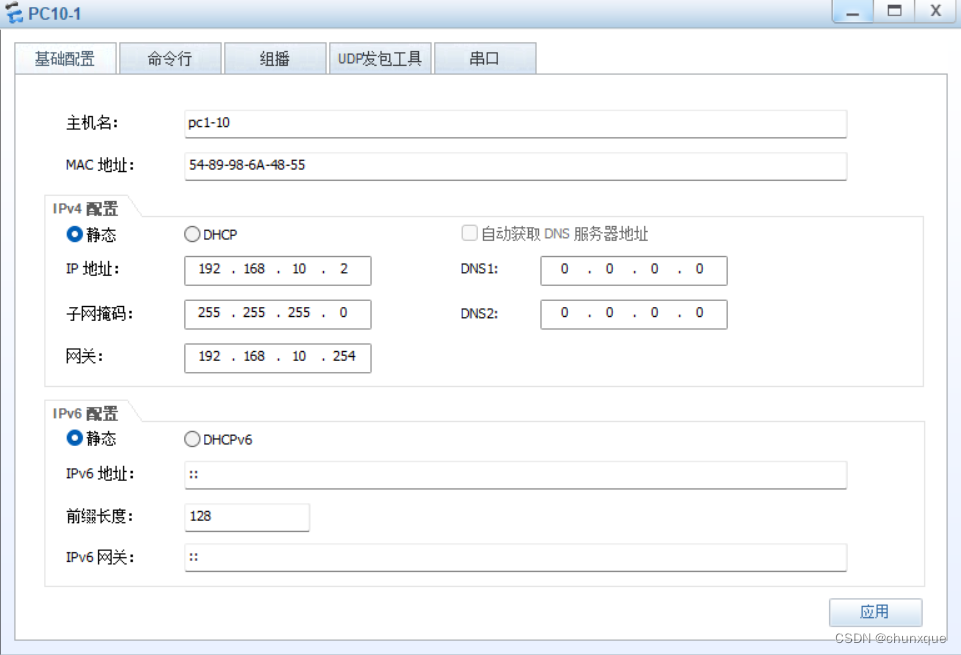
PC2配置

4.实验验证
在PC1上ping PC2
路由器路由表
三层交换机实现VLAN间通信
GigabitEthernet 0/0/1配置为vlan10 A端口 vlanif 192.168.10.254/24
GigabitEthernet 0/0/2配置为vlan20 A端口 vlanif 192.168.20.254/24
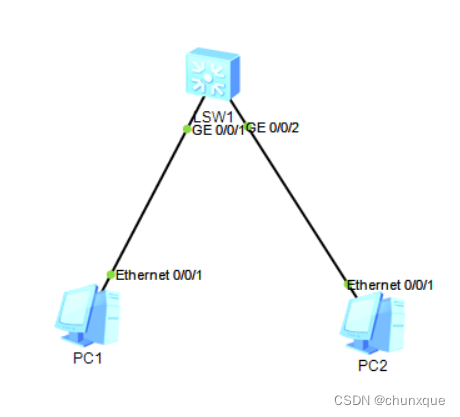
- 交换机的配置
将上图中的PC1划入vlan10,将PC2划入vlan20
GigabitEthernet 0/0/1配置为vlan10 A端口
[Huawei]interface GigabitEthernet 0/0/1

[Huawei-GigabitEthernet0/0/1]port link-type access

[Huawei]vlan 10 [Huawei-vlan10]port GigabitEthernet 0/0/1
GigabitEthernet 0/0/2配置为vlan20 A端口
[Huawei]interface GigabitEthernet 0/0/2

[Huawei-GigabitEthernet0/0/2]port link-type access

[Huawei]vlan 20

[Huawei-vlan20]port GigabitEthernet 0/0/2
查看vlan
[Huawei]display vlan
The total number of vlans is : 3
--------------------------------------------------------------------------------
...

10   common  UT:GE0/0/1(U)

20   common  UT:GE0/0/2(U)
配置vlanif:
vlanif介绍:
vlanif相当于将交换机的物理地址改变为逻辑地址,配置ip地址后此时三层交换机就有了路由功能,每个vlan的vlanif相当于vlan的网关,此时不同vlan不同网段就可以进行数据的转发
vlan10接口配置
[Huawei]interface Vlanif 10

[Huawei-Vlanif10]ip address 192.168.10.254 24
vlan20接口配置
[Huawei]interface Vlanif 20

[Huawei-Vlanif20]ip address 192.168.20.254 24
查看配置ip
[Huawei-Vlanif20]display this

# interface Vlanif20

ip address 192.168.20.254 255.255.255.0
查看路由表
[Huawei]display ip routing-tablePC1配置

PC2配置

2. 实验结果

实现不同VLAN间相互访问并访问外网
目的:实现不同VLAN间互相访问并且可以访问外网
三层交换机+路由器+宽带
网络拓扑图

本实验使用一台PC模拟为外网主机
PC主机
外网PC主机:192.168.2.2/24 网关:192.168.2.1
PC1-V10:192.168.10.2/24 网关:192.168.10.1
PC2-V20:192.168.20.2/24 网关:192.168.20.1
R1路由器
Ethernet 0/0/0: 192.168.1.1/24
Ethernet 0/0/1: 192.168.1.2/24
静态路由
ip route-static 192.168.10.0 255.255.255.0 192.168.1.254
ip route-static 192.168.20.0 255.255.255.0 192.168.1.254
LSW3交换机
GE 0/0/1 Vlan10 Vlanif:192.168.10.254/24
GE 0/0/2 Vlan20 Vlanif:192.168.20.254/24
GE 0/0/3 Vlan1 Vlanif:192.168.1.254/24
静态路由:
[Huawei]ip route-static 0.0.0.0 0.0.0.0 192.168.1.1
1.交换机的配置
1.1 创建vlan
创建vlan10和20:
[Huawei]vlan batch 10 201.2 端口的配置
将 GE 0/0/1 划入 vlan10, GE 0/0/2 划入 vlan20,以 GE 0/0/2 为例
GE 0/0/1
[Huawei]interfvace GigabitEthernet 0/0/1

[Huawei-GigabitEthernet0/0/1]port link-type access

[Huawei-GigabitEthernet0/0/1]port default vlan 10
GE 0/0/2
[Huawei]interfvace GigabitEthernet 0/0/2

[Huawei-GigabitEthernet0/0/2]port link-type access

[Huawei-GigabitEthernet0/0/2]port default vlan 20
查看VLAN
display vlan
....
10   common  UT:GE0/0/1(U)      GE0/0/4(U)

20   common  UT:GE0/0/2(U)      GE0/0/5(U)
配置vlanif1的ip为192.168.1.254
[Huawei]interface Vlanif 1

[Huawei-Vlanif1]ip address 192.168.1.254 24
查看vlanif ip
[Huawei-Vlanif1]display this
#
interface Vlanif1
 ip address 192.168.1.254 255.255.255.0
#
return
配置vlanif10的ip为192.168.10.254
[Huawei]interface Vlanif 10

[Huawei-Vlanif1]ip address 192.168.10.254 24
配置vlanif20的ip为192.168.20.254
[Huawei]interface Vlanif 20

[Huawei-Vlanif1]ip address 192.168.20.254 24
静态路由配置
[Huawei]ip route-static 0.0.0.0 0.0.0.0 192.168.1.1查看路由表
[Huawei]display ip routing-table
2. 路由器的配置
注意:如上图中的接口0/0/0.1为物理0/0/0的逻辑接口,通过配置逻辑接口,并且将此逻辑接口的ip地址设置为pc的网关地址,此时就可以保证vlan间进行通信
0/0/0配置
[Huawei]interface Ethernet 0/0/1

[Huawei-Ethernet0/0/1]ip address 192.168.1.1 24
查看配置
[Huawei-Ethernet0/0/0]display this
#
interface Ethernet0/0/1
 ip address 192.168.1.1 255.255.255.0
0/0/1配置
[Huawei]interface Ethernet 0/0/1

[Huawei-Ethernet0/0/1]ip address 192.168.2.1 24
查看配置
[Huawei-Ethernet0/0/1]display this
#
interface Ethernet0/0/1
 ip address 192.168.2.1 255.255.255.0
静态路由配置
ip route-static 192.168.10.0 255.255.255.0 192.168.1.254

ip route-static 192.168.20.0 255.255.255.0 192.168.1.254
保存配置
3.PC网络配置
PC1配置
PC2配置
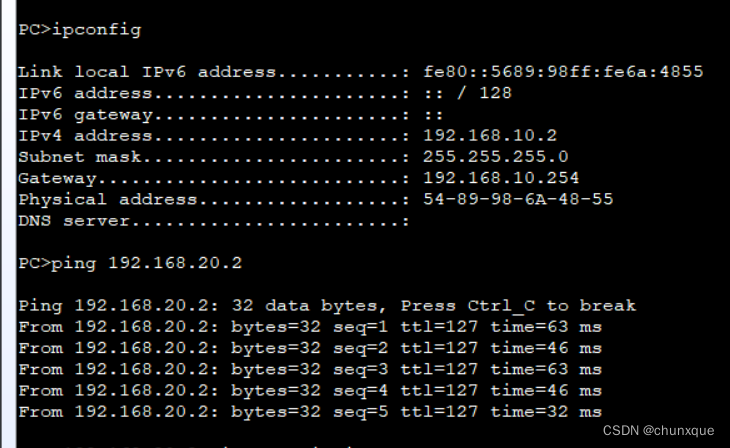
4.验证
PC1访问PC2
PC1访问外网主机

PC2访问外网

外网访问PC1

边栏推荐
- 數組部分方法
- [daily exercises] merge two ordered arrays
- 做亚马逊测评要了解的知识点有哪些?
- 学好C语言从关键字开始
- Nlp-d46-nlp match D15
- [reading this article is enough!!! Easy to understand] confidence level understanding (95% confidence level and confidence interval)
- Chapter 6 of machine learning [series] random forest model
- C语言大战“扫雷”
- 山东大学项目实训之examineListActivity
- C language war "minesweeping"
猜你喜欢

Eureka集群搭建

What should the cross-border e-commerce evaluation team do?

Sqli-libs post injection question 11-17 actual combat
SQLI_ LIBS range construction and 1-10get injection practice

Servlet
Installing and using sublist3r in Kali

MATLAB realizes mean filtering and FPGA for comparison, and uses Modelsim waveform simulation

Teach you to write word formula

Yonghong Bi product experience (I) data source module
Make a small game with R language and only basic package
随机推荐
This point of arrow function
Linux Installation redis
autojs,读取一行删除一行,停止自己外的脚本
Servlet
Global case | how an airline with a history of 100 years can expand and transform to promote innovation in the aviation industry
A multi classification model suitable for discrete value classification -- softmax regression
Squid agent
山东大学项目实训之examineListActivity
Matlab实现均值滤波与FPGA进行对比,并采用modelsim波形仿真
数组部分方法
FPGA面试题目笔记(一)——FPGA开发流程、亚稳态和竞争冒险、建立保持时间、异步FIFO深度等
What is a planning BOM?
Ethical discussion on reptile Technology
[reading this article is enough!!! Easy to understand] confidence level understanding (95% confidence level and confidence interval)
Méthode de la partie du tableau
通过R语言且只用基础package来制作一个小游戏
Growth Diary 01
Goodbye 2021 Hello 2022
SQLI_ LIBS range construction and 1-10get injection practice
Servlet