当前位置:网站首页>(01). Net Maui actual construction project
(01). Net Maui actual construction project
2022-06-13 00:46:00 【Dotnet cross platform】
1. Summary
This series of articles will address .NET MAUI Some contents of actual development , I will continuously update what I have learned for a long time . When learning new software development techniques , Will start with infrastructure projects MAUI No exception .
ref:https://docs.microsoft.com/zh-cn/dotnet/maui/get-started/first-app?pivots=devices-windows
This article will share the following :
1.VS Version selection for ( This content is too simple to handle directly )
2. Build project ( This content is too simple to handle directly )
3. understand MAUI Project structure ( Key content )
4.DEBUG Catalog
2. The detailed content
(1)VS Version selection
At present, this article uses a preview version of visual studio 2022, The official version will be gradually improved MAUI Project template creation .
Download address :https://c2rsetup.officeapps.live.com/c2r/downloadVS.aspx?sku=Community&channel=Preview&Version=VS2022&source=VSLandingPage&add=Microsoft.VisualStudio.Workload.CoreEditor&add=Microsoft.VisualStudio.Workload.NetCrossPlat;includeRecommended&cid=2302
install Visual Studio Or modify the installation , And install... Using the default optional installation options .NET Multi-platform application UI Development workload :
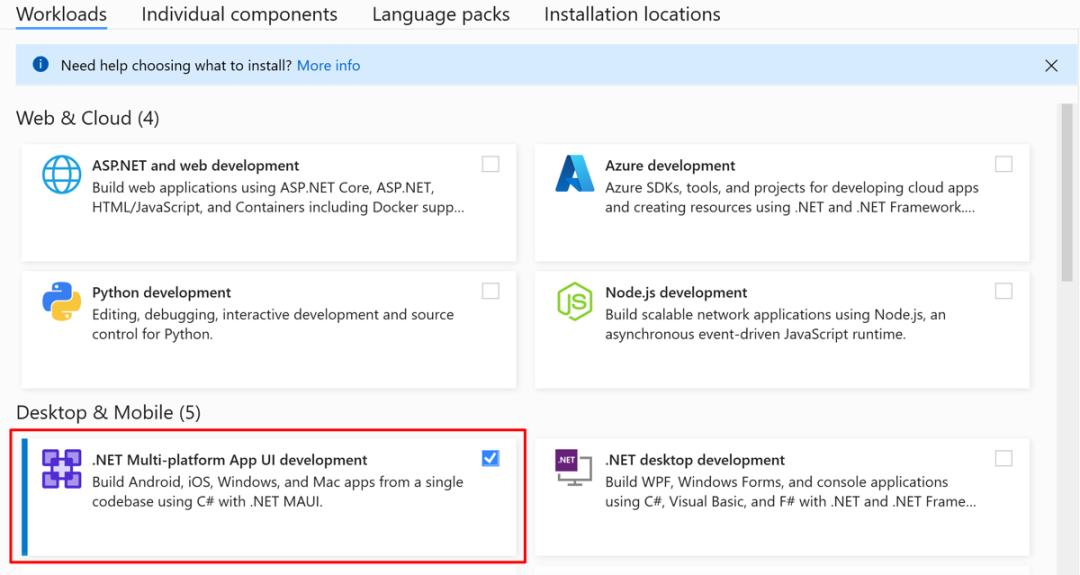
(2) Construction project
start-up Visual Studio 2022 17.3 preview , Then click... In the start window “ Create a new project ” To create a new project :

stay “ Create a new project ” Window , choice “ All project types ” In the drop-down list MAUI, choice .NET MAUI application Templates , And then click “ next step ” Button :

stay “ Configure new projects ” Window , Name the project , Choose the right location for it , And then click “ establish ” Button :

Wait for the project to be created and its dependencies restored :

stay Visual Studio In the toolbar , Use “ Debugging objectives ” Drop down list selection frame , And then choose net6.0-windows entry ( What needs to be specified here is the selection windows The platform can avoid installing simulators ):

stay Visual Studio In the toolbar , Press Windows Computer Button to generate and run the application :

If developer mode is not enabled ,Visual Studio You will be prompted to enable it . stay “ by Windows Enable Developer mode ” In the dialog box , single click Developer settings To open the settings application :

In the settings app , open Developer mode And accept the disclaimer :

Close the settings application , Then close it “ by Windows Enable Developer mode ” Dialog box .
In a running application , Multiple press “ Click me ” Button , And watch the count of button clicks increase :

(3) Interpretation of project structure
rely on

open MAUI The project structure is red “ rely on ” when , Can see 4 References to platforms , Android 、 Apple 、windows、mac. as for linux The platform needs to know the project address :https://github.com/jsuarezruiz/maui-linux be based on GtkSharp add to Linux Support .
Platforms

Main program classes for different platforms . In the latest release, it is worth mentioning that , In the picture above we can see Tizen Update . Let's see Tizen What is it? ?


In this update, you can see the update of this platform , in the future MAUI It is likely to be used in the on-board system . If it can be applied in this way , It has to be said that Microsoft is not prepared to leave opportunities for other technologies . In the future, I will continue to pay attention to whether this line is really so .
Resources

The meaning of this folder is very obvious. I won't explain it one by one , This point is for novice developers . Undoubtedly, some coding specifications have been formulated , The resources of are stored in the corresponding folder for centralized management .
xaml
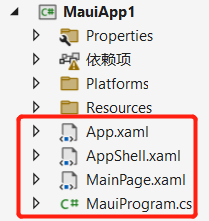
app.xaml , This is the setup MAUI The default startup form and other operations , The usage here will be explained in subsequent articles .

MainPage.xaml It's like wpf Of mainwindo 了 , Write form code , Layout control .

MauiProgram.cs It's very similar here asp.net The start of class , You can add injection components or set Fonts 、 Contents of platform configuration .

Here you can see , It can be used #if To determine which corresponding configurations the current platform should start . The usage here is also important .
(4)Debug Catalog

When our program is finished , Can be in debug See the files of the corresponding platform under the directory . It should be noted here that only the version folder corresponding to the compilation can contain content . The following articles will tell you how to compile and formulate the platform version through commands . Here I use windows For example, the platform can directly see the executable file .

When we F5 Have run MAUI After that, you can also “win” You can see the startup shortcut in the Startup menu of .

I hope you will pay more attention to my wechat official account and b Station account will update video and articles . Thank you for watching .
边栏推荐
猜你喜欢
Introduction to ROS from introduction to mastery (zero) tutorial

Kali system -- fierce of DNS collection and analysis

MAYA建模六
Maya modeling VI

硬(磁)盘(二)

Another year 1024, happy programmer's Day!

6.824 Lab 3B: Fault-tolerant Key/Value Service

How to solve the duplication problem when MySQL inserts data in batches?

硬(磁)盘(一)

Static analysis of malicious code
随机推荐
[network protocol] problems and solutions in the use of LwIP
Win10 home vs pro vs enterprise vs enterprise LTSC
人神共愤,唐山“群殴女性事件”细节...
[virtual machine] notes on virtual machine environment problems
What is meebits? A brief explanation
MySQL finds duplicate data based on one or more fields
What are the conditions of index invalidation?
@Disallowcurrentexecution prevents quartz scheduled tasks from executing in parallel
kotlin 协程withContext切换线程
[JS] solve the problem that removeeventlistener is invalid after the class listening event from new is bound to this
Basic operations of FreeMarker
[error] invalid use of incomplete type uses an undefined type
6.824 Lab 3A: Fault-tolerant Key/Value Service
A simple deadlock example
Assembly language learning
为什么磁盘分区的时候,第一个分区前面总有一段空间(63或者2048个扇区)
Summary of openstack installation problems
Mongodb array operation
市值破万亿,连续三个月销量破10万,比亚迪会成为最强国产品牌?
Pipelines in go concurrency mode