当前位置:网站首页>全局事件总线
全局事件总线
2022-07-03 13:27:00 【十八岁讨厌编程】
原理分析
全局事件总线能实现任意两个组件间的通信
例如我们现在有如下的结构:
我们想要实现任意两组件的通信,少不了一个中介X(图中右上角的粉色圆圈)。例如现在D组件要向A组件传一点数据,过程如下:
- 在A组件里面写点代码,给X绑定一个自定义事件(假设这个自定义事件的名称和叫做demo)
- 在D中写一段代码去触发X中的demo事件
- 在触发事件的同时带点数据过去(比如说我们带个666)
- 此时数据就以参数的形式来到了A组件中
在这个过程中,我们不难发现这个类似于中介的X,是有一定的要求的:
- 他能被其他所有组件给看见
- 这个X能调用
$on(),$off(),$emit()等方法
首先我们可以讨论第一个要求怎么实现,我们有如下几种方法:
- 借用浏览器对象window,所有的组件对它一定是可视的(此方法可行,但不推荐)
- 既然对所有的组件对象可见,那么放在VueComponent构造函数的原型对象上(这个方法不可行,因为VueComponent构造函数是通过Vue.extend得来的,而每次得到的都是不同的VueComponent)
- 在上一个方法的基础上,修改源码,每出现一个新的VueComponent,就挂载一个X(此方法可行,但不推荐)
- 利用关系
VueComponent.prototype.__proto__ === Vue.prototype,也就是说我们把X放在Vue.prototype身上,那么所有的组件都可以搜寻到他。(此法推荐)
接下来我们实现第二个要求:
$on(),$off(),$emit()等方法都存在于Vue的原型对象上。
因为Vue原型对象上的属性和方法都是给Vue的实例对象(vm)或组件的实例对象(vc)用的,所以这个X我们必须创建为Vue的实例对象或者组件的实例对象。
不过我们普遍强调只能由一个Vue的实例对象,所以我们一般使用组件的实例对象来代替这个中介X
代码实现
例如我们现在有如下的组件结构:
我们想实现两个兄弟组件间的通信,Student组件将学生姓名交给School组件,步骤如下:
①首先创建好中介X
我们写在main.js中,因为Vue是在那个时候被引入的
import Vue from 'vue'
import App from './App.vue'

Vue.config.productionTip = false

const Demo = Vue.extend()
const d = new Demo()

Vue.prototype.talkHelper = d


new Vue({

  render: h => h(App),
}).$mount('#app')
②接受者方(School组件)去在中介上绑定事件
School组件:
<template>
        <div class="demo">
            <h2>学校名称:{
   {name}}</h2>
            <h2>学校地址:{
   {address}}</h2>
<!-- <button @click="getSchoolName(name)">点击将学校名称交给父组件App</button>-->
            <hr>
        </div>
</template>

<script> export default {
       name:'DongBei', data(){
       return {
       name:'NEFU', address:'哈尔滨', } }, // props:['getSchoolName'], methods:{
       studentNameDeliver(name){
       console.log('School组件已经接收到了来自Studennt组件的学生名称',name) } }, mounted() {
       this.talkHelper.$on('studentName',this.studentNameDeliver) } } </script>

<style > .demo {
       background-color: yellow; } </style>
③发送者方(Student组件)去调用中介身上的方法
Student组件:
<template>
    <div class="demo">
        <h2 class="stu" >学生名称:{
   {name}}</h2>
        <h2 >学生年纪:{
   {age}}</h2>
        <button @click="deliverStudentName">把学生名称给School组件</button>
    </div>
</template>

<script> export default {
       name:'MyStudent', data(){
       return {
       name:'张三', age:18 } }, methods:{
       deliverStudentName(){
       this.talkHelper.$emit('studentName',this.name) } } } </script>

<style > /*.demo {*/ /* background-color: green;*/ /*}*/ </style>
最终的效果: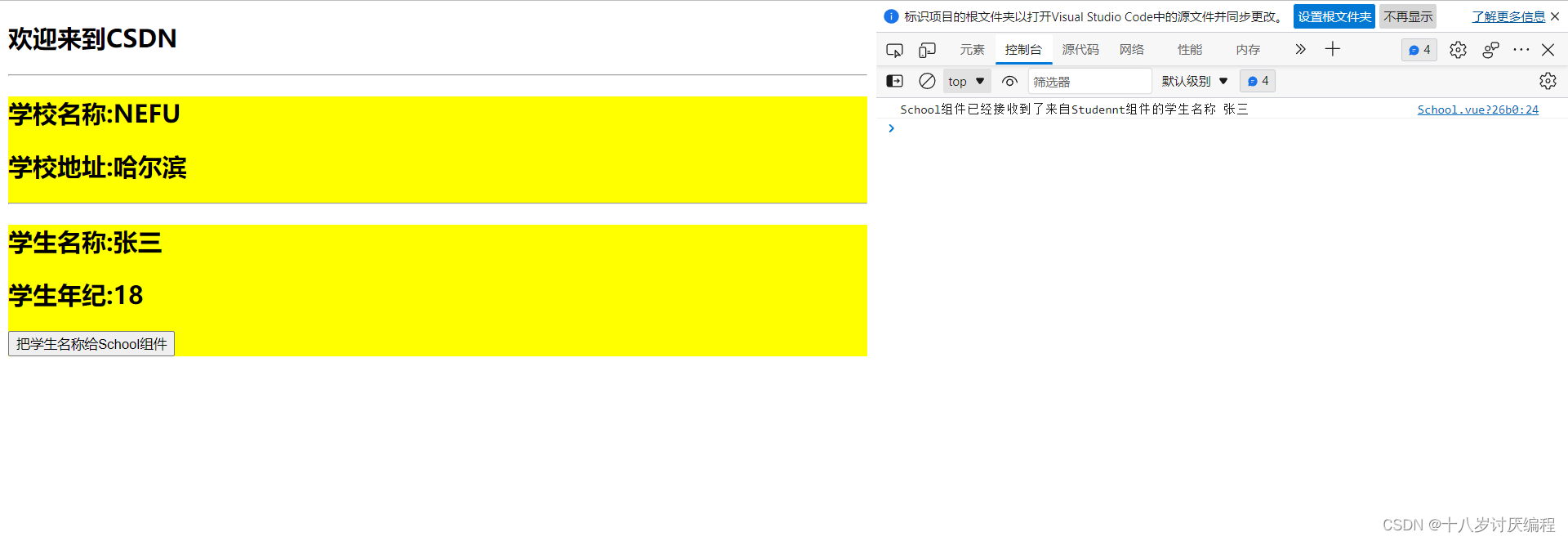
代码优化
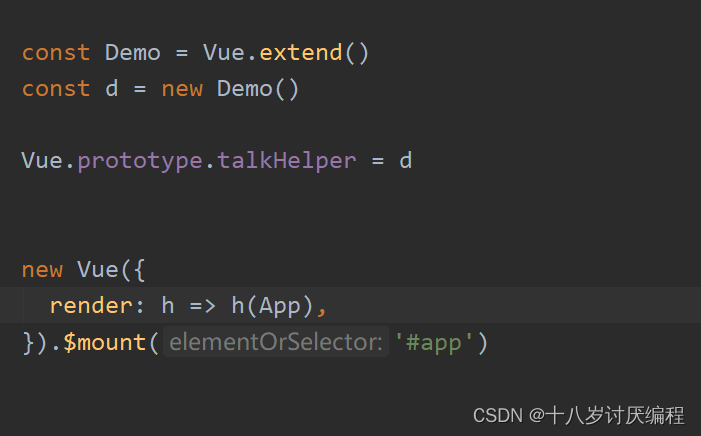
在此处单独创建一个组件实例对象vc太麻烦,我们不如就使用Vue的实例对象vm来作为这个中介。

不过这么写是有错误的。时机有点晚了!因为当前三行vm创建完毕之后,App组件整个都已经放在页面上去了,这就意味着School组件上的mounted都已经执行完了!
此时你再去Vue的原型对象上放一个中介已经晚了!
所以说这个中介放入的时机非常的重要,它既要在vm定义之后,又要在App组件放入之前。所以这个时候我们就想到了要用生命周期钩子!
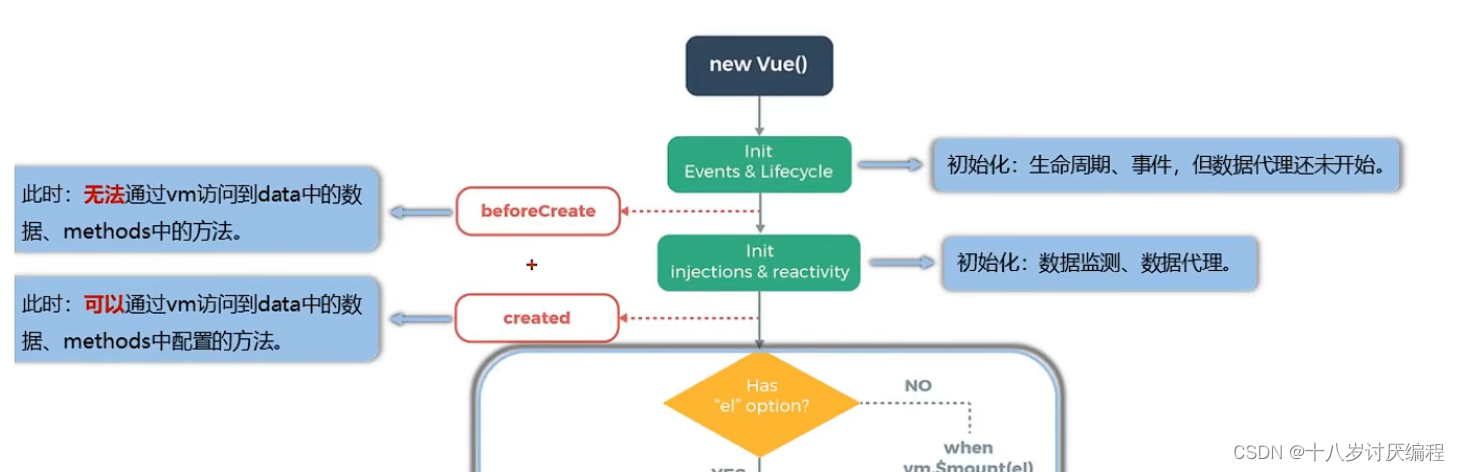
我们选择使用beforeCreate(),这个时候模板还没有开始解析
于是我们改进后的代码如下:
  import Vue from 'vue'
  import App from './App.vue'

  Vue.config.productionTip = false

  // const Demo = Vue.extend()
  // const d = new Demo()
  //
  // Vue.prototype.talkHelper = d


  new Vue({

    render: h => h(App),
    beforeCreate() {

      Vue.prototype.talkHelper = this
    }
  }).$mount('#app')
这个中介其实就是全局事件总线,我们一般用$bus来进行标识
也就是说如上的代码我们应该写成:

还有一个注意点:在组件销毁之前,我们应该把其绑定在全局事件总线上的事件给解绑!
在自定义事件中我们说解绑这个操作是可有可无的,因为当组件销毁死亡之后,其身上的自定义事件自然就会消失。但是这里的全局事件总线他是一直存在的,即使有一个组件销毁了,但是绑定在全局事件总线上的事件还在,这就会造成资源的浪费。所以在这里我们推荐:在组件销毁之前,我们应该把其绑定在全局事件总线上的事件给解绑
我们使用beforeDestroy()生命周期钩子来执行解绑操作:
<template>
        <div class="demo">
            <h2>学校名称:{
   {name}}</h2>
            <h2>学校地址:{
   {address}}</h2>
            <hr>
        </div>
</template>

<script> export default {
       name:'DongBei', data(){
       return {
       name:'NEFU', address:'哈尔滨', } }, methods:{
       studentNameDeliver(name){
       console.log('School组件已经接收到了来自Studennt组件的学生名称',name) } }, mounted() {
       this.talkHelper.$on('studentName',this.studentNameDeliver) }, beforeDestroy() {
       this.talkHelper.$off('studentName') } } </script>

<style > .demo {
       background-color: yellow; } </style>
总结
全局事件总线(GlobalEventBus)
一种组件间通信的方式,适用于任意组件间通信。
安装全局事件总线:
new Vue({

	......
	beforeCreate() {

		Vue.prototype.$bus = this //安装全局事件总线,$bus就是当前应用的vm
	},
    ......
})
使用事件总线:
接收数据:A组件想接收数据,则在A组件中给$bus绑定自定义事件,事件的回调留在A组件自身。
methods(){

  demo(data){
        ......}
}
......
mounted() {

  this.$bus.$on('xxxx',this.demo)
}
提供数据:
this.$bus.$emit('xxxx',数据)
最好在beforeDestroy钩子中,用$off去解绑当前组件所用到的事件。
边栏推荐
- Go language web development series 30: gin: grouping by version for routing
- C language standard IO function sorting
- Qt学习21 Qt 中的标准对话框(下)
- Go language web development series 27: Gin framework: using gin swagger to implement interface documents
- Go language web development series 28: solve cross domain access of CORS with gin contrib / CORS
- 【BW16 应用篇】安信可BW16模组与开发板更新固件烧录说明
- Go 1.16.4: manage third-party libraries with Mod
- Which securities company has the lowest Commission for opening an account online? I want to open an account. Is it safe for the online account manager to open an account
- Implementation of Muduo accept connection, disconnection and sending data
- 叶酸修饰的金属-有机骨架(ZIF-8)载黄芩苷|金属有机骨架复合磁性材料([email protected])|制备路线
猜你喜欢

How to use lxml to judge whether the website announcement is updated
![[机缘参悟-37]:人感官系统的结构决定了人类是以自我为中心](/img/06/b71b505c7072d540955fda6da1dc1b.jpg)
[机缘参悟-37]:人感官系统的结构决定了人类是以自我为中心

Golang — 命令行工具cobra

挡不住了,国产芯片再度突进,部分环节已进到4nm

Solve MySQL 1045 access denied for user 'root' @ 'localhost' (using password: yes)

Go language web development series 29: Gin framework uses gin contrib / sessions library to manage sessions (based on cookies)
Golang - command line tool Cobra
![[redis] cache warm-up, cache avalanche and cache breakdown](/img/df/81f38087704de36946b470f68e8004.jpg)
[redis] cache warm-up, cache avalanche and cache breakdown

Qt学习24 布局管理器(三)
Qt学习21 Qt 中的标准对话框(下)
随机推荐
“又土又穷”的草根高校,凭什么被称为“东北小清华”?
MySQL data processing value addition, deletion and modification
RichView TRVStyle ListStyle 列表样式(项目符号编号)
Unity Render Streaming通过Js与Unity自定义通讯
网上开户哪家证券公司佣金最低,我要开户,网上客户经理开户安全吗
Resource Cost Optimization Practice of R & D team
怎样删除对象的某个属性或⽅法
SQL Injection (GET/Select)
Common network state detection and analysis tools
Go language unit test 4: go language uses gomonkey to test functions or methods
Logback log sorting
Stack application (balancer)
Shell timing script, starting from 0, CSV format data is regularly imported into PostgreSQL database shell script example
Depth and breadth first traversal of tree (regardless of binary tree)
Another industry has been broken by Chinese chips. No wonder the leading analog chip companies in the United States have cut prices and sold off
Record 405 questions about bank callback post request
logback日志的整理
Go 1.16.4: manage third-party libraries with Mod
Software testing is so hard to find, only outsourcing offers, should I go?
IBEM mathematical formula detection data set