当前位置:网站首页>MySQL data processing value addition, deletion and modification
MySQL data processing value addition, deletion and modification
2022-07-03 13:52:00 【Chen Yixin】
Catalog
1.1 The way 1:VALUES The way to add
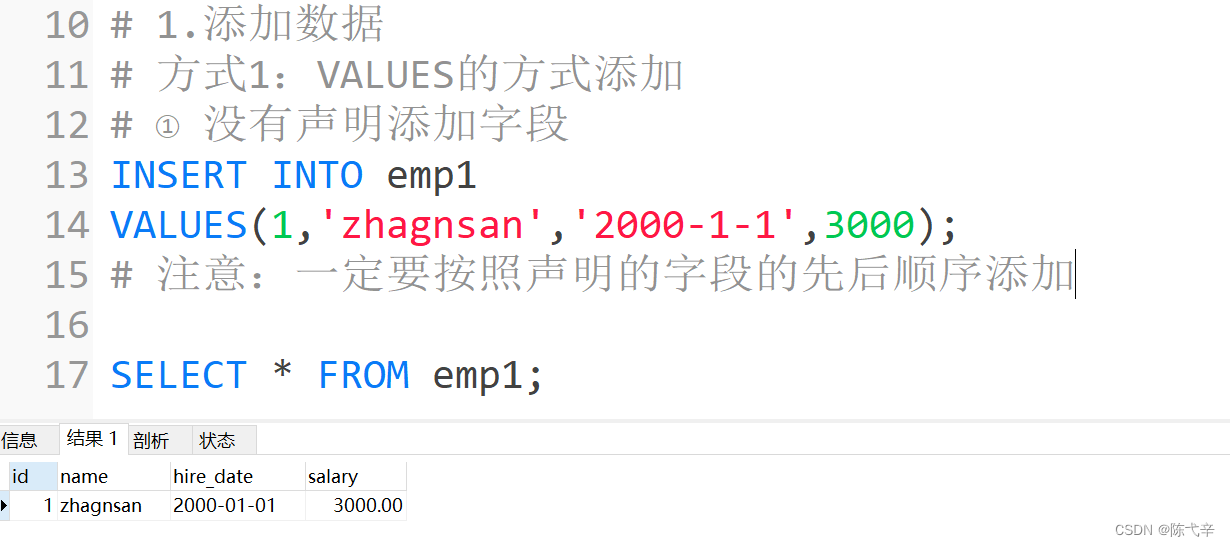
1.1.1 situation 1: Inserts data in the default order for all fields of the table
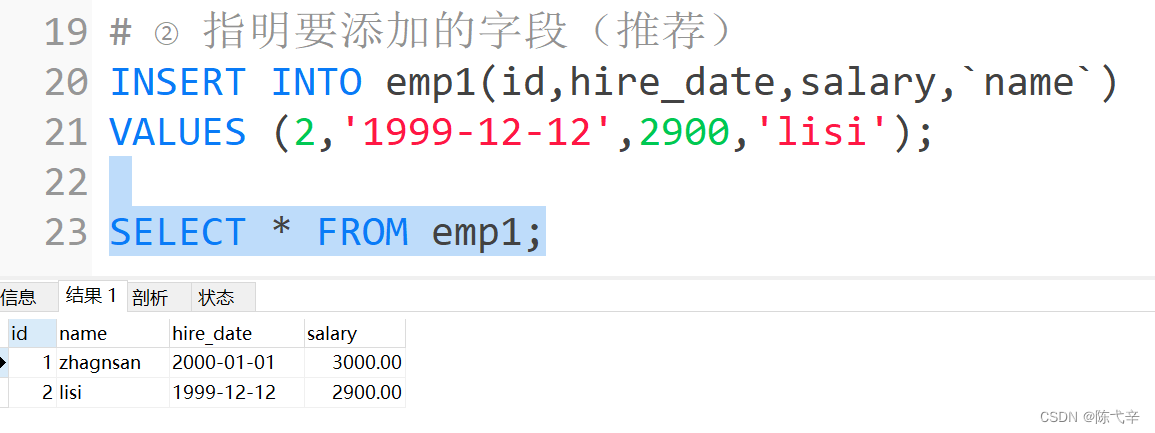
1.1.2 situation 2: Insert data for the specified fields of the table
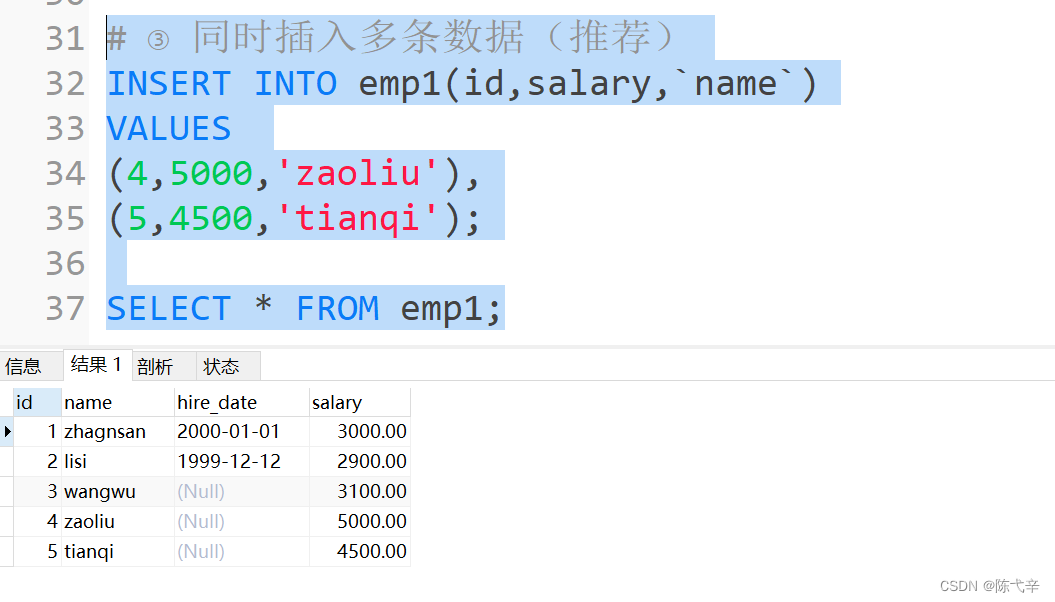
1.1.3 situation 3: Insert multiple records at the same time
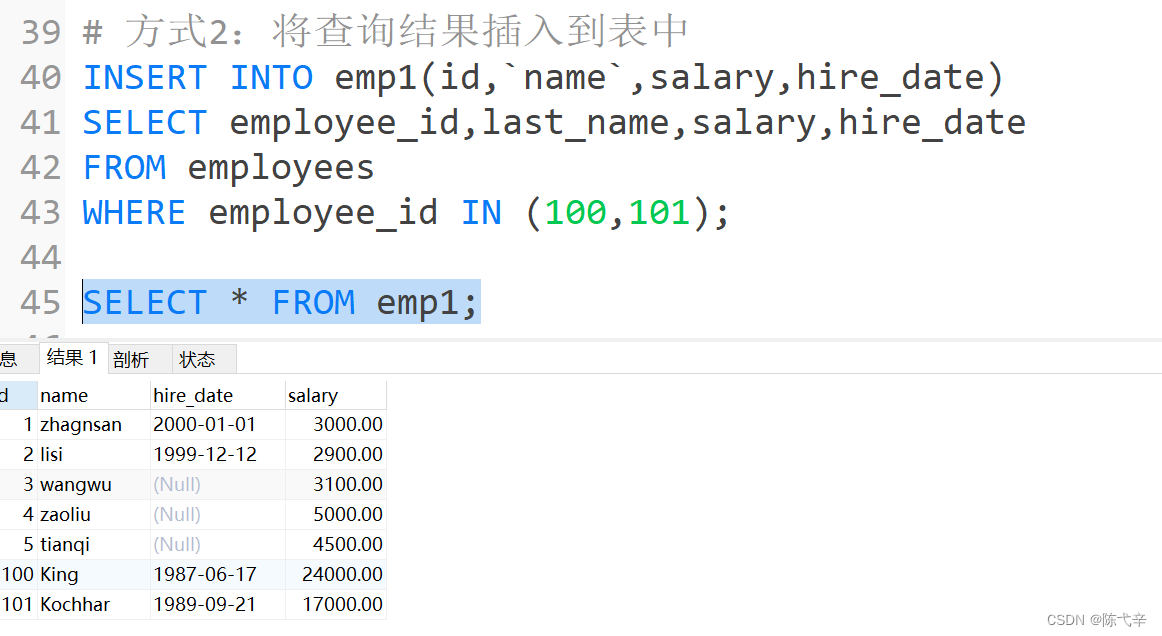
1.2 The way 2: Insert the query results into the table
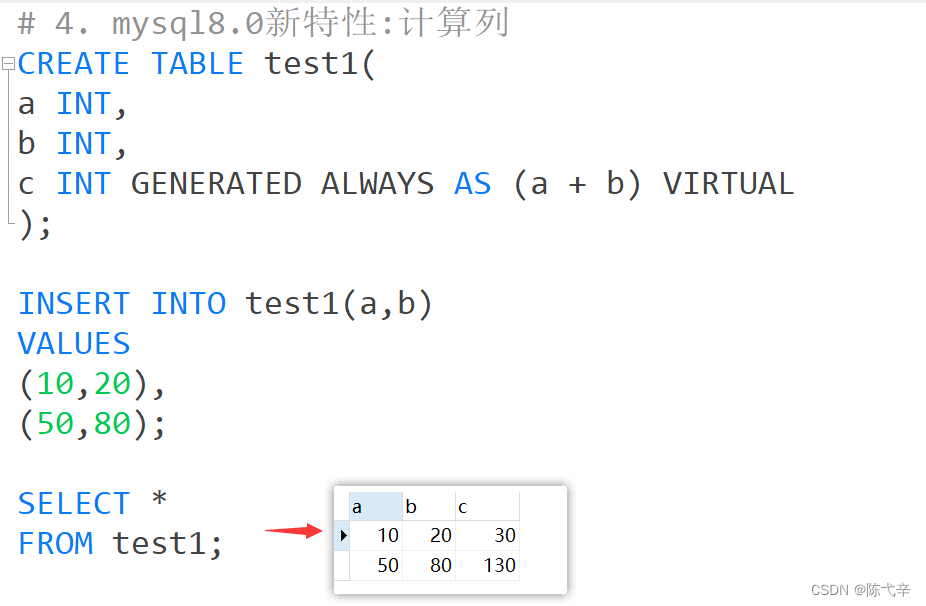
5.mysql8.0 New characteristics : Calculated column
2. Run the following script to create the table my_employees
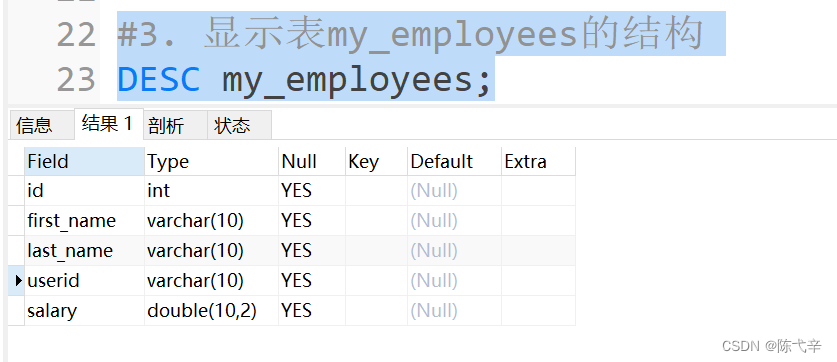
3. Display table my_employees Structure
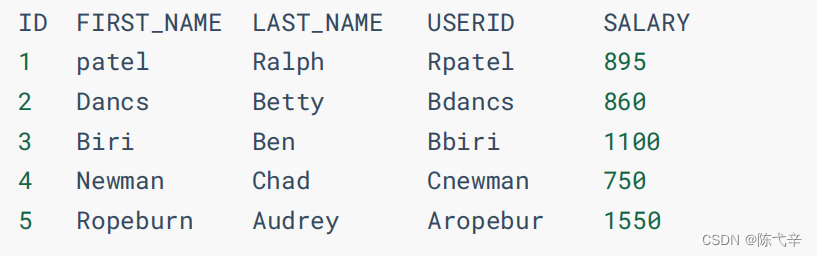
4. towards my_employees Insert the following data into the table
5. towards users Insert data into the table
6. take 3 Of employee No last_name It is amended as follows “drelxer”
7. All wages will be less than 900 The salary of the employee is modified to 1000
8. take userid by Bbiri Of user Table and my_employees All records in the table are deleted
9. Delete my_employees、users Table all data
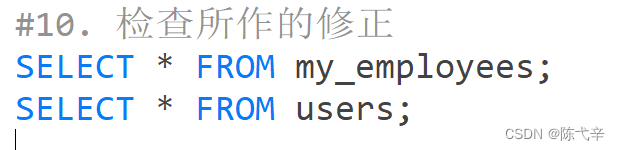
10. Check the corrections made
11. Clear the table my_employees
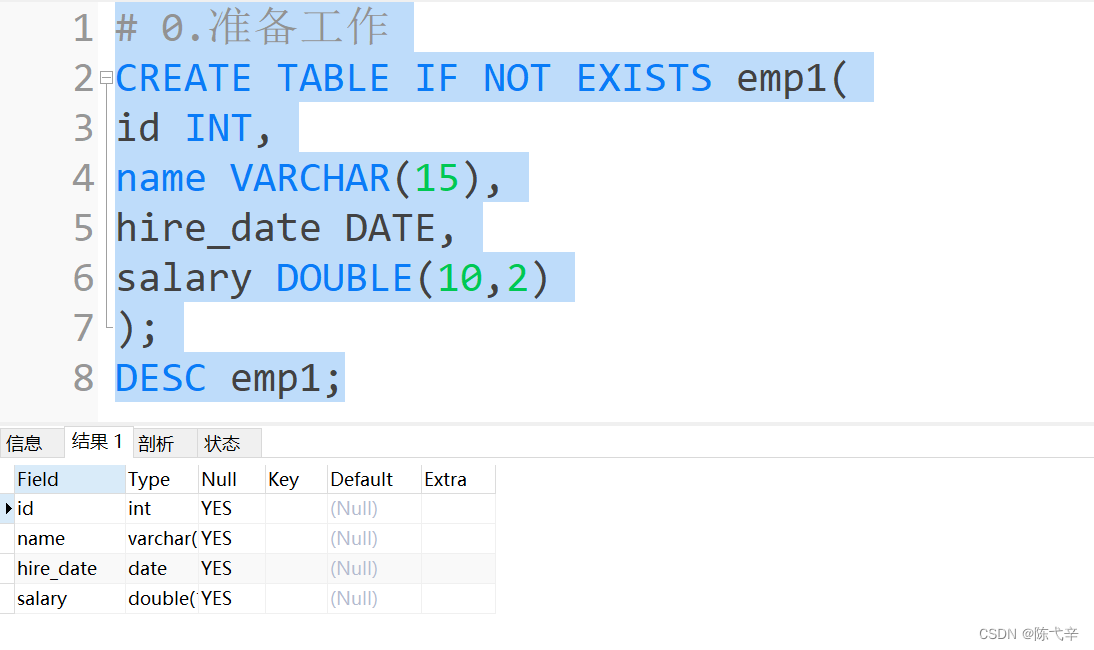
0. preparation
Data files :mysql Inquire about sql file - Dataset document class resources -CSDN library
1. insert data
1.1 The way 1:VALUES The way to add
Using this syntax, you can only insert into a table at a time One data .1.1.1 situation 1: Inserts data in the default order for all fields of the table
Grammar format :
INSERT INTO Table nameVALUES (value1,value2,....);In the value list, you need to specify a value for each field of the table , And the order of values must be the same as that of fields in the data table .
1.1.2 situation 2: Insert data for the specified fields of the table
Grammar format :
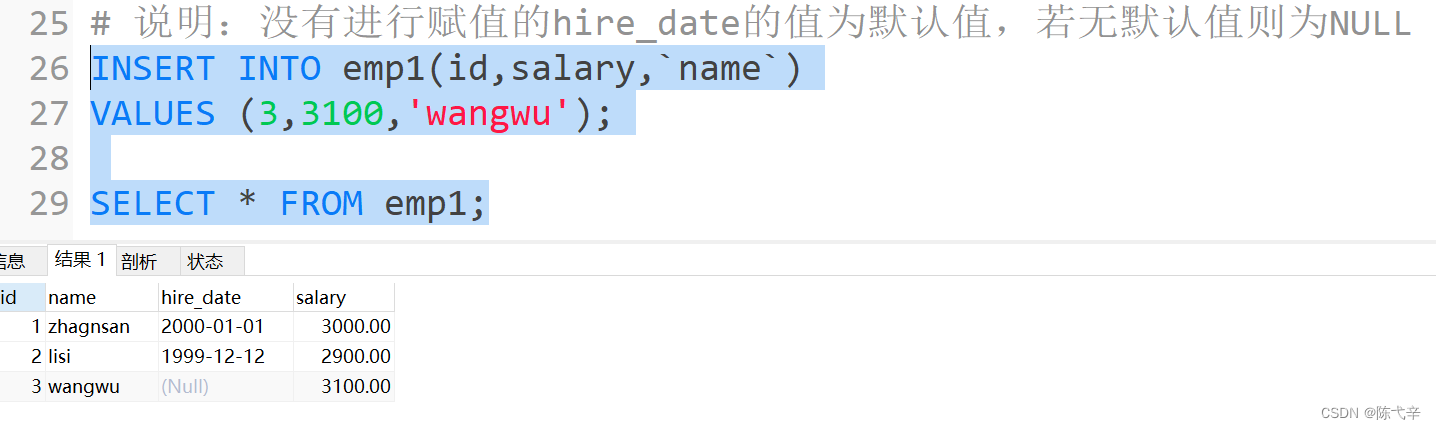
INSERT INTO Table name (column1 [, column2, …, columnn])VALUES (value1 [,value2, …, valuen]);Insert data for the specified fields of the table , Is in the INSERT Statement inserts values into only some fields , The values of other fields are the default values when the table is defined .
1.1.3 situation 3: Insert multiple records at the same time
INSERT Statement can insert multiple records into the data table at the same time , Specify multiple value lists when inserting , Each value list is separated by commas .Grammar format :
INSERT INTO table_nameVALUES(value1 [,value2, …, valuen]),(value1 [,value2, …, valuen]),……(value1 [,value2, …, valuen]);or
INSERT INTO table_name(column1 [, column2, …, columnn])VALUES(value1 [,value2, …, valuen]),(value1 [,value2, …, valuen]),……(value1 [,value2, …, valuen]);
explain :
1. Use INSERT When inserting multiple records at the same time ,MySQL It will return some additional information that is not available when performing single line insertion , The content of this information The meaning is as follows : ● Records: Indicates the number of records inserted . ● Duplicates: Indicates the records that were ignored during insertion , The reason may be that Some records contain duplicate primary key values . ● Warnings: Data values indicating a problem , For example, data type conversion occurs .
2. A that inserts multiple rows of records at the same time INSERT Statement is equivalent to multiple single line inserts INSERT sentence , But multi line INSERT sentence During processing More efficient . because MySQL Execute a single article INSERT Statement inserts more rows of data than using multiple INSERT sentence fast , Therefore, when inserting multiple records, it is best to choose to use a single record INSERT Insert... In the form of a statement .
1.1.4 Summary :
1. VALUES Or you could write it as VALUE , however VALUES It's standard writing .2. Character and date data should be enclosed in single quotes .1.2 The way 2: Insert the query results into the table
INSERT Can also be SELECT Insert the result of the statement query into the table , At this time, it is not necessary to input the values of each record one by one , just To use a INSERT Statement and a line SELECT Statements can be quickly inserted from one or more tables into a table Multiple lines .Grammar format :INSERT INTO Target table name(tar_column1 [, tar_column2, …, tar_columnn])SELECT(src_column1 [, src_column2, …, src_columnn])FROM Source table name[WHERE condition]explain :1. stay INSERT Add a subquery to the statement .2. There's no need to write VALUES Clause .3. The list of values in the subquery should be the same as INSERT The column name in Clause corresponds to .
Be careful :
1. The data type of the query field must correspond to the data type of the field added to the table one by one
2. The length of the field added to the table cannot be less than the query field , Otherwise, there is a risk of unsuccessful addition .
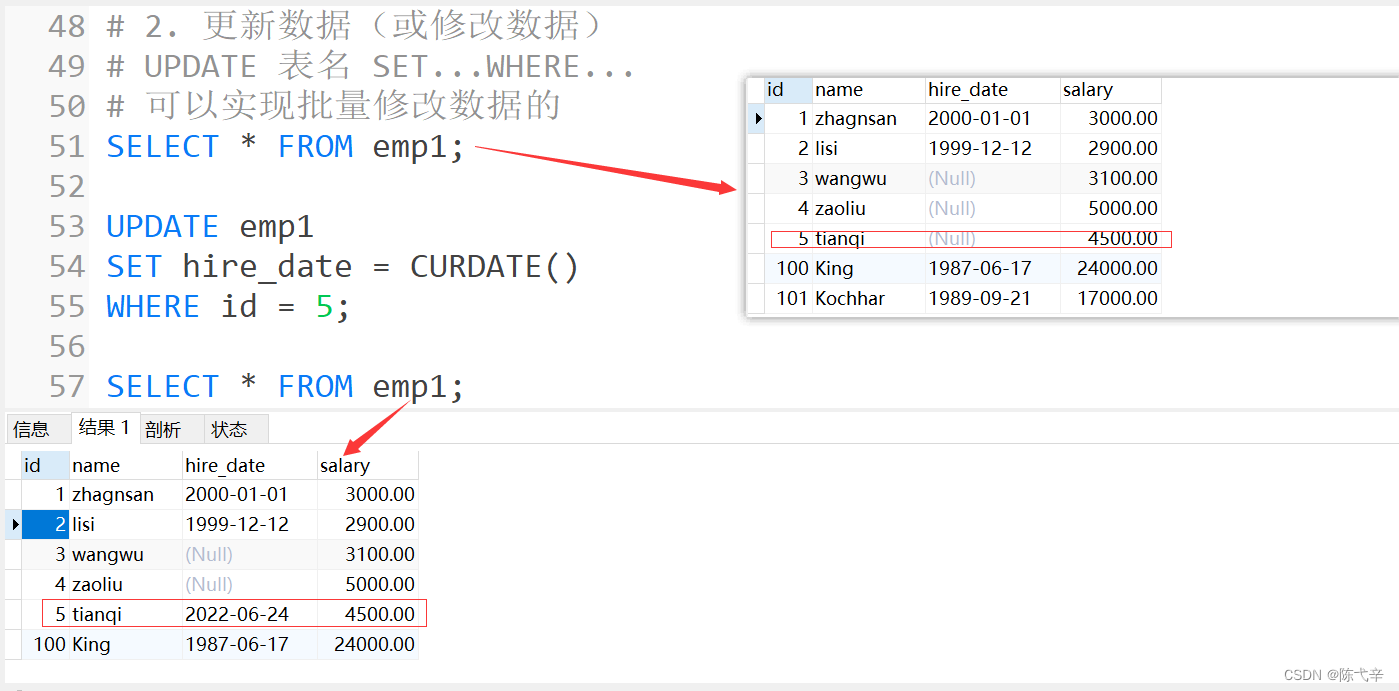
2. Update data
Use UPDATE Statement update data . The grammar is as follows :
UPDATE table_nameSET column1=value1, column2=value2, … , column=valuen[WHERE condition]It can be updated at one time multiple data .If you need to roll back data , It needs to be guaranteed in DML front , Set it up :SET AUTOCOMMIT = FALSE;
notes : Adding 、 When modifying or deleting data , There may be unsuccessful .( When possible, due to the influence of constraints )
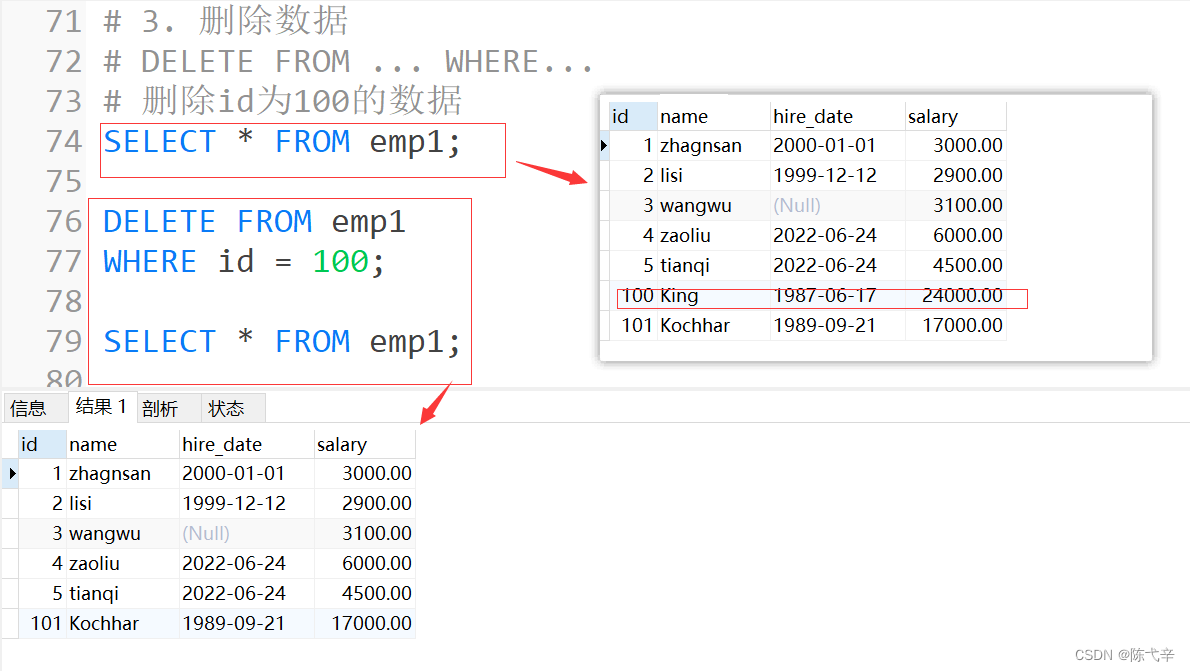
3. Delete data
Use DELETE Statement to delete data from a table , The syntax is as follows :DELETE FROM table_name[WHERE <condition>];table_name Specify the table to delete ;“[WHERE ]” Is an optional parameter , Specify deletion criteria , without WHERE Clause , DELETE Statement will delete all records in the table .notes : Adding 、 When modifying or deleting data , There may be unsuccessful .( When possible, due to the influence of constraints )
4. Summary
1.DML The operation is by default , After execution, the data will be submitted automatically , If you want to finish the execution , Do not submit data automatically , You need to use SET autocommit = FALSE;
2. Adding 、 When modifying or deleting data , There may be unsuccessful .( When possible, due to the influence of constraints )3. Basic grammar :add to : The way 1:INSERT INTO Table nameVALUES (value1,value2,....);The way 2:INSERT INTO Target table name (tar_column1 [, tar_column2, …, tar_columnn])SELECT (src_column1 [, src_column2, …, src_columnn])FROM Source table name[WHERE condition]to update ( modify ):UPDATE table_nameSET column1=value1, column2=value2, … , column=valuen[WHERE condition]Delete :DELETE FROM table_name[WHERE <condition>];5.mysql8.0 New characteristics : Calculated column
What is a calculated column ? Simply put, the value of a column is calculated from other columns . for example ,a The column value is 1、b The column value is 2,c Column Manual insertion is not required , Definition a+b As the result of the c Value , that c Is the calculation column , It is calculated from other columns .stay MySQL 8.0 in ,CREATE TABLE and ALTER TABLE Both support adding calculation Columns . Let's say CREATE TABLE For example .
6. practice
1. Create database dbtest11
CREATE DATABASE IF NOT EXISTS dbtest11 CHARACTER SET 'utf8';2. Run the following script to create the table my_employees
USE dbtest11;CREATE TABLE my_employees(id INT(10),first_name VARCHAR(10),last_name VARCHAR(10),userid VARCHAR(10),salary DOUBLE(10,2));CREATE TABLE users(id INT,userid VARCHAR(10),department_id INT);3. Display table my_employees Structure
4. towards my_employees Insert the following data into the table
5. towards users Insert data into the table
1 Rpatel 102 Bdancs 103 Bbiri 204 Cnewman 305 Aropebur 40
6. take 3 Of employee No last_name It is amended as follows “drelxer”
7. All wages will be less than 900 The salary of the employee is modified to 1000
8. take userid by Bbiri Of user Table and my_employees All records in the table are deleted
9. Delete my_employees、users Table all data
10. Check the corrections made
11. Clear the table my_employees











边栏推荐
- Flutter dynamic | fair 2.5.0 new version features
- TensorBoard可视化处理案例简析
- 常见的几种最优化方法Matlab原理和深度分析
- Shell timing script, starting from 0, CSV format data is regularly imported into PostgreSQL database shell script example
- Use docker to build sqli lab environment and upload labs environment, and the operation steps are provided with screenshots.
- Spark practice 1: build spark operation environment in single node local mode
- 使用vscode查看Hex或UTF-8编码
- 【BW16 应用篇】安信可BW16模组与开发板更新固件烧录说明
- Unity render streaming communicates with unity through JS
- 全面发展数字经济主航道 和数集团积极推动UTONMOS数藏市场
猜你喜欢

Several common optimization methods matlab principle and depth analysis

双向链表(我们只需要关注插入和删除函数)

又一个行业被中国芯片打破空白,难怪美国模拟芯片龙头降价抛售了
Error running 'application' in idea running: the solution of command line is too long

PhpMyAdmin stage file contains analysis traceability

Go language web development series 30: gin: grouping by version for routing

Kivy教程之 盒子布局 BoxLayout将子项排列在垂直或水平框中(教程含源码)
The latest BSC can pay dividends. Any B usdt Shib eth dividend destruction marketing can

User and group command exercises

【BW16 应用篇】安信可BW16模组与开发板更新固件烧录说明
随机推荐
SQL Injection (AJAX/JSON/jQuery)
Ocean CMS vulnerability - search php
IBEM mathematical formula detection data set
【BW16 应用篇】安信可BW16模组与开发板更新固件烧录说明
实现CNN图像的识别和训练通过tensorflow框架对cifar10数据集等方法的处理
Dynamic programming 01 knapsack and complete knapsack
从零开始的基于百度大脑EasyData的多人协同数据标注
静态链表(数组的下标代替指针)
Error handling when adding files to SVN:.... \conf\svnserve conf:12: Option expected
又一个行业被中国芯片打破空白,难怪美国模拟芯片龙头降价抛售了
JS 将伪数组转换成数组
MyCms 自媒体商城 v3.4.1 发布,使用手册更新
Unity render streaming communicates with unity through JS
Conversion function and explicit
Mycms we media mall v3.4.1 release, user manual update
Error running 'application' in idea running: the solution of command line is too long
[556. Next larger element III]
[技術發展-24]:現有物聯網通信技術特點
[技术发展-24]:现有物联网通信技术特点
Replace the GPU card number when pytorch loads the historical model, map_ Location settings