当前位置:网站首页>Intelij idea efficient skills (I)
Intelij idea efficient skills (I)
2022-06-21 21:45:00 【crysw】
Introduce
Intellij-IDEA Is a very powerful development tool , The configuration of various operations can improve our experience and work efficiency many times . Here are some common settings , For future review . My tool version is Intellij-IDEA-2019.3.4
Show tool boundary window
Setup method : View–>ToolWindows->...
Mouse hover prompt API Information
Setup method : File–>settings–>Editor–>General–> Check Show quick documentation...
The following figure shows the effect , Of course, if you don't want to set the mouse hover display api Information , You can also focus the mouse cursor , Press shortcut key Ctrl+Q Same effect .
Show method separator
Setup method : File–>settings–>Editor->General–>Appearance–> Check Show method separators
The following figure shows the effect :
Ignore case hints
remarks :
ideaThe default setting for is strictly case sensitive , For example, the input string No prompt String, Inconvenient coding

Setup method : File–>settings–>Editor–>General->Code Completion-> Uncheck the Match case
If it is lower than 2019 edition Of idea, It may not be the setting item above , You can refer to the following figure to set :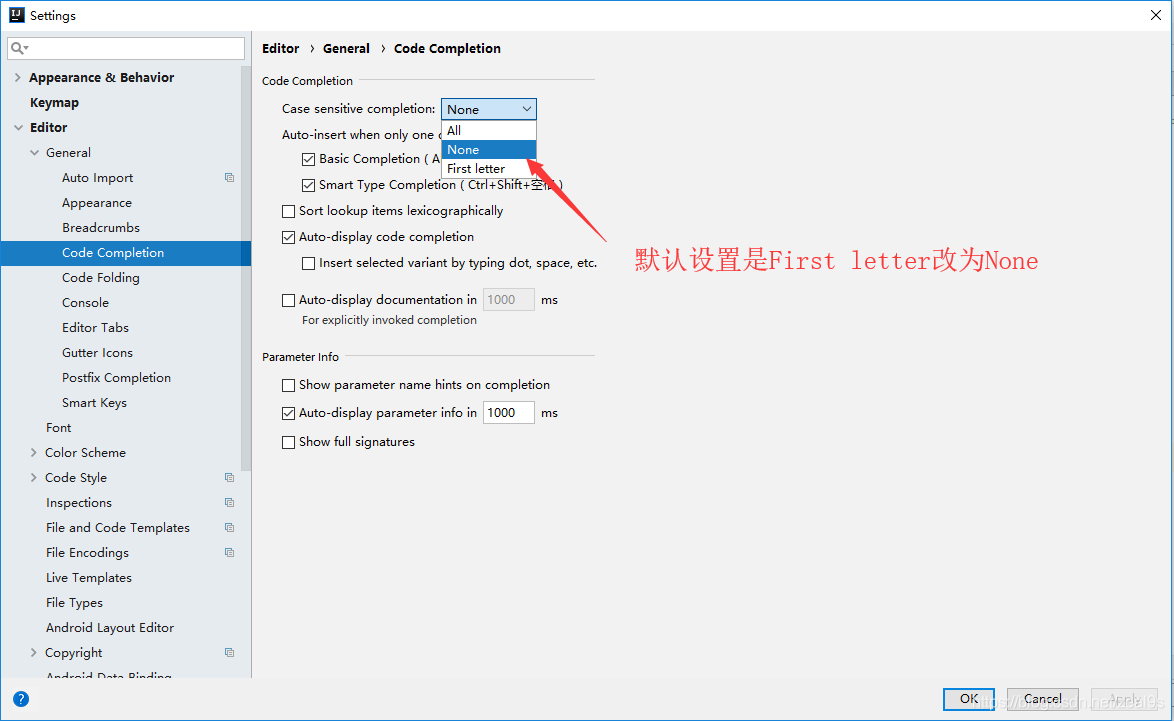
Theme Settings
Default theme settings
remarks : There are black and white styles
Setup method : File–>settings–>Appearance & Behavior–>Appearance–>Theme Option select a theme
Provides three themes : IntelliJ style , Darcula style , high constract style 
Comparison of renderings :IntelliJ The theme 
Darcula The theme 
high constract The theme 
Import other topics
Theme download
IDEA Three edit area themes are provided by default , You can choose as follows .
If you want more theme effects, you need to download the theme package , Here are a few IDEA Theme download website :
* IDEA Theme Official website : * Portal 
* riaway Official website : * Portal 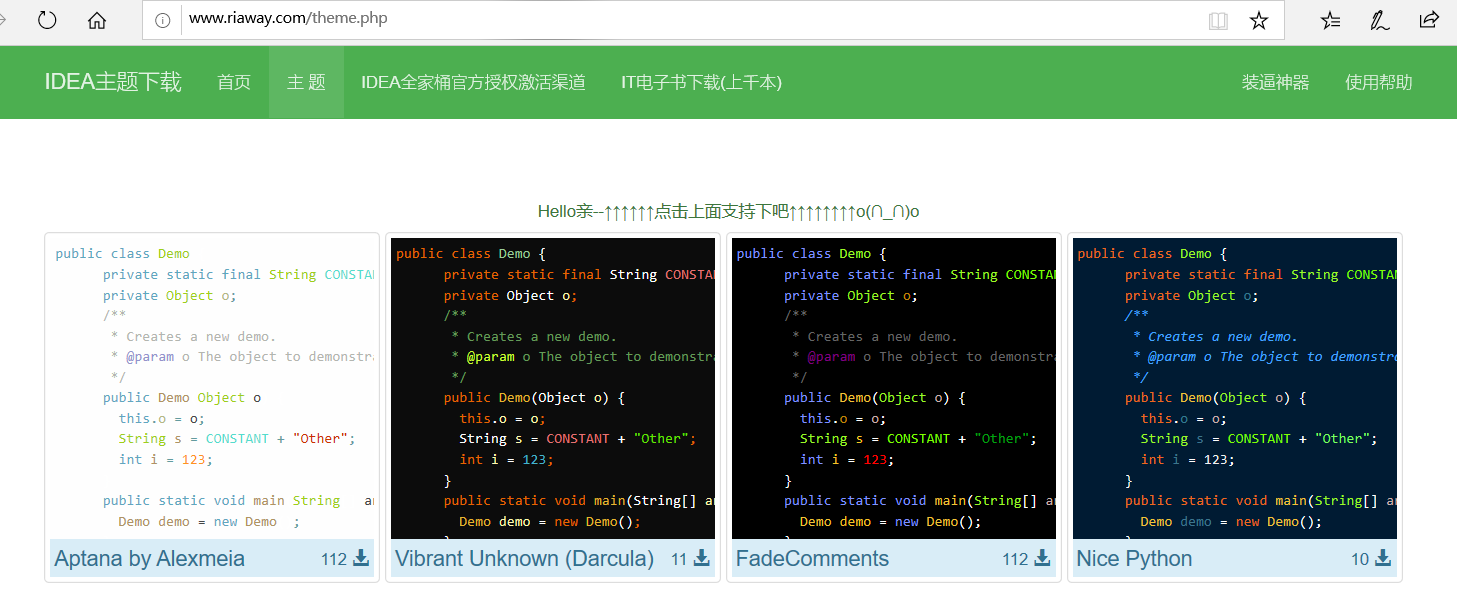
Import method 1
file → import settings → Select the downloaded theme jar file → Press the prompt to confirm → Restart the program 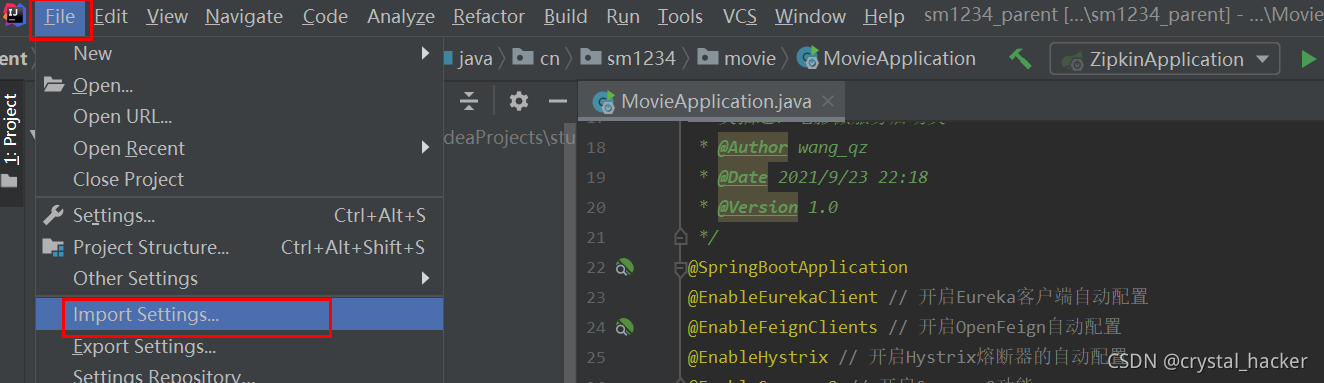
 After the restart , The new theme is automatically enabled , If not enabled , You can choose as follows :
Import the way 2
File–>settings–>Editor–>Color Scheme, Theme setting selection Import Scheme, Then follow the prompts to import the downloaded theme jar.

Uninstall theme
Uninstall the theme plug-in of the editing area , File–>settings–>Editor–>Color Scheme, Select the theme to uninstall →Delete, And then restart IDEA.

Eye protection background settings
If you want to change the background color of the edit page , You can adjust the background color inside the settings .
Setup method : File–>settings–>Editor–>Color Scheme->General->Text->Default text, Background Choose your favorite color .
Automatic guiding package
remarks : By default, the package needs to be imported manually , For example, we need to import Map class , Then you need to import it manually (
Alt+Enter key), If you don't need to use it , Deleted Map Example , Imported packages also need to be manually deleted , If you set this function, you don't need to do it manually , Automatically help you to automatically import and remove packages .
Setup method : File–>settings–>Editor–>general–>Auto Import–>, As shown in the figure below, check it 
Single line shows multiple Tabs
The default is single row Tabs, As shown in the figure below :
Single line shows multiple Tabs Setup method : File–>settings–>Editor–>General -->Editor Tabs, Show tabs in single row Uncheck .
Font settings
remarks : The default installation starts Idea The font is very small , I'm not used to it , Need to adjust font size and font ( It can be adjusted if necessary )
Code editing area font
File -> Settings -> Editor -> Font
Console font
File -> Settings -> Editor -> Color Scheme -> Console Font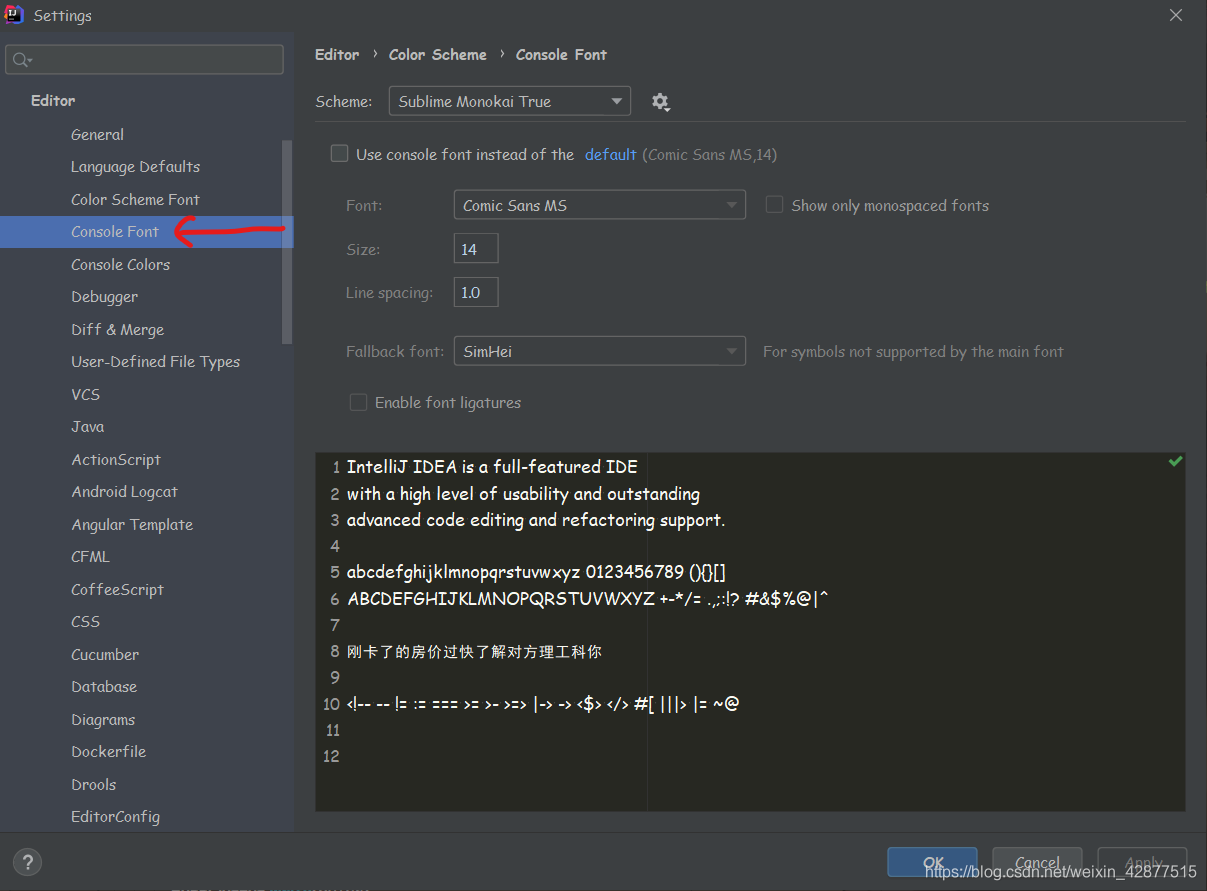
Left and top menu bar Fonts
File -> Settings -> Appearance & Behavior -> Apearrance , On the hook Use costom font, Select the desired font from the drop-down list .
Use the mouse wheel to adjust the font size in the code editing area
Specific operation : Hold down Ctrl Key while using the mouse wheel to adjust the font size
Be careful : This setting is only valid for the file currently being edited
Set up : Click on one by one File -> Stetings -> Editor -> General, On the hook Mouse Control Under column Change font …
The mouse wheel resizes the picture
stay File -> Setting -> Editor -> Images You can set it up under , Choose Zoom image with mouse wheel (Ctrl+Mouse wheel), Pictured 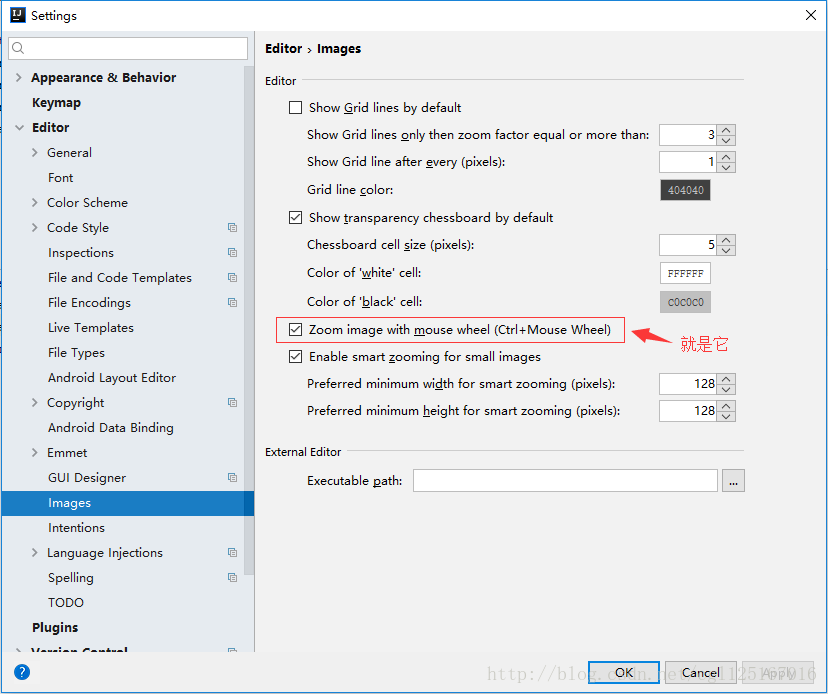
Comment template
Class annotation template
File–>settings–>Editor–>File and Code Templates , Files TAB , choice class, Set the template in the edit box .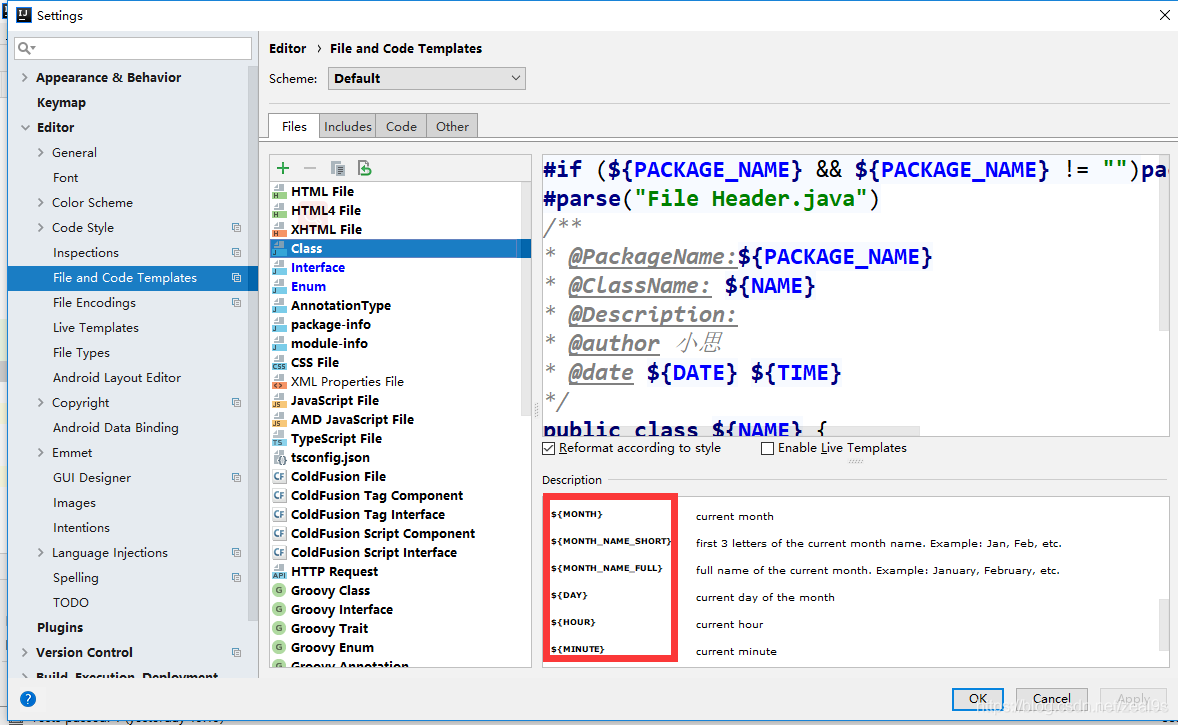
Method annotation template
To be added …
Display code horizontally or vertically
Eclipse If you need to compare the code , Just drag Tabs that will do , however idea To set up , Setting mode :
Right mouse click Tabs, choice Split Vertically or Split Horizontally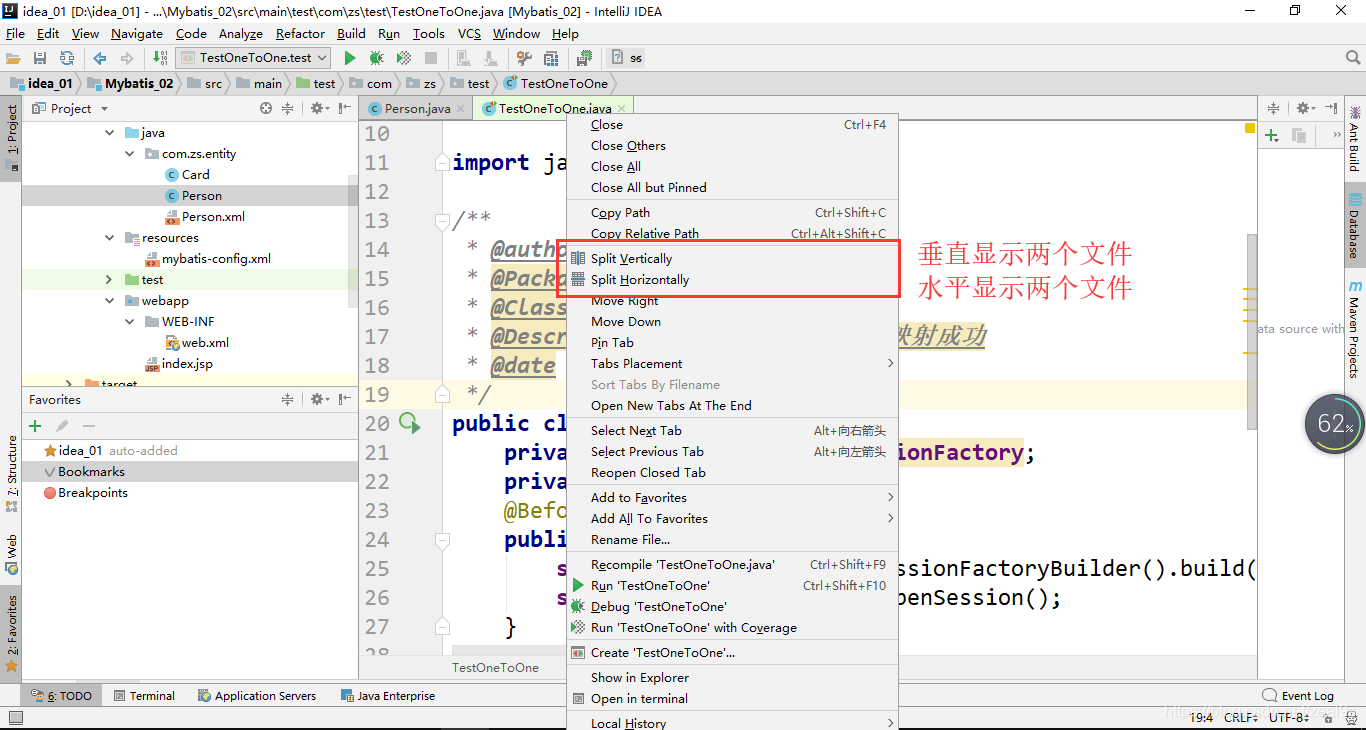
vertical tabs design sketch :
Shortcut key settings
remarks : from Eclipse Change to idea code , Many shortcuts are inconsistent , Lead to write efficiency , Now let's change the shortcut keys
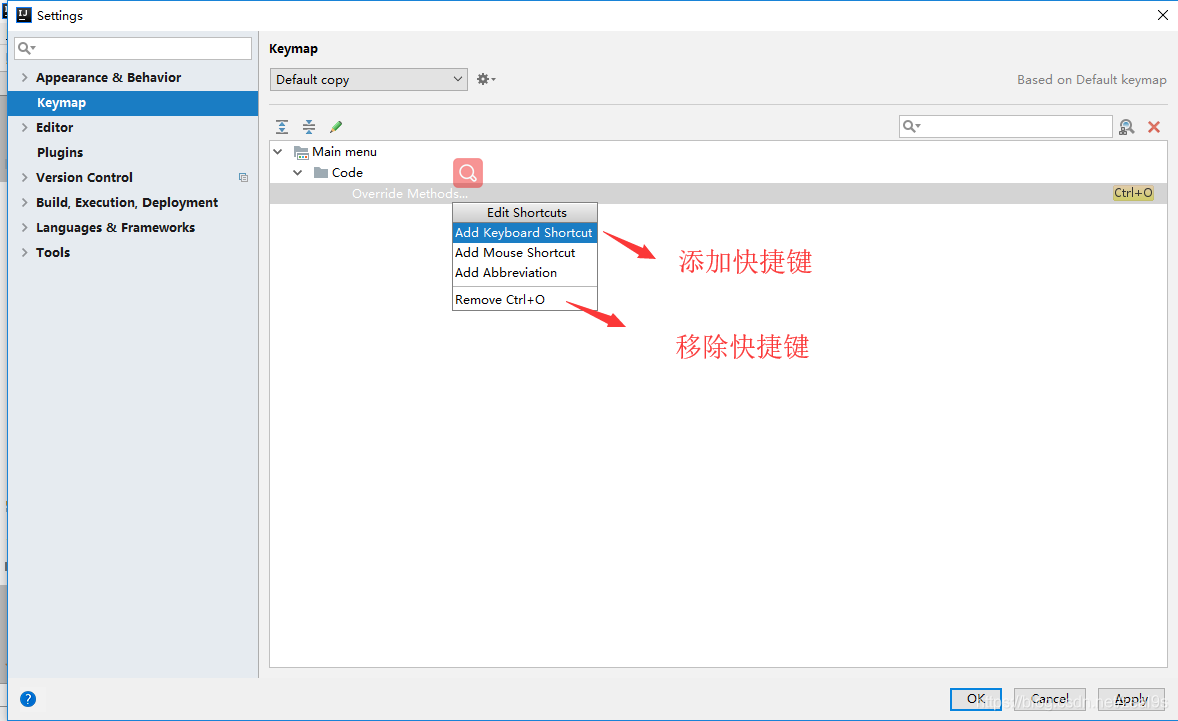
Setting mode : File–>Setting–>Keymap, Select the shortcut key habit of the corresponding development tool .
You can also customize the shortcut key , File–>Setting–>Keymap Search requires shortcuts , Then change the shortcut key 
Code detection warning level settings
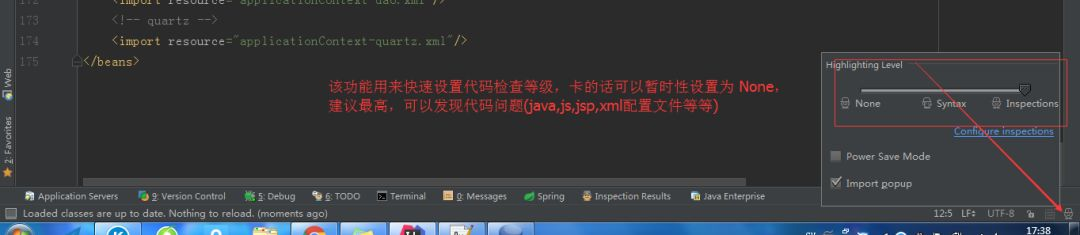
Strongly recommended , Don't turn it off , Don't give up trouble , His tips are all good for you , Help you improve the quality of your code , It's very helpful
View local code history
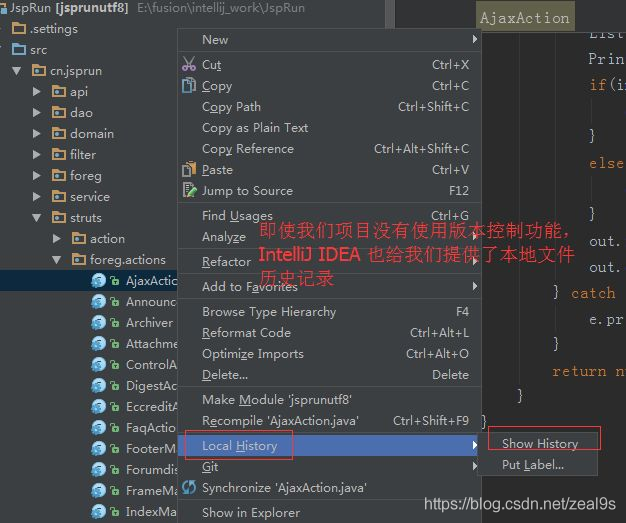
Quick completion of semicolon
Ctrl+Shift+Enter, You can quickly generate a semicolon at the end of the current line anywhere ";".
Quick search Controller Method
If you have a lot of projects controller, There are a lot of http perhaps resful Method . How to find these methods quickly ? This is the time ,Ctrl+Alt+Shift+N I can use it .
Quick matching and positioning of braces
When a brace appears {} When the code in is very long , May have filled the entire computer screen , Especially those who work with notebooks , Just throw away the big screen , Sometimes you have to find someone Brace start Corresponding to the other side Braces close , It takes a long time for the mouse to slide , Use the following methods to quickly locate .
location Brace start : ctrl+[
location Braces close : ctrl+]
You can also position the cursor to Braces close , Then double click the mouse , The contents of the whole brace will be selected .
Add
The above configuration information is saved in the system disk IDEA In the installation directory .C:\Users\18482\.IntelliJIdea2019.3\configC:\Users\18482\.IntelliJIdea2019.3\system
config : In the initial installation IntelliJ IDEA Sometimes you are asked if you want to import the existing configuration information , This config It's your configuration information , It's convenient to replace the computer and the system , The premise is to save this folder .
system : This folder is IntelliJ IDEA When something unexpected happens , Like blue screen , A sudden power failure caused the project to fail to start , You can try deleting this file , Let the system regenerate a system The file of
Personal blog
Welcome to my personal blog : https://www.crystalblog.xyz/
Alternate address : https://wang-qz.gitee.io/crystal-blog/
边栏推荐
- 如何解决idea文件被锁Make File Read-Only?
- 杰理之配对成对耳后,想保持两个耳机都输出立体声【篇】
- 潮流媒體Hypebeast擬曲線上市:作價5.3億美元 擬第三季完成
- Constructor in JS (emphasis)
- Trend media Hypebeast plans to be listed on the curve: with a price of USD 530million, it is planned to be completed in the third quarter
- Go language self-study series | golang standard library encoding/xml
- 杰理之做蓝牙发射的时候,回链没有声音解决方法【篇】
- 杰理之,提示芯片信 息不匹配,错误代号 10 的处理方法【篇】
- JS中的构造函数(重点)
- Summary of intelligence problems
猜你喜欢

30组户外旅行游玩VLOG记录LUTs调色预设Moody Travel LUTs

#16迭代器经典案例

Delaying patient self-help guide | "I have 100 excuses for not delaying, but I am not willing to take a step"

Data types in JS (basic)

有哪些将英文文献翻译为中文的网站或软件?
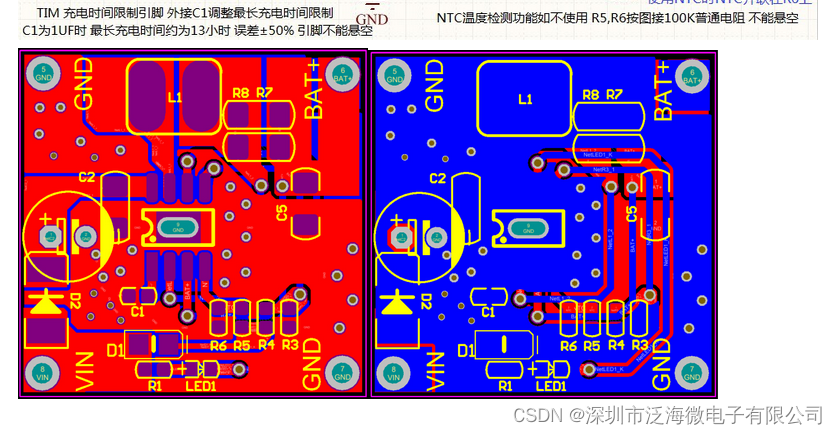
Yb5212a charging IC chip sop8

Tx9118 Synchronous Boost IC

Principle and application of user mode hot patch

杰理之配对成对耳后,想保持两个耳机都输出立体声【篇】

晶合集成通过注册:拟募资95亿 合肥建投与美的是股东
随机推荐
Which small directions of cv/nlp are easy to publish papers?
ctfshow 105-127
Implementation principle of global load balancing
How to use the free and easy-to-use reference management software Zotero? Can I support both Chinese and English
Ln2220 2A overcurrent 5v1a High Efficiency Boost IC chip dc/dc voltage regulator
Excuse me, which website is better for college students to check literature?
Which iPad apps can read English literature well?
Installing component and package libraries in Ad
杰理之开启四声道通话近端变调问题【篇】
ACM. HJ51 输出单向链表中倒数第k个结点 ●
C language array and pointer exercises (original question + analysis + original code)
N - string problem HDU - 3374 (max min notation template)
Precautions for Jerry's external radio [chapter]
tkinter绘制组件(29)——单选组控件
数据库管理:Navicat Premium 15
7.目标检测
Xmind8 最新破解教程(亲测有用)
Constructor in JS (emphasis)
自己动手写编译器:while,for,do等循环语句的中间代码生成
2022年焊工(高级)考试题模拟考试题库模拟考试平台操作