当前位置:网站首页>jsp连接oracle实现登录注册(简单)
jsp连接oracle实现登录注册(简单)
2022-06-28 05:21:00 【辕小白】
要求
tomcat、oracle数据库服务启动
需要一个Oracle的驱动器,放在WEB-INFO的lib。版本号如下: 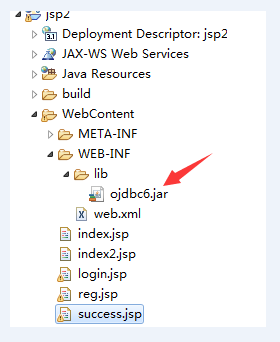
数据库文件
在Oracle数据库中的scott的连接,建立一个名字叫t_user的表,表格的字段为username,password。
login.jsp
<%@ page language="java" contentType="text/html; charset=UTF-8"
pageEncoding="UTF-8"%>
<!DOCTYPE html>
<html>
<head>
<meta charset="UTF-8">
<title>登录</title>
<style>
input[type="submit"] {
width: 100px;
margin: 0 5px;
}
input[type="button"] {
width: 100px;
margin: 0 5px;
}
</style>
</head>
<body>
<center>
<font face="楷体" size="6" color="#000">登录界面</font>
<form action="index.jsp" method="post">
<table width="300" height="180" border="5" bordercolor="#A0A0A0">
<tbody>
<tr>
<td><label>用户名:</label></td>
<td><input type="text" name="name" maxlength = "12" placeholder="请输入用户名!" /></td>
</tr>
<tr>
<td><label>密 码:</label></td>
<td><input type="password" name="pwd" maxlength = "16" placeholder="请输入密码!" /></td>
</tr>
<tr>
<td colspan="2" align="center">
<input type="submit" value="登陆" />
<input type="button" value="注册" onclick = "window.open('reg.jsp')" /></td>
</tr>
</tbody>
</table>
</form>
</center>
</body>
</html>
效果图如下:
index.jsp
实现检查登录界面与数据库连接
实现数据库连接,判断登录时用户名和密码是否正确。
<%@ page import="java.sql.*"%>
<%@ page language="java" contentType="text/html; charset=UTF-8"
	pageEncoding="UTF-8"%>
<!DOCTYPE html>
<html>
<head>
<meta charset="UTF-8">
<title>login</title>
</head>
<body>
	<%
		String uName = new String(request.getParameter("name"));
	String uPwd = request.getParameter("pwd");

	Connection conn = null;
	PreparedStatement pstm = null;
	ResultSet rs = null;
	String driverClass = "oracle.jdbc.driver.OracleDriver";
	String url = "jdbc:oracle:thin:@localhost:1521:orcl";
	String user = "scott";
	String password = "tiger";
	String sql = "select username,password from t_user";
	try {

		Class.forName(driverClass);
		conn = DriverManager.getConnection(url, user, password);
		pstm = conn.prepareStatement(sql);
		rs = pstm.executeQuery();
		while (rs.next()) {

			if (rs.getString("username").equals(uName) && rs.getString("password").equals(uPwd)) {

				RequestDispatcher dis = request.getRequestDispatcher("success.jsp");
				dis.forward(request, response);
				return;
			}
		}
		response.sendRedirect("login.jsp");
	} catch (ClassNotFoundException e) {

		// TODO Auto-generated catch block
		e.printStackTrace();
	} catch (SQLException e) {

		// TODO Auto-generated catch block
		e.printStackTrace();
	} finally {

		try {

			if (rs != null) {

				rs.close();
				rs = null;
			}
			if (pstm != null) {

				pstm.close();
				pstm = null;
			}
			if (conn != null) {

				conn.close();
				conn = null;
			}
		} catch (SQLException e) {

			// TODO Auto-generated catch block
			e.printStackTrace();
		}
	}
	%>
</body>
</html>
reg.jsp
<%@ page language="java" contentType="text/html; charset=UTF-8"
	pageEncoding="UTF-8"%>
<!DOCTYPE html>
<html>
<head>
<meta charset="UTF-8">
<title>注册界面</title>
<style>
input[type="submit"] {

	width: 100px;
	margin: 0 5px;
}

input[type="reset"] {

	width: 100px;
	margin: 0 5px;
}
</style>
<script>
	function addCheck() {

		var username = document.getElementById("username").value;
		var password = document.getElementById("password").value;
		var newword = document.getElementById("newword").value;
		if (username == "") {

			alert("用户名不能为空!");
			document.getElementById("username").focus();
			return false;
		}
		if (password == "") {

			alert("密码不能为空!");
			document.getElementById("password").focus();
			return false;
		}
		if (password != newword) {

			alert("两次输入密码不相同!");
			document.getElementById("newword").focus();
			return false;
		}
	}
	function validate() {

		var flag = addCheck();
		if (flag == false)
			return false;
		return true;
	}
</script>
</head>
<body>
	<center>
		<font face="楷体" size="6" color="#000">注册界面</font>
		<form action="index2.jsp" method="post"
			onsubmit="return validate()">
			<table width="300" height="180" border="5" bordercolor="#A0A0A0">
				<tr>
					<th>用户名:</th>
					<td><input type="text" name="name" id="username"
						placeholder="输入16个字符以内" maxlength="16"
						onfocus="if(this.value == '输入16个字符以内') this.value =''"></td>
				</tr>
				<tr>
					<th>输入密码:</th>
					<td><input type="password" name="pwd" id="password"
						placeholder="输入20个字符以内" maxlength="20"
						onfocus="if(this.value == '输入20个字符以内') this.value =''"></td>
				</tr>
				<tr>
					<th>确认密码:</th>
					<td><input type="password" name="nwd" id="newword"
						placeholder="重新输入密码" maxlength="20"
						onfocus="if(this.value == '重新输入密码') this.value =''"></td>
				</tr>
				<tr>
					<td colspan="2" align="center"><input type="submit"
						value="注 册"> <input type="reset" value="重 置"></td>
				</tr>
			</table>
		</form>
	</center>
</body>
</html>
效果图如下:
index2.jsp
实现检查注册界面与数据库连接
实现数据库连接,把注册的用户名和密码添加到数据库中。
<%@ page import="java.sql.*" %>
<%@ page language="java" contentType="text/html; charset=UTF-8"
    pageEncoding="UTF-8"%>
<!DOCTYPE html>
<html>
<head>
<meta charset="UTF-8">
<title>login</title>
</head>
<body>
	<%
		String uName = request.getParameter("name");
		String uPwd = request.getParameter("pwd");

		Connection conn =null;
		PreparedStatement pstm = null;
		ResultSet rs =  null;
		String driverClass = "oracle.jdbc.driver.OracleDriver";
        String url = "jdbc:oracle:thin:@localhost:1521:orcl";
        String user = "scott";
        String password = "tiger";
        String sql="insert into t_user(username,password) values(?,?)";
        try{

        	Class.forName(driverClass);
			conn = DriverManager.getConnection(url, user, password);
			pstm = conn.prepareStatement(sql);
			pstm.setString(1, uName);
			pstm.setString(2, uPwd);
			rs=pstm.executeQuery();
			if(rs.next()){

				out.print("用户注册成功!");
				response.sendRedirect("login.jsp");
			}else{

				out.print("用户注册失败!");
				response.sendRedirect("reg.jsp");
			}
        }catch (ClassNotFoundException e) {

			// TODO Auto-generated catch block
			e.printStackTrace();
		} catch (SQLException e) {

			// TODO Auto-generated catch block
			e.printStackTrace();
		}finally {

			try {

				if(rs!=null) {

					rs.close();
					rs =null;
				}
				if(pstm!=null) {

					pstm.close();
					pstm =null;
				}
				if(conn!=null) {

					conn.close();
					conn =null;
				}
			} catch (SQLException e) {

				// TODO Auto-generated catch block
				e.printStackTrace();
			}
		}
	%>
</body>
</html>
边栏推荐
- How does the power outlet transmit electricity? Simple problems that have plagued my little friend for so many years
- Docker安装Mysql5.7并开启binlog
- Unity out ref params
- msa. h: There is no such file or directory
- 程序员-放羊娃
- 开关电源电压型与电流型控制
- [leetcode] 12. Integer to Roman numeral
- metaRTC5.0编程之p2p网络穿透(stun)指南
- 基于微信小程序的婚纱影楼门户小程序
- Opencv实现目标检测
猜你喜欢
MySQL 45讲 | 05 深入浅出索引(下)

并发之wait/notify说明

Based on the order flow tool, what can we see?

【无标题】drv8825步进电机驱动板子原理图

A guide to P2P network penetration (stun) for metartc5.0 programming

IP datagram sending and forwarding process

Pcr/qpcr research: lumiprobe dsgreen is used for real-time PCR
![[leetcode] 12. Integer to Roman numeral](/img/3e/815f24a85a3333ce924acee1856f62.png)
[leetcode] 12. Integer to Roman numeral

Lumiprobe细胞成像分析:PKH26 细胞膜标记试剂盒

Gorm transaction experience
随机推荐
Is it enough for the project manager to finish the PMP? no, it isn't!
Why don't big manufacturers use undefined
Qcom LCD commissioning
2022 new version NFT source code source code of China meta universe digital collection art trading platform
Steve Jobs' speech at Stanford University -- follow your heart
BioVendor sRAGE Elisa试剂盒化学性质和技术研究
Lumiprobe细胞成像分析:PKH26 细胞膜标记试剂盒
Operation of simulated examination platform of G3 boiler water treatment recurrent training question bank in 2022
Disable right-click, keyboard open console events
MySQL 45讲 | 05 深入浅出索引(下)
Feign implements path escape through custom annotations
MCLK configuration of Qualcomm platform camera
The latest examination questions and answers for the eight members (standard members) of Liaoning architecture in 2022
!‘ Cat 'is not an internal or external command, nor is it a runnable program or batch file.
PCR/qPCR研究:Lumiprobe丨dsGreen 用于实时 PCR
The heading angle of sliceplane is the same as that of math Corresponding transformation relation of atan2 (y, x)
The short video local life section has become popular. How to grasp the new opportunities?
分享|智慧环保-生态文明信息化解决方案(附PDF)
【JVM系列】JVM调优
Performance degradation during dpdk source code testing