当前位置:网站首页>EasyExcel 复杂数据导出
EasyExcel 复杂数据导出
2022-07-01 21:43:00 【揽月随风醉】
EasyExcel实现 多标题、动态标题,并且实现一个Excel表有多个sheet,一个sheet有多个表
因工作需要导出数据,导出到excel的格式如下:
需求1:假设有A、B员工,那么就相当于有两张工作表【sheet】
需求2:假设A员工要展示一年的工资,要那么同一工作表【sheet】就得有多个表
再此先奉献上EasyExcel语雀 或者 EasyExcel官网
我最开始看的官网,但是官网又没有语雀写的多。但是耐不住官网的简洁。嗯…我觉得简洁
一、根据文档写了个实体类
package com.admin.ctt.entity.excelPojo;

import com.alibaba.excel.annotation.ExcelProperty;
import com.alibaba.excel.annotation.write.style.ColumnWidth;
import com.alibaba.excel.annotation.write.style.ContentRowHeight;
import com.alibaba.excel.annotation.write.style.HeadRowHeight;
import lombok.Data;
import lombok.EqualsAndHashCode;

import java.util.Date;

/** * 导出员工的合同提成及绩效 * @author LunarYouI * @create 2022-06-28 17:05 */

@Data
@EqualsAndHashCode
//所有标题的高
@HeadRowHeight(30)
//所有内容的高
@ContentRowHeight(25)
//所有单元格列宽
@ColumnWidth(25)
public class EmployeeSalaryPojo {

// @ColumnWidth(50) //指定某一个单元格列宽
// @ExcelProperty({"员工工资表", "标题1", "合同提成/绩效", "字符串标题"})
// private String string;
//
// @ExcelProperty({"员工工资表", "标题1", "合同提成/绩效", "日期标题"})
// private Date date;
//
// @ExcelProperty({"员工工资表", "标题1", "合同提成/绩效", "数字标题"})
// private Double doubleData;

    //员工名称
    private String name;
    //员工日期
    private Date date;
    //员工工资
    private Double doubleData;
}
二、参照文档写的两个方法,分别是标题与数据
- 标题这里我定义了两个人,分别是王某、李某,分别对应两个sheet
/** * 数据 * LunarYouI */
	private static List<EmployeeSalaryPojo> data() {

		List<EmployeeSalaryPojo> list = new ArrayList<>();
		for (int i = 0; i < 10; i++) {

			EmployeeSalaryPojo data = new EmployeeSalaryPojo();
			data.setName("某人" + i);
			data.setDate(new Date());
			data.setDoubleData(0.56);
			list.add(data);
		}
		return list;
	}

	/** * 标题 * @return */
	private static Map<String, List<List<String>>> head() {

		String a = "管理员:张某 工资时间:2022.01 职位:员工/执行人 姓名:王某";
		String b = "管理员:李某 工资时间:2022.01 职位:员工/执行人 姓名:李某";
		Map<String, List<List<String>>> mp = new HashMap<>();
		/** * 人1 */
		List<List<String>> head = new ArrayList<>();
		List<String> list1 = new ArrayList<>();
		list1.add("员工工资表");
		list1.add(a);
		list1.add("合同提成/绩效");
		list1.add("员工名称");
		head.add(list1);
		List<String> list2 = new ArrayList<>();
		list2.add("员工工资表");
		list2.add(a);
		list2.add("合同提成/绩效");
		list2.add("员工日期");
		head.add(list2);
		List<String> list3 = new ArrayList<>();
		list3.add("员工工资表");
		list3.add(a);
		list3.add("合同提成/绩效");
		list3.add("员工工资");
		head.add(list3);
		mp.put("r1",head);
		/** * 人2 */
		List<List<String>> head1 = new ArrayList<>();
		List<String> list4 = new ArrayList<>();
		list4.add("员工工资表");
		list4.add(b);
		list4.add("合同提成/绩效");
		list4.add("员工名称");
		head1.add(list4);
		List<String> list5 = new ArrayList<>();
		list5.add("员工工资表");
		list5.add(b);
		list5.add("合同提成/绩效");
		list5.add("员工日期");
		head1.add(list5);
		List<String> list6 = new ArrayList<>();
		list6.add("员工工资表");
		list6.add(b);
		list6.add("合同提成/绩效");
		list6.add("员工工资");
		head1.add(list6);
		mp.put("r2",head1);
		return mp;
	}
三、【多个sheet】参照EasyExcel官网导出数据在不同sheet上
	public static void simpleWrite() {

		ExcelWriter excelWriter = null;
		// 方法2: 如果写到不同的sheet 同一个对象
		String fileName = "F:\\temporary\\" + "repeatedWrite" + System.currentTimeMillis() + ".xlsx";
		// 这里 指定文件
		try {

			excelWriter = EasyExcel.write(fileName, EmployeeSalaryPojo.class).build();
			// 去调用写入,这里我调用了五次,实际使用时根据数据库分页的总的页数来。这里最终会写到5个sheet里面
			for (int i = 0; i < 5; i++) {

				// 每次都要创建writeSheet 这里注意必须指定sheetNo 而且sheetName必须不一样
				WriteSheet writeSheet = EasyExcel.writerSheet(i, "模板" + i).build();
				//写入到excel和上面空开几行
				writeSheet.setRelativeHeadRowIndex(1);
				// 分页去数据库查询数据 这里可以去数据库查询每一页的数据
				List<EmployeeSalaryPojo> data = data();
				excelWriter.write(data, writeSheet);
			}
		} finally {

			if(excelWriter!=null){

				excelWriter.finish();
			}
		}
	}
这里没有标题是因为 EmployeeSalaryPojo实体类中的前字段三个被注释了,解开前三个注释后三个就可以了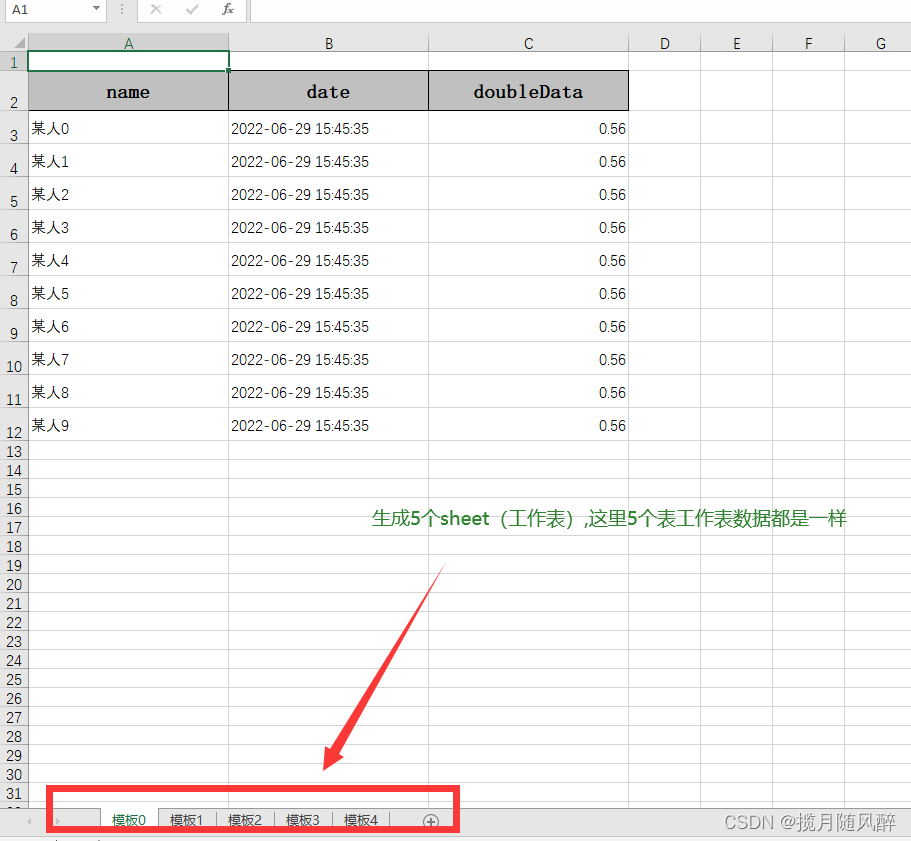
四、【同一sheet多个表】
public static void simpleWrite() {

		ExcelWriter excelWriter = null;
		// 方法2: 如果写到不同的sheet 同一个对象
		String fileName = "F:\\temporary\\" + "repeatedWrite" + System.currentTimeMillis() + ".xlsx";
		// 这里 指定文件
		try {

			excelWriter = EasyExcel.write(fileName, EmployeeSalaryPojo.class).build();
			// 把sheet设置为不需要头 不然会输出sheet的头 这样看起来第一个table 就有2个头了
			WriteSheet writeSheet = EasyExcel.writerSheet("模板").needHead(Boolean.FALSE).build();
			//距离上边空一行
			writeSheet.setRelativeHeadRowIndex(10);
			// 这里必须指定需要头,table 会继承sheet的配置,sheet配置了不需要,table 默认也是不需要
			WriteTable writeTable0 = EasyExcel.writerTable(0).needHead(Boolean.TRUE).build();
			WriteTable writeTable1 = EasyExcel.writerTable(1).needHead(Boolean.TRUE).build();
			// 第一次写入会创建头
			excelWriter.write(data(), writeSheet, writeTable0);
			// 第二次写如也会创建头,然后在第一次的后面写入数据
			excelWriter.write(data(), writeSheet, writeTable1);
		} finally {

			if(excelWriter!=null){

				excelWriter.finish();
			}
		}
	}

五、【Excel中多个sheet,并且一个sheet多个表】
	public static void simpleWrite() {

		ExcelWriter excelWriter = null;
		// 方法2: 如果写到不同的sheet 同一个对象
		String fileName = "F:\\temporary\\" + "repeatedWrite" + System.currentTimeMillis() + ".xlsx";
		// 这里 指定文件
		try {

			excelWriter = EasyExcel.write(fileName, EmployeeSalaryPojo.class).build();
			//设置动态标题
			Map<String, List<List<String>>> head = head();
			int i = 0;
			for (String key : head.keySet()) {

				i++;
				/** * 1、获取到value; 获取到的List<List<String>>就表示是同一个sheet的数据 */
				List<List<String>> lists = head.get(key);
				// 每次都要创建writeSheet 这里注意必须指定sheetNo 而且sheetName必须不一样【这里必须要加.needHead(Boolean.FALSE),否则会多处标题而没数据】
				WriteSheet writeSheet = EasyExcel.writerSheet(i, "模板" + i).needHead(Boolean.FALSE).build();
				//动态标题
				writeSheet.setHead(lists);
				//写入到excel和上面空开几行
				writeSheet.setRelativeHeadRowIndex(1);

				/** * 2、相同数据写在同一个sheet里面 * 这里的j表示1个sheet会有几个表单数据 */
				for (int j = 0;j<3;j++) {

					WriteTable writeTable = EasyExcel.writerTable(j).needHead(Boolean.TRUE).build();
					excelWriter.write(data(), writeSheet, writeTable);
				}
			}
		} finally {

			if(excelWriter!=null){

				excelWriter.finish();
			}
		}
	}

边栏推荐
- Simple interactive operation of electron learning (III)
- locust 系列入门
- Count the number of each character in the character
- 【智能QbD风险评估工具】上海道宁为您带来LeanQbD介绍、试用、教程
- 手动实现function isInstanceOf(child,Parent)
- Difference and use between require and import
- Qtreeview+qabstractitemmodel custom model: the third of a series of tutorials [easy to understand]
- 基于LSTM模型实现新闻分类
- Design and practice of new generation cloud native database
- Spark interview questions
猜你喜欢

指标陷阱:IT领导者易犯的七个KPI错误

“丝路正青春 风采看福建”在闽外籍青年短视频大赛火热征集作品中
Spark面试题

基于三维GIS的不动产管理应用
![[noip2013] building block competition [noip2018] road laying greed / difference](/img/d1/a56231cd4eb3cc1d91d8a55048ccfe.png)
[noip2013] building block competition [noip2018] road laying greed / difference
十三届蓝桥杯B组国赛
Significance and measures of security encryption of industrial control equipment
Yan Rong looks at how to formulate a multi cloud strategy in the era of hybrid cloud

Go - exe corresponding to related dependency
Why does blocprovider feel similar to provider?
随机推荐
AIDL基本使用
MySQL系列之事务日志Redo log学习笔记
使用闭包实现点击按钮切换 toggle
CNN convolution neural network principle explanation + image recognition application (with source code) [easy to understand]
require与import的区别和使用
收到一封CTO来信,邀约面试机器学习工程师
js如何获取集合对象中某元素列表
名单揭晓 | 2021年度中国杰出知识产权服务团队
AirServer2022最新版功能介绍及下载
【MySQL】explain的基本使用以及各列的作用
Medium pen test questions: flip the string, such as ABCD, print out DCBA
按照功能对Boost库进行分类
企业架构与项目管理的关联和区别
MQ学习笔记
【MySQL】索引的创建、查看和删除
Flume interview questions
小 P 周刊 Vol.11
PMP与NPDP之间的区别是什么?
Count the number of each character in the character
“丝路正青春 风采看福建”在闽外籍青年短视频大赛火热征集作品中