当前位置:网站首页>博文推荐|构建 IoT 应用——FLiP 技术栈简介
博文推荐|构建 IoT 应用——FLiP 技术栈简介
2022-06-10 22:48:00 【StreamNative】
译者简介
王中兴,就职于 eBay 消息中间件团队。社区昵称 AlphaWang。
本文翻译自 StreamNative 博客《What the FLiP is the FLiP Stack?》,作者 Tim Spann,StreamNative 布道师。
FLiP 技术栈介绍
本文将介绍 FLiP 技术栈,我们将解释如何使用最新的开源框架构建实时事件驱动应用程序,并介绍如何通过 Apache Pulsar、Apache Flink、Apache Spark 和 Apache NiFi 构建一个 Python IoT 应用。得益于 FLiP 的简单、快速、可扩展的特性,使用 FLiP 可以快速地为各种场景构建应用程序。
FLiP 技术栈由许多可协同工作的开源技术组成,是构建各种流数据应用程序的最佳实践模式。FLiP 技术栈包含哪些项目并不是固定的,而是由特定场景的需求、团队当前掌握的技术栈、以及期望的最终结果决定。建立在 Apache Flink 和 Apache Pulsar 基础上的 FLiP 技术栈有很多变体。
例如对于日志分析这种场景,通常需要清晰直观的仪表板来可视化、聚合并查询日志数据。对于这种场景,你可能需要像 FLiPEN 这样的技术,作为对 ELK 技术栈[1] 的增强。由此可以看出,FLiP+ 是一个可变的缩写,表示多种配合使用的开源项目。
常见场景
由于 FLiP 技术栈的变体非常多,所以可能很难确定哪一种适合你的场景。因此,我们提供了一些通用指南,你可以根据不同的场景选择合适的 FLiP+ 技术栈。上文提到的日志分析是一种常用场景,当然还有其他更多的场景,通常由数据 source 和 sink 驱动。


Flink-Pulsar 集成
FLiP 技术栈的一个关键组件是利用 Apache Flink[2] 作为流式处理引擎来处理 Apache Pulsar 数据。这是基于 Pulsar-Flink 连接器实现的,开发人员可以构建原生的 Flink 应用,并在事件发生时从 Pulsar 大规模地流式传输事件,适用于流式 ELT 以及在主题流上持续执行 SQL 等场景。SQL 是一种业务语言,可以通过使用 Flink SQL 编写针对 Pulsar 流的简单 SQL 查询(包括聚合和连接)来实现事件驱动的实时应用程序。
Pulsar-Flink 连接器构建了一个弹性数据处理平台,通过无缝集成 Apache Pulsar 和 Apache Flink 允许以任何规模对 Pulsar 消息进行完全读写访问。作为数据工程师或数据分析师,你可以专注于业务逻辑,而无需担心数据来源以及存储。可以通过如下资源学习更多关于 Pulsar-Flink 连接器的知识:
• 打造全新批流融合:详解 Apache Flink 1.14.0 发布的 Pulsar Flink Connector
• 使用 Apache Pulsar 和 Apache Flink SQL 进行流式分析[3]
NiFi-Pulsar 集成
近期,StreamNative 与 Cloudera 宣布推出 Apache Pulsar + Apache NiFi 联合解决方案。现在我们官方支持利用 Apache NiFi 这种低代码流式工具从任何 Pulsar 主题中消费和生产消息。
利用 NiFi-Pulsar 集成,我们可以为任何数据管道构建实时数据处理和分析平台。这是流式应用程序开发平民化的关键连接器。

若要了解更多信息,可以阅读如下文章:
• StreamNative 与 Cloudera 宣布推出 Apache Pulsar + Apache NiFi 联合解决方案
• Producing and Consuming Pulsar messages with Apache NiFi[4]
• Code for Pulsar, NiFi Tie-Up Now Open Source[5]
• Pulsar and NiFi Integration Resources[6]
FLiP 技术栈示例
上文介绍了 FLiP 的技术组合、使用场景以及基本集成,现在我们来看一个 FLiP 技术栈应用的示例。在此示例中,我们从一个运行 Python Pulsar 程序的设备中采集传感数据。

演示使用的边缘端硬件规格
• 2GB 内存的 Raspberry Pi 4
• Pimoroni BreakoutGarden Hat
• Sensiron SGP30 TVOC 及 eCO2 传感器
• TVOC 传感器用于 0-60,000 ppb(十亿分之几)
• CO2 传感器用于 400-60,000 ppm(百万分之几)

演示所用的边缘端软件规格
• Apache Pulsar C++ 及 Python 客户端
• Pimoroni SGP30 Python 库
流式服务器
• HP ProLiant DL360 G7 1U RackMount 64 位服务器
• Ubuntu 18.04.6 LTS
• 72GB PC3 RAM
• X5677 Xeon 3.46GHz 24 核 CPU
• 4×900GB 10K SAS SFF HDD
• Apache Pulsar 2.9.1
• Apache Spark 3.2.0
• Scala 2.12.15 (OpenJDK 64-Bit Server VM, Java 1.8.0_302)
• Apache Flink 1.13.2
• MongoDB
NiFi/AI 服务器
• NVIDIA Jetson Xavier NX Developer Kit
• AI Perf: 21 TOPS
• GPU: 48 Tensor Core 的 384 核 NVIDIA Volta GPU
• CPU:6 核 NVIDIA Carmel ARMv8.2 64 位 CPU 6 MB L2 + 4 MB L3
• 内存:8 GB 128 位 LPDDR4x 59.7GB/s
• Ubuntu 18.04.5 LTS (GNU/Linux 4.9.201-tegra aarch64)
• Apache NiFi 1.15.3
• Apache NiFi Registry 1.15.3
• Apache NiFi Toolkit 1.15.3
• Pulsar 处理器
• OpenJDK 8 and 11
• Jetson Inference GoogleNet
• Python 3
使用 FLiPN-Py 构建空气质量传感器程序

在这个示例程序中,我们希望持续监测办公室的空气质量,然后将大量数据交给数据科学家进行预测。一旦该模型完成,我们会将其添加到 Puslar Function 中进行实时异常检测,发送告警给办公室人员。我们还需要仪表盘来监控趋势、进行聚合和高级分析。
一旦初始的原型证明可用,我们将部署到所有远程办公室以监测内部空气质量。未来我们将持续改进,采集外部空气质量数据以及当地天气状况。
我们的客户端设备执行如下三个步骤来收集传感器读数,将数据格式化为期望的 schema,并将记录发送到 Pulsar。
边缘端第一步:收集传感器读数
result = sgp30.get_air_quality()
边缘端第二步:根据 Schema 格式化数据
class Garden(Record):
    cpu = Float()
    diskusage = String()
    endtime = String()
    equivalentco2ppm = String()
    host = String()
    hostname = String()
    ipaddress = String()
    macaddress = String()
    memory = Float()
    rowid = String()
    runtime = Integer()
    starttime = String()
    systemtime = String()
    totalvocppb = String()
    ts = Integer()
    uuid = String()
边缘端第三步:生产记录到 Pulsar 主题
producer.send(gardenRec,partition_key=str(uniqueid))
现在我们构建了从边缘设备到 Pulsar 的数据采集管道,接下来我们对发布到 Pulsar 的传感器数据做一些有意思的处理。
云端第一步:通过 Spark ETL 转成 Parquet 文件
val dfPulsar =
spark.readStream.format("pulsar")
.option("service.url", "pulsar://pulsar1:6650")
.option("admin.url", "http://pulsar1:8080")
.option("topic","persistent://public/default/garden3")
.load()

val pQuery = dfPulsar.selectExpr("*")
.writeStream
.format("parquet")
.option("truncate", false)
.option("checkpointLocation", "/tmp/checkpoint")
.option("path", "/opt/demo/gasthermal").start()
云端第二步:使用 Flink SQL 进行持续 SQL 分析
select equivalentco2ppm, totalvocppb, cpu, starttime, systemtime, ts, cpu, diskusage, endtime, memory, uuid from garden3;

select max(equivalentco2ppm) as MaxCO2, max(totalvocppb) as MaxVocPPB from garden3;
云端第三步:使用 Pulsar SQL 进行 SQL 分析
select * from pulsar."public/default"."garden3"
云端第四步:NiFi 过滤、路由、转换并存储到 MongoDB

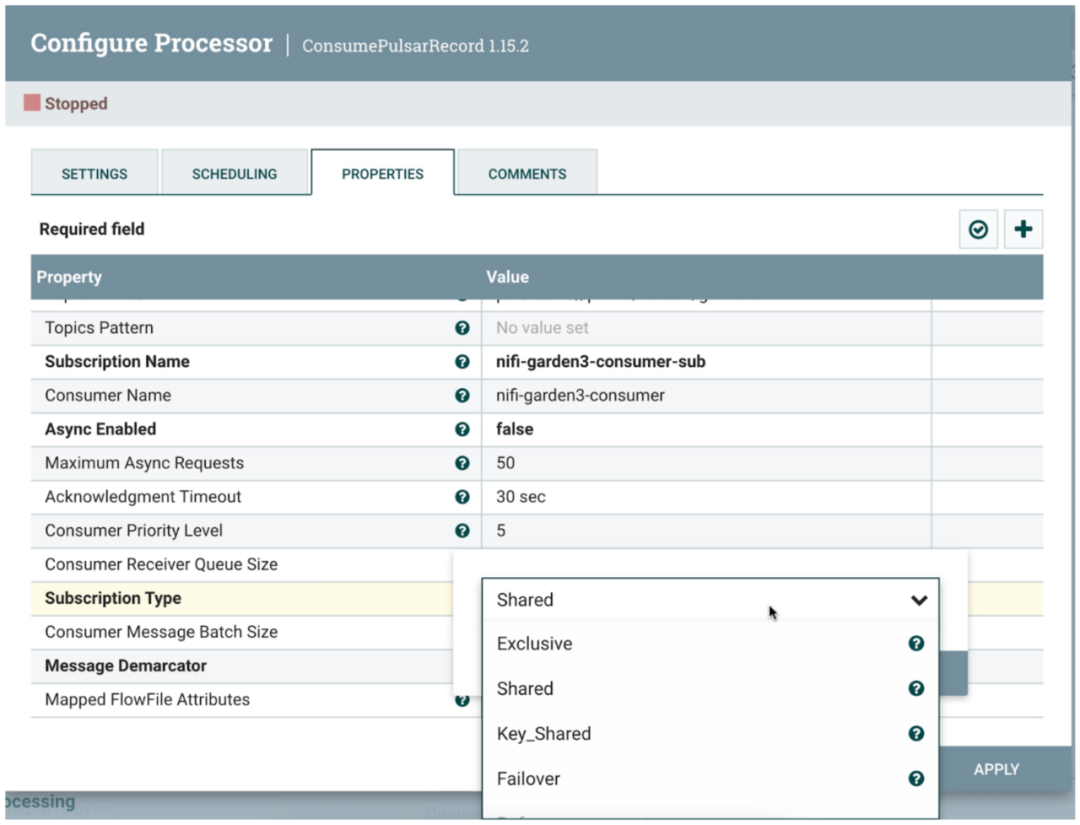
我们本可以为 MongoDB 使用 Pulsar Function 和 Pulsar IO Sink,但使用 Apache NiFi 无需编码就能完成数据丰富。
云端第五步:验证 MongoDB 数据
show collections

db.garden3.find().pretty()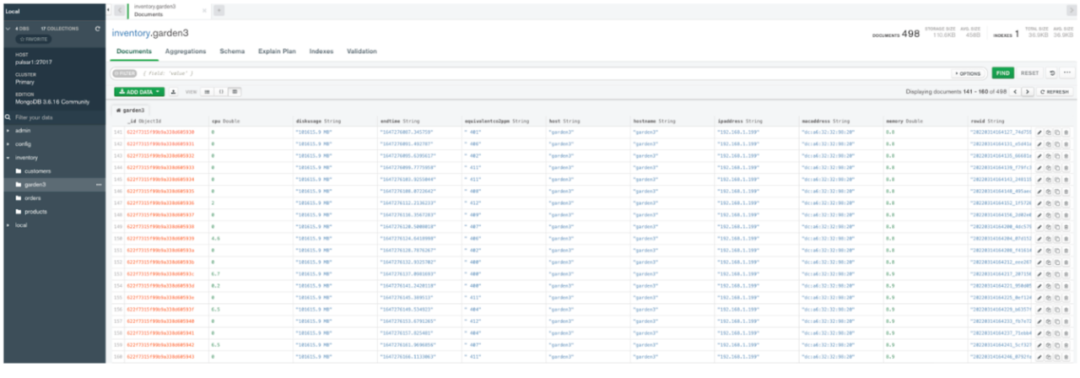

示例数据
{'cpu': 0.3, 'diskusage': '101615.7 MB', 'endtime': '1647276937.7144697', 'equivalentco2ppm': ' 411', 'host': 'garden3', 'hostname': 'garden3', 'ipaddress': '192.168.1.199', 'macaddress': 'dc:a6:32:32:98:20', 'memory': 8.9, 'rowid': '20220314165537_a9941b0d-6ce2-48f9-8a1b-4ac7cfbd889e', 'runtime': 0, 'starttime': '03/14/2022 12:55:37', 'systemtime': '03/14/2022 12:55:38', 'totalvocppb': ' 18', 'ts': 1647276938, 'uuid': 'garden3_uuid_oqz_20220314165537'}使用 Web Socket 的 HTML 示例数据展示
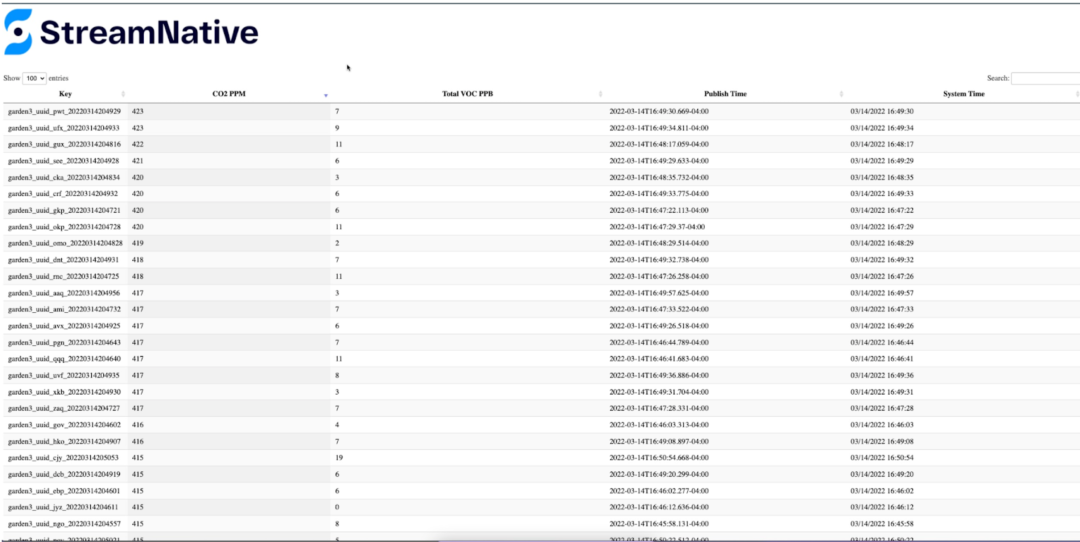
观看演示视频

结论
本文介绍了如何利用最新的开源框架组成 FLiP 技术栈,来构建实时事件驱动应用程序。通过使用最新的优秀的开源 Apache 流处理和大数据项目,我们可以更快、更轻松、更可扩展地构建应用程序。
欢迎大家使用 Pulsar 及其他上下游生态中出色的工具来构建可扩展的应用程序。从数据开始,通过 Pulsar 进行路由,对其进行转换以满足分析需求,并将其流式传输到企业的每个角落。无需数月的时间,数据工程师即可在数小时内构建出大规模快速数据驱动的仪表板、实时报告、应用程序以及机器学习分析数据。现在就开始构建这些 FLiPN 应用程序吧。
资源
• Source code for the air quality sensors application[7]
• FLiP Stack for Apache Pulsar Developer[8]
• Using the FLiPN Stack for Edge AI (Flink, NiFi, Pulsar)[9]
搭建 Pulsar 集群
在几分钟内搭建 Puslar 集群:如果你需要构建微服务应用而不想自己搭建 Pulsar 集群,请立即注册 StreamNative Cloud[10]。StreamNative Cloud 可以在公有云中轻松、快速、经济高效地运行 Pulsar,让你可以在几分钟之内启动一个 Pulsar 集群
相关阅读
引用链接
[1] ELK 技术栈: https://www.elastic.co/what-is/elk-stack[2] Apache Flink: https://flink.apache.org/[3] 使用 Apache Pulsar 和 Apache Flink SQL 进行流式分析: https://github.com/tspannhw/FLiP-SQL[4] Producing and Consuming Pulsar messages with Apache NiFi: https://www.datainmotion.dev/2021/11/producing-and-consuming-pulsar-messages.html[5] Code for Pulsar, NiFi Tie-Up Now Open Source: https://www.datanami.com/2022/03/09/code-for-pulsar-nifi-tie-up-now-open-source/[6] Pulsar and NiFi Integration Resources: https://streamnative.io/apache-nifi-connector/[7] Source code for the air quality sensors application: https://github.com/tspannhw/FLiP-Py-Pi-GasThermal/[8] FLiP Stack for Apache Pulsar Developer: https://www.flipstack.dev/[9] Using the FLiPN Stack for Edge AI (Flink, NiFi, Pulsar): https://www.youtube.com/watch?v=pfhoF3yTdHU[10] StreamNative Cloud: https://console.streamnative.cloud/
▼ 关注「Apache Pulsar」获取更多技术干货 ▼
加入 Apache Pulsar 中文交流群

点击阅读原文,为 Pulsar 点赞吧!
边栏推荐
- [pyGame] this classic bomber super game is online. Do you love it? (source code attached)
- Insert sort
- Leetcode-713 subarray with product less than k
- After deepin20 menu startup option, the self-test indicates that iwlwwifi is stopped
- LabVIEW编程规范
- Several common current transformer sampling circuits
- LabVIEW使用MathScript Node或MATLAB脚本时出现错误1046
- The serial port in the visa test panel under LabVIEW or max does not work
- Error report of curl import postman
- About optimizing API interface response speed
猜你喜欢

LabVIEW编程规范
![[pyGame] can the little dinosaur on chrome be played with code? It looks like fun~](/img/b4/a4140eb10658af40a8a2fc0f428b0f.jpg)
[pyGame] can the little dinosaur on chrome be played with code? It looks like fun~
Compared with the "South-to-North Water Transfer", what will the "east to west" of the fire bring to cloud computing?
![[pyGame games] here it is. This Gobang game is super A. share it with your friends~](/img/76/faea3558ed6fadff755c517922088b.png)
[pyGame games] here it is. This Gobang game is super A. share it with your friends~

LabVIEW determines the position of the control in the display coordinate system
Self made app connected to onenet --- realize data monitoring and distribution control (mqtt)
LabVIEW确定控件在显示器坐标系中的位置

LabVIEW调用DLL时出现异常0xc0000005代码
C language file operation
![[turtle confessions collection]](/img/81/b4bacc23691e58e403f1330d0ca7cf.jpg)
[turtle confessions collection] "the moon at the bottom of the sea is the moon in the sky, and the person in front of us is the sweetheart." Be happy for the rest of your life, and be safe for ever ~
随机推荐
【Pygame小游戏】这款经典的炸弹人超能游戏上线,你爱了嘛?(附源码)
Hyperleger fabric installation
[pyGame games] in the first month, it broke 100 million to download a masterpiece that is highly integrated with "super casual game features"~
启牛学堂理财可靠吗,安全吗
Merge sort
IGBT与三代半导体SiC双脉冲测试方案
【颜值检测神器】来,请拿出你们的绝活(这颜值,对得起观众么?)
LabVIEW programming specification
Typecho blog site wide deployment of Tencent cloud CDN tutorial - Xingze V Club
安全生产月,黄埔开展燃气安全进商铺宣传活动
【Pygame合集】滴~穿越童年游戏指南 请查收:这里面有你玩过的游戏嘛?(附五款源码自取)
[pyGame games] I'm not afraid you can't walk the maze series: the ultimate AI walks the maze. After learning, it will take you to open the door to a new world ~ (with game source code)
快速排序
High speed data stream disk for LabVIEW
Self made app connected to onenet --- realize data monitoring and distribution control (mqtt)
Lambda learning records
[new version] new pseudo personal homepage v2.0- starze V Club
[turtle confessions collection] "the moon at the bottom of the sea is the moon in the sky, and the person in front of us is the sweetheart." Be happy for the rest of your life, and be safe for ever ~
【Pygame小遊戲】別找了,休閑遊戲專題來了丨泡泡龍小程序——休閑遊戲研發推薦
File转为MultipartFile的方法