当前位置:网站首页>Self made app connected to onenet --- realize data monitoring and distribution control (mqtt)
Self made app connected to onenet --- realize data monitoring and distribution control (mqtt)
2022-06-10 23:48:00 【⁽⁽⁾⁾⁾⁾】
List of articles
Preface
The main function of this case is to make your own mobile phone APP Connect OneNET Of MQTT The server , At the same time, it receives and displays the data of single chip microcomputer , On the single chip computer LED The lamp is remotely controlled .
although OneNET There is application management on , It can realize the control of single chip microcomputer by mobile phone , But it's a little simple , Not up to the design level , I can barely pass the course . If you make one by yourself APP To control the microcontroller , All of a sudden, it was very tall .
One 、 Preparation
1、STM32F103C8T6 Minimum system board
2、ESP8266-01S modular
3、 stay OneNET Create on the platform MQTT Protocol products and create two devices
4、 install E4A Software , Software is not a few hundred megabytes Download link
Two 、 Function is introduced
1、 self-control APP The page display
Because it is a connection OneNET Of MQTT The server , So the address port is fixed .
product ID、 equipment ID、 The authentication information can be displayed in OneNET Get... On the platform , There's no need to say more about this .
Subscription Buttons : The subscription topic is EndTopic The theme of
Release button : The theme is AppToic The news of , The message is 123456
The three green boxes are the illumination values 、 Temperature value 、 Humidity value . The temperature and humidity here are self increasing , Not the actual temperature and humidity .
The first switch : The theme is AppToic The news of , The message is KEY:1 or KEY:0
The second switch : The theme is AppToic The news of , The message is LED1:1 or LED1:0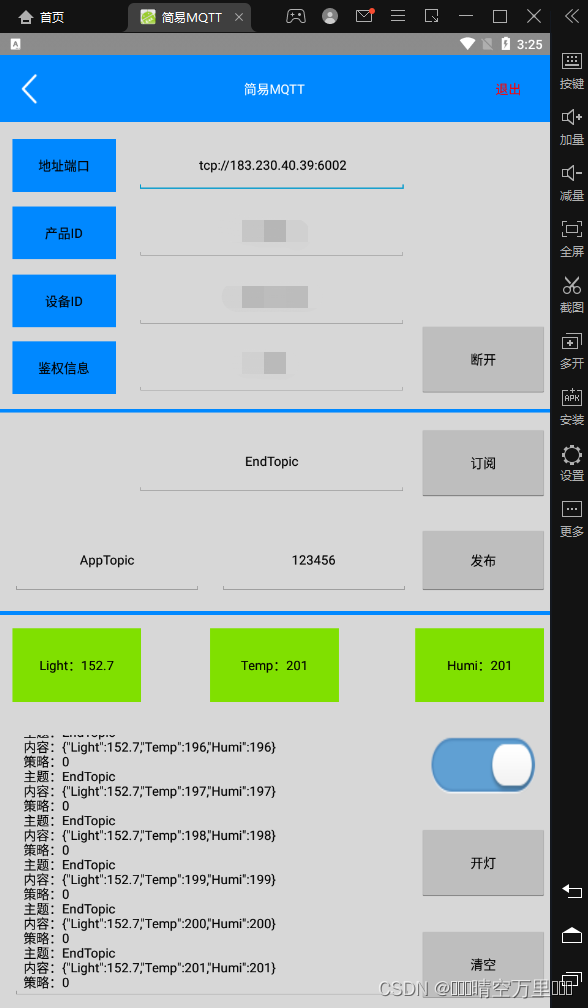
2、 Serial assistant interface
1、EndTopic It is the subject of the information released by the single chip computer
2、{“Light”:152.7,“Temp”:104,“Humi”:104} Is the content of the message
3、AppTopic Is from APP The message subject published by the client
4、KEY:1 It's the message 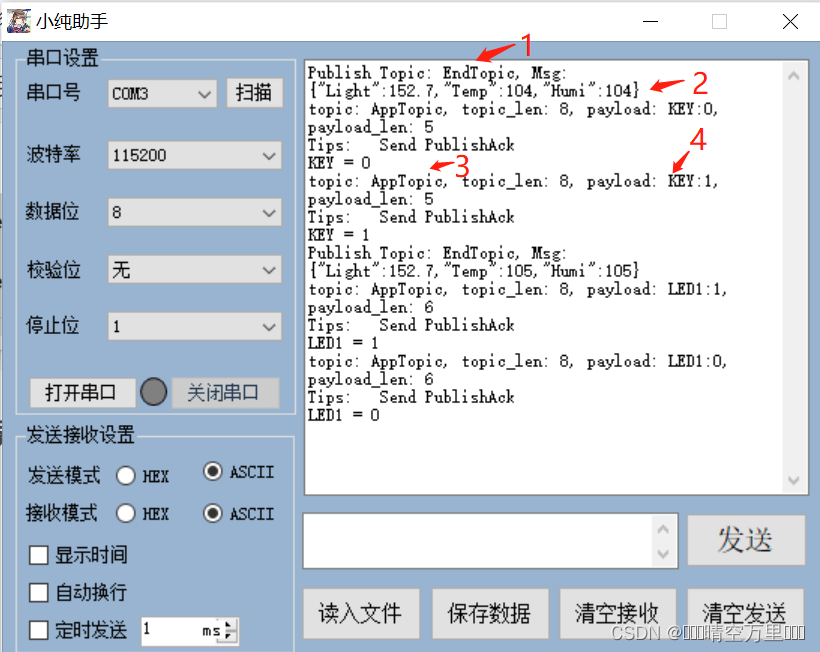
3、OneNET Platform display
APP The devices at the terminal and the single-chip computer terminal both display online .
3、 ... and 、 The function of single-chip computer is realized
1、 modify OneNET Official routines
(1) Change the chip model from the original STM32F103RC Change to STM32F103C8
(2) In the global macro definition STM32F10X_HD Change to STM32F10X_MD
(3) Put the original startup_stm32f10x_hd.s The boot file for is removed , add to startup_stm32f10x_md.s Of
Startup file
(4) stay stm32f10x.h In file , take HSE_VALUE The value of the macro is changed from the original 12M Change it to 8M
(5) stay onenet.c The three macro definitions at the top of the file are filled in the three elements of the connection platform
(6) stay esp8266.c in , Defines the hotspot name and password that the system needs to connect
(7) Migrate from other routines OneNet_SendData(); function
(8) Transplant sensors to collect data and LED(PC13) Initialization code 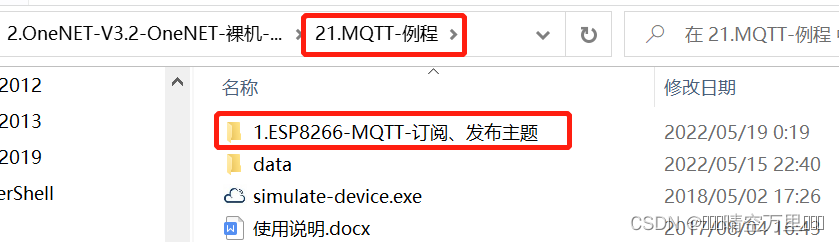
2、 Main function code
int main(void)
{

	unsigned short timeCount = 0;	// Send interval variable

	unsigned char *dataPtr = NULL;

	Hardware_Init();				// Initialize peripheral hardware

	ESP8266_Init();					// initialization ESP8266

	while(OneNet_DevLink())			// Access OneNET
		DelayXms(500);

	Beep_Set(BEEP_ON);				// A beep indicates that the connection is successful
	DelayXms(250);
	Beep_Set(BEEP_OFF);

	OneNet_Subscribe(SubTopics, 1);

	while(1)
	{

		if(++timeCount >= 300)									// Send interval 3s
		{

			//UsartPrintf(USART_DEBUG, "OneNet_Publish\r\n");
			light = LIght_Intensity();  // Read the value of light intensity
			// You can read the temperature and humidity values here

			OneNet_SendData();// Send data to mobile phone APP

			timeCount = 0;
			ESP8266_Clear();
		}

		dataPtr = ESP8266_GetIPD(0);
		if(dataPtr != NULL)
			OneNet_RevPro(dataPtr);    // Issue a command to process

		DelayXms(10);
	}
}
3、 Upload data to APP
The relevant codes for uploading data are as follows :
void OneNet_SendData(void)
{

	char buf[256];

	memset(buf, 0, sizeof(buf));

	OneNet_FillBuf(buf);									// Encapsulate data flow

	//ESP8266_SendData((unsigned char *)buf, strlen(buf)); // Upload data
	OneNet_Publish(PubTopics, buf);   // Release the news
}
Data encapsulation function
The function of this function is to package the data to be uploaded into JSON Format .
extern u8 temp,humi;
extern	float light;
extern const char PubTopics[] ;    // Release theme
unsigned char OneNet_FillBuf(char *buf)
{


	char text[16];

	memset(text, 0, sizeof(text));

	strcpy(buf, "{");

	memset(text, 0, sizeof(text));
	sprintf(text, "\"Light\":%.1f,",light);
	strcat(buf, text);

	memset(text, 0, sizeof(text));
	sprintf(text, "\"Temp\":%d,", temp++);
	strcat(buf, text);

	memset(text, 0, sizeof(text));
	sprintf(text, "\"Humi\":%d", humi++);
	strcat(buf, text);

	strcat(buf, "}");

	return strlen(buf);
}
4、 Command processing
When received from APP After the command issued by the client , Will call the issue command processing function OneNet_RevPro(), In this function, the MCU is controlled according to the message content .
Part of the code inside the function is as follows :
	dataPtr = strchr(req_payload, ':');					// Search for ':'

	if(dataPtr != NULL && result != -1)					// If you find it
	{

		dataPtr++;

		while(*dataPtr >= '0' && *dataPtr <= '9')		// Determine whether it is the issued command control data
		{

			numBuf[num++] = *dataPtr++;
		}

		num = atoi((const char *)numBuf);			// Change to numerical form

		if(strstr((char *)req_payload, "LED1"))		// Search for "LED1"
		{

			UsartPrintf(USART_DEBUG,"LED1 = %d\r\n", num);     //num Namely LED1:V  in V Value
			LED1 = !num;                   			 // control LED The lamp , Low level on
		}
		else if(strstr((char *)req_payload, "KEY"))	// Search for "KEY"
		{

			UsartPrintf(USART_DEBUG,"KEY = %d\r\n", num);
		}
		// continue else if Add other commands

	}
Four 、APP End function realization
This part mainly talks about how to make mobile phones APP Connect OneNET platform , And obtain data and issue commands to control LED The lamp .APP It's using E4A Chinese Android programming development , Programming thinking and C The language is very similar , And it is Chinese programming , It takes only one day to master .
1、 Connect MQTT The server
Accessing the cloud platform mainly depends on E4A above mqtt Communication components , This component command has eight methods , Seven events . From the point of view of SCM programming , Method is equivalent to function , It can be called artificially , An event is equivalent to an interruption , There is no need to call . And connect OneNET Of MQTT The server uses the method of connecting to the server .
The call to the connection server method needs to pass in seven parameters , Parameter 1 is the server address port , namely OneNET Of MQTT Server address and port ; Parameter 2: fill in the product ID; Parameter 3: fill in the authentication information ; Parameter 4 is filled in the equipment ID; By clicking the connect button , You can call the connect server method , Realize the function of accessing the cloud platform .
 event   Connect button . Clicked ()

	 If   Connect button . title  = " Connect "  be    '  product ID box . If the content is empty, it will flash back
		 Connect button . title  = " To break off "
	    mqtt Communications 1. Connect to server ( Address port box . Content , product ID box . Content , Authentication information box . Content , equipment ID box . Content , really , false ,5)

	 otherwise
		 Connect button . title  = " Connect "
	    mqtt Communications 1. disconnect ()
	 end   If

 end   event
2、 Realize subscription and publishing
Subscription and publication are used separately mqtt Methods for subscribing to messages and publishing messages in the communication component , These two methods are called through the corresponding button click event .
The subscription and publishing program is written as follows .
 event   Subscription Buttons . Clicked ()

	mqtt Communications 1. Subscribe to news ( Subscribe to the topic box . Content ,0)

 end   event

 event   Release button . Clicked ()
	mqtt Communications 1. Send a message ( Publish topic box . Content , Text to byte ( Publish message box . Content ,"UTF-8"),1, really )
 end   event
The call of the subscribe message method needs to pass in two parameters , Parameter 1 is the subject of the subscription , In order to receive the topic message issued by the single chip computer , The subscription here is “EndTopic”; Parameter 2: Message policy , It can be filled in 0、1、2, Fill in here 0, Indicates that only one push message will be sent , I don't care whether I take it or not , This is because the single-chip computer will release theme messages for many times , Therefore, it is not necessary to receive... Every time .
The call of the publish message method needs to pass in four parameters , Parameter 1 is the message subject , Fill in here “AppTopic”; Parameter 2 is the message content , Parameter 3 is message policy , Fill in here 1
3、APP Display the data
Because the information released by the single-chip computer is not only the illumination value , And temperature and humidity , To facilitate the interpretation of data , These data are packed into JSON Format , And then publish it .
When APP After receiving the message , It will trigger mqtt Message receiving events in the communication , In this case , We make use of E4A Medium JSON The operation component parses the message content , Store the parsed content in JSON Inside the object , And then use JSON Operate the text value retrieval method in the component to obtain JSON Object to specify the value of the data member , Finally, assign this value to the corresponding display tag .
The program for receiving message events is written as follows
 event  mqtt Communications 1. Received a message ( Message topic   by   The text type ,  The message content   by   Byte type (),  Message policy   by   Integer type )

	 Receiving frame . Content  =  Receiving frame . Content  & "\n" & " The theme :" &  Message topic  & "\n Content :" &  Byte to text ( The message content ,"UTF-8") & "\n Strategy :" &  Message policy
	 Receiving frame . Set the cursor position ( Take text length ( Receiving frame . Content ))

	' Start json analysis
	 Variable  JSON object   by   object
	JSON object  = JSON operation 1. analysis ( Byte to text ( The message content ,"UTF-8"))
	 Debug output ("JSON Number of members :" & JSON operation 1. Get the number of members (JSON object ))
	 Light value label . title  = "Light:" & JSON operation 1. Take the text value (JSON object  , "Light")
	 Temperature value label . title  = "Temp:" & JSON operation 1. Take the text value (JSON object  , "Temp")
	 Humidity value label . title  = "Humi:" & JSON operation 1. Take the text value (JSON object  , "Humi")

 end   event
4、APP Issue order
Here, the control of light switch is taken as an example , Other control functions are similar . The light switch assembly status is changed event procedure is as follows .
 event   Light on button . Clicked ()

	 If   Connect button . title  = " Connect "  be  ' Exit event when not connected
		 sign out
	 end   If

	 If   Light on button . title  = " turn on the light "  be
     Light on button . title  = " Turn off the lights "
    mqtt Communications 1. Send a message ( Publish topic box . Content , Text to byte ("LED1:1","UTF-8"),1, really )

	 otherwise
	 Light on button . title  = " turn on the light "
	mqtt Communications 1. Send a message ( Publish topic box . Content , Text to byte ("LED1:0","UTF-8"),1, really )
	 end   If

 end   event
The single-chip computer receives a message from APP After the message published by the client , The message unpacking function will be used to get the subject of the packet 、 The message content 、 Message policy , If the message policy is 1 Just reply first Ack To server , Then judge whether there is a programmed command string in the message content , If so, execute the corresponding procedures .
summary
If necessary , You can ask me to get the source code , I will reply when I am free .
边栏推荐
- LeetCode+ 21 - 25
- Fiddler creates an autoresponder
- LabVIEW change the shape or color of point ROI overlay
- Exception 0xc00000005 code occurred when LabVIEW called DLL
- [paper sharing] pata: fuzzing with path aware Taint Analysis
- 30 | 怎么重设消费者组位移?
- Is it safe to open an account in Shanghai Stock Exchange?
- Apple CMS collection station source code - building tutorial - attached source code - new source code - development documents
- Why many new websites are not included by search engines
- flutter 如何去掉listview顶部空白的问题
猜你喜欢

LabVIEW determines the position of the control in the display coordinate system

Create millisecond time id in LabVIEW

LabVIEW锁相环(PLL)

LabVIEW 禁止其他可多核心处理的应用程序在所有核心上执行
LabVIEW pictures look bright or dark after being cast from 16 bits to 8 bits
![[Video] kmeans mean clustering and hierarchical clustering: R language analysis life happiness index visualization | data sharing](/img/d5/d544ab0c14ba22946219feafdc3392.png)
[Video] kmeans mean clustering and hierarchical clustering: R language analysis life happiness index visualization | data sharing

Why is the kotlin language not popular now?

Exception 0xc00000005 code occurred when LabVIEW called DLL

Apple CMS collection station source code - building tutorial - attached source code - new source code - development documents

Analysis of Genesis public chain
随机推荐
Flowable process deployment
Common settings for vs
redis列表list常用命令大全
Data and information resource sharing platform (IV)
Build TAR model using beersales data set in TSA package
LabVIEW获取Clamp函数找到的所有点的信息
Baidu quick collection SEO optimization keyword ranking optimization skills
ILRuntime热更框架 安装以及断点调试
掌握高性能计算前,我们先了解一下它的历史
Solve access denied for user 'root' @ 'localhost' (using password: yes)
Introduction to Wireshark capturing RTP load TS stream (UDP multicast)
Prefer "big and small weeks", only write 200 lines of code every day, and the monthly salary of 8k-17k people will rise again
给线程池里面线程添加名称的4种方式
LabVIEW phase locked loop (PLL)
可扩展到Max–MCU和MPU开发,使用相同的许可证
自制APP连接OneNET---实现数据监控和下发控制(MQTT)
34. find the first and last positions of elements in the sorted array - binary search, double pointer
LabVIEW或MAX下的VISA测试面板中串口无法工作
LabVIEW打开其他EXE程序
Why many new websites are not included by search engines