当前位置:网站首页>Robot hand eye calibration ax=xb (eye to hand and eye in hand) and plane nine point calibration
Robot hand eye calibration ax=xb (eye to hand and eye in hand) and plane nine point calibration
2022-07-26 15:58:00 【Hua Weiyun】
One 、 background
Calibration It is the eternal pain of robot developers . Although the method has existed decades ago , But everyone who wants to use the camera still has to go through a painful step , There is no bag that works well when you bring it easily .
Robot vision applications , Hand eye calibration is a very basic and key problem . In short, the purpose of hand eye calibration is to obtain the relationship between the robot coordinate system and the camera coordinate system , Finally, the result of visual recognition is transferred to the robot coordinate system .
Hand eye calibration industry is divided into two forms , Depending on where the camera is fixed , If the camera and the robot end are fixed together , It's called “ Eyes in hand ”(eye in hand), If the camera is fixed on the base outside the robot , Call it “ Eyes out ”(eye to hand).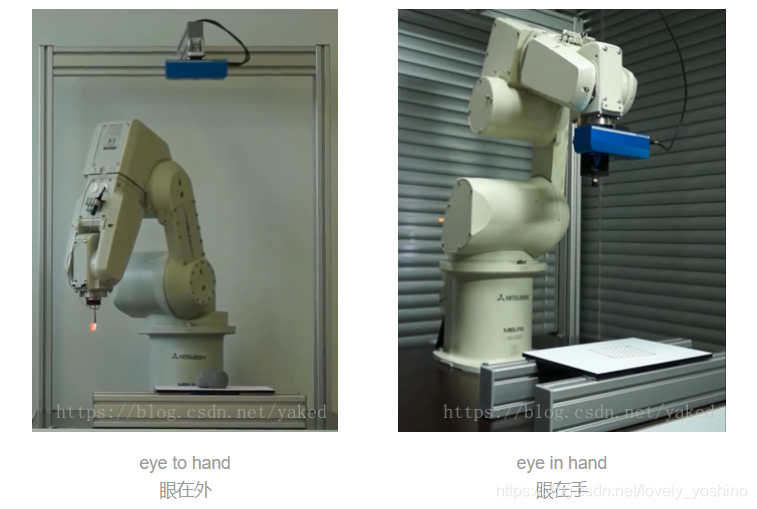
Two 、 Mathematical description of hand eye relationship
- eye in hand, In this relationship , Two movements , The relationship between the robot base and the calibration plate remains unchanged . The quantity to be solved is the pose relationship between the camera and the robot end coordinate system .

- eye to hand, In this relationship , Two movements , The pose relationship between the robot end and the calibration plate remains unchanged . The quantity to be solved is the pose relationship between the camera and the robot base coordinate system .
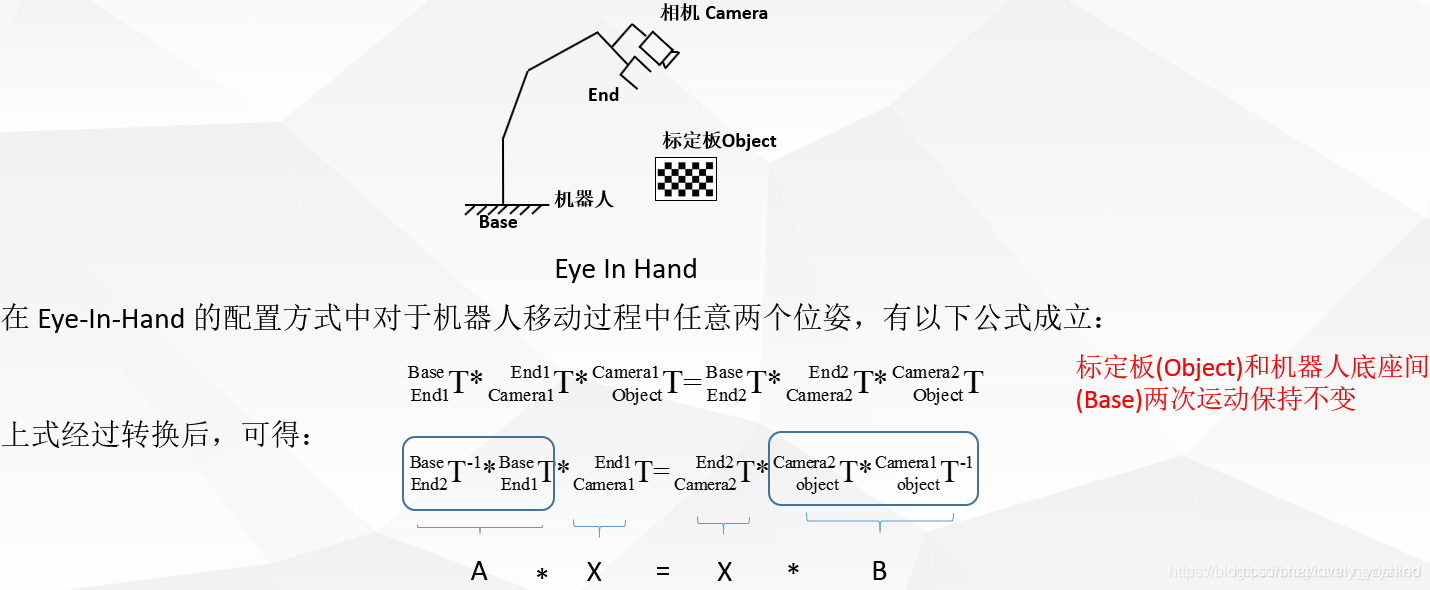
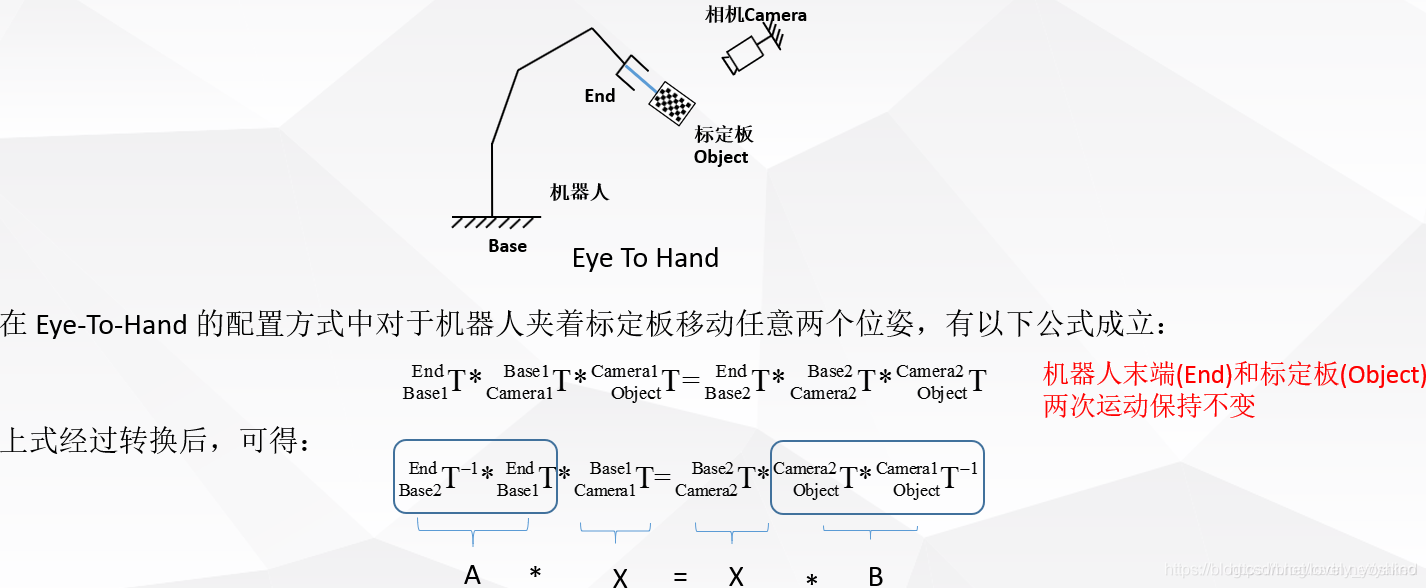
3、 ... and 、AX = XB The solution of the problem
- Shiu Y C, Ahmad S. Calibration of wrist-mounted robotic sensors by
solving homogeneous transform equations of the form AX=XB[J]. IEEE
Transactions on Robotics & Automation, 1989, 5(1):16-29.
Related online English tutorials http://math.loyola.edu/~mili/Calibration/index.html There are also some AX= XB Of matlab The code can be used .
ROS There are also some related package You can use
https://github.com/IFL-CAMP/easy_handeye
http://visp-doc.inria.fr/doxygen/visp-daily/calibrateTsai_8cpp-example.html#_a0
http://campar.in.tum.de/Chair/HandEyeCalibration TUM There are also many reference links for hand eye calibration solutions
Four 、 Other references
https://mp.weixin.qq.com/s/nJx1dlpBXaL2_iT_J4W5Kg Qiu Qiang Flyqq Wechat articles
https://blog.csdn.net/u011089570/article/details/47945733 Nice picture
https://blog.csdn.net/qq_16481211/article/details/79764730 part halocon Code
https://blog.csdn.net/qq_16481211/article/details/79767100 halocon Code
https://blog.csdn.net/happyjume/article/details/80847822 Partial principle
https://blog.csdn.net/zhang970187013/article/details/81098175 UR5 And easy hand eye
It's usually used “ two-step ” Solve the basic equation , That is, first solve the rotating part from the basic equation , Then substitute to solve the translation part .
https://blog.csdn.net/yunlinwang/article/details/51622143
5、 ... and 、Matlab Lower hand eye calibration solution
my Matlab edition R2013a, Use some angle conversion functions and displays of the robot toolbox , Its installation and basic use refer to here :https://blog.csdn.net/yaked/article/details/48933603
Cameras and robots are eye-to-hand Pattern , Robots for Canada Kinova 6 Shaft manipulator , robot pose Is the end relative to the base x,y,z,rx,ry,rz, In meters and radians
2017.08.29Kinova_pose_all_10_1.txt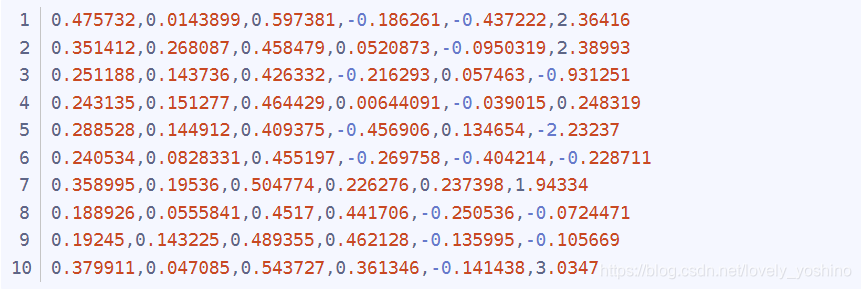
pattern pose Is the calibration plate relative to the camera x,y,z,rx,ry,rz, In meters and radians
2017.08.29Pattern_pose_all_10_1.txt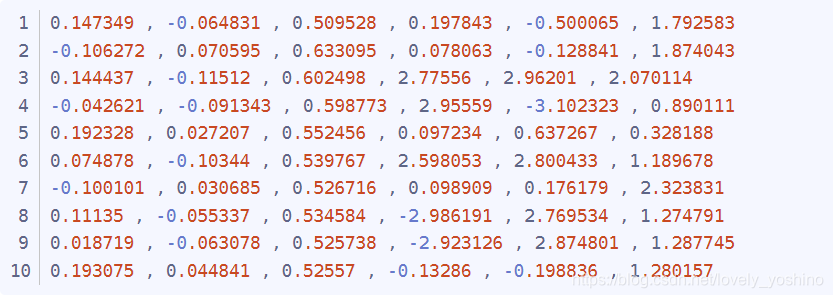
this Matlab File call data for offline solution .http://math.loyola.edu/~mili/Calibration/index.html This part of Registering Two Sets of 6DoF Data with 1 Unknown, Yes code download , Download it and name it shiu.m and tsai.m Just call for the following program
Jaco_handeye_rewrite_10.m
%% Eye to Hand calibration with Ensenso N20 and Kinova robotics arm.% input : Pattern pose to camera and arm cartesian pose in base coordiante.% output: The left eye of Ensenso N20 to the arm base coordiante.% % Robot Pose(Homogeneous) stored in cell A. -------------------10 pose% clear;close all;clc; JacoCartesianPose = importdata('D:\\jaco\\2017.08.29Kinova_pose_all_10_1.txt'); [m,n] = size(JacoCartesianPose); % 10* 6A = cell(1,m); % 1*10 for i = 1: 1: m A{1,i} = transl(JacoCartesianPose(i,1), JacoCartesianPose(i,2), JacoCartesianPose(i,3)) * trotx(JacoCartesianPose(i,4)) * troty(JacoCartesianPose(i,5))* trotz(JacoCartesianPose(i,6));end % Pattern Pose(Homogeneous) stored in cell B.patternInCamPose = importdata('D:\\jaco\\2017.08.29Pattern_pose_all_10_1.txt'); [melem,nelem] = size(patternInCamPose); % 10*6B=cell(1,melem);for x=1:1:melem B{1,x} = transl(patternInCamPose(x,1), patternInCamPose(x,2), patternInCamPose(x,3)) * trotx(patternInCamPose(x,4)) * troty(patternInCamPose(x,5))* trotz(patternInCamPose(x,6));end%% Remember to obtain the position and posture of the robot in the form of a five pointed star , reference Tsai The paper of n2=m;TA=cell(1,n2);TB=cell(1,n2); %--------------------- 10 ----------------------------------- for j=[1,6]% Only begin. TA{1,j}=A{1,j+1}*inv(A{1,j}); TA{1,j+1}=A{1,j+2}*inv(A{1,j+1}); TA{1,j+2}=A{1,j+3}*inv(A{1,j+2}); TA{1,j+3}=A{1,j+4}*inv(A{1,j+3}); TA{1,j+4}=A{1,j}*inv(A{1,j+4}); TB{1,j}=B{1,j+1}*inv(B{1,j}); TB{1,j+1}=B{1,j+2}*inv(B{1,j+1}); TB{1,j+2}=B{1,j+3}*inv(B{1,j+2}); TB{1,j+3}=B{1,j+4}*inv(B{1,j+3}); TB{1,j+4}=B{1,j}*inv(B{1,j+4}); end %M1=[TA{1,1} TA{1,2} TA{1,3} TA{1,4} TA{1,5} TA{1,6} TA{1,7} TA{1,8} TA{1,9}... TA{1,10} ]; %M2=[TB{1,1} TB{1,2} TB{1,3} TB{1,4} TB{1,5} TB{1,6} TB{1,7} TB{1,8} TB{1,9}... TB{1,10} ]; M1=[TA{1,1} TA{1,2} TA{1,3} TA{1,4} TA{1,5} TA{1,6} TA{1,7} TA{1,8} TA{1,9} ]; M2=[TB{1,1} TB{1,2} TB{1,3} TB{1,4} TB{1,5} TB{1,6} TB{1,7} TB{1,8} TB{1,9} ];%--------------------- 10 ----------------------------------- C_Tsai=tsai(M1,M2);T_Tsai = (transl(C_Tsai))';C_Tsai_rad = tr2rpy(C_Tsai);C_Tsai_rpy_rx_ry_rz =rad2deg(C_Tsai_rad);fprintf('Tsai(rad) = \n%f, %f, %f, %f, %f, %f\n',T_Tsai(1,1), T_Tsai(1,2), T_Tsai(1,3), C_Tsai_rad(1,1), C_Tsai_rad(1,2), C_Tsai_rad(1,3));fprintf('Tsai(deg) = \n%f, %f, %f, %f, %f, %f\n\n',T_Tsai(1,1), T_Tsai(1,2), T_Tsai(1,3), C_Tsai_rpy_rx_ry_rz(1,1), C_Tsai_rpy_rx_ry_rz(1,2), C_Tsai_rpy_rx_ry_rz(1,3));C_Shiu=shiu(M1,M2);T_Shiu= [C_Shiu(1,4) C_Shiu(2,4) C_Shiu(3,4)] ;C_Shiu_rad = tr2rpy(C_Shiu);C_Shiu_rpy_rx_ry_rz = rad2deg(C_Shiu_rad);fprintf('Shiu(rad) = \n%f, %f, %f, %f, %f, %f\n',T_Shiu(1,1), T_Shiu(1,2), T_Shiu(1,3), C_Shiu_rad(1,1), C_Shiu_rad(1,2), C_Shiu_rad(1,3));fprintf('Shiu(deg) = \n%f, %f, %f, %f, %f, %f\n\n',T_Shiu(1,1), T_Shiu(1,2), T_Shiu(1,3), C_Shiu_rpy_rx_ry_rz(1,1), C_Shiu_rpy_rx_ry_rz(1,2), C_Shiu_rpy_rx_ry_rz(1,3));C_Ijrr=ijrr1995(M1,M2);T_ijrr= [C_Ijrr(1,4) C_Ijrr(2,4) C_Ijrr(3,4)] ;C_ijrr_rad = tr2rpy(C_Ijrr);C_ijrr_rpy_rx_ry_rz = rad2deg(C_ijrr_rad);fprintf('Ijrr(rad) = \n%f, %f, %f, %f, %f, %f\n',C_Ijrr(1,1), C_Ijrr(1,2), C_Ijrr(1,3), C_ijrr_rad(1,1), C_ijrr_rad(1,2), C_ijrr_rad(1,3));fprintf('Ijrr(deg) = \n%f, %f, %f, %f, %f, %f\n\n',C_Ijrr(1,1), C_Ijrr(1,2), C_Ijrr(1,3), C_ijrr_rpy_rx_ry_rz(1,1), C_ijrr_rpy_rx_ry_rz(1,2), C_ijrr_rpy_rx_ry_rz(1,3));%%%%%%%%%%%%%%%%%%%%%%%%%%%%%%%%%%%%%%%%%%%%%%% robotHcam =[ -0.076, -0.674, 0.760631455868699, 178.7221124879378, -0.0735038591212, -11.5304192925905 ];% robotHcam1 = transl(robotHcam(1,1), robotHcam(1,2), robotHcam(1,3)) * trotx(robotHcam(1,4),'deg') * troty(robotHcam(1,5), 'deg')* trotz(robotHcam(1,6), 'deg')* trotx(90,'deg'); % rotx 90robotHcam =[ 0.013, -0.94, 0.86, -90.0, 0.0, 0.0 ];% robotHcam =[ 0.25, 0.22, 1.1, 180.0, 0.0, 90.0 ]; % bind to the stack robotHcam1 = transl(robotHcam(1,1), robotHcam(1,2), robotHcam(1,3)) * trotx(robotHcam(1,4),'deg') * troty(robotHcam(1,5), 'deg')* trotz(robotHcam(1,6), 'deg');fprintf('robotHcam used in Program(rad) = \n%f, %f, %f, %f, %f, %f\n',robotHcam(1,1), robotHcam(1,2), robotHcam(1,3), deg2rad(robotHcam(1,4)), deg2rad(robotHcam(1,5)), deg2rad(robotHcam(1,6)));fprintf('robotHcam used in Program(deg) = \n%f, %f, %f, %f, %f, %f\n\n',robotHcam(1,1), robotHcam(1,2), robotHcam(1,3), robotHcam(1,4), robotHcam(1,5), robotHcam(1,6)); t1 = eye(4);trplot(t1,'frame','R','arrow','width', '1', 'color', 'r', 'text_opts', {'FontSize', 10, 'FontWeight', 'light'},'view', [-0.3 0.5 0.6],'thick',0.9,'dispar',0.8 );% Display Robot coordinatehold on;trplot(robotHcam1,'frame','C', 'color', 'black'); % Display Camera coordinate used in Programtrplot(C_Tsai,'frame','T', 'color', 'b'); % Display Tsaitrplot(C_Shiu,'frame','S', 'color', 'g'); % Display Shiu Hand eye calibration (eye to hand) structure A and B.eye in hand When the way , The inverse of the matrix is different . That is to say matlab Code TA{1,j}=A{1,j+1}*inv(A{1,j}); and TB{1,j}=B{1,j+1}*inv(B{1,j}); The reverse is different , Pay attention to .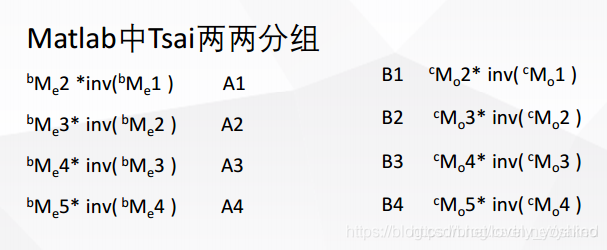
clc;clear;close all;% D:\jaco\ConsoleApplication1/get_saveCartesian.cpp——Kinova_pose.txtrobotAeef = [-0.0860801, -0.641813, -0.0987199, 3.13316, 0.000389122, -0.297456];robotBeef = transl(robotAeef(1,1), robotAeef(1,2), robotAeef(1,3)) * trotx(robotAeef(1,4)) * troty(robotAeef(1,5))* trotz(robotAeef(1,6));% D:\jaco\C#\nxCsExamples.sln —— Pattern_pose_all.txtcamAobj = [0.011651 , -0.069043 , 0.857845 , -3.12825 , 3.137609 , 3.048224];camBobj =transl(camAobj(1,1), camAobj(1,2), camAobj(1,3)) * trotx(camAobj(1,4)) * troty(camAobj(1,5))* trotz(camAobj(1,6));robotAcam = robotBeef * inv(camBobj);robotAcam_Trans0 = (transl(robotAcam))'; fprintf('robotAcam_T = \n%f, %f, %f\n',robotAcam_Trans0(1,1), robotAcam_Trans0(1,2), robotAcam_Trans0(1,3));robotAcam_R_rad = tr2rpy((robotAcam));fprintf('robotAcam_R(rad) = \n%f, %f, %f\n',robotAcam_R_rad(1,1), robotAcam_R_rad(1,2), robotAcam_R_rad(1,3));R_degree0 = rad2deg(robotAcam_R_rad);fprintf('robotAcam_R(deg) = \n%f, %f, %f\n\n',R_degree0(1,1), R_degree0(1,2), R_degree0(1,3));% [theta, v] = tr2angvec(robotAcam)% robotAcam = [% robotAcam(1, 1) robotAcam(1, 2) robotAcam(1, 3) -0.097;% robotAcam(2, 1) robotAcam(2, 2) robotAcam(2, 3) -0.695;% robotAcam(3, 1) robotAcam(3,2) robotAcam(3, 3) robotAcam(3, 4);% 0 0 0 1;% ]% Trans1 = (transl(robotAcam))'% R_rad1 = tr2rpy((robotAcam))% R_degree1 = rad2deg(R_rad1)fprintf('===============Test point===============\n');% camAobj2= [ 0.011634 , -0.068815 , 0.858039 , -3.124779 , 3.139759 , 3.046957]; % Workspace home. camAobj2= [ -0.102468 , -0.059197 , 0.858 , -3.127464 , 3.136249 , 3.053341];camBobj2 = transl(camAobj2(1,1), camAobj2(1,2), camAobj2(1,3)) * trotx(camAobj2(1,4)) * troty(camAobj2(1,5))* trotz(camAobj2(1,6));robotAobj2 = robotAcam * camBobj2; robotAobj2_T = (transl(robotAobj2))'; fprintf('robotAobj2_T = \n%f, %f, %f\n',robotAobj2_T(1,1), robotAobj2_T(1,2), robotAobj2_T(1,3));robotAobj2_R_rad = tr2rpy((robotAobj2));fprintf('robotAobj2_R(rad) = \n%f, %f, %f\n',robotAobj2_R_rad(1,1), robotAobj2_R_rad(1,2), robotAobj2_R_rad(1,3));robotAobj2_R_degree = rad2deg(robotAobj2_R_rad);fprintf('robotAobj2_R(deg) = \n%f, %f, %f\n',robotAobj2_R_degree(1,1), robotAobj2_R_degree(1,2), robotAobj2_R_degree(1,3));============== Plane nine point calibration method ==============
When using RGB The camera or robot only grabs the plane ( That is, fixed posture grasp , The position and posture of the robot with six degrees of freedom are simplified to consider only translation , The posture is artificially given and fixed , At this time, the robot can move above the target point ), The problem can be reduced to a plane RGB The target pixel set of the image A(x1,y1) With the robot in the plane (X1,Y1) Point to point relationship . The specific method is that the camera recognizes the pixels and gives them A, Then use the teaching pendant to check the coordinates of the robot in the base coordinate system , treat as B.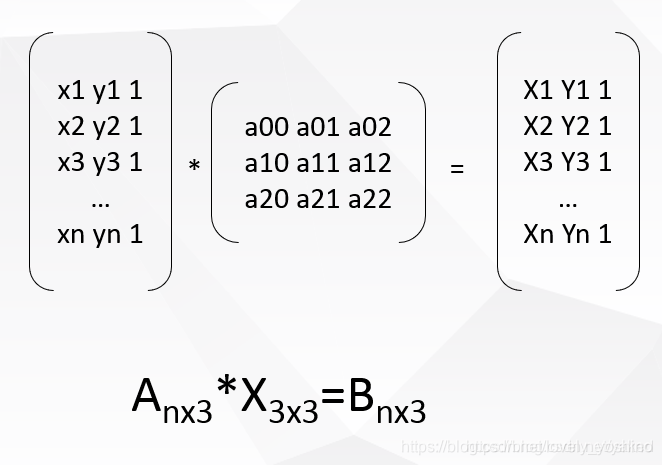
Camera coordinates and robot coordinates are written in homogeneous form , Projection matrix X It's a 3x3 Matrix we need 6 Group corresponding points to solve the minimum configuration solution . Using singular value decomposition SVD To get .
D:\opencv_work\cubeSolver\cv_solver\ConsoleApplication1\CV_SVD.cpp
D:\Matlab_work\handeye\NinePoints_Calibration.m
//Solve equation:AX=b #include <cv.h>#include<opencv2/opencv.hpp>using namespace std;using namespace cv; int main(int argc, char** argv){ printf("\nSolve equation:AX=b\n\n"); //Mat A = (Mat_<float>(6, 3) << //480.8, 639.4, 1, //227.1, 317.5, 1, //292.4, 781.6, 1, //597.4, 1044.1, 1, //557.7, 491.6, 1, //717.8, 263.7, 1 // );// 4x3 //Mat B = (Mat_<float>(6, 3) << //197170, 185349, 1, //195830, 186789, 1, //196174, 184591, 1, //197787, 183176, 1, //197575, 186133, 1, //198466, 187335, 1 // ); Mat A = (Mat_<float>(4, 3) << 2926.36, 2607.79, 1, 587.093, 2616.89, 1, 537.031, 250.311, 1, 1160.53, 1265.21, 1);// 4x3 Mat B = (Mat_<float>(4, 3) << 320.389, 208.197, 1, 247.77, 209.726, 1, 242.809, 283.182, 1, 263.152, 253.715, 1); Mat X; cout << "A=" << endl << A << endl; cout << "B=" << endl << B << endl; solve(A, B, X, CV_SVD); cout << "X=" << endl << X << endl; Mat a1 = (Mat_<float>(1, 3) << 1864, 1273, 1); Mat b1 = a1*X; cout << "b1=" << endl << b1 << endl; cout << " The true value is :" << "283.265, 253.049, 1" << endl; getchar(); return 0;}https://docs.opencv.org/3.1.0/d2/de8/group__core__array.html#ga12b43690dbd31fed96f213eefead2373
Results contrast : Left halcon C#( The third as 0,0,1, No display ), Right opencv c++, Below is Matlab result , The three are the same , Algorithm detection passed .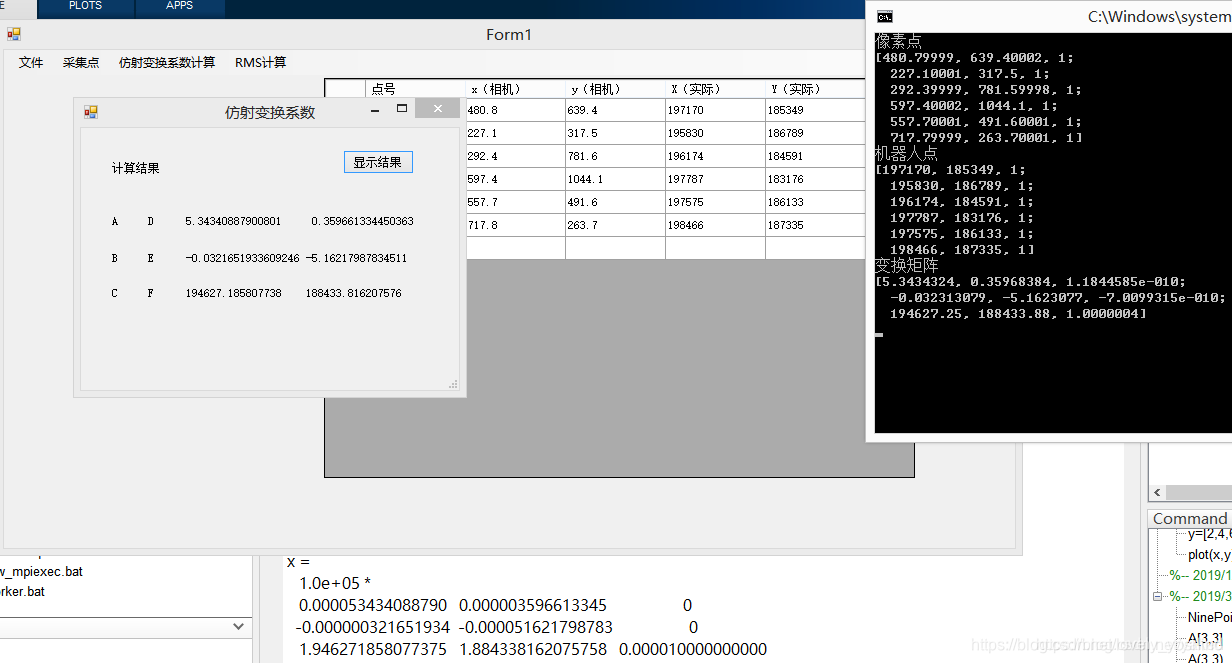
https://blog.csdn.net/Stones1025/article/details/100085338
This method uses point pairs , Find the affine transformation matrix
#include "pch.h"#include <iostream> #include <cv.h>#include<opencv2/opencv.hpp> using namespace cv; int main(int argc, char** argv){ printf("\nSolve equation:AX=b\n\n"); Point2f srcTri[3]; srcTri[0] = Point2f(480.8f, 639.4f); srcTri[1] = Point2f(227.1f, 317.5f); srcTri[2] = Point2f(292.4f, 781.6f); Point2f dstTri[3]; dstTri[0] = Point2f(197170.0f, 185349.0f); dstTri[1] = Point2f(195830.0f, 186789.0f); dstTri[2] = Point2f(196174.0f, 184591.0f); Mat warp_mat = getAffineTransform(srcTri, dstTri); // Calculate image coordinates std::cout << "img_corners:\n" << srcTri << std::endl; std::cout << "robot_corners:\n" << dstTri << std::endl; std::cout << warp_mat << std::endl; // //[5.284835627018051, -0.00236967559639317, 194630.5662011061; //0.4056177440315953, -4.793119669651512, 188218.6997054448] return 0;}边栏推荐
- 我们被一个 kong 的性能 bug 折腾了一个通宵
- DELTA控制器RMC200
- 一文搞懂│XSS攻击、SQL注入、CSRF攻击、DDOS攻击、DNS劫持
- [leetcode] 33. Search rotation sort array
- Detailed explanation of nat/napt address translation (internal and external network communication) technology [Huawei ENSP]
- bucher齿轮泵QX81-400R301
- 关于我写的IDEA插件能一键生成service,mapper....这件事(附源码)
- Super simple! It only takes a few steps to customize the weather assistant for TA!!
- Delta controller rmc200
- [expdp export data] expdp exports a table with 23 rows of records and no lob field. It takes 48 minutes. Please help us have a look
猜你喜欢

教大模型自己跳过“无用”层,推理速度×3性能不变,谷歌MIT这个新方法火了...

Google Earth Engine——MERRA-2 M2T1NXAER:1980-2022年气溶胶逐日数据集
Bucher gear pump qx81-400r301

Summary of QT plug-in development -- add plug-in menu in the main interface
Parker solenoid valve d1vw020dnypz5

Digital warehouse: iqiyi digital warehouse platform construction practice

PS + PL heterogeneous multicore case development manual for Ti C6000 tms320c6678 DSP + zynq-7045 (3)
Delta controller rmc200

If you want to be good at work, you must first use its tools -c language expansion -- embedded C language (11)

数据中台、BI业务访谈(四)—— 十个问题看本质
随机推荐
数仓:爱奇艺数仓平台建设实践
小哥自创AI防拖延系统,一玩手机就被“闪瞎” | Reddit高热
Implementation of personalized healthy diet recommendation system based on SSM
Encryption model
Practical task scheduling platform (scheduled task)
组件化开发基本规范、localStorage 和 sessionStorage、对象数据转基本值、原型链使用
第七章 在 REST 服务中支持 CORS
Quanzhi a40i industrial core board, 100% domestic 4-core arm cortex-a7, supports "dual screen abnormal display" [display interface capability, preferred scheme for industrial HMI]
03 common set security classes under JUC
Development and implementation of campus epidemic prevention and control management system based on SSM
[leetcode] 33. Search rotation sort array
Can't you see the withdrawal? Three steps to prevent withdrawal on wechat.
Sword finger offer II 009. subarray with product less than k
Parker solenoid valve d1vw020dnypz5
German EMG electric actuator eb800-60ii
提问征集丨快来向NLLB作者提问啦!(智源Live第24期)
Chapter 7 supporting CORS in rest services
TI C6000 TMS320C6678 DSP+ Zynq-7045的PS + PL异构多核案例开发手册(4)
Change an ergonomic chair to relieve the old waist of sitting and writing code~
.NET 手动获取注入对象