当前位置:网站首页>JSP connects with Oracle to realize login and registration (simple)
JSP connects with Oracle to realize login and registration (simple)
2022-06-28 05:28:00 【Yuanxiaobai】
requirement
tomcat、oracle The database service starts
Need one Oracle The driver of , Put it in WEB-INFO Of lib. Version number: : 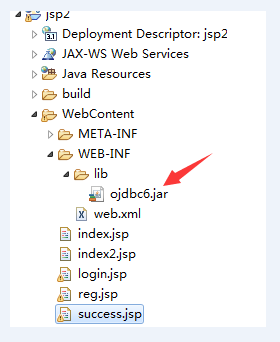
Database files
stay Oracle In the database scott The connection of , Create a name called t_user Table of , The fields of the table are username,password.
login.jsp
<%@ page language="java" contentType="text/html; charset=UTF-8"
pageEncoding="UTF-8"%>
<!DOCTYPE html>
<html>
<head>
<meta charset="UTF-8">
<title> Sign in </title>
<style>
input[type="submit"] {
width: 100px;
margin: 0 5px;
}
input[type="button"] {
width: 100px;
margin: 0 5px;
}
</style>
</head>
<body>
<center>
<font face=" Regular script " size="6" color="#000"> Login screen </font>
<form action="index.jsp" method="post">
<table width="300" height="180" border="5" bordercolor="#A0A0A0">
<tbody>
<tr>
<td><label> user name :</label></td>
<td><input type="text" name="name" maxlength = "12" placeholder=" Please enter a user name !" /></td>
</tr>
<tr>
<td><label> The secret code :</label></td>
<td><input type="password" name="pwd" maxlength = "16" placeholder=" Please input a password !" /></td>
</tr>
<tr>
<td colspan="2" align="center">
<input type="submit" value=" land " />
<input type="button" value=" register " onclick = "window.open('reg.jsp')" /></td>
</tr>
</tbody>
</table>
</form>
</center>
</body>
</html>
The renderings are as follows :
index.jsp
Check the connection between login interface and database
Realize database connection , Determine whether the user name and password are correct when logging in .
<%@ page import="java.sql.*"%>
<%@ page language="java" contentType="text/html; charset=UTF-8"
	pageEncoding="UTF-8"%>
<!DOCTYPE html>
<html>
<head>
<meta charset="UTF-8">
<title>login</title>
</head>
<body>
	<%
		String uName = new String(request.getParameter("name"));
	String uPwd = request.getParameter("pwd");

	Connection conn = null;
	PreparedStatement pstm = null;
	ResultSet rs = null;
	String driverClass = "oracle.jdbc.driver.OracleDriver";
	String url = "jdbc:oracle:thin:@localhost:1521:orcl";
	String user = "scott";
	String password = "tiger";
	String sql = "select username,password from t_user";
	try {

		Class.forName(driverClass);
		conn = DriverManager.getConnection(url, user, password);
		pstm = conn.prepareStatement(sql);
		rs = pstm.executeQuery();
		while (rs.next()) {

			if (rs.getString("username").equals(uName) && rs.getString("password").equals(uPwd)) {

				RequestDispatcher dis = request.getRequestDispatcher("success.jsp");
				dis.forward(request, response);
				return;
			}
		}
		response.sendRedirect("login.jsp");
	} catch (ClassNotFoundException e) {

		// TODO Auto-generated catch block
		e.printStackTrace();
	} catch (SQLException e) {

		// TODO Auto-generated catch block
		e.printStackTrace();
	} finally {

		try {

			if (rs != null) {

				rs.close();
				rs = null;
			}
			if (pstm != null) {

				pstm.close();
				pstm = null;
			}
			if (conn != null) {

				conn.close();
				conn = null;
			}
		} catch (SQLException e) {

			// TODO Auto-generated catch block
			e.printStackTrace();
		}
	}
	%>
</body>
</html>
reg.jsp
<%@ page language="java" contentType="text/html; charset=UTF-8"
	pageEncoding="UTF-8"%>
<!DOCTYPE html>
<html>
<head>
<meta charset="UTF-8">
<title> The registration screen </title>
<style>
input[type="submit"] {

	width: 100px;
	margin: 0 5px;
}

input[type="reset"] {

	width: 100px;
	margin: 0 5px;
}
</style>
<script>
	function addCheck() {

		var username = document.getElementById("username").value;
		var password = document.getElementById("password").value;
		var newword = document.getElementById("newword").value;
		if (username == "") {

			alert(" The username cannot be empty !");
			document.getElementById("username").focus();
			return false;
		}
		if (password == "") {

			alert(" The password cannot be empty !");
			document.getElementById("password").focus();
			return false;
		}
		if (password != newword) {

			alert(" The two passwords are different !");
			document.getElementById("newword").focus();
			return false;
		}
	}
	function validate() {

		var flag = addCheck();
		if (flag == false)
			return false;
		return true;
	}
</script>
</head>
<body>
	<center>
		<font face=" Regular script " size="6" color="#000"> The registration screen </font>
		<form action="index2.jsp" method="post"
			onsubmit="return validate()">
			<table width="300" height="180" border="5" bordercolor="#A0A0A0">
				<tr>
					<th> user name :</th>
					<td><input type="text" name="name" id="username"
						placeholder=" Input 16 Within characters " maxlength="16"
						onfocus="if(this.value == ' Input 16 Within characters ') this.value =''"></td>
				</tr>
				<tr>
					<th> Input password :</th>
					<td><input type="password" name="pwd" id="password"
						placeholder=" Input 20 Within characters " maxlength="20"
						onfocus="if(this.value == ' Input 20 Within characters ') this.value =''"></td>
				</tr>
				<tr>
					<th> Confirm the password :</th>
					<td><input type="password" name="nwd" id="newword"
						placeholder=" Reenter the password " maxlength="20"
						onfocus="if(this.value == ' Reenter the password ') this.value =''"></td>
				</tr>
				<tr>
					<td colspan="2" align="center"><input type="submit"
						value=" notes   book "> <input type="reset" value=" heavy   Set up "></td>
				</tr>
			</table>
		</form>
	</center>
</body>
</html>
The renderings are as follows :
index2.jsp
Check the connection between the registration interface and the database
Realize database connection , Add the registered user name and password to the database .
<%@ page import="java.sql.*" %>
<%@ page language="java" contentType="text/html; charset=UTF-8"
    pageEncoding="UTF-8"%>
<!DOCTYPE html>
<html>
<head>
<meta charset="UTF-8">
<title>login</title>
</head>
<body>
	<%
		String uName = request.getParameter("name");
		String uPwd = request.getParameter("pwd");

		Connection conn =null;
		PreparedStatement pstm = null;
		ResultSet rs =  null;
		String driverClass = "oracle.jdbc.driver.OracleDriver";
        String url = "jdbc:oracle:thin:@localhost:1521:orcl";
        String user = "scott";
        String password = "tiger";
        String sql="insert into t_user(username,password) values(?,?)";
        try{

        	Class.forName(driverClass);
			conn = DriverManager.getConnection(url, user, password);
			pstm = conn.prepareStatement(sql);
			pstm.setString(1, uName);
			pstm.setString(2, uPwd);
			rs=pstm.executeQuery();
			if(rs.next()){

				out.print(" User registration successful !");
				response.sendRedirect("login.jsp");
			}else{

				out.print(" User registration failed !");
				response.sendRedirect("reg.jsp");
			}
        }catch (ClassNotFoundException e) {

			// TODO Auto-generated catch block
			e.printStackTrace();
		} catch (SQLException e) {

			// TODO Auto-generated catch block
			e.printStackTrace();
		}finally {

			try {

				if(rs!=null) {

					rs.close();
					rs =null;
				}
				if(pstm!=null) {

					pstm.close();
					pstm =null;
				}
				if(conn!=null) {

					conn.close();
					conn =null;
				}
			} catch (SQLException e) {

				// TODO Auto-generated catch block
				e.printStackTrace();
			}
		}
	%>
</body>
</html>
边栏推荐
- Organize the online cake mall project
- How to do a good job of gateway high availability protection in the big promotion scenario
- Dart learning - functions, classes
- metaRTC5.0编程之p2p网络穿透(stun)指南
- 证明素数/质数有无限多个
- Gee learning notes 3- export table data
- Study on chemical properties and technology of biovendor rage ELISA Kit
- sqlmap工具使用手册
- MySQL 45 talk | 05 explain the index in simple terms (Part 2)
- IP datagram sending and forwarding process
猜你喜欢

Dart learning - functions, classes

2022 high altitude installation, maintenance and removal examination questions and answers

Oracle基础知识总结
mysql导出数据库字典成excel文件

JS中的链表(含leetcode例题)<持续更新~>

Oracle 常用基础函数
![[JVM] - memory partition in JVM](/img/d8/29a5dc0ff61e35d73f48effb858770.png)
[JVM] - memory partition in JVM

Lumiprobe细胞成像分析:PKH26 细胞膜标记试剂盒

Leetcode 88: merge two ordered arrays

活性染料研究:Lumiprobe AF594 NHS 酯,5-异构体
随机推荐
A guide to P2P network penetration (stun) for metartc5.0 programming
Store inventory management system source code
[Verilog quick start of Niuke online question brushing series] ~ one out of four multiplexer
Camera Basics
Study on modified triphosphate: lumiprobe amino-11-ddutp
Operation of 2022 power cable judgment question simulation examination platform
北斗三号短报文终端在大坝安全监测方案的应用
mysql导出数据库字典成excel文件
How high is the gold content of grade II cost engineer certificate? Just look at this
Shutter nestedscrollview sliding folding head pull-down refresh effect
Office is being updated and the application cannot start normally
[microservices openfeign] openfeign quick start service invocation based on feign
阴阳师页面
Why don't big manufacturers use undefined
氨基染料研究:Lumiprobe FAM 胺,6-异构体
To batch add background pictures and color changing effects to videos
Dart learning - functions, classes
Simple usage of GSAP
Intensive learning notes
MySQL 45 talk | 05 explain the index in simple terms (Part 2)