当前位置:网站首页>【Unity3D】发射(RayCast)物理射线(Ray)
【Unity3D】发射(RayCast)物理射线(Ray)
2022-06-28 18:30:00 【little_fat_sheep】
1 前言
碰撞体组件Collider 中介绍了 2 个碰撞体之间的碰撞检测,本文将介绍物理射线与碰撞体之间的碰撞检测。物理射线由 Ray 定义,通过 Physics.RayCast / Physics.RayCastAll 发射射线,返回 RayCastHit 碰撞检测信息。
射线仅用于检测碰撞,游戏界面不能看见,但用户可以通过 Debug.DrawRay 绘制射线,通过 Debug.DrawLine 绘制线段,它们绘制的射线和线段只能在 Scene 窗口看见,在 Game 窗口看不见。
1)定义射线
// origin: 起点, direction: 方向
public Ray(Vector3 origin, Vector3 direction)
// 屏幕射线: 以相机位置为起点, 向近平面上鼠标位置方向投射的射线
Ray ray = Camera.main.ScreenPointToRay(Input.mousePosition);
2)发射射线
// ray: 待发射的射线, hitInfo: 碰撞检测信息, maxDistance: 射线发射的最远距离, 返回是否发生碰撞, 只检测第一个碰撞对象
public static bool Raycast(Ray ray)
public static bool Raycast(Ray ray, out RaycastHit hitInfo)
public static bool Raycast(Ray ray, float maxDistance)
public static bool Raycast(Ray ray, out RaycastHit hitInfo, float maxDistance)
// 检查射线射程范围内所有碰撞
public static RaycastHit[] RaycastAll(Ray ray)
public static RaycastHit[] RaycastAll(Ray ray, float maxDistance)
说明:以上方法是 Physics 类的静态方法,hitInfo 封装了碰撞信息,包含碰撞位置 point、碰撞体 collider 等。
3)调试射线
// start: 射线起点, dir: 射线方向, color: 射线颜色
public static void DrawRay(Vector3 start, Vector3 dir)
public static void DrawRay(Vector3 start, Vector3 dir, Color color)
// start: 线段起点, end: 线段终点, color: 线段颜色
public static void DrawLine(Vector3 start, Vector3 end)
public static void DrawLine(Vector3 start, Vector3 end, Color color)
4)区域碰撞检测
// 检验立方体范围内是否有碰撞体
public static bool CheckBox(Vector3 center, Vector3 halfExtents)
public static bool CheckBox(Vector3 center, Vector3 halfExtents, Quaternion orientation, int layermask)
// 检验球体范围内是否有碰撞体
public static bool CheckSphere(Vector3 position, float radius)
public static bool CheckSphere(Vector3 position, float radius, int layerMask)
// 检验胶囊体范围内是否有碰撞体
public static bool CheckCapsule(Vector3 start, Vector3 end, float radius)
public static bool CheckCapsule(Vector3 start, Vector3 end, float radius, int layermask)
说明:以上方法是 Physics 类的静态方法。
5)投射物体
// 投射立方体
public static bool BoxCast(Vector3 center, Vector3 halfExtents, Vector3 direction)
public static bool BoxCast(Vector3 center, Vector3 halfExtents, Vector3 direction, out RaycastHit hitInfo, Quaternion orientation, float maxDistance, int layerMask)
public static RaycastHit[] BoxCastAll(Vector3 center, Vector3 halfExtents, Vector3 direction)
public static RaycastHit[] BoxCastAll(Vector3 center, Vector3 halfExtents, Vector3 direction, Quaternion orientation, float maxDistance, int layermask)
// 投射球体
public static bool SphereCast(Ray ray, float radius)
public static bool SphereCast(Ray ray, float radius, out RaycastHit hitInfo, float maxDistance, int layerMask)
public static bool SphereCast(Vector3 origin, float radius, Vector3 direction, out RaycastHit hitInfo)
public static bool SphereCast(Vector3 origin, float radius, Vector3 direction, out RaycastHit hitInfo, float maxDistance, int layerMask)
public static RaycastHit[] SphereCastAll(Ray ray, float radius)
public static RaycastHit[] SphereCastAll(Ray ray, float radius, float maxDistance, int layerMask)
public static RaycastHit[] SphereCastAll(Vector3 origin, float radius, Vector3 direction)
public static RaycastHit[] SphereCastAll(Vector3 origin, float radius, Vector3 direction, float maxDistance, int layerMask)
// 投射胶囊体
public static bool CapsuleCast(Vector3 point1, Vector3 point2, float radius, Vector3 direction)
public static bool CapsuleCast(Vector3 point1, Vector3 point2, float radius, Vector3 direction, out RaycastHit hitInfo, float maxDistance, int layerMask)
public static RaycastHit[] CapsuleCastAll(Vector3 point1, Vector3 point2, float radius, Vector3 direction)
public static RaycastHit[] CapsuleCastAll(Vector3 point1, Vector3 point2, float radius, Vector3 direction, float maxDistance, int layermask)
说明:以上方法是 Physics 类的静态方法。
2 应用
1)游戏对象
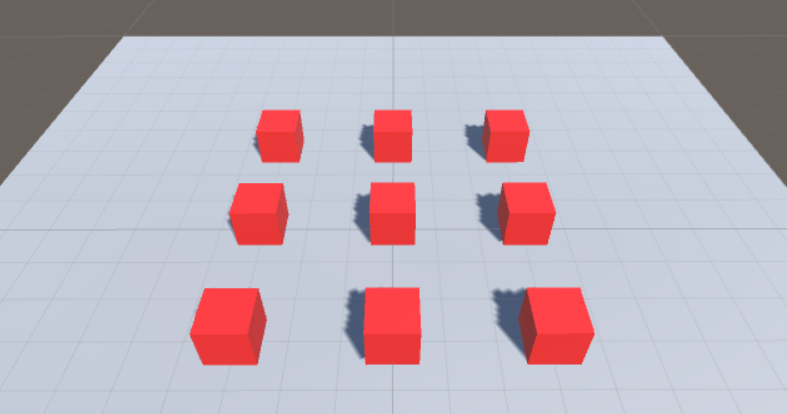
游戏对象的 Transform 组件参数如下:
| Name | Type | Position | Rotation | Scale | Color |
|---|---|---|---|---|---|
| Plane | Plane | (0, 0, 0) | (0, 0, 0) | (2, 2, 2) | #B8B2B2FF |
| Cube1 | Cube | (-3, 0.5, 3) | (0, 0, 0) | (1, 1, 1) | #F91D1DFF |
| Cube2 | Cube | (0, 0.5, 3) | (0, 0, 0) | (1, 1, 1) | #F91D1DFF |
| Cube3 | Cube | (3, 0.5, 3) | (0, 0, 0) | (1, 1, 1) | #F91D1DFF |
| Cube4 | Cube | (-3, 0.5, 0) | (0, 0, 0) | (1, 1, 1) | #F91D1DFF |
| Cube5 | Cube | (0, 0.5, 0) | (0, 0, 0) | (1, 1, 1) | #F91D1DFF |
| Cube6 | Cube | (3, 0.5, 0) | (0, 0, 0) | (1, 1, 1) | #F91D1DFF |
| Cube7 | Cube | (-3, 0.5, -3) | (0, 0, 0) | (1, 1, 1) | #F91D1DFF |
| Cube8 | Cube | (0, 0.5, -3) | (0, 0, 0) | (1, 1, 1) | #F91D1DFF |
| Cube9 | Cube | (3, 0.5, -3) | (0, 0, 0) | (1, 1, 1) | #F91D1DFF |
| Bullet | Sphere | (0, 0.5, -5) | (0, 0, 0) | (0.3, 0.3, 0.3) | #FDF723FF |
| BulletCreater | Empty | (0, 0, 0) | (0, 0, 0) | (1, 1, 1) | —— |
补充:Cube1~Cube9 和 Bullet 都添加了 Rigidbody 刚体组件,将 Bullet 拖拽至 Assets 窗口的 Resources/Prefabs 目录下,生成预设体(prefab),再删除 Hierarchy 窗口下 Bullet 对象。
2)脚本组件
给 BulletCreater 游戏对象添加 RayController 脚本组件。
RayController.cs
using UnityEngine;

public class RayController : MonoBehaviour {
	private GameObject bulletPrefab; // 炮弹预设体
	private RaycastHit hit; // 碰撞信息

	void Start () {
		bulletPrefab = (GameObject) Resources.Load("Prefabs/Bullet");
		hit = new RaycastHit();
	}

	void Update () {
		if (Input.GetMouseButtonDown(0)) {
			Ray ray = Camera.main.ScreenPointToRay(Input.mousePosition);
			if (Physics.Raycast(ray, out hit, 100)) {
				// ray.origin = Camera.main.transform.position
				GameObject bullet = Instantiate(bulletPrefab, ray.origin, Quaternion.identity); // 通过预设体创建炮弹
				bullet.GetComponent<Rigidbody>().velocity = ray.direction * 100;
				Destroy(bullet, 3);
			}
		}
	}
}
3)运行效果

边栏推荐
- 中金财富开户安全吗?开过中金财富的讲一下
- 【云驻共创】昇腾异构计算架构CANN,助力释放硬件澎湃算力
- Small program graduation project based on wechat subscription water supply mall small program graduation project opening report function reference
- 第2章 处理文件、摄像头和图形用户界面cameo应用
- Would you like to ask for advice on how to open a stock account? Is it safe to open an account online?
- Small program graduation project based on wechat agricultural and sideline products agricultural products mall small program graduation project opening report function reference
- 【软件测试】2022年普通高等学校招生全国统一考试
- SqlTransaction
- Unity about oculus quest2 developing 002-ui interaction based on XR interaction Toolkit
- Record an emotet Trojan horse handling case
猜你喜欢

Go, begin, end, for, after, instead of

Dnslog injection

Lumiprobe非荧光叠丨氮化物研究丨3-叠丨氮丙醇

面部識別試驗涉及隱私安全問題?國外一公司被緊急叫停

Small program graduation design based on wechat driving school examination small program graduation design opening report function reference
Le test de reconnaissance faciale comporte - t - il des préoccupations en matière de protection de la vie privée? Une entreprise étrangère a été arrêtée en cas d'urgence
GCC getting started manual

记一次Emotet木马处理案例

curl: (56) Recv failure: Connection reset by peer

Applet graduation design based on wechat conference room reservation applet graduation design opening report function reference
随机推荐
请问大智慧上开户安全吗
Small program graduation project based on wechat subscription water supply mall small program graduation project opening report function reference
内存抖动
抗兔Dylight 488丨Abbkine通用型免疫荧光(IF)工具箱
Openfire 3.8.2集群配置
OneFlow源码解析:算子签名的自动推断
tensorboard 使用总结
正版ST-link/V2 J-LINK JTAG/SWD引脚定义和注意事项
[flask] update and delete crud of data
面部识别试验涉及隐私安全问题?国外一公司被紧急叫停
从知名软件提取出的神器,吊打一众付费
WiFi安全漏洞KRACK深度解读
select/poll/epoll
Unity about oculus quest2 basic development based on XR interaction toolkit 003- capture function - making a VR bowling game
golang中的select详解(转)
About the solution of "modulenotfounderror: no module named 'flask.\u compat'"
中金财富开户安全吗?开过中金财富的讲一下
独立站卖家如何高效管理复杂的Facebook主页?
1 invalid import format(s) Postman Collection Format v1 is no longer supported and can not be import
亿信华辰:地产企业数字化转型想要把握时代机遇