当前位置:网站首页>Automation operation and maintenance 1 - installation and deployment of ansible
Automation operation and maintenance 1 - installation and deployment of ansible
2022-06-21 13:38:00 【Zhaohui_ Zhang】
Catalog
One 、ansible Significance to enterprise operation and maintenance
3、 ... and 、 structure ansible List of
1、 List setting —— Global list
2、 Scope operation of host specification
3、 List setting —— List others
4、 The logical relationship in the list
Four 、Ansible Detailed explanation of configuration file parameters
5、 ... and 、 Build user level Ansible Operating environment
1、Ansible The host ssh Unclassified
2、 Cancel the of the controlled host sudo password
3、 Cancel ansible Password authentication when executing commands
4、 recovery ansible The default configuration , And re-establish a ansible system
6、 ... and 、 Summary of this chapter
Experimental environment : A host with internet access (ansible), Two clients . Configure the network , Configure the software source .
One 、ansible Significance to enterprise operation and maintenance
In the actual production environment , There are hundreds of hosts . It is not easy for a person to set up the host one by one , It's time-consuming and error prone . So it needs to pass Ansible Realize batch operation, maintenance and management of a large number of servers .
Two 、 install Ansible
Alibaba open source mirror site -OPSX Mirror station - Alicloud developer community Alibaba open source mirror site , Free supply Linux Image download service , Have Ubuntu、CentOS、Deepin、MongoDB、Apache、Maven、Composer And other open source software image sources , In addition, it also provides domain name resolution DNS、 Network time service NTP Etc , Committed to providing comprehensive services for Internet users , Efficient and stable basic services .

To configure epel Mirror source :

install ansible

3、 ... and 、 structure ansible List of
Set up a ansible detailed list , When managing hosts, only the hosts in the list are set .
One is ansible Primary profile for , One is ansible Global inventory directory for

1、 List setting —— Global list
(1) Single layer list
edit ansible Manifest configuration file </etc/ansible/hosts>. With “ Group ” In the form of , It is divided into westos Group 、linux Group and list1 Group .
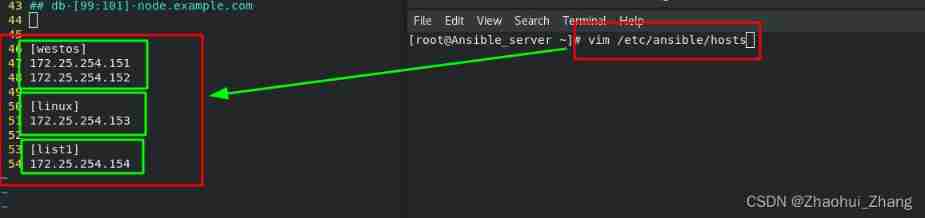
View the single tier list
ansible  all --list-hosts            #ansible View all listings
ansible  all --list                  #ansible View all listings
# This hosts Can not add
Select whichever group you want to view

(2) Nested list
Represents a nested list test Contains a single-layer list westos and linux

View nested list

2、 Scope operation of host specification
When adding batch hosts , If there are too many hosts , Adding will be more troublesome . So you can use Character set Representation to simplify . By specifying the host name or IP The scope of can be simplified Ansible Host list .

test :

3、 List setting —— List others
stay </mnt/> Next create a manifest ,absible It will not be read by default , So you need to add parameters <-i> To specify the location of the read manifest .
ansible -i /mnt/ansible_list all --list #-i Parameter specifies the manifest location 
View host names that are not in the group
ansible -i /mnt/ansible_list ungrouped --list # View host names that are not in any group 
4、 The logical relationship in the list
| * | all / 172.25.254.* / westos* |
| : | Logic or / westos1:linux / 172.25.254.100:172.25.254.200 |
| :& | Logic and / westos1:&linux / The host is at westos1 The list is also here linux In the list |
| :! | Logic is not / westos1:!linux / stay westos1 Not in linux in |
| ~ | Start with a keyword |
| ~(str1|str2) | On condition of 1 Or the conditions 2 start |
ansible The global list contains the following , Take these as examples .
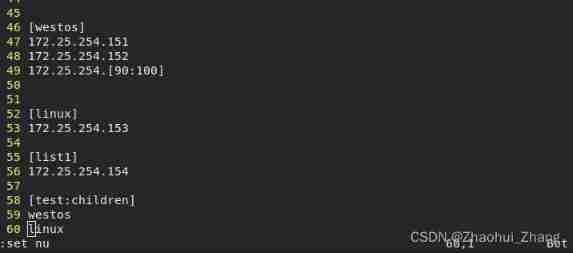
< * > : Match all characters

< : > : Logic or , One of the two conditions is satisfied
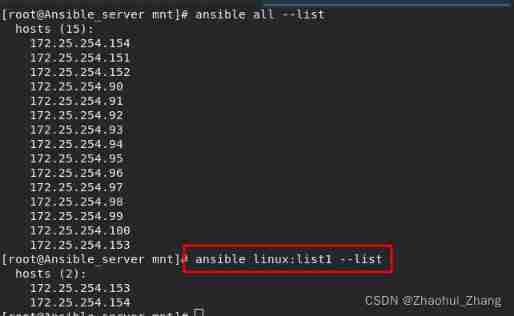
< :& >: Logic and , Hosts that exist in both lists
Be careful : Because logic and < :& > It's a special character , So put quotation marks in the middle
ansible 'westos:&linux' --list # Logic and 
< :! >: Logic is not , Hosts in the first list and not in the second list .
Be careful : Special symbols need to be enclosed in quotation marks , Otherwise, the system will not recognize .
ansible 'westos:!linux' --list # In the list westos Not in linux Host in 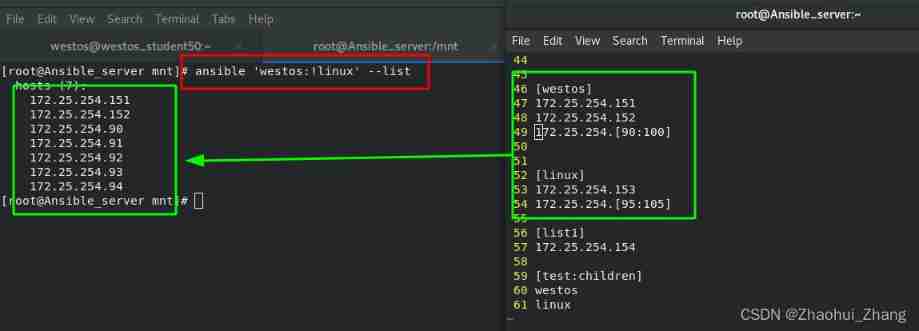
< ~ >: Start with a keyword

< ~(str1|str2)>: Said to str1 Beginning or beginning with str2 At the beginning
Be careful : Special symbols need to be enclosed in quotation marks , Otherwise, the system will not recognize .
ansible '~(node|c)' --list # Said to node perhaps c Initial host 
Four 、Ansible Detailed explanation of configuration file parameters
ansible The configuration file is </etc/ansible/ansible.cfg>
ansible Group name in list -m modular -u remote_userCommand syntax indicates : stay The host in the list With remote_user The identity of the user perform ** modular
If not specified , The current user identity is used by default
Basic information setting :
| #[default] | ## Basic information setting |
| inventory= | ## Specify the manifest path |
| remote_user= | ## The name of the user logged in on the managed host , The current user is not specified |
| ask_pass= | ## Do you want to prompt for SSH password , If the public key login is set to false |
| library= | ## Library file storage directory |
| local_tmp= | ## Local temporary command execution Directory |
| remote_tmp= | ## Remote host temporary py Command file storage directory |
| forks= | ## Default concurrency number |
| host_key_checking= | ## Whether to enter... When connecting to the managed host for the first time yes establish host_key |
| sudo_user= | ## Default sudo user |
| ask_sudo_pass= | ## Every time... Is performed on the controlled host ansible Whether to ask sudo password |
| module_name= | ## Default module , By default command, It can be changed to shell |
| log_path= | ## Log file path |
ansible The essence of execution is , Convert the command to <.py> file , Store in local_tmp= Set directory , Then upload to the remote host remote_tmp= Set directory , After the normal execution of the remote master , Delete the temporary files of both parties .
Identity settings : Used to set sudo When user permissions
| [privilege_escalation] | ## Identity settings |
| become= | ## Whether to automatically switch users after connection |
| become_method= | ## Set the way to switch users , Usually use sudo |
| become_user= | ## The user to switch to in the managed host , Usually it is root |
| become_ask_pass | ## Do you need to become_method Prompt for password , The default is false |
1、 When executing an order , Host password verification occurs for the first time

You can change the configuration file after , No more validation

2、 When connecting to a remote host , need <-k> Input password , If you do not enter the password, an error will be reported .
ansible westos -m shell -a 'hostname' -k
3、 Add the default list


4、 Specify user login
If it is not specified by default, the current user is used . It is easy to cause confusion in the actual production environment .

Test again after changing parameters :
Default to westos Log in as the user of <remote_user = westos>

5、 Identity change
Execute the command remotely with westos Log in as the user of , But many operations of ordinary users cannot be realized , This requires sudo Get the super user identity to execute .

test :
After making the above changes , It also needs to be provided to ordinary users in the controlled host westos Of sudo to grant authorization .<visudo>

After authorization ,ansible Display with westos Successfully executed the command as .

5、 ... and 、 Build user level Ansible Operating environment
because
One 、 Each time you execute a command, you need to enter the remote password , so much trouble . So you can Build a dedicated user ansible Operating environment of .
Two 、 same Ansible Different operators on the host have different control habits , So in the original ansible Based on the default configuration , You can recreate a set of ansible Configuration system .
1、Ansible The host ssh Unclassified
ssh-keygen            # Generate the key
ssh-copy-id -i .ssh/id_rsa.pub [email protected] # Perform secret free authentication to the target host 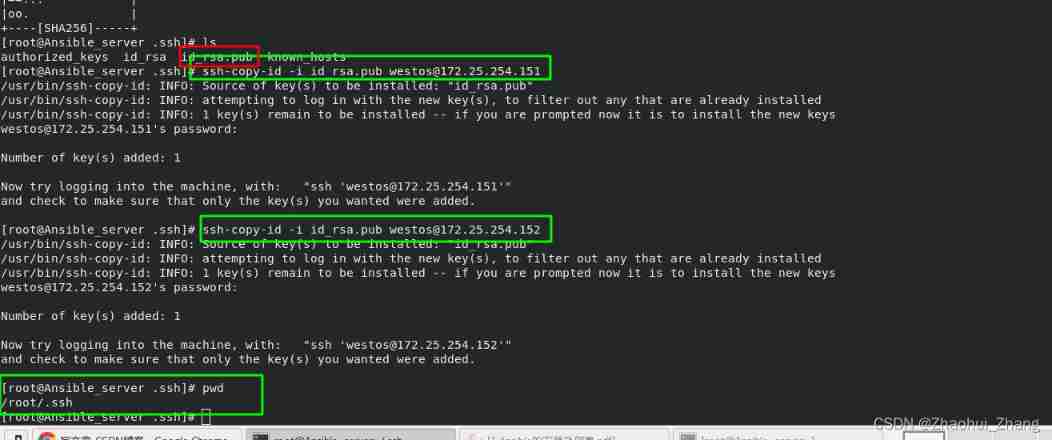
2、 Cancel the of the controlled host sudo password <visudo>

3、 Cancel ansible Password authentication when executing commands

4、 recovery ansible The default configuration , And re-establish a ansible system
Create a new... In the root directory <.ansible> The catalog of , And the original ansible Configuration file for </etc/ansible/ansible.cfg> Copy to this directory . The configuration files in this directory will be modified later .
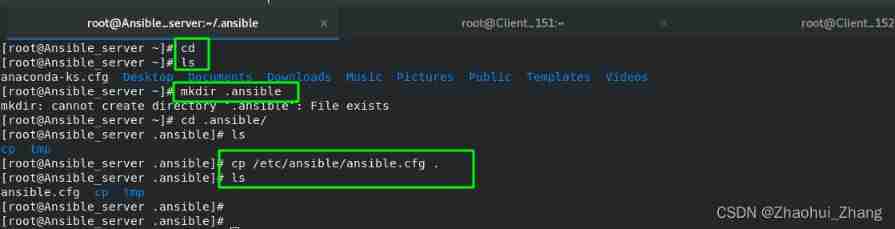
Modify the configuration file in this directory as follows :
file <inventory> The user list corresponding to the configuration under this directory ;<module_name> The option defaults to command, The modified default is shell

The contents of the files in the new directory are as follows :

ansible When executing, you will first read the configuration file in your current directory , Only when there is no in the current path can it be read </etc/ansible/> Configuration under Directory .
6、 ... and 、 Summary of this chapter
1、ansible When executing, you will first read the configuration file in your current directory , Only when there is no in the current path can it be read </etc/ansible/> Configuration under Directory .
边栏推荐
- Cvpr2022 | the action sequence verification task was first proposed by X xiaohongshu of Shanghai University of science and technology, which can be applied to multiple scenarios such as scoring of spo
- Two common schemes for handling interface idempotence
- MySQL constraints (descriptions of various conditions when creating tables)
- Not only zero:bmtrain technology principle analysis
- Is it safe to open a securities account by downloading the app of qiniu business school? Is there a risk?
- 对app和微信小程序进行接口测试
- Application configuration management, basic principle analysis
- 启牛商学院app下载证券开户,是安全的吗?有风险嘛?
- Kube Prometheus grafana installation plug-in and grafana image renderer
- [deeply understand tcapulusdb technology] tmonitor background one click installation
猜你喜欢

居家办公初体验之新得分享| 社区征文

Repair for a while, decisively reconstruct and take responsibility -- talk about CRM distributed cache optimization

Kube-prometheus grafana安装插件和grafana-image-renderer

Map collection traversal, adding, replacing and deleting elements

Heat mapping using Seaborn

塔米狗 热门资讯:厦门产权交易中心再创第一次!

MySQL - table join and join

How to read AI summit papers?
![[deeply understand tcapulusdb technology] tcapulusdb import data](/img/bd/999a0d2020f68b3bcee6b617328dfc.png)
[deeply understand tcapulusdb technology] tcapulusdb import data

MySQL - table constraints
随机推荐
1. memory partition model
Generalized Focal Loss: Learning Qualified and Distributed Bounding Boxes for Dense Object Detection
MySQL - table constraints
Kotlin - i/o flow
居家办公初体验之新得分享| 社区征文
scrapy_ Redis distributed crawler
如何使用搜索引擎?
C language elementary (VII) structure
JS 中的集合引用类型
Summary of the latest remote deployment O & M tools
7. pointer
Hands on data analysis unit 2 section 4 data visualization
【深入理解TcaplusDB技术】TcaplusDB导入数据
Kotlin - sequence sequence
How to write test cases
Annual special analysis of China Mobile Banking in 2022
Application configuration management, basic principle analysis
Efficient remote office manual | community essay solicitation
MySQL - index
Comment utiliser un moteur de recherche?